10 Real-World AI Agent Examples (And How to Build Your Own)
Explore 10 concrete, real-world AI agent examples — from customer support to financial research. See exactly what AI agents do, how they work, and how to build your own without code.
AI Agents
Automation
AI Examples
Workflow Automation
AI agents are one of the most significant developments in business automation in years — but the term is often abstract. “AI agent” sounds impressive until you’re trying to explain what it actually does, whether it would work for your organisation, and how you’d go about building one.
This guide cuts through the abstraction with 10 concrete, real-world AI agent examples. For each one, we explain what the agent does, what tools it uses, what a non-automated version of this work looks like, and how you could build it yourself.
What Is an AI Agent?
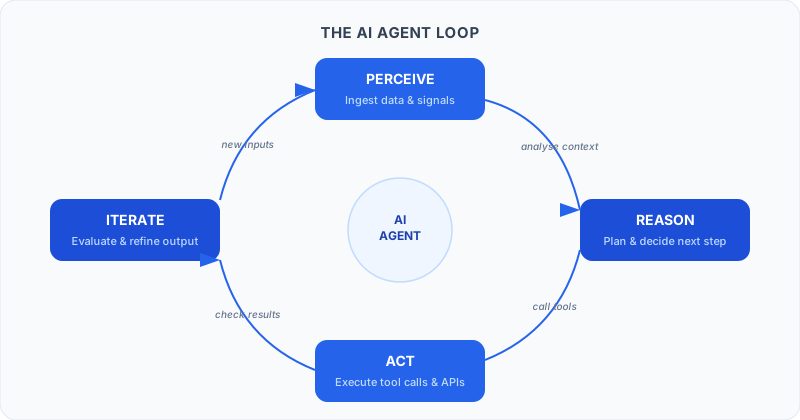
Before the examples, a brief definition. An AI agent is an autonomous software system that:
Perceives — reads inputs from its environment (emails, databases, websites, APIs, files)
Reasons — uses a large language model to understand context and decide what to do
Acts — calls tools, sends messages, updates records, triggers other systems
Iterates — takes feedback from its actions and adjusts
The critical difference from automation tools like Zapier: traditional automation follows rigid if-this-then-that logic you’ve pre-programmed. AI agents handle situations you haven’t explicitly anticipated — because they reason about what to do rather than pattern-matching against a fixed rulebook.
Now, the examples.
1. Customer Support AI Agent
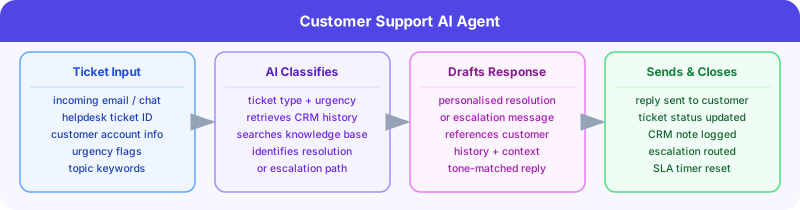
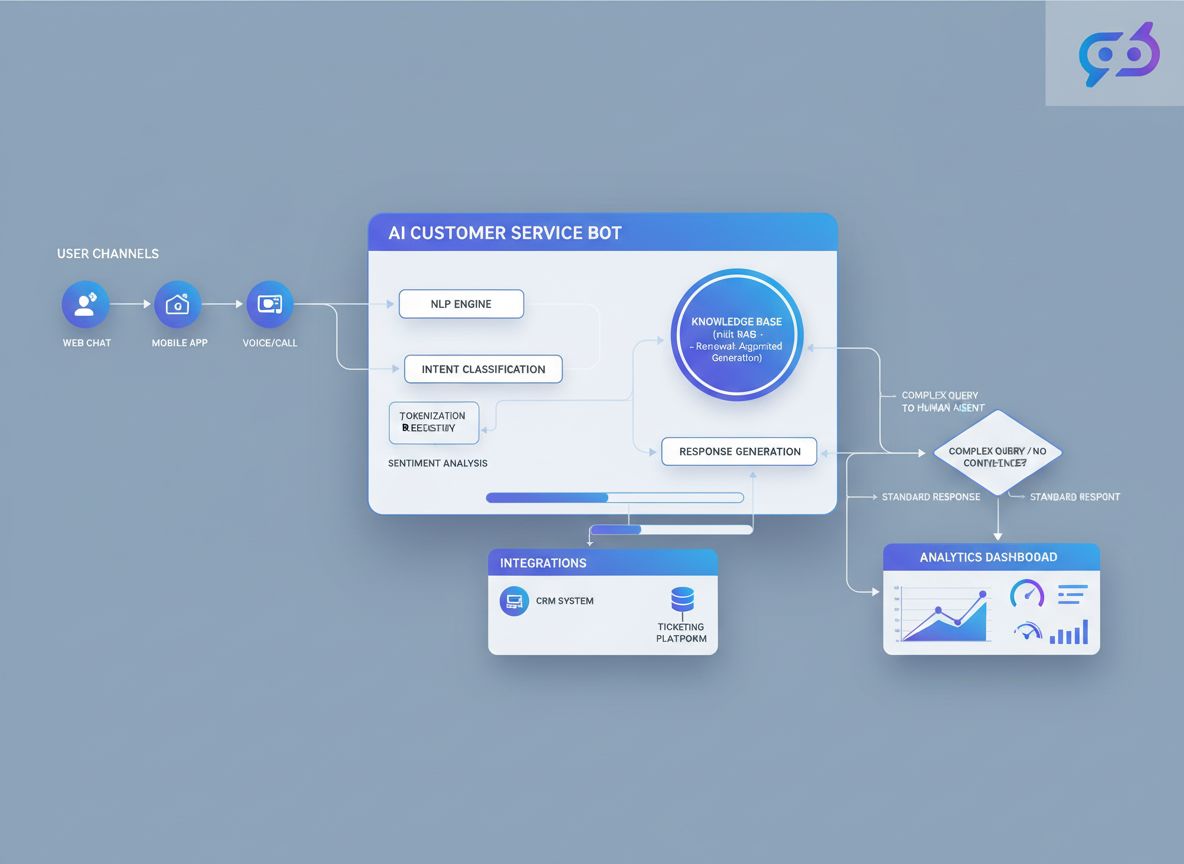
What it does: Reads incoming support tickets, classifies them by type and urgency, retrieves relevant customer history from the CRM, drafts a resolution (or escalation message if it can’t resolve), sends the response, and updates the ticket system — all without human involvement for routine cases.
Inputs: Support ticket (email, chat, or helpdesk), customer database, knowledge base, product documentation
Outputs: Drafted and sent customer response, updated ticket status in helpdesk, CRM note with interaction summary
Non-automated version: An SDR or support agent reads every ticket, manually looks up customer history, searches the knowledge base, writes a response from scratch, updates the CRM, and closes the ticket. For teams handling 500+ tickets/week, this is a full-time job.
What the AI agent changes: Routine tickets (password resets, order status queries, FAQ-type questions) resolve automatically in under 60 seconds. Complex tickets are pre-researched and drafted — the human’s job is to review and approve rather than research and write. Support capacity increases without headcount.
Key tools: Zendesk/Intercom/Freshdesk (ticket system), CRM (HubSpot/Salesforce), LLM (Claude or GPT-4o), knowledge base search
Ready to grow your business?
Start your free trial today and see results within days.
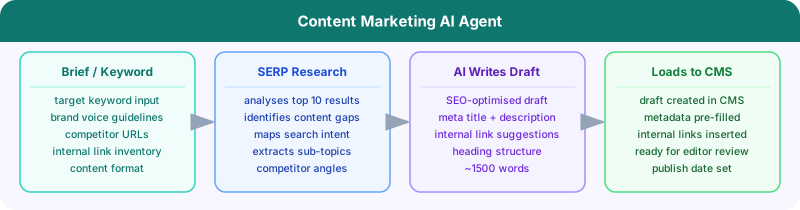
What it does: Given a target keyword or topic brief, the agent researches the SERP (top-ranking articles), identifies content gaps, creates a detailed content brief, writes a first draft, suggests internal links, generates meta description and title tags, and loads the draft into your CMS — ready for editor review.
Inputs: Target keyword, brand voice guidelines, competitor URLs to avoid, internal link inventory
Outputs: Research summary, content brief, ~1,500-word first draft, SEO metadata, internal link suggestions, CMS draft
Non-automated version: A content manager researches the SERP (30 min), writes a brief (30 min), hands to a writer (2-3 days), receives draft, edits, adds SEO metadata, loads to CMS. Total: 2-4 days, 3+ people.
What the AI agent changes: Research-to-CMS-draft goes from days to under an hour. Editors focus on voice, accuracy, and strategic additions rather than research and first drafts. A team that previously published 4 articles/month can publish 20+.
Key tools: Web search API, SERP analysis, LLM, CMS API (WordPress, Webflow, etc.), internal link database
3. Lead Generation AI Agent
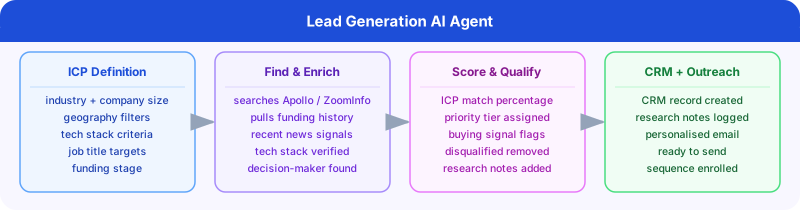
What it does: Given an ICP (ideal customer profile) definition, the agent searches prospect databases, enriches each lead with company research (funding, recent news, tech stack, job postings), scores each lead against your ICP, generates a personalised outreach email for each qualified lead, and loads them into your CRM with full context notes.
Inputs: ICP definition (company size, industry, tech stack, geography), outreach tone and messaging guidelines
Outputs: Enriched prospect list, ICP score per lead, personalised email drafts, CRM records with research notes
Non-automated version: An SDR spends 2-4 hours per day on prospecting and research — and the research is often shallow because there’s no time for depth. Personalisation is limited to “I saw you work at {Company}” placeholders.
What the AI agent changes: 50-100 deeply researched, genuinely personalised prospects per day, produced automatically. SDR time shifts from research to relationship-building and calls. For the full technical breakdown, see our AI lead generation guide
.
Key tools: Apollo or ZoomInfo (contact data), Clay or custom enrichment, LLM for research and writing, HubSpot/Salesforce CRM, email platform
Join our newsletter
Get latest tips, trends, and deals for free.
4. SEO Research AI Agent
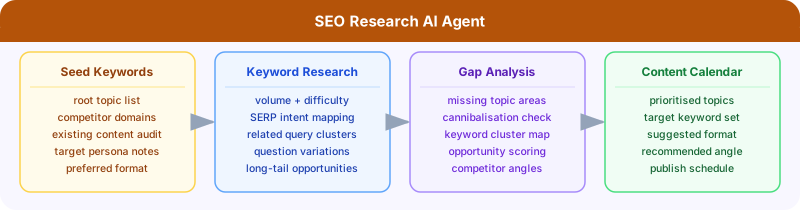
What it does: Given a seed keyword list or content category, the agent conducts keyword research, identifies content gaps vs competitors, groups keywords by search intent, maps keywords to existing content (to avoid cannibalisation), and produces a prioritised content calendar with target keywords, estimated volume, difficulty, and suggested angle for each piece.
Outputs: Keyword research report, content gap analysis, keyword cluster map, prioritised content calendar
Non-automated version: An SEO specialist spends a week manually running keyword research tools, analysing SERP results, mapping keywords to existing content, and writing up recommendations. The analysis is often static — done quarterly or annually.
What the AI agent changes: SEO research that took a week now runs overnight. The agent can re-run continuously, flagging new keyword opportunities, monitoring ranking changes, and updating recommendations dynamically. For teams using FlowHunt for SEO, see our SEO solutions page
.
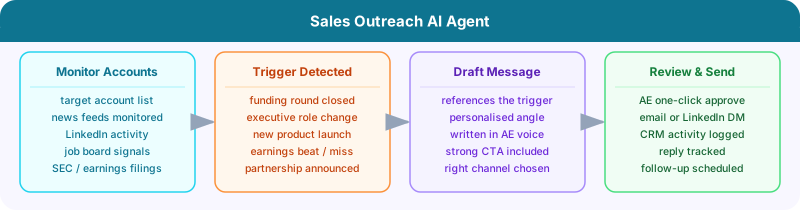
What it does: Monitors a list of target accounts for trigger events (job changes, funding announcements, product launches, LinkedIn posts, earnings calls), drafts a personalised outreach message referencing the specific trigger event, routes the draft to the assigned AE for one-click approval, and sends via the designated channel (email or LinkedIn) when approved.
Outputs: Trigger-event alerts with drafted outreach, AE review queue, sent messages, CRM activity logs
Non-automated version: AEs manually monitor LinkedIn and news sites for account triggers — which rarely happens consistently. Most trigger-event outreach is missed because it requires active monitoring and fast action.
What the AI agent changes: Zero trigger events are missed. Every funding round, executive hire, or product launch on your target account list generates a drafted, personalised message within minutes — not days. Response rates on trigger-event outreach consistently exceed generic outreach by 3-5x.
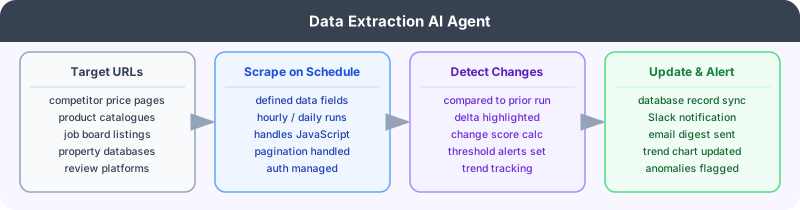
What it does: Given a list of target websites (competitor pricing pages, job boards, property listings, e-commerce catalogues), the agent scrapes the specified data fields on a defined schedule, structures the data into a consistent schema, detects changes from the previous extraction, and sends a structured alert or updates a connected database/spreadsheet.
Inputs: Target URL list, data field definitions, extraction schedule, change threshold for alerts
Outputs: Structured data table, change detection alerts, updated database records, trend analysis over time
Non-automated version: A data analyst manually visits each target website, copies data into a spreadsheet, and compares to last week’s version. This is error-prone, time-consuming, and can only be done infrequently.
What the AI agent changes: Monitoring that previously ran weekly now runs hourly. Price changes, new job postings, and competitor product updates are detected within minutes. Data is immediately available in the format your downstream tools need.
Key tools: Web scraping API (Firecrawl, Apify, or native browser), LLM for structure extraction, database or Google Sheets, alerting (Slack/email)
7. Social Media AI Agent
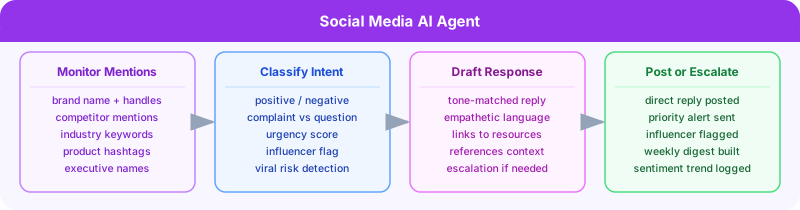
What it does: Monitors mentions of your brand, competitors, and relevant keywords across social platforms, classifies each mention by sentiment and intent (complaint, question, praise, comparison), drafts appropriate responses for review, and escalates high-priority mentions (viral negative content, direct influencer engagement) with urgency flags.
Outputs: Classified mention feed, drafted responses for each actionable mention, escalation alerts, weekly sentiment trend report
Non-automated version: A social media manager manually searches brand mentions, reads each one, decides how to respond, and writes the response. For brands with significant social volume, this becomes impossible to do well.
What the AI agent changes: Zero mentions are missed. Response drafts are ready before a human even sees the mention. Escalations happen in minutes rather than hours. The social media manager’s role shifts from monitoring to strategy and relationship decisions.
Key tools: Social listening API (Twitter/X API, Reddit API), LLM for classification and drafting, social media management tool, Slack for escalation
8. HR Recruitment AI Agent
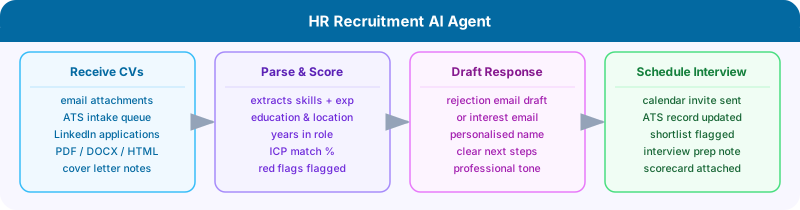
What it does: Receives incoming CVs, extracts structured data (skills, experience, education, location), scores each candidate against the job requirements, drafts a personalised rejection or “we’re interested” response, schedules first interviews for shortlisted candidates via calendar integration, and updates the ATS with all notes and scores.
Outputs: Structured candidate profiles, ICP match scores, drafted response emails, calendar invitations for shortlisted candidates, ATS records
Non-automated version: A recruiter reads every CV (even obviously unsuitable ones), manually scores candidates, writes individual emails, and coordinates interview scheduling via email chains. For a popular role receiving 500+ applications, this takes weeks.
What the AI agent changes: Time-from-application to initial response drops from days to hours. Shortlisting is consistent and unbiased against criteria (rather than against whoever the recruiter happened to read last). Recruiters focus on interviews and offers rather than administrative screening.
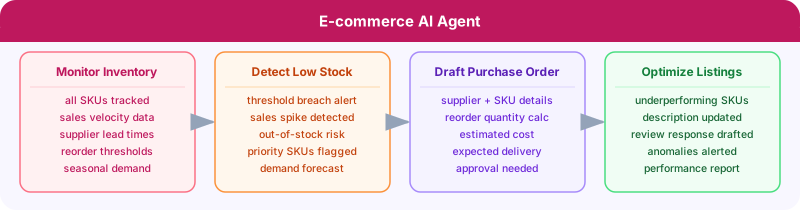
What it does: Monitors inventory levels across SKUs, detects low-stock thresholds, automatically drafts supplier purchase orders for restocking, monitors product listing performance (views, conversion, reviews), suggests and drafts product description updates for underperforming listings, and alerts the team to anomalous activity (sudden stock drop, review score decline).
Non-automated version: An e-commerce operations manager manually monitors stock across all SKUs, writes POs, and periodically reviews listing performance. For shops with hundreds of SKUs, something always falls through the cracks.
What the AI agent changes: Stockouts are prevented through automated reorder triggers. Listings are continuously optimised rather than set-and-forgotten. Operations scale without proportional headcount increase.
Key tools: E-commerce platform API (Shopify, WooCommerce), inventory management system, LLM for content generation, email/supplier portal
10. Financial Research AI Agent
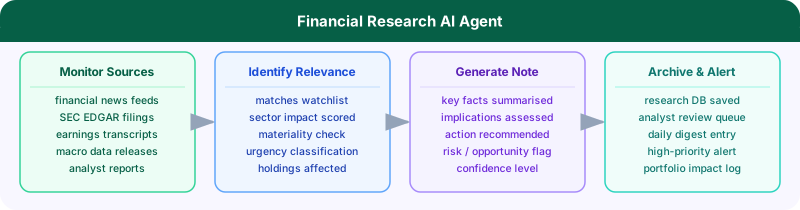
What it does: Monitors financial news feeds, earnings call transcripts, SEC filings, and macroeconomic data releases relevant to a defined investment universe. For each significant development, the agent summarises the key facts, assesses implications for relevant holdings, and generates a structured research note — flagging items requiring analyst review and archiving all findings to a research database.
Inputs: Watchlist of companies and sectors, news sources and data feeds, research note template, alert thresholds
Outputs: Summarised news items with relevance scoring, structured research notes for significant events, daily digest, updated research database
Non-automated version: A research analyst or associate manually monitors multiple information sources, reads dense financial documents, identifies relevant items, and writes up summaries. For a portfolio of 50+ companies, comprehensive coverage is impossible.
What the AI agent changes: Nothing in the news universe is missed. Research notes are generated within minutes of a filing or announcement. Analysts focus on interpretation, client communication, and investment decisions — not information gathering.
Key tools: Financial news API, SEC EDGAR API, earnings transcript API, LLM, research database, report generation
How to Build Your Own AI Agent
Every AI agent in this list follows the same fundamental pattern: perceive → reason → act → iterate.
Building one requires:
Define the goal — what specific output should the agent produce?
Identify inputs — what data sources does the agent need to read?
Map the steps — what reasoning steps and tool calls does the agent need to take?
Define outputs — where should results go? (CRM, email, Slack, database, document)
Add error handling — what happens when a step fails or returns unexpected data?
FlowHunt
makes this process visual and no-code. Each step above becomes a node on a canvas — you connect them, configure the AI reasoning at each node, and FlowHunt handles execution. For all ten use cases above, FlowHunt provides either pre-built templates or the flexibility to build custom workflows.
The biggest misconception about building AI agents is that it requires machine learning expertise or extensive programming. It doesn’t — it requires a clear understanding of the business process you want to automate, and the right tool to implement it. For more on getting started, see our guide to workflow automation for beginners
and our deep-dive on multi-agent AI systems
.
Bottom Line
AI agents are not a future technology — they’re being deployed today across every major business function. The ten examples above represent the most impactful and widely applicable use cases, but they’re a fraction of what’s possible.
The common thread across all of them: AI agents handle the research, judgment, and execution of complex multi-step tasks so humans can focus on the decisions, relationships, and creative work that genuinely require human intelligence.
An AI agent is an autonomous software system that perceives its environment, makes decisions, and takes actions to achieve a specific goal — without requiring step-by-step human instruction. Unlike a chatbot that responds to questions, an AI agent proactively executes multi-step tasks: it can browse the web, call APIs, read and write files, send emails, update databases, and coordinate with other agents. The key characteristic is autonomy — the agent decides how to accomplish its goal, not just what to say in response.
The most widely deployed AI agent use cases in 2026 include customer support automation (ticket routing, response drafting), content marketing (research, writing, publishing workflows), B2B lead generation (prospect research, enrichment, personalised outreach), SEO research (keyword analysis, content gap identification), HR recruitment (CV screening, interview scheduling), and financial research (news monitoring, report generation). Any workflow involving research, judgment, and multi-step action is a candidate for AI agent automation.
The easiest way to build an AI agent without code is to use a visual AI workflow platform like FlowHunt. You design the agent's workflow on a canvas — connecting nodes for data sources, AI reasoning steps, conditions, and output actions — and FlowHunt handles the execution. No programming required. Most use cases can be built in under an hour using pre-built templates as a starting point.
A chatbot responds to user input with generated text — it's reactive and conversational. An AI agent is proactive and action-oriented: it takes initiative to complete multi-step tasks, uses tools (APIs, databases, browsers), makes decisions based on what it discovers, and produces tangible outputs (emails sent, records updated, reports generated). A customer support chatbot answers questions; a customer support AI agent reads the ticket, looks up the customer's history, drafts a resolution, and updates the CRM.
AI agents are reliable for well-defined workflows with clear inputs, outputs, and success criteria. For high-stakes decisions (contract signing, large financial transactions, sensitive customer communications), human-in-the-loop checkpoints are advisable. For research, drafting, data enrichment, routing, and information processing tasks, AI agents in production consistently outperform manual processes on both speed and consistency. The key is designing agents with appropriate fallbacks, error handling, and monitoring.
Arshia is an AI Workflow Engineer at FlowHunt. With a background in computer science and a passion for AI, he specializes in creating efficient workflows that integrate AI tools into everyday tasks, enhancing productivity and creativity.
Arshia Kahani
AI Workflow Engineer
Build Your Own AI Agent in Minutes — Try FlowHunt Free
FlowHunt's visual canvas makes it easy to build, test, and deploy AI agents for any business use case — no code required. Join thousands of teams already automating with AI.
What Are AI Agents? Complete Guide to Autonomous AI Systems
Learn what AI agents are, how they work, different types, and how to build them without code. Complete guide with examples, ROI data, challenges, and comparison...
How Can I Make an AI Bot That Talks to Customers 24/7? The Definitive Guide
Learn how to design, build, and deploy a 24/7 AI customer service bot. Includes real-world case studies, technical breakdowns, best practices, actionable steps,...
7 min read
AI
Chatbots
+5
Cookie Consent We use cookies to enhance your browsing experience and analyze our traffic. See our privacy policy.