Automating Glossary Page Generation with AI: A Complete Guide for Modern Websites
Learn how to automate glossary page generation using AI, from data collection to SEO optimization. Discover step-by-step strategies to keep your website’s terminology current and searchable.
AI
Automation
Content Management
SEO
Web Development
In today’s digital landscape, maintaining an accurate and comprehensive glossary is essential for user experience and search engine optimization. However, manually creating and updating glossary entries for every term on your website is time-consuming and prone to inconsistencies. Imagine having a system that automatically identifies new terminology across your content, generates clear definitions, optimizes them for search engines, and publishes them—all without manual intervention.
This is where AI-powered glossary automation comes in. By combining artificial intelligence with strategic automation workflows, you can create a dynamic glossary that evolves with your content, improves your website’s SEO performance, and provides genuine value to your users. In this comprehensive guide, we’ll explore how to implement an automated glossary system, from initial data collection through ongoing maintenance and optimization.
What is Glossary Automation and Why It Matters
A glossary is more than just a reference tool—it’s a critical component of your website’s information architecture. It serves multiple purposes: it helps users understand specialized terminology, improves accessibility for non-expert audiences, and signals to search engines that your content is authoritative and well-organized. However, as your website grows and your content expands, maintaining a glossary manually becomes increasingly impractical.
Glossary automation leverages artificial intelligence to streamline this process. Rather than manually researching and writing definitions for each term, an automated system can identify terms from your existing content, generate contextually appropriate definitions, and publish them to your website—often with minimal human oversight. This approach not only saves time but also ensures consistency, reduces errors, and keeps your glossary synchronized with your actual content.
The automation process typically involves several interconnected steps: identifying terms that need definitions, generating those definitions using AI, storing them in a structured format, and dynamically rendering them on your website. Each step can be optimized and integrated into your existing content management workflow, creating a seamless system that requires minimal ongoing maintenance.
Ready to grow your business?
Start your free trial today and see results within days.
For businesses operating in technical, specialized, or rapidly evolving industries, the benefits of automated glossary management are substantial. Consider the challenges faced by SaaS companies, fintech platforms, healthcare providers, and educational institutions—all of which use specialized terminology that their audiences may not fully understand. Without a clear glossary, users may become confused, bounce from your site, or fail to engage with your content effectively.
Automated glossary systems address these challenges in several critical ways:
Improved User Experience: Users can quickly understand unfamiliar terms without leaving your site, reducing friction and improving engagement metrics.
Enhanced SEO Performance: Glossary pages create additional indexable content, target long-tail keywords, and establish topical authority in your niche.
Consistency and Accuracy: Automated systems ensure that terms are defined consistently across your entire website, reducing confusion and building trust.
Scalability: As your content library grows, an automated system scales effortlessly, whereas manual glossary maintenance becomes increasingly burdensome.
Time and Cost Savings: Eliminating manual definition writing frees your team to focus on higher-value content creation and strategic initiatives.
Competitive Advantage: A well-maintained, comprehensive glossary signals professionalism and expertise, differentiating your brand from competitors.
For organizations managing large content libraries or operating in fast-moving industries, the ROI of glossary automation is compelling. Rather than dedicating team members to glossary maintenance, you can invest in automation infrastructure that pays dividends over time.
Step 1: Data Collection and Preparation
The foundation of any successful glossary automation system is high-quality data. Before you can generate definitions, you need to identify which terms should be included in your glossary. This process involves both automated term extraction and strategic curation.
Sourcing Terms from Your Content
The most logical place to start is your existing website content. Your blog posts, documentation, product pages, and help articles already contain the terminology your audience encounters. Rather than manually reviewing each page, you can use automated tools to extract candidate terms. Natural Language Processing (NLP) libraries like NLTK, spaCy, or TextRank can analyze your content and identify frequently occurring terms, technical jargon, and domain-specific vocabulary.
When collecting terms, consider multiple sources: your website’s published content, internal documentation, customer support conversations, and industry-standard terminology lists. This multi-source approach ensures your glossary covers both the terms your audience actually encounters and the foundational concepts they need to understand.
Integrating with APIs and External Data Sources
Beyond your own content, you can enrich your glossary by integrating with external APIs. Services like the Oxford Dictionaries API, Merriam-Webster API, and specialized domain APIs provide pre-written definitions that you can incorporate into your glossary. This hybrid approach—combining AI-generated definitions with curated external sources—often produces the highest-quality results.
For example, if you’re building a glossary for a financial services website, you might use the Merriam-Webster API for common terms like “asset” or “liability,” while using AI to generate custom definitions for proprietary concepts like your specific product features or company-specific terminology.
Preparing Your Term List
Once you’ve collected candidate terms, organize them into a structured format—typically a JSON file, CSV spreadsheet, or database table. This structured approach makes it easy to process terms programmatically and track which definitions have been generated, reviewed, and published.
Data Source
Advantages
Disadvantages
Best For
Website Content Analysis
Captures actual terminology used
Requires NLP processing
Identifying domain-specific terms
External APIs
Pre-written, authoritative definitions
Limited to common terms
Standard business terminology
AI Generation
Customizable, context-aware
Requires review and validation
Specialized or proprietary terms
Manual Curation
High quality, expert-reviewed
Time-consuming
Critical or complex concepts
Customer Data
Reflects real user language
May include informal terms
Understanding user perspective
Join our newsletter
Get latest tips, trends, and deals for free.
Step 2: AI-Based Glossary Definition Generation
With your term list prepared, the next step is generating definitions. This is where AI truly shines, offering flexibility, scalability, and the ability to create contextually appropriate definitions tailored to your audience.
Choosing the Right AI Model
Several AI models and services are well-suited for glossary definition generation. OpenAI’s GPT-4 and GPT-3.5 are industry-leading options that produce clear, concise, and contextually appropriate definitions. These models understand nuance, can adjust their tone and complexity based on your instructions, and can generate definitions for virtually any term—from common business concepts to highly specialized technical terminology.
Other options include open-source models like LLaMA or Mistral, which you can self-host for greater control and privacy. For specific domains, you might consider fine-tuning a model on your own content to generate definitions that perfectly match your brand voice and terminology preferences.
The choice of model depends on several factors: your budget, privacy requirements, desired definition quality, and the specificity of your terminology. For most businesses, GPT-4 offers the best balance of quality, reliability, and ease of integration.
Crafting Effective Prompts
The quality of AI-generated definitions depends heavily on how you structure your prompts. A well-crafted prompt provides context, specifies the desired tone and complexity level, and includes examples of the format you want. Here’s an example of an effective prompt structure:
Define the term '[TERM]' in simple, clear language suitable for [TARGET AUDIENCE].
The definition should be 1-2 sentences, avoid jargon, and include a brief practical example if relevant.
Context: This term is used in [INDUSTRY/DOMAIN].
By providing this context, you guide the AI to generate definitions that match your specific needs. You can adjust the complexity level for different audience segments—technical definitions for expert users, simplified versions for general audiences.
Implementing the Generation Workflow
Automating the definition generation process requires a script that iterates through your term list, calls the AI API for each term, and stores the results. Here’s a practical example using Python and OpenAI’s API:
import openai
import json
import time
openai.api_key ='your-api-key'defgenerate_glossary_entry(term, context=""):
prompt =f"""Define the term '{term}' in simple, clear language.
The definition should be 1-2 sentences, avoid unnecessary jargon, and be suitable for a general business audience.
{f'Context: {context}'if context else''} Provide only the definition, without the term itself.""" response = openai.ChatCompletion.create(
model="gpt-4",
messages=[{"role": "user", "content": prompt}],
max_tokens=150,
temperature=0.7 )
return response['choices'][0]['message']['content'].strip()
# Load your term listwith open("terms.json", "r") as f:
terms_data = json.load(f)
glossary_entries = {}
# Generate definitions for each termfor term in terms_data['terms']:
print(f"Generating definition for: {term}")
definition = generate_glossary_entry(term)
glossary_entries[term] = {
"definition": definition,
"generated_at": time.strftime("%Y-%m-%d %H:%M:%S"),
"status": "pending_review" }
time.sleep(1) # Rate limiting# Save resultswith open("glossary_generated.json", "w") as f:
json.dump(glossary_entries, f, indent=2)
print(f"Generated {len(glossary_entries)} definitions")
This script demonstrates the core workflow: iterate through terms, call the AI API with a well-structured prompt, and store results with metadata. The “pending_review” status indicates that definitions should be reviewed before publication.
Step 3: Automating Content Creation and Storage
Once definitions are generated, you need a system to store, manage, and track them. This infrastructure becomes increasingly important as your glossary grows and you implement regular update cycles.
Choosing Your Storage Solution
Your storage choice depends on your website’s architecture and your specific needs. Common options include:
JSON Files: Simple, version-controllable, ideal for static site generators like Hugo or Jekyll
Relational Databases: MySQL, PostgreSQL for dynamic websites with complex querying needs
NoSQL Databases: MongoDB for flexible schema and scalability
Headless CMS: Contentful, Strapi for managed content with API access
Git-based Storage: Store glossary data in your repository for version control and easy deployment
For many organizations, especially those using static site generators or Git-based workflows, storing glossary data as JSON or YAML files in your repository offers simplicity and version control benefits. For dynamic websites with complex requirements, a database solution provides more flexibility.
Implementing a Review Workflow
AI-generated content should never be published without review. Implement a workflow that flags definitions for human review, allows editors to approve or modify definitions, and tracks the status of each entry. This might involve:
Automated Generation: AI generates initial definitions
Flagging for Review: Definitions marked as “pending_review”
Editor Review: Subject matter experts review and approve definitions
Publication: Approved definitions are published to your website
Archival: Previous versions are archived for reference
This workflow ensures quality while maintaining the efficiency benefits of automation. Over time, as your team becomes confident in the AI’s output, you might reduce the review scope for certain categories of terms.
Organizing Glossary Data
Structure your glossary data to include not just the definition, but also metadata that supports SEO, categorization, and maintenance:
{
  "terms": [
    {
      "id": "blockchain-001",
      "term": "Blockchain",
      "definition": "A decentralized digital ledger that records transactions across many computers, ensuring security and transparency without needing a central authority.",
      "category": "Technology",
      "difficulty_level": "intermediate",
      "related_terms": ["cryptocurrency", "distributed ledger", "smart contract"],
      "seo_keywords": ["blockchain technology", "distributed ledger"],
      "generated_at": "2024-01-15T10:30:00Z",
      "reviewed_by": "john_doe",
      "reviewed_at": "2024-01-15T14:00:00Z",
      "status": "published",
      "version": 1
    }
  ]
}
This structured approach enables sophisticated features like related term linking, difficulty-based filtering, and comprehensive audit trails.
Step 4: Dynamic Glossary Page Generation and Website Integration
With your glossary data prepared and stored, the next step is integrating it into your website. The approach varies depending on your website’s architecture, but the principles remain consistent.
Integration with Static Site Generators
If you’re using Hugo, Jekyll, or another static site generator, you can leverage your glossary JSON data to generate static HTML pages at build time. This approach is fast, secure, and SEO-friendly.
For Hugo, you might create a template that iterates through your glossary data and generates individual pages for each term:
{{ range .Site.Data.glossary.terms }}
<div class="glossary-entry">
  <h2>{{ .term }}</h2>
  <p>{{ .definition }}</p>
  {{ if .related_terms }}
  <div class="related-terms">
    <h4>Related Terms:</h4>
    <ul>
    {{ range .related_terms }}
      <li><a href="/glossary/{{ . | urlize }}/">{{ . }}</a></li>
    {{ end }}
    </ul>
  </div>
  {{ end }}
</div>
{{ end }}
This template automatically generates glossary pages from your JSON data, ensuring consistency and making updates as simple as modifying your data file.
Dynamic Rendering with JavaScript Frameworks
For single-page applications built with React, Vue, or Angular, you can fetch glossary data from an API or JSON file and render it dynamically. Here’s a React example:
This component provides search and filtering capabilities, creating an interactive glossary experience that users appreciate.
Backend Integration with FlowHunt
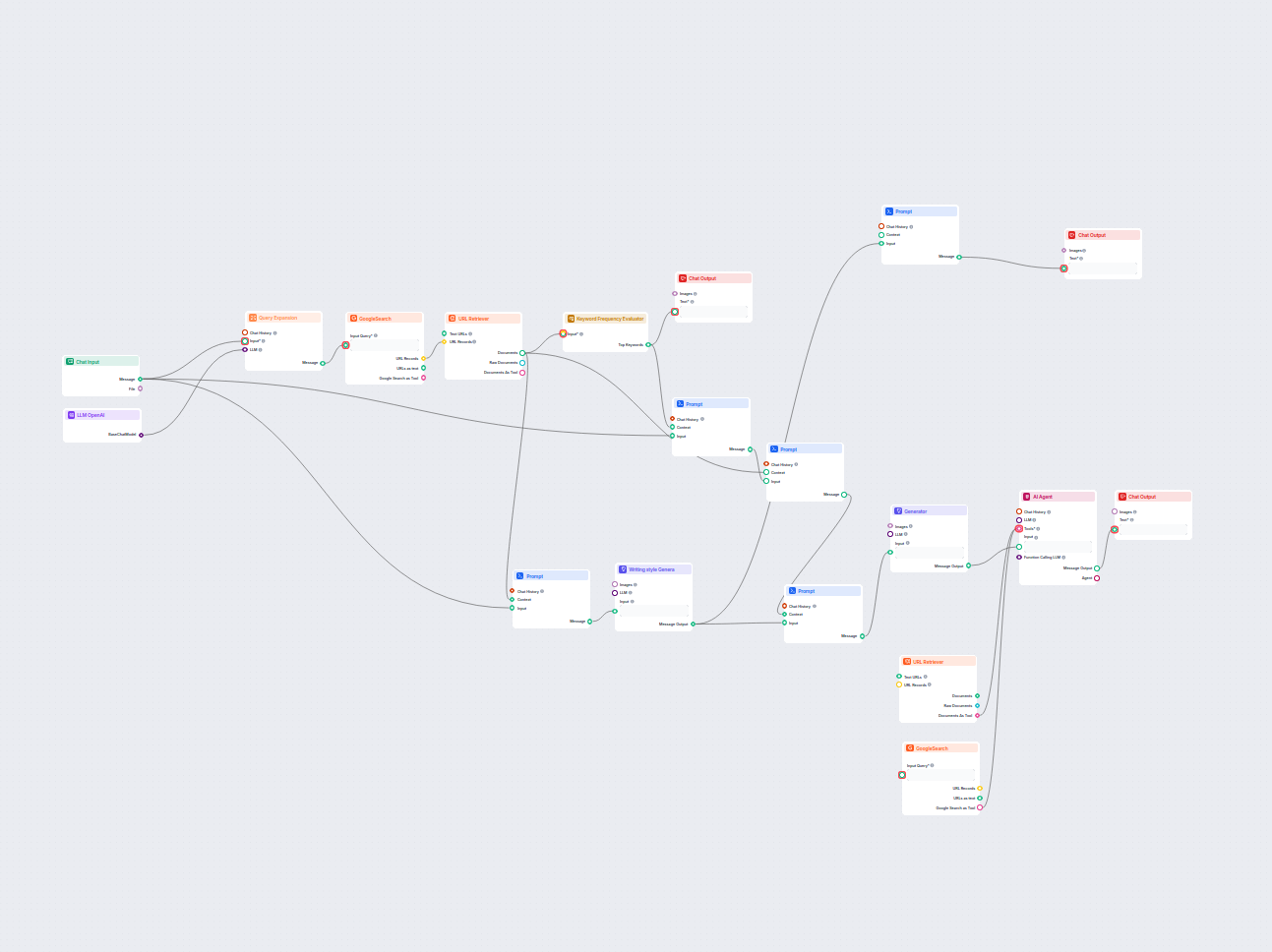
FlowHunt streamlines this entire integration process. Rather than manually building scripts and managing workflows, FlowHunt’s automation platform can orchestrate your entire glossary generation pipeline. You can create a flow that:
Extracts terms from your website content
Calls AI APIs to generate definitions
Stores results in your database or file system
Triggers website rebuilds or API updates
Monitors for new content and regenerates glossary entries automatically
This eliminates the need to maintain custom scripts and ensures your glossary stays synchronized with your content.
Step 5: SEO Optimization for Glossary Pages
A glossary is only valuable if people can find it. SEO optimization ensures your glossary pages rank well in search results and drive organic traffic to your website.
Meta Tags and Structured Data
Each glossary entry should include optimized meta tags and structured data markup. For a term like “blockchain,” your page should include:
<head>
<title>Blockchain Definition - [Your Company] Glossary</title>
<metaname="description"content="Learn what blockchain is. A decentralized digital ledger that records transactions across many computers...">
<metaname="keywords"content="blockchain, distributed ledger, cryptocurrency, blockchain technology">
<scripttype="application/ld+json">
{
"@context":"https://schema.org",
"@type":"DefinedTerm",
"name":"Blockchain",
"description":"A decentralized digital ledger that records transactions across many computers, ensuring security and transparency without needing a central authority.",
"url":"https://yoursite.com/glossary/blockchain/" }
</script>
</head>
This structured data helps search engines understand your glossary content and can improve your visibility in search results.
Internal Linking Strategy
One of the most powerful SEO benefits of a glossary is the opportunity to create internal links. When a term appears in your blog posts or documentation, link it to the glossary definition. This serves multiple purposes:
Improves User Experience: Users can quickly understand unfamiliar terms
Distributes Page Authority: Internal links pass authority to your glossary pages
Increases Time on Site: Users spend more time engaging with your content
Reduces Bounce Rate: Users don’t leave your site to find definitions elsewhere
You can automate this process by scanning your content for glossary terms and automatically inserting links. Here’s a simple example:
import re
from urllib.parse import quote
defadd_glossary_links(content, glossary_terms):
"""Add internal links to glossary terms in content"""for term in glossary_terms:
# Create a regex pattern that matches the term (case-insensitive, whole word) pattern =r'\b'+ re.escape(term) +r'\b' glossary_url =f'/glossary/{quote(term.lower().replace(" ", "-"))}/'# Replace first occurrence only (avoid over-linking) replacement =f'<a href="{glossary_url}">{term}</a>' content = re.sub(pattern, replacement, content, count=1, flags=re.IGNORECASE)
return content
Keyword Optimization
AI can help optimize your glossary entries for specific keywords. When generating definitions, you can instruct the AI to naturally incorporate target keywords:
Define the term '[TERM]' in simple language.
Naturally incorporate these related keywords: [KEYWORD1], [KEYWORD2], [KEYWORD3]
Keep the definition to 1-2 sentences.
This approach ensures your definitions are both user-friendly and optimized for search engines.
Step 6: Automating Updates and Maintenance
A glossary is never truly “finished”—it should evolve as your business, industry, and content evolve. Implementing automated update mechanisms ensures your glossary remains current without requiring constant manual attention.
Scheduled Regeneration
Set up scheduled tasks (using cron jobs, GitHub Actions, or your platform’s native scheduling) to periodically regenerate your glossary. This might happen weekly, monthly, or quarterly depending on how frequently your content changes.
Implement monitoring to track glossary health metrics:
Coverage: What percentage of terms in your content have glossary entries?
Freshness: How old are your definitions? When were they last reviewed?
Performance: Which glossary pages drive the most traffic? Which terms are most searched?
Quality: Are there any definitions with low user satisfaction ratings?
These metrics help you identify gaps and prioritize updates.
Version Control and Rollback
Store your glossary data in Git to maintain version history. This allows you to:
Track changes over time
Revert to previous versions if needed
Review what changed and when
Maintain an audit trail for compliance purposes
git log --oneline glossary.json
# Shows all changes to your glossary file
Step 7: Advanced Features and Enhancements
Beyond the basics, several advanced features can significantly enhance your glossary’s value.
Multilingual Glossaries
If your website serves international audiences, AI can generate translations of your glossary entries. Rather than manually translating each definition, you can use AI to generate translations that maintain consistency with your original definitions:
deftranslate_definition(definition, target_language):
prompt =f"""Translate the following definition to {target_language},
maintaining the same clarity and simplicity:
{definition}""" response = openai.ChatCompletion.create(
model="gpt-4",
messages=[{"role": "user", "content": prompt}],
max_tokens=150 )
return response['choices'][0]['message']['content'].strip()
This enables you to serve glossaries in multiple languages without proportionally increasing your maintenance burden.
User Contributions and Feedback
Allow users to suggest new terms or provide feedback on definitions. AI can assist in this process by:
Validating Suggestions: Checking if suggested terms are relevant and properly formatted
Generating Initial Definitions: Creating a draft definition for user-suggested terms
Ranking Suggestions: Prioritizing which suggestions to review based on relevance and frequency
Search and Discovery
Implement a sophisticated search experience that goes beyond simple text matching:
Fuzzy Matching: Find terms even if users misspell them
Synonym Matching: Link related terms and synonyms
Contextual Search: Suggest related terms based on what the user is reading
Analytics: Track which terms users search for most frequently
Difficulty Levels and Progressive Disclosure
Organize your glossary by difficulty level, allowing users to learn progressively:
Beginner: Simple, foundational definitions
Intermediate: More detailed explanations with context
Advanced: Technical depth and specialized applications
This approach serves users at different expertise levels and improves the learning experience.
Supercharge Your Workflow with FlowHunt
Experience how FlowHunt automates your AI content and SEO workflows — from research and content generation to publishing and analytics — all in one place.
Real-World Case Study: Implementing Glossary Automation at Scale
Consider a SaaS company offering project management software. Their platform uses specialized terminology—“sprint,” “backlog,” “burndown chart,” “velocity”—that new users often don’t understand. Without a glossary, support tickets increased by 15% as users struggled with terminology.
The company implemented an automated glossary system:
Term Extraction: They scanned their documentation, help articles, and product interface for specialized terms, identifying 127 unique terms that needed definitions.
Definition Generation: Using GPT-4, they generated initial definitions for all 127 terms in under an hour. Their product team reviewed and refined definitions to match their specific product implementation.
Website Integration: They integrated the glossary into their Hugo-based documentation site, creating a searchable glossary page and automatically linking glossary terms throughout their documentation.
SEO Optimization: They optimized each glossary entry with relevant keywords and structured data markup, resulting in improved search visibility for long-tail keywords like “what is a sprint in project management.”
Ongoing Maintenance: They set up a monthly regeneration process that identifies new terms in their documentation and flags them for review.
Results:
Support tickets decreased by 12% as users could self-serve definitions
Organic traffic to their documentation increased by 34% as glossary pages ranked for long-tail keywords
Time spent on documentation pages increased by 28%, indicating improved engagement
New user onboarding time decreased by 18% as users could quickly understand terminology
This case demonstrates the tangible business value of glossary automation—improved user experience, reduced support burden, and increased organic traffic.
Conclusion
Automating glossary page generation represents a significant opportunity for organizations seeking to improve user experience, enhance SEO performance, and reduce operational overhead. By combining AI-powered definition generation with strategic automation workflows, you can create a glossary that evolves with your content, serves your users effectively, and drives measurable business results.
The implementation process—from data collection through ongoing maintenance—is straightforward and increasingly accessible. Whether you’re using custom scripts, platforms like FlowHunt, or a combination of tools, the key is establishing a systematic approach that ensures quality while maintaining efficiency.
The most successful glossary implementations share common characteristics: they’re comprehensive, regularly updated, well-integrated into the website experience, and optimized for both users and search engines. By following the strategies outlined in this guide, you can build a glossary system that delivers value to your organization and your users for years to come.
The future of content management is increasingly automated and AI-driven. Organizations that embrace these tools today will find themselves with significant competitive advantages—better user experiences, improved search visibility, and more efficient operations. Your glossary is an ideal starting point for this automation journey.
Frequently asked questions
GPT-4, GPT-3.5, and other large language models excel at generating clear, concise definitions. For specialized domains, fine-tuned models or domain-specific APIs like Oxford Dictionaries or Merriam-Webster provide more accurate results.
Set up automated updates on a weekly or monthly schedule using cron jobs or scheduled tasks. Monitor your website content for new terms and regenerate entries as needed to keep terminology current.
AI-generated definitions are generally reliable for common terms, but should be reviewed by subject matter experts, especially for technical or specialized terminology. Implement a review workflow before publishing.
FlowHunt automates the entire workflow—from term extraction and definition generation to content publishing and SEO optimization—eliminating manual processes and ensuring consistency across your website.
Arshia is an AI Workflow Engineer at FlowHunt. With a background in computer science and a passion for AI, he specializes in creating efficient workflows that integrate AI tools into everyday tasks, enhancing productivity and creativity.
Arshia Kahani
AI Workflow Engineer
Automate Your Glossary Management with FlowHunt
Streamline your glossary creation and maintenance with AI-powered automation. Let FlowHunt handle the heavy lifting while you focus on your core business.
How to Generate SEO-Optimized Glossary Pages with AI in FlowHunt
Learn how to automatically generate comprehensive, SEO-optimized glossary pages using AI agents and workflow automation in FlowHunt. Discover the complete proce...
Discover the benefits of using a Glossary Article Generator to create comprehensive, well-researched glossary pages. Ideal for educational and resource-based pl...
Generate in-depth, SEO-optimized glossary articles by leveraging AI and real-time web research. This flow analyzes the top-ranking content and writing styles, e...
4 min read
Cookie Consent We use cookies to enhance your browsing experience and analyze our traffic. See our privacy policy.