

Hosted MCP Server for BiznisWeb.sk
The BiznisWeb.sk MCP Server enables seamless integration between AI tools and BiznisWeb.sk e-commerce systems, allowing automated workflows to manage products, ...
8 min read
AI
BiznisWeb.sk
+5
Learn how to integrate Biznisweb with FlowHunt using MCP servers to automate content creation, FAQ generation, and e-shop management at scale.
E-commerce businesses face constant pressure to maintain fresh, engaging content across their online stores. Whether you’re running a perfume shop, fashion boutique, or any other e-commerce venture, the challenge of creating high-quality product descriptions, FAQ sections, and blog content at scale can be overwhelming. This comprehensive guide explores how to leverage Biznisweb, FlowHunt, and MCP servers to automate your content creation process, dramatically reducing manual effort while maintaining quality and consistency. By the end of this article, you’ll understand how to set up a powerful automation system that can generate dozens of articles, FAQ entries, and product content in a fraction of the time it would take manually.
Biznisweb is a Slovak-Czech e-commerce platform designed to make launching and managing online stores accessible to businesses of all sizes. Unlike more complex enterprise solutions, Biznisweb offers a relatively straightforward approach to building functional e-shops without requiring extensive technical knowledge. It serves as a practical alternative to platforms like Shopify, particularly for businesses operating in Central European markets. The platform provides essential e-commerce features including product management, order processing, inventory tracking, and customer communication tools. What makes Biznisweb particularly valuable is its flexibility and integration capabilities, which allow business owners to extend functionality through third-party services and automation tools. For entrepreneurs and small business owners who want to focus on their core business rather than technical infrastructure, Biznisweb provides a solid foundation that can be enhanced with intelligent automation solutions.

Start your free trial today and see results within days.
The modern e-commerce landscape demands constant content updates to maintain search engine visibility, engage customers, and provide comprehensive product information. Creating content at scale—whether that’s FAQ sections, blog articles, or product descriptions—traditionally requires significant time investment from content creators, copywriters, or marketing teams. However, the emergence of artificial intelligence and automation platforms has fundamentally changed what’s possible. Businesses can now generate dozens of high-quality articles, FAQ entries, and product content pieces in hours rather than weeks. This shift from manual content creation to AI-assisted automation represents a significant competitive advantage, particularly for smaller businesses that lack dedicated content teams. By automating routine content generation tasks, e-shop owners can focus on strategy, customer relationships, and business growth while maintaining a consistently updated online presence that drives organic traffic and improves search rankings.
FlowHunt is an AI automation platform developed by Quality Unit that specializes in automating business processes across various industries and use cases. The platform is built on the principle of making complex automation accessible to non-technical users through an intuitive visual interface. FlowHunt allows businesses to create sophisticated automation workflows—called “flows”—that can handle everything from content generation to customer support automation. The platform integrates with various data sources and AI models, enabling businesses to build custom solutions tailored to their specific needs. For e-commerce businesses, FlowHunt serves as the orchestration layer that connects your e-shop data with powerful AI language models, enabling intelligent content generation, customer interaction automation, and operational efficiency improvements. What distinguishes FlowHunt is its focus on security and data protection, particularly through its implementation of MCP servers, which ensure that sensitive business data remains protected while still being accessible to AI systems.
Get latest tips, trends, and deals for free.
MCP (Model Context Protocol) servers represent a critical innovation in how businesses can safely connect sensitive data to AI systems. An MCP server acts as a secure intermediary layer between your e-shop and AI models, controlling exactly what data can be accessed and what actions can be performed. Rather than exposing your entire e-shop infrastructure to an AI system, an MCP server allows you to define granular permissions—for example, allowing an AI agent to create new FAQ entries and blog posts while preventing it from accessing customer payment information or modifying product prices. This security-first approach is essential for businesses handling sensitive data, as it ensures that AI automation can be powerful and efficient without compromising data security or privacy. The MCP server essentially acts as a gatekeeper, validating all requests from AI agents and ensuring they comply with your defined permissions and business rules. This architecture enables businesses to confidently implement AI automation across their operations, knowing that their data remains protected and under their control.
The process of integrating FlowHunt with your Biznisweb e-shop is straightforward and requires no technical expertise. First, you need to add FlowHunt as a service within your Biznisweb administration panel. Biznisweb provides a simple blue button in the service marketplace where you can add FlowHunt at no cost—there are zero integration fees, making it accessible to businesses of all sizes. Once you’ve added the service, you’ll navigate to your Biznisweb settings and create an API token that will serve as the secure connection between your e-shop and FlowHunt. When creating this token, you’ll select FlowHunt as the partner and give it a descriptive name like “MCP FlowHunt” for easy identification. This API token is then used in FlowHunt to authenticate and establish the connection to your e-shop. The entire setup process typically takes just a few minutes and requires only basic information like your e-shop domain and administrative domain. Once the integration is complete, FlowHunt has secure access to your e-shop data and can begin automating your content creation workflows.
After integrating FlowHunt with Biznisweb, the next step is creating an MCP server that will define what capabilities your AI agent has access to. In FlowHunt, you’ll navigate to the integrations menu and create a new MCP server, which you might name “Business Web MCP” or something similarly descriptive. When setting up this MCP server, you’ll select the Biznisweb integration you just created and then specify exactly which features and data the server can access. For a content generation workflow, you’ll typically enable the ability to create news items (blog posts or FAQ entries), list web pages, and retrieve page information. Importantly, you’ll disable capabilities you don’t need for this particular workflow—for example, you might not enable product updates or deletion functions if you’re only focused on content creation. This granular permission system is what makes MCP servers so powerful for security. You can create multiple MCP servers with different permission sets for different purposes—one for content creation, another for customer support automation, and so on. Each MCP server acts as a specialized tool with precisely defined capabilities, ensuring that your AI agents can only perform the actions you’ve explicitly authorized.
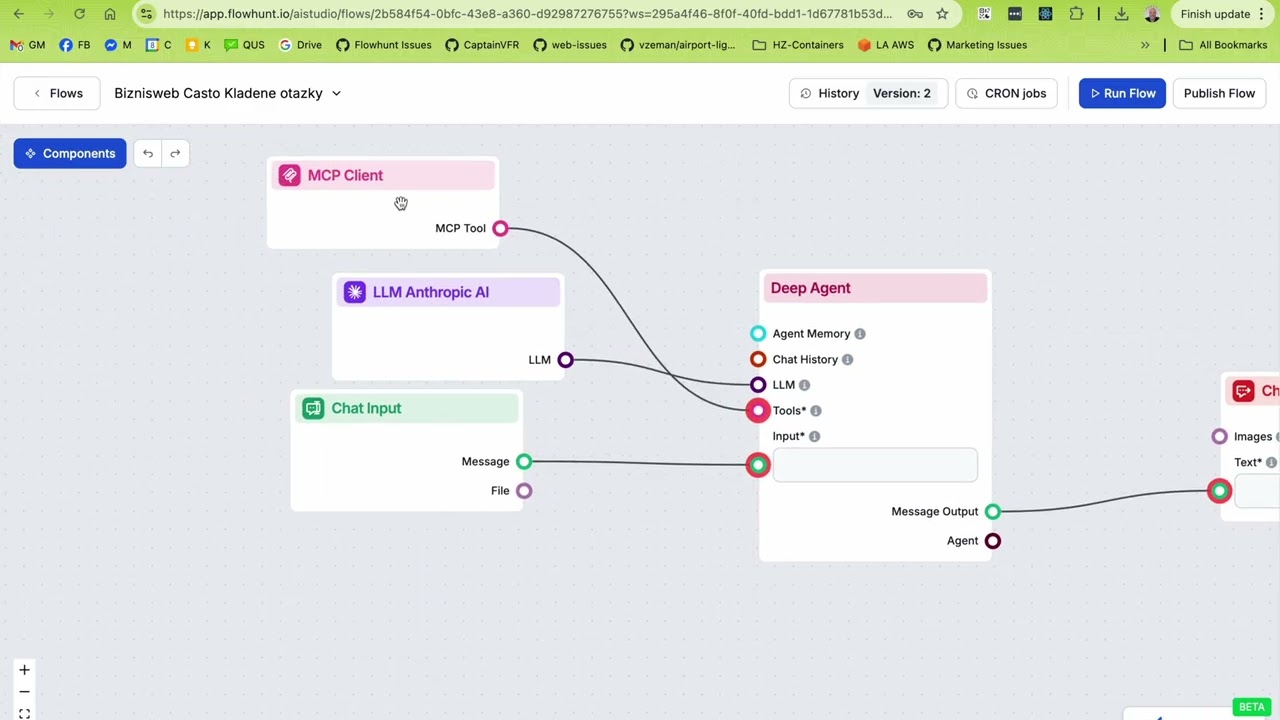
With your MCP server configured, you’re ready to create the actual automation flow that will generate content. In FlowHunt, you’ll create a new flow and give it a descriptive name like “Biznisweb FAQ Generation” or “E-Shop Blog Content Creator.” The flow starts with inputs (what information you’re providing) and outputs (what you want to receive), with various components in between that handle the actual work. The core component for content generation is typically a Deep Agent, which is an AI agent with specific capabilities and access to tools. You’ll configure this Deep Agent with a detailed prompt that instructs it on how to generate content—for example, “Create comprehensive FAQ entries about laundry care for perfume products, ensuring each answer is detailed and helpful to customers.” The Deep Agent will have access to your MCP server, allowing it to interact with your Biznisweb e-shop. You’ll also configure the AI model settings, such as which language model to use (Anthropic’s Claude is often ideal for content generation), the maximum number of tokens (40,000 tokens allows for longer, more detailed articles), and other parameters that affect cost and quality.
When setting up your content generation flow, choosing the right AI model and configuration is crucial for balancing quality and cost. FlowHunt supports various language models, with Anthropic’s Claude being particularly well-suited for content creation tasks due to its ability to produce coherent, well-structured text. To keep costs manageable—typically €0.50 to €1.50 per article rather than tens of euros—you’ll want to use cost-effective model variants. Setting the token limit to around 40,000 tokens provides sufficient capacity for generating longer, more detailed articles while processing additional context like source materials or research data. The token limit is particularly important when you’re planning to enhance your generated content with information from external sources, as this requires additional context processing. You can also configure the model to use specific instructions or system prompts that guide the AI’s behavior and ensure consistency with your brand voice and content standards. These settings allow you to fine-tune the balance between content quality, processing time, and cost, ensuring that your automation workflow is both effective and economical.
Experience how FlowHunt automates your AI content and SEO workflows — from research and content generation to publishing and analytics — all in one place.
One of the most powerful aspects of FlowHunt’s content generation system is the ability to enhance AI-generated content with information from external sources. By configuring your Deep Agent with access to Google Search capabilities, you can instruct it to research topics and incorporate current information, statistics, and best practices into the generated content. This approach ensures that your automated content isn’t just generic AI output, but rather well-researched, contextually relevant material that provides genuine value to your customers. For example, when generating FAQ entries about laundry care for perfume products, the AI agent can search for current best practices, common customer concerns, and industry standards, then synthesize this information into comprehensive, authoritative answers. You can also configure the agent to download and process content from specific websites, allowing you to incorporate your own existing content, competitor analysis, or industry resources into the generation process. This multi-source approach transforms content generation from a simple template-filling exercise into a sophisticated research and writing process that produces genuinely valuable content.
To illustrate the practical power of this system, consider a real-world example: a perfume e-shop owner wanted to create comprehensive FAQ content about laundry care and perfume preservation. Rather than manually writing dozens of FAQ entries, the owner set up a FlowHunt automation flow with the Biznisweb MCP server. In a single evening, the system generated approximately 80 FAQ entries covering various topics related to perfume care, laundry compatibility, storage recommendations, and customer concerns. Each entry was generated with the AI agent researching relevant information, synthesizing it into clear, helpful answers, and automatically publishing it to the e-shop’s FAQ section through the MCP server. What would have taken a content creator weeks to accomplish manually was completed in hours, with the AI handling research, writing, formatting, and publishing. The generated content was immediately live on the e-shop, improving the site’s search engine visibility and providing customers with comprehensive information that reduces support inquiries. This example demonstrates how automation can fundamentally change the economics of content creation for e-commerce businesses.
Beyond content generation, the MCP server architecture enables sophisticated customer support automation. By configuring your MCP server with access to order information, inventory data, and customer details, you can create AI-powered chatbots that handle common customer inquiries automatically. For instance, a customer might ask whether their order has been delivered, and the chatbot—powered by your AI agent with MCP access—can query the order system, check the current status, retrieve tracking information from the courier, and provide a complete answer without human intervention. This type of automation can handle a significant portion of routine support tickets, freeing your team to focus on complex issues that require human judgment. Similarly, you can automate inventory inquiries, product recommendations, and order modifications. The key is that the MCP server ensures all these interactions happen securely, with the AI agent only accessing the specific data and performing the specific actions you’ve authorized. This approach transforms customer support from a labor-intensive operation into an efficient, scalable system that improves response times while reducing costs.
Creating a customer support chatbot with MCP integration involves similar steps to content generation, but with different permissions and prompts. You’ll create a new MCP server specifically for customer support, enabling access to order details, customer information, and product data while disabling content creation capabilities. Your Deep Agent will be configured with a prompt that instructs it to be helpful, professional, and accurate when responding to customer inquiries. The chatbot can be deployed on your website, integrated into your helpdesk system, or connected to messaging platforms like WhatsApp or Facebook Messenger. When a customer submits a query, the chatbot receives it, uses the MCP server to access relevant information from your Biznisweb e-shop, and generates an appropriate response. For routine inquiries—order status, shipping information, product details, return policies—the chatbot can provide immediate, accurate answers. For complex issues that require human judgment, the system can escalate to your support team with all relevant context already gathered. This hybrid approach maximizes efficiency while maintaining quality customer service.
While MCP servers provide robust security through their permission-based architecture, implementing them effectively requires thoughtful planning and best practices. First, always follow the principle of least privilege: only grant your AI agents access to the specific data and capabilities they need for their assigned tasks. A content generation agent doesn’t need access to customer payment information or inventory management functions. Second, regularly review and audit your MCP server configurations to ensure permissions haven’t drifted from their intended scope. Third, use descriptive naming conventions for your API tokens and MCP servers so you can easily identify what each one does and who created it. Fourth, consider implementing rate limiting and usage monitoring to detect unusual activity that might indicate a security issue. Finally, keep your FlowHunt account credentials secure and use strong, unique passwords. By following these practices, you can confidently implement AI automation across your e-shop operations while maintaining robust data security and privacy protection.
Once your automation flows are live, it’s important to measure their effectiveness and continuously optimize them. For content generation, track metrics like the number of articles generated, the time saved compared to manual creation, and the impact on search engine traffic and customer engagement. Monitor which types of content generate the most traffic and customer interest, then adjust your prompts and generation strategies accordingly. For customer support automation, track metrics like the percentage of inquiries handled automatically, customer satisfaction scores, and the reduction in support team workload. Use these insights to refine your AI agent prompts, adjust MCP server permissions, and identify new automation opportunities. FlowHunt provides analytics and logging capabilities that help you understand how your flows are performing and where improvements can be made. Regular optimization ensures that your automation system continues to deliver value and adapts to changing business needs.
As you become comfortable with automation, you can expand it across multiple areas of your e-shop operations. Beyond content generation and customer support, consider automating product description updates, category page generation, email marketing content, social media posts, and more. Each function might require its own MCP server with specific permissions, but the underlying architecture remains the same. You might create a content calendar flow that automatically generates blog posts on a schedule, a product update flow that refreshes descriptions based on inventory changes, and a customer communication flow that generates personalized emails. By systematically automating routine tasks across your e-shop, you can dramatically increase operational efficiency while freeing your team to focus on strategic initiatives like marketing strategy, product development, and customer relationship building. The key is to start with high-impact, routine tasks and gradually expand automation as you gain confidence and experience.
The integration of Biznisweb, FlowHunt, and MCP servers represents a powerful approach to e-commerce automation that’s accessible to businesses of all sizes. By following the setup process outlined in this guide—from integrating FlowHunt with your Biznisweb e-shop, to creating MCP servers with appropriate permissions, to building automation flows for content generation and customer support—you can dramatically reduce manual work while improving the quality and consistency of your e-shop operations. The real-world example of generating 80 FAQ entries in a single evening demonstrates the transformative potential of this approach. Whether you’re looking to improve your search engine visibility through automated content creation, reduce support team workload through intelligent chatbots, or streamline product management through automated updates, this automation architecture provides the tools and security framework to accomplish your goals. Start with a single automation flow focused on your highest-impact need, measure the results, and gradually expand your automation system as you discover new opportunities. The future of e-commerce belongs to businesses that leverage AI and automation to work smarter, not just harder.
An MCP (Model Context Protocol) server acts as a secure intermediary layer between your e-shop data and AI models. It allows you to safely connect sensitive business data to AI systems without exposing your entire infrastructure, enabling secure automation of content creation, customer support, and inventory management.
Yes, FlowHunt is designed with a user-friendly interface that allows non-technical users to set up integrations and create automation flows. The process involves simple steps like adding your e-shop domain, creating API tokens, and configuring which features the AI agent can access.
The FlowHunt service integration with Biznisweb is completely free to add to your e-shop. You only pay for the AI processing credits you use when generating content or running automated workflows. Costs are typically minimal, often ranging from €0.50 to €1.50 per article depending on length and complexity.
You can automate FAQ sections, blog articles, product descriptions, category pages, and more. The system can generate content at scale—for example, creating 80+ articles in a single evening on various topics relevant to your products and industry.
Arshia is an AI Workflow Engineer at FlowHunt. With a background in computer science and a passion for AI, he specializes in creating efficient workflows that integrate AI tools into everyday tasks, enhancing productivity and creativity.

Discover how FlowHunt's MCP integration enables seamless, secure automation of your e-shop operations and content workflows.
The BiznisWeb.sk MCP Server enables seamless integration between AI tools and BiznisWeb.sk e-commerce systems, allowing automated workflows to manage products, ...

Learn how to create an AI-powered Shopify manager using FlowHunt's MCP server integration to automate product management, orders, customers, and inventory contr...
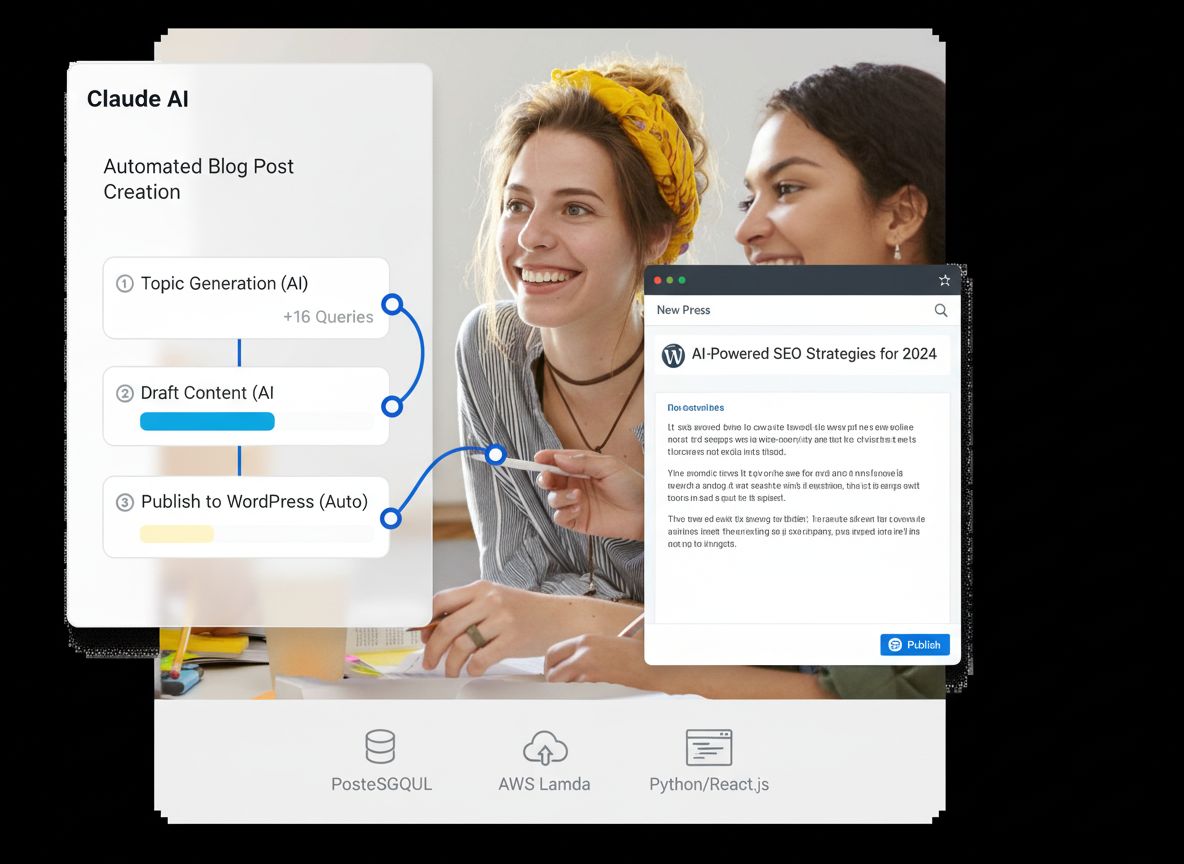
Learn how to integrate Claude AI with WordPress through FlowHunt's MCP servers to automatically create, manage, and publish blog posts without manual interventi...