Connect AI to Slack: Add Claude, GPT, Gemini, Grok, Llama & Mistral with FlowHunt
Connect any LLM (Claude, GPT, Gemini, Grok, Llama, Mistral) to Slack using FlowHunt’s no-code flow builder. The setup is the same for every model — pick the model that fits your use case, then ship in minutes.
Connect any AI model to Slack — one flow, every LLM
Adding an AI assistant to Slack used to mean picking a vendor, writing integration code, and rebuilding everything when a better model shipped six months later. With FlowHunt, the integration is decoupled from the model: you build the Slack flow once, plug in the LLM you want — Claude, GPT, Gemini, Grok, Llama, Mistral — and swap it any time without touching the rest.
This guide walks through the full setup. The first half is the same for every model. The second half breaks down which model to pick for which use case, with notes specific to each LLM family. Skip to the section that matches your stack, or read end-to-end if you’re starting from zero.
Why put an AI agent in Slack
Slack is where teams ask questions. An AI agent that lives there answers them instantly — without context-switching to a separate chat tool, dashboard, or knowledge base. Common deployments:
Internal Q&A: agent answers HR, IT, or product questions from a company knowledge base
The setup is identical regardless of which AI model you choose. Pick your model in step 4; everything else stays the same.
1. Connect Slack to FlowHunt
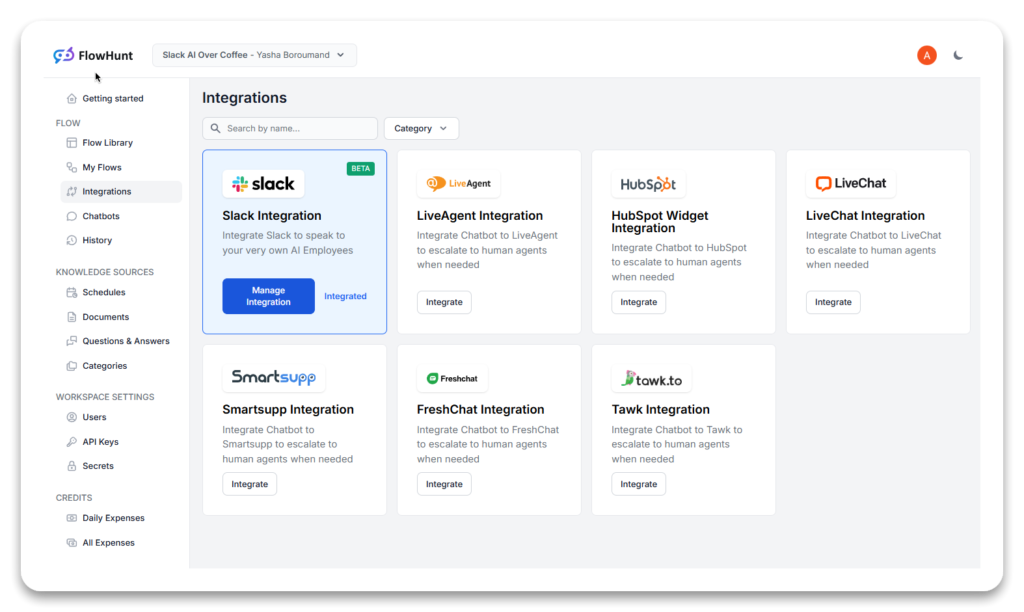
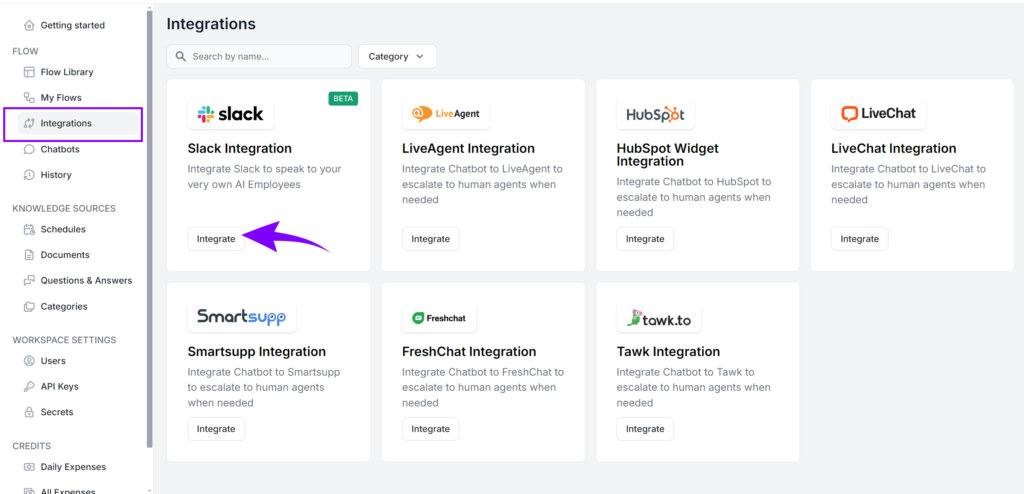
Log in to your FlowHunt
account and open the Integrations tab. Select Slack, click Connect, and authorize the app on Slack’s OAuth screen. Grant the read/write permissions FlowHunt requests — these let the bot receive messages and post replies in your workspace.
Your workspace URL appears in the top-left corner of the Slack desktop or web app — copy it from there if FlowHunt asks. Once authorized, Slack is connected and ready to use in any flow.
2. Create a new flow and add the Slack Message Received block
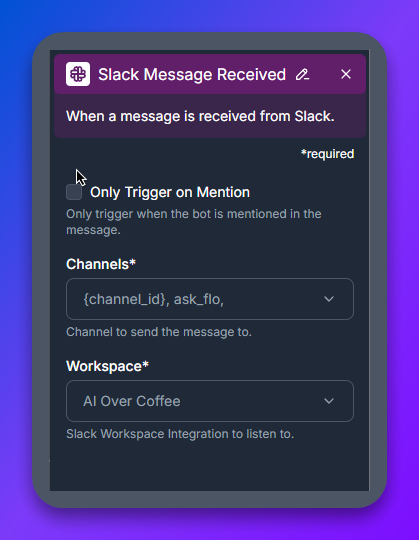
In FlowHunt’s flow builder, drop a Slack Message Received component on the canvas. This block listens for incoming Slack messages and triggers the rest of the flow.
Configure two settings:
Channel and workspace: pick the workspace you connected, and either the whole workspace or a specific channel. A dedicated #ai-assistant channel is the cleanest setup.
Only Trigger on Mention: enable this so the bot only fires when someone @-mentions it. Without this, every message in the channel will trigger the flow.
3. Add the AI Agent component
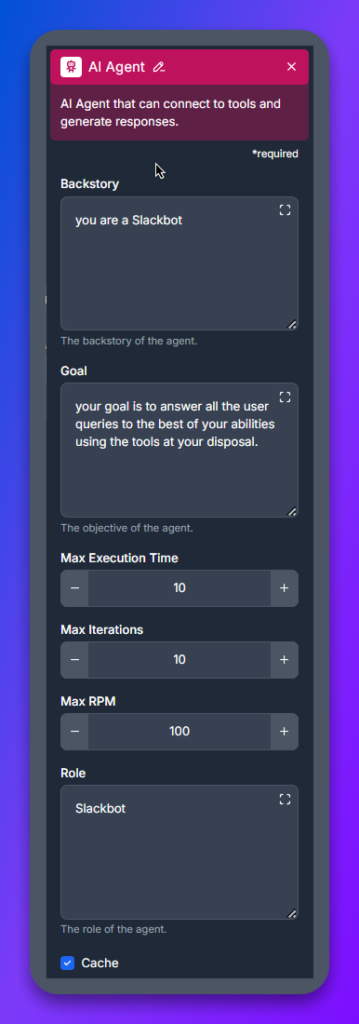
The AI Agent block is the bot’s reasoning layer. It takes the user’s message, decides what tools to use, and crafts the response.
Backstory: a short description of the bot’s persona and scope, e.g. “You are a helpful Slack assistant for the engineering team.”
Goal: the bot’s primary objective, e.g. “Answer questions accurately using all available tools and knowledge sources. Cite sources when relevant.”
4. Add an LLM component and pick your model
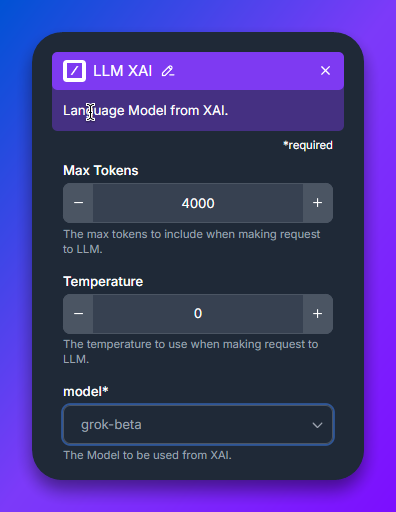
Connect an LLM component to the AI Agent. This is where you choose which AI model powers the bot. FlowHunt has a separate LLM component for each provider — LLM OpenAI, LLM Anthropic, LLM Google, LLM Meta, LLM Mistral, LLM xAI — and inside each you select the specific model variant.
This is the only step that differs per model. Jump to the Pick the right AI model
section below for a comparison and per-family notes.
5. Add tools (optional but recommended)
The AI Agent gets dramatically more useful when it can use tools. Common ones:
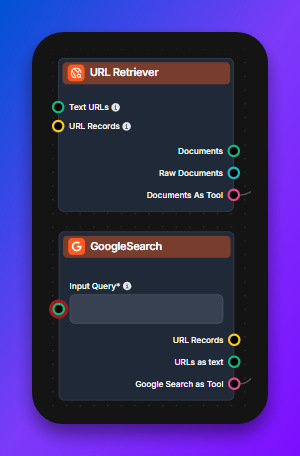
Google Search Tool — live web search for real-time information
URL Retriever — fetches and summarizes any URL shared in Slack
Document Retriever — RAG over your own knowledge base (Notion, Confluence, Google Drive, file uploads)
Custom API tools — call any internal service that accepts HTTP
Tools are model-agnostic. Any LLM you pick in step 4 can use any tool you wire in.
6. Add the Slack Send Message block and test
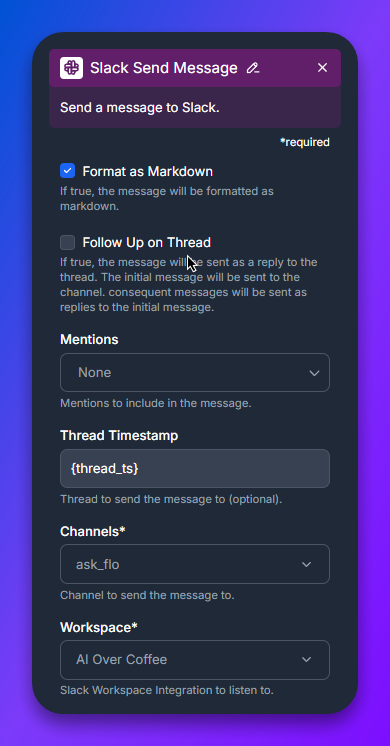
Finish the flow with a Slack Send Message component, configured for the same channel and workspace as step 2. Save the flow, open Slack, and @-mention the bot in your test channel. The bot should respond using the model you picked in step 4.
That’s the entire setup. Switching models later is a one-click change in step 4 — no code edits, no flow rebuild.
Pick the right AI model for Slack
Every major LLM family works in FlowHunt’s Slack flow. The differences come down to cost, latency, context window, reasoning depth, and tool-calling quality. Use the table to shortlist, then read the family-specific section for setup notes.
Pick one to start. Switching models in FlowHunt is a one-click change in the LLM component, so over-thinking the initial choice doesn’t pay off — ship with a sensible default, measure quality on real Slack traffic, iterate.
Join our newsletter
Get latest tips, trends, and deals for free.
Per-family setup notes
Each section below is self-contained. Pick the section for the model family you’re connecting and follow its notes.
Anthropic Claude
Claude is Anthropic’s family of LLMs, well-suited for Slackbots that handle nuanced internal Q&A, document summarization, code review, and careful instruction-following. To connect Claude to Slack, drop the LLM Anthropic component in step 4 and pick the variant:
Claude 3 Haiku — fastest, cheapest, ideal for high-volume FAQ replies
Claude 3.5 Sonnet — the workhorse: strong reasoning, large context, good price-performance
Claude 4.5 Sonnet / Opus — top-tier for the hardest reasoning, code, and long-document analysis
Older variants (Claude 2, Claude 3 base) still work but are superseded by Sonnet 3.5+
For internal-knowledge Slackbots over Notion or Confluence, Claude 3.5 Sonnet plus a Document Retriever is the most reliable starting point.
OpenAI GPT and o-series
OpenAI’s GPT and o-series models are the broadest choice for Slack — strong general-purpose performance, the most mature tool-calling, and multimodal input (vision, audio). Drop the LLM OpenAI component in step 4 and pick the variant:
GPT-4o Mini — the default. Fast, cheap, handles 95% of Slack use cases
GPT-4o — when you need higher quality, image understanding, or longer context
GPT-4 Vision Preview — when the bot needs to interpret images shared in Slack (largely superseded by GPT-4o)
o1 Mini / o1 Preview / o3 — reasoning models for hard analytical tasks (slower, pricier; use sparingly)
GPT-5 — frontier-tier, available where applicable
For most teams, start with GPT-4o Mini. Promote to GPT-4o or o1 only on flows where users complain about answer quality.
Google Gemini
Google Gemini is the strongest choice when context window matters — Gemini 1.5 Pro handles over 1M tokens, enough to drop entire codebases or document sets into a single Slack query. Drop the LLM Google component in step 4 and pick the variant:
Gemini 1.5 Flash / Flash 8B — fast and cheap; good for high-volume Slack channels
Gemini 2.0 Flash / 2.5 Flash — newer Flash generations, faster and smarter than 1.5
Gemini 1.5 Pro / 2.5 Pro — top-tier with massive context; best for whole-document Q&A
Gemini 3 Flash — latest fast model
If your Slackbot needs to reason over your full knowledge base in a single pass (no retrieval step), Gemini Pro’s context window is the cleanest answer.
xAI Grok
xAI Grok is built into FlowHunt’s Slack flow the same way as the other models — drop the LLM xAI component (or use the LLM OpenAI component pointing at the Grok endpoint, depending on your FlowHunt version) and pick the Grok variant. Grok’s distinguishing trait is real-time awareness — it has access to live information, including X (Twitter) data, making it the best choice when the Slackbot needs current-events context: news, market data, breaking developments. Pair it with the Google Search Tool for even broader web access.
Meta Llama
Meta’s Llama family is the open-weight option — use it when data residency, self-hosting, or per-token cost rules out hosted APIs. Drop the LLM Meta component in step 4 and pick the variant:
Llama 3.3 Versatile — the current flagship, competitive with GPT-4o on many tasks
Llama 4 (where available) — newer generation
Llama is the right answer when your security or compliance team requires the model to run on infrastructure you control, or when high message volume makes hosted-API costs prohibitive.
Mistral
Mistral is the European open-weight contender — strong models, EU-friendly hosting, and good price-performance. Drop the LLM Mistral component in step 4 and pick the variant:
Mistral 7B — small and fast, runs on commodity hardware
Mistral 8x7B (Mixtral) — mixture-of-experts, strong general performance
Mistral Large — flagship, competes with GPT-4o on quality at lower price
Choose Mistral when EU data residency matters, or when you want open-weight flexibility with closer-to-frontier quality than Llama 3.x in some benchmarks.
Common Slackbot patterns
Three flow patterns cover most Slack deployments. Build any of them on top of the setup above by adjusting the AI Agent’s tools and prompt:
Knowledge-base assistant — add a Document Retriever pointing at Notion / Confluence / Google Drive / your file uploads. The bot answers questions citing internal sources.
Web research assistant — add the Google Search Tool and URL Retriever. The bot pulls live web context and summarizes URLs the team shares.
Workflow agent — add custom API tools that hit your internal services. The bot triggers jobs, queries dashboards, posts status updates on demand.
These patterns layer cleanly: a single Slack flow can combine knowledge-base retrieval, live web search, and internal API calls, with the LLM choosing the right tool per query.
Troubleshooting
The bot doesn’t respond to messages. Check that “Only Trigger on Mention” matches how you’re testing — if it’s enabled, you must @-mention the bot. Confirm the channel in Slack Message Received matches the channel you’re posting in.
The bot responds but the answer is poor. Iterate on the AI Agent’s backstory and goal first — they’re more impactful than swapping models. If quality is still off after prompt iteration, promote to a stronger model in the LLM component (Mini → standard → top-tier).
Permissions errors after Slack auth. Reconnect the Slack integration in FlowHunt’s Integrations tab and re-grant permissions. Slack occasionally invalidates tokens after workspace owner changes.
Long replies get truncated in Slack. Slack has a per-message character limit. Add a post-processing step in the flow to split long responses, or instruct the AI Agent in its goal to keep responses under 3,000 characters when posting to Slack.
Ship your AI Slackbot
The whole setup — connecting Slack, building the flow, picking a model — is a one-evening project in FlowHunt. The flow you build today works with any future model: when GPT-6 or Claude 5 ship, you swap the LLM component and the rest of the flow keeps running.
Start with FlowHunt’s free tier
, connect Slack, and ship a working AI Slackbot before lunch.
Frequently asked questions
FlowHunt supports every major LLM family in Slack: Anthropic Claude (Claude 2, Claude 3, Claude 3 Haiku, Claude 3.5 Sonnet, Claude 4.5), OpenAI GPT and o-series (GPT-4 Vision, GPT-4o, GPT-4o Mini, o1 Mini, o1 Preview, GPT-5), Google Gemini (1.5 Flash, 1.5 Flash 8B, 1.5 Pro, 2.0 Flash, 2.5 Pro), Meta Llama (3.2 1B, 3.2 3B, 3.3 Versatile), Mistral (7B, 8x7B, Large), and xAI Grok. The same flow works with any of them — just swap the LLM component.
No. FlowHunt is a no-code visual flow builder. You drag a Slack Message Received block, an AI Agent block, an LLM block (set to your chosen model), and a Slack Send Message block onto the canvas, configure each one, and the bot is live.
The first-time setup — connecting your Slack workspace and building the basic flow — takes about 10 to 15 minutes. Switching the AI model later (e.g. from GPT-4o to Claude 3.5 Sonnet) is a single component change in the same flow.
For general team Q&A and balanced cost: GPT-4o Mini or Claude 3 Haiku. For complex reasoning and analysis: Claude 3.5 Sonnet, GPT-4o, or o1. For long-context document processing: Gemini 1.5 Pro or Claude 3.5 Sonnet. For real-time fast responses with web access: Grok or Gemini Flash. For self-hosted or cost-sensitive deployments: Llama 3.x or Mistral. The comparison table in this guide breaks it down per use case.
Yes. Add the Google Search Tool component for live web answers, the URL Retriever component for summarizing shared links, or connect a Document Retriever to your knowledge base for RAG over your internal documents. Tools are model-agnostic — any LLM in the flow can use them.
By default, no. Configure the Slack Message Received component with 'Only Trigger on Mention' enabled, and the bot only responds when someone @-mentions it. You can also restrict it to a specific channel like #ai-assistant.
Arshia is an AI Workflow Engineer at FlowHunt. With a background in computer science and a passion for AI, he specializes in creating efficient workflows that integrate AI tools into everyday tasks, enhancing productivity and creativity.
Arshia Kahani
AI Workflow Engineer
Ship Your AI Slackbot in Minutes
FlowHunt's no-code flow builder connects Slack to every major LLM — Claude, GPT, Gemini, Grok, Llama, Mistral — through one consistent flow. No code, no infrastructure to manage.
How to Add an AI Assistant to Slack: FlowHunt vs OpenClaw
Two ways to put an AI assistant in Slack: FlowHunt's no-code 'deploy to Slack' in a few clicks, or a self-hosted OpenClaw connected over a Slack app. Same goal,...
FlowHunt’s Slack integration enables seamless AI collaboration directly within your Slack workspace. Bring any Flow into Slack, automate workflows, provide real...
Integrate FlowHunt with Slack to automate messaging, monitor channels, reply to threads, and build AI-powered bots that work 24/7 across your workspace.
5 min read
AI
Slack
+3
Cookie Consent We use cookies to enhance your browsing experience and analyze our traffic. See our privacy policy.