

Data Exfiltration (AI Context)
In AI security, data exfiltration refers to attacks where sensitive data accessible by an AI chatbot — PII, credentials, business intelligence, API keys — is ex...
5 min read
Data Exfiltration
AI Security
+3
A comprehensive guide to safely integrating AI platforms with your database using API gateways, encryption, access controls, and monitoring strategies.
Key security practices for exposing databases to AI:
Secure database exposure means enabling AI systems to access the data they need while maintaining strict controls over what data is accessed, who (or what) is accessing it, when access occurs, and how that access is monitored and logged. It’s fundamentally different from simply opening your database to the internet or providing AI platforms with direct database credentials.
When we talk about exposing a database to AI platforms, we’re describing a deliberate architectural decision to create a controlled interface between your data and external AI systems. This interface acts as a security checkpoint, enforcing authentication, authorization, encryption, and audit logging at every step. The goal is to create what security professionals call a “single choke point”—a centralized location where all access can be monitored, controlled, and validated.
The challenge is that AI platforms often require broad access to diverse datasets to function effectively. A machine learning model might need to analyze customer behavior patterns, transaction histories, and product information simultaneously. A generative AI system might need to search across multiple tables to answer complex questions. Yet granting this access without proper safeguards can expose your organization to data breaches, compliance violations, and insider threats.
The business case for securely exposing databases to AI is compelling. Organizations that successfully integrate AI with their data infrastructure gain significant competitive advantages: faster decision-making, automated insights, improved customer experiences, and operational efficiency. However, the risks are equally significant.
Data breaches involving exposed databases have become increasingly common and costly. The average cost of a data breach in 2024 exceeded $4.45 million, with database-related incidents accounting for a substantial portion of these losses. When that breach involves personal data subject to regulations like GDPR or CCPA, the financial and reputational damage multiplies dramatically. Beyond the direct costs, organizations face operational disruption, loss of customer trust, and potential legal liability.
The challenge intensifies when AI systems are involved. AI models can inadvertently memorize sensitive training data, making it recoverable through prompt injection attacks or model extraction techniques. AI agents operating with database access can be manipulated through carefully crafted prompts to execute unintended queries or expose confidential information. These novel attack vectors require security approaches that go beyond traditional database protection.
Furthermore, regulatory scrutiny of AI is increasing rapidly. Data protection authorities worldwide are issuing guidance on how organizations must handle personal data when using AI systems. Compliance with GDPR, CCPA, HIPAA, and emerging AI-specific regulations requires demonstrating that you have appropriate safeguards in place before exposing any data to AI platforms.

Start your free trial today and see results within days.
Before implementing any strategy to expose your database to AI platforms, you need a clear understanding of your current security infrastructure and data landscape. This assessment should answer several critical questions:
What data do you actually have? Conduct a comprehensive data inventory and classification exercise. Categorize your data by sensitivity level: public, internal, confidential, and restricted. Identify which data contains personally identifiable information (PII), payment card information (PCI), protected health information (PHI), or other regulated data types. This classification becomes the foundation for all subsequent access control decisions.
What are your current security controls? Document your existing database security measures: authentication mechanisms, encryption status (both in transit and at rest), network segmentation, backup and recovery procedures, and audit logging capabilities. Identify gaps where controls are missing or outdated.
What compliance obligations do you have? Review applicable regulations for your industry and geography. If you handle personal data, GDPR compliance is likely mandatory. If you’re in healthcare, HIPAA requirements apply. Financial services organizations must consider PCI-DSS. Understanding these obligations shapes your security architecture.
What is your risk tolerance? Different organizations have different risk appetites. A healthcare provider handling patient data has a much lower risk tolerance than a SaaS company analyzing anonymized usage metrics. Your risk tolerance should inform how restrictive your access controls need to be.
The most critical architectural decision you’ll make is to never expose your database directly to AI platforms. Instead, implement a secure API gateway that sits between your database and external systems. This gateway becomes the single point of control for all database access.
An API gateway serves multiple essential functions. First, it provides a layer of abstraction that decouples the AI platform from your database schema. If your database structure changes, you only need to update the API, not renegotiate access with every AI platform. Second, it enables you to implement consistent security policies across all access requests. Third, it creates a centralized location for monitoring, logging, and alerting on suspicious activity.
When selecting or building an API gateway, look for solutions that support identity-aware proxying (IAP). An IAP gateway authenticates every request before it reaches your database, ensuring that only authorized systems can access data. It should support multiple authentication methods including OAuth 2.0, JWT tokens, mutual TLS (mTLS), and API keys. The gateway should also enforce rate limiting to prevent abuse and implement request validation to block malformed or suspicious queries.
Popular options include cloud-native solutions like AWS API Gateway with IAM integration, Google Cloud’s Identity-Aware Proxy, Azure API Management, or specialized database access solutions like Hoop or DreamFactory. Each has different strengths, but all share the common principle of creating a controlled access layer.
Get latest tips, trends, and deals for free.
Once you have an API gateway in place, the next critical layer is implementing robust authentication and authorization mechanisms. These two concepts are often confused but serve different purposes: authentication verifies who (or what) is making a request, while authorization determines what that entity is allowed to do.
For human users accessing AI systems that interact with your database, implement multi-factor authentication (MFA). This typically combines something you know (a password), something you have (a phone or hardware token), and something you are (biometric data). MFA significantly reduces the risk of account compromise, which is the entry point for many data breaches.
For AI systems and service principals, use strong, automatically rotated credentials. Never hardcode database credentials in application code or configuration files. Instead, use environment variables, secrets management systems (like HashiCorp Vault, AWS Secrets Manager, or Azure Key Vault), or cloud-native credential systems that automatically rotate credentials on a schedule.
Implement certificate-based authentication where possible. Mutual TLS (mTLS) authentication, where both the client and server authenticate each other using digital certificates, provides stronger security than password-based authentication. Each AI platform or service gets a unique certificate that must be presented to access the API gateway.
Role-Based Access Control (RBAC) is the most common authorization model. You define roles (like “AI_Analytics_Reader” or “ML_Training_Agent”) and assign permissions to those roles. Each AI system is assigned one or more roles, and can only perform actions permitted by those roles. RBAC is straightforward to implement and understand, making it ideal for most organizations.
Attribute-Based Access Control (ABAC) is more sophisticated and flexible. Instead of assigning roles, you define policies based on attributes of the request: the user’s department, the data’s classification level, the time of day, the geographic location of the request, the purpose of the access, and many other factors. ABAC allows for more granular control but requires more careful policy design.
Implement the principle of least privilege: grant each AI system only the minimum permissions it needs to function. If an AI system only needs to read customer names and email addresses, don’t grant it access to payment information or social security numbers. If it only needs to read data, don’t grant write or delete permissions.
Even with strong authentication and authorization in place, you need to protect the data itself. This involves two complementary strategies: encryption and data masking.
Encryption in transit protects data as it moves between your database and the AI platform. Use TLS 1.2 or higher for all connections. This ensures that even if network traffic is intercepted, the data remains unreadable without the encryption keys. Most modern API gateways and database systems support TLS by default, but verify that it’s enabled and configured correctly.
Encryption at rest protects data stored in your database. Even if an attacker gains unauthorized access to your database files or backups, they cannot read the data without the encryption keys. Most modern databases support transparent data encryption (TDE) or similar features that encrypt data automatically. Enable this feature and ensure that encryption keys are managed securely.
Key management is critical. Never store encryption keys in the same location as the encrypted data. Use a dedicated key management service (KMS) that controls access to encryption keys separately from your database. Rotate encryption keys regularly—at least annually, and more frequently for highly sensitive data. Implement key versioning so that old keys remain available for decrypting historical data.
Data masking involves replacing sensitive values with obfuscated or synthetic values. For example, a customer’s social security number might be masked as “XXX-XX-1234” showing only the last four digits. A credit card number might be masked as “--****-4567”. This allows AI systems to work with data that has the same structure and distribution as real data, but without exposing sensitive values.
Dynamic data masking applies masking rules at query time, based on the user’s role and the data’s sensitivity. A customer service representative might see full customer names and phone numbers, while an AI analytics system might see only masked versions. This approach is more flexible than static masking because it can apply different masking rules to different users.
Implement column-level masking for your most sensitive data. Identify columns containing PII, payment information, health data, or other regulated information, and apply masking rules to those columns. Many databases support this natively, or you can implement it in your API gateway layer.
Let’s examine how RBAC works in a practical scenario. Imagine you have a database containing customer information, transaction history, and product data. You want to expose this database to three different AI systems: a recommendation engine, a fraud detection system, and a customer analytics platform.
| AI System | Required Access | Recommended Role | Specific Permissions |
|---|---|---|---|
| Recommendation Engine | Customer profiles, purchase history | AI_RECOMMENDATIONS_READER | SELECT on customers, orders, products tables; no access to payment methods or personal contact info |
| Fraud Detection System | Transaction details, customer history | AI_FRAUD_DETECTOR | SELECT on transactions, customers, accounts; access to payment information but not customer contact details |
| Analytics Platform | Aggregated customer data | AI_ANALYTICS_READER | SELECT on aggregated views only; no access to individual customer records or transaction details |
Each role has specific permissions that limit what data can be accessed and what operations can be performed. The recommendation engine cannot see payment information because it doesn’t need it. The fraud detection system can see transactions but not customer email addresses. The analytics platform only sees aggregated data, not individual records.
This approach ensures that if one AI system is compromised, the attacker’s access is limited to only the data that system needs. The blast radius of a security incident is minimized.
Even with strong preventive controls in place, you need to detect and respond to security incidents. This requires comprehensive monitoring, detailed auditing, and automated threat detection.
Enable detailed audit logging for all database access. Every query executed by an AI system should be logged, including:
Store audit logs in a secure, immutable location separate from your primary database. Cloud providers offer managed logging services (like AWS CloudTrail, Google Cloud Logging, or Azure Monitor) that provide this functionality. Maintain audit logs for at least one year, and longer for highly sensitive data.
Implement real-time monitoring that detects suspicious patterns of database access. Set up alerts for:
Modern database monitoring tools can fingerprint queries and detect anomalies automatically. Tools like Imperva, Satori, and others provide AI-powered threat detection that learns normal access patterns and alerts on deviations.
Develop an incident response plan specific to database security incidents involving AI systems. This plan should include:
For organizations with large, diverse datasets, consider segmenting your data to reduce exposure. This can take several forms:
Network Segmentation: Place your database on a separate network segment with restricted access. Only the API gateway can access the database directly. AI platforms access the database only through the API gateway, never directly.
Database Segmentation: If your database contains both sensitive and non-sensitive data, consider storing them in separate databases. This way, if an AI system only needs non-sensitive data, it can be granted access to only that database.
Data Sharding: For very large datasets, split the data into smaller pieces (shards) based on some criteria (like customer ID or geographic region). Grant AI systems access to only the shards they need.
Synthetic Data: For development and testing, use synthetic data that mimics the structure and distribution of real data but contains no actual sensitive information. AI systems can be trained and tested on synthetic data, reducing the need to expose real data.
Exposing your database to AI platforms has significant compliance implications. Different regulations impose different requirements:
GDPR (General Data Protection Regulation): If you process personal data of EU residents, GDPR applies. Key requirements include:
CCPA (California Consumer Privacy Act): If you process personal data of California residents, CCPA applies. Key requirements include:
HIPAA (Health Insurance Portability and Accountability Act): If you handle protected health information, HIPAA applies. Key requirements include:
Industry-Specific Standards: Depending on your industry, additional standards may apply:
Before exposing any data to AI platforms, conduct a compliance assessment to understand which regulations apply to your data and what specific requirements they impose.
Managing secure database access to AI platforms involves coordinating multiple systems and enforcing consistent policies across your organization. This is where workflow automation platforms like FlowHunt become invaluable.
FlowHunt enables you to build automated workflows that securely integrate AI systems with your database infrastructure. Rather than manually managing API keys, monitoring access, and coordinating between teams, FlowHunt provides a unified platform for:
Workflow Orchestration: Define complex workflows that involve database queries, AI processing, and data transformation. FlowHunt handles the orchestration, ensuring that each step executes securely and in the correct order.
Access Control Integration: FlowHunt integrates with your identity and access management systems, automatically enforcing role-based access control and least privilege principles across all AI workflows.
Audit and Compliance: FlowHunt maintains comprehensive audit logs of all workflow executions, including what data was accessed, when, and by whom. These logs support compliance with GDPR, CCPA, HIPAA, and other regulations.
For organizations seeking an extra layer of isolation between their AI models and production databases, FlowHunt offers the Grid feature. The Grid allows users to create a searchable database by simply uploading structured files, such as CSVs.
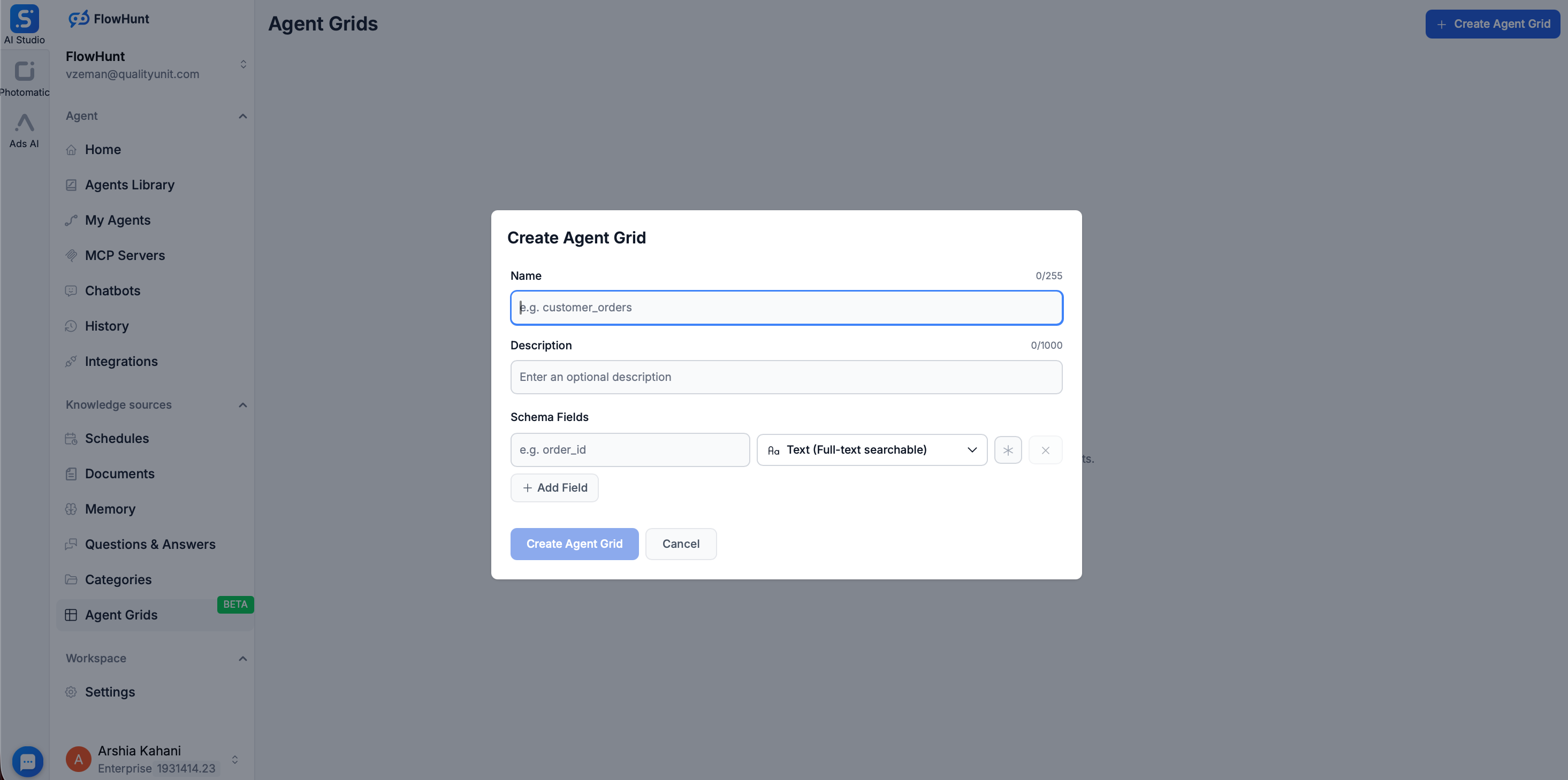
Once a CSV is uploaded to the Grid, FlowHunt uses Elasticsearch to index the data, effectively turning a static file into a dynamic, high-speed Knowledge Source. This approach offers significant security advantages:
By using FlowHunt’s Grid and workflow capabilities, you reduce the complexity of maintaining security controls and ensure consistent enforcement of policies across your organization.
Implementing secure database exposure to AI platforms is a multi-step process. Here’s a practical roadmap:
Step 1: Assess Your Current State
Step 2: Design Your Architecture
Step 3: Implement Core Controls
Step 4: Implement Data Protection
Step 5: Deploy Monitoring and Auditing
Step 6: Test and Validate
Step 7: Operationalize and Maintain
As you implement secure database exposure, watch out for these common mistakes:
Direct Database Exposure: Never expose your database directly to the internet or to AI platforms without an API gateway. This is the single biggest security risk.
Overly Broad Permissions: Granting AI systems more permissions than they need violates the principle of least privilege. Start with minimal permissions and expand only when necessary.
Inadequate Encryption: Encrypting data in transit but not at rest (or vice versa) leaves your data vulnerable. Implement encryption at both layers.
Weak Credential Management: Hardcoding credentials in code, storing them in version control, or failing to rotate them regularly creates significant risk.
Insufficient Monitoring: Implementing strong preventive controls but failing to monitor for breaches means you won’t know if your controls have been bypassed.
Ignoring Compliance: Failing to consider regulatory requirements until after a breach occurs is costly. Build compliance into your architecture from the start.
Inadequate Testing: Deploying security controls without thorough testing means they may not work as intended when needed.
As AI systems become more sophisticated, new attack vectors emerge. Two particularly concerning threats are prompt injection and model extraction.
Prompt Injection: An attacker crafts a prompt that tricks an AI system into executing unintended actions. For example, a prompt might be designed to make an AI system ignore its normal access controls and return data it shouldn’t have access to. To defend against prompt injection:
Model Extraction: An attacker interacts with an AI model to extract information about its training data or internal structure. To defend against model extraction:
Securely exposing your database to AI platforms is not just possible—it’s increasingly necessary for organizations that want to leverage AI’s capabilities while protecting their most valuable asset. The key is implementing a layered approach that combines strong authentication and authorization, encryption, data masking, comprehensive monitoring, and regular testing.
Start with the fundamentals: never expose your database directly, always use an API gateway, implement strong authentication and authorization, and encrypt your data. Build from there, adding data masking, comprehensive monitoring, and compliance controls appropriate for your organization’s risk profile and regulatory obligations.
Remember that security is not a one-time implementation but an ongoing process. Regularly review your controls, test for vulnerabilities, monitor for threats, and update your approach as new risks emerge. By treating database security as a continuous priority rather than a checkbox to complete, you can safely unlock the value of AI while protecting your organization’s data and reputation.
Experience how FlowHunt automates your AI content and SEO workflows — from research and content generation to publishing and analytics — all in one place.
Arshia is an AI Workflow Engineer at FlowHunt. With a background in computer science and a passion for AI, he specializes in creating efficient workflows that integrate AI tools into everyday tasks, enhancing productivity and creativity.

Streamline your AI-powered data workflows while maintaining enterprise-grade security and compliance standards.
In AI security, data exfiltration refers to attacks where sensitive data accessible by an AI chatbot — PII, credentials, business intelligence, API keys — is ex...
AI chatbots with access to sensitive data are prime data exfiltration targets. Learn how attackers extract PII, credentials, and business intelligence through p...

Autonomous AI agents face unique security challenges beyond chatbots. When AI can browse the web, execute code, send emails, and call APIs, the blast radius of ...