
How to Send Images to AI Chatbots
Learn how to upload and send images to AI chatbots like ChatGPT, Claude, and Meta AI. Discover supported formats, file size limits, and best practices for image...
11 min read
Learn how to use AI image generation chatbots effectively. Master prompt engineering, compare top platforms like ChatGPT, Midjourney, and Stable Diffusion, and create stunning visuals with our comprehensive guide.
Using an AI image generation chatbot involves selecting a platform, writing detailed text prompts describing your desired image, and refining the results through iterative feedback. Start with clear descriptions including subject, style, lighting, and mood, then use the platform's editing tools to perfect your output.
AI image generation chatbots represent a revolutionary shift in how we create visual content. These intelligent systems transform simple text descriptions into detailed, high-quality images through advanced machine learning algorithms. The technology leverages neural networks trained on billions of text-image pairs to understand concepts, artistic styles, and visual relationships. When you provide a text prompt, the chatbot analyzes your description and generates images that match your vision with remarkable accuracy. This democratization of image creation means anyone can produce professional-quality visuals without formal design training or expensive software.
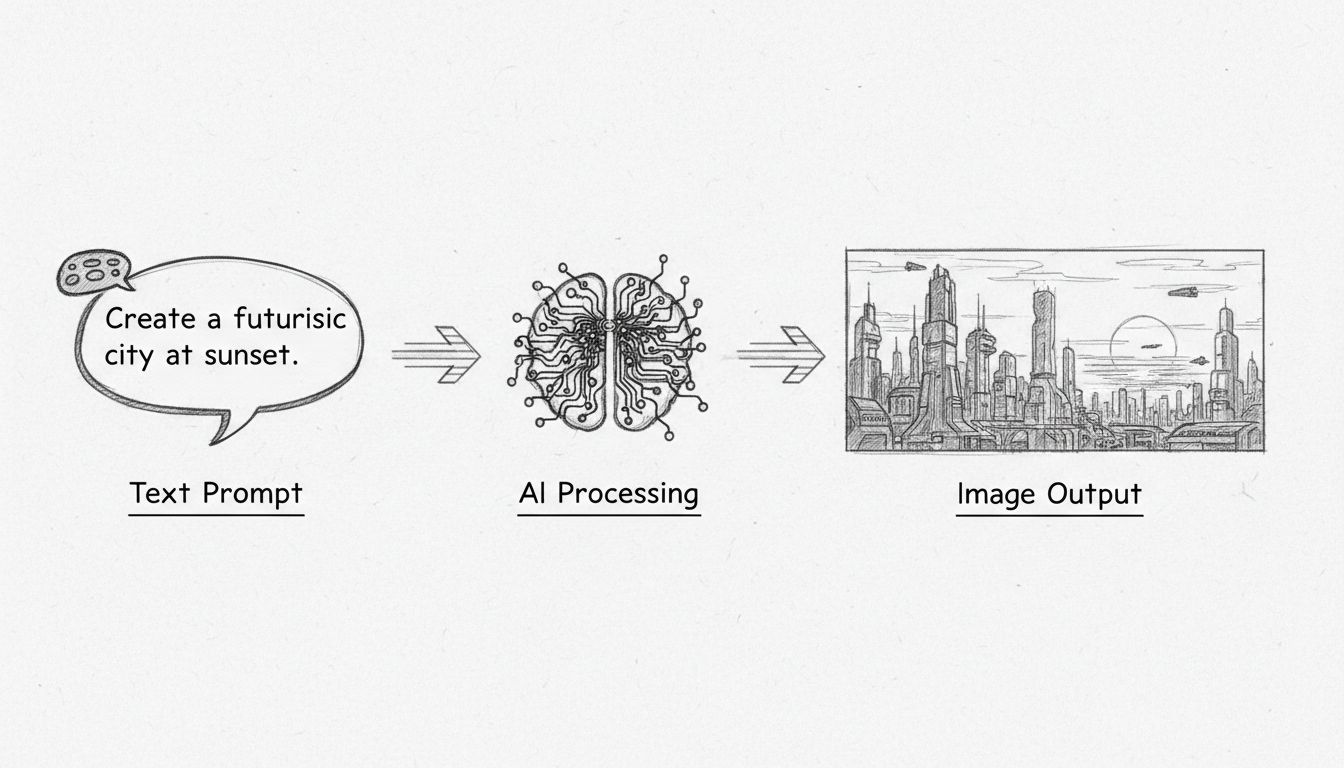
The underlying technology uses diffusion models or generative adversarial networks to create images. These models start with random noise and iteratively refine it based on your prompt, similar to gradually bringing a cloudy sky into focus until it resembles your desired image. The process happens in discrete steps, with each iteration moving closer to the final output. Modern platforms like ChatGPT with GPT-4o have introduced autoregression models that excel at rendering text accurately and following prompts precisely. This technological advancement means you can now generate images with readable text, photorealistic details, and consistent quality across multiple iterations.
The landscape of AI image generation platforms has evolved significantly by 2025, with each offering distinct advantages. ChatGPT with GPT-4o stands out as the top choice for most users, offering free access to image generation for all users since March 2025. The integration with ChatGPT’s conversational interface means you can refine images through natural dialogue, building upon previous images and text in your chat context. This native integration ensures consistency throughout your creative process and allows you to maintain context across multiple generations. The platform excels at accurately rendering text within images, a feature that previously plagued AI image generators, and produces photorealistic results with improved facial features and hand rendering.
Midjourney remains a powerful alternative, particularly for artistic and stylized outputs. While it requires a subscription starting at $10/month, the platform delivers exceptional artistic quality with bold, detailed renditions. Midjourney’s web app provides sophisticated controls including parameters for fine-tuning, style references, and character consistency. The community-driven approach through Discord integration creates a collaborative environment where users share techniques and inspiration. However, Midjourney’s strength lies in abstract and artistic interpretations rather than photorealistic imagery, making it ideal for creative projects, concept art, and stylized marketing materials.
Stable Diffusion offers flexibility through its open-source nature, available through multiple platforms like NightCafe, Clipdrop, and Tensor.Art. The platform excels at generating photorealistic images and provides extensive customization options through ControlNet, allowing precise spatial and semantic control. You can adjust specific parameters, use randomized seeds for consistency, and even transfer pose models for specific subject positioning. Stable Diffusion’s affordability and accessibility make it attractive for experimentation, though the ecosystem has become fragmented with various versions (SDXL 1.0, SD 3, and community models) offering different quality levels.
| Platform | Best For | Starting Price | Key Strength | Learning Curve |
|---|---|---|---|---|
| ChatGPT (GPT-4o) | General use, text rendering | Free | Native integration, photorealism | Very Easy |
| Midjourney | Artistic outputs, stylization | $10/month | Artistic quality, detail | Easy |
| Stable Diffusion | Photorealism, customization | Free-$9/month | Flexibility, open-source | Moderate |
| Adobe Firefly | Professional design | Included in Creative Cloud | Copyright-safe training | Easy |
The quality of your AI-generated images depends almost entirely on how well you craft your prompts. A basic formula that consistently produces excellent results follows this structure: subject + style + details + format of output. This framework ensures you provide all necessary information for the AI to interpret your vision accurately. Start by describing your subject in as much detail as possible, answering questions like: What is the main object or person? What are they doing? What colors and textures should they have? What mood or emotion should they convey? The more specific you are about these elements, the closer the AI will get to your intended result.
Style specification dramatically impacts your output quality. You can request specific artistic movements like impressionism, cubism, or pointillism, or reference particular mediums such as watercolor, oil painting, pencil drawing, or digital art. You might specify “in the style of Van Gogh” or “photorealistic” or “anime aesthetic” depending on your needs. Adding lighting descriptions transforms ordinary prompts into exceptional ones—mention whether you want soft golden hour lighting, dramatic shadows, neon glow, or natural daylight. These details help the AI understand the mood and atmosphere you’re creating. For example, instead of “a cat,” try “a fluffy orange tabby cat with bright green eyes, sitting on a sunny windowsill, in the style of a watercolor painting, with warm golden light streaming through the window.”
Advanced prompt techniques include using negative prompts to specify what you don’t want in the image. Most modern platforms support syntax like “a beautiful landscape, no people, no buildings, no text” to exclude unwanted elements. You can also use aspect ratio specifications to control the image dimensions, such as “16:9 widescreen” or “square format.” Reference images provide powerful guidance—uploading an existing image and asking the AI to generate something “in the style of this reference” or “with similar composition” helps maintain consistency. For professional applications, consider using parameters like guidance scale (how strictly the AI follows your prompt) and inference steps (how many refinement iterations to perform) to fine-tune results.
Step 1: Access Your Chosen Platform
Begin by selecting and accessing your preferred AI image generation platform. For ChatGPT, simply log into your account and ensure you’re using GPT-4o, which you can verify at the top of your chat window. The platform is now free for all users, though paid subscribers get faster generation and higher usage limits. For Midjourney, access the web app at midjourney.com or use Discord if you prefer the original interface. For Stable Diffusion, choose your preferred access method—whether through Stable Assistant, NightCafe, Clipdrop, or local installation.
Step 2: Craft Your Detailed Prompt
Write your prompt using the subject + style + details + format formula. Be specific and descriptive, including all visual elements you want to see. For example: “A minimalist skincare bottle on a marble countertop with soft shadows and pastel colors, styled for Instagram, professional product photography, soft natural lighting, high resolution, clean and modern aesthetic.” The more detailed your prompt, the better your results will be. Avoid vague descriptions like “a nice picture” and instead provide concrete visual information.
Step 3: Submit and Wait for Generation
Submit your prompt and allow the platform time to generate your image. ChatGPT typically takes 30 seconds to a few minutes depending on server load. Midjourney usually completes generation within a minute. Stable Diffusion varies based on your chosen platform and settings. Be patient—the additional processing time in newer models like GPT-4o produces significantly better quality results than faster alternatives.
Step 4: Review and Refine
Once your image appears, evaluate whether it matches your vision. Look for details like facial features, hands, text accuracy, lighting, and overall composition. If the result isn’t quite right, use refinement commands specific to your platform. In ChatGPT, you might say “Make the colors more vibrant” or “Remove the trees and add snowy mountains instead.” Midjourney users can upscale, create variations, or use editing tools. Stable Diffusion allows parameter adjustments for the next generation.
Step 5: Download and Integrate
Once satisfied with your image, download it directly from the platform. Most platforms provide high-resolution downloads suitable for professional use. Check the platform’s terms regarding commercial usage rights—ChatGPT and Midjourney allow commercial use of generated images, though copyright protection is limited. Store your images in an organized system for future reference and integration into your projects.
Text Rendering Issues
Historically, AI image generators struggled with rendering readable text within images, producing garbled letters or misspellings. ChatGPT’s GPT-4o has largely solved this problem, now generating clear, correctly-spelled text in multiple languages. If you encounter text issues with other platforms, try specifying “with clear, readable text” in your prompt or use separate design tools to add text after generation. For critical text elements, consider generating the image without text and adding it in post-production using design software.
Inconsistent Hand and Facial Features
While modern models have dramatically improved, hands and faces can still appear distorted or anatomically incorrect. Solve this by being specific about facial expressions and hand positioning in your prompt. Use reference images to guide the AI toward your desired aesthetic. If results remain problematic, try generating multiple variations and selecting the best one, or use image editing tools to refine specific areas after generation.
Prompt Misinterpretation
Sometimes the AI generates something completely different from your intention. This usually happens with ambiguous or overly complex prompts. Solution: simplify your prompt, break complex requests into multiple generations, or use negative prompts to exclude unwanted interpretations. For example, if you ask for “a bank” and get a riverbank instead of a financial institution, specify “a financial bank building” in your next attempt.
Image Quality Variations
Different platforms and models produce varying quality levels. If you’re unsatisfied with results from one platform, try another. ChatGPT excels at photorealism and text, Midjourney at artistic quality, and Stable Diffusion at customization. You might also adjust parameters like guidance scale or inference steps to influence output quality.
AI image generation chatbots serve countless professional and creative purposes. Content creators and marketers use these tools to generate social media graphics, blog header images, product mockups, and advertising visuals without hiring designers or purchasing stock photos. A marketer can generate dozens of variations of a product image in different settings and lighting conditions within minutes. Educators and trainers create custom educational materials, diagrams, infographics, and visual aids tailored to their specific curriculum. Teachers can generate illustrations for language learning, scientific diagrams with labels, and timeline visualizations that engage students more effectively than generic stock images.
Product designers and entrepreneurs use image generation for rapid prototyping and concept visualization before investing in physical prototypes or professional photography. You can explore different design variations, color schemes, and styling options instantly. Content writers and bloggers generate featured images, illustrations, and visual elements that enhance their written content without copyright concerns. Graphic designers use AI generation as a starting point for creative projects, generating base images that they then refine in professional design software. E-commerce businesses create product images in various contexts, backgrounds, and lighting conditions to improve conversion rates and reduce photography costs.
For maximum efficiency, integrate AI image generation into your broader automation workflows. FlowHunt provides the ideal platform for this integration, allowing you to build sophisticated automation workflows that combine AI image generation with your existing tools and processes. You can create workflows that automatically generate images based on triggers—for example, when a new product is added to your inventory, automatically generate multiple product images in different styles and backgrounds. Connect image generation with your CRM to create personalized visual content for different customer segments, or integrate with your content management system to automatically generate and publish blog header images.
Advanced workflows might include: generating images based on customer requests submitted through a form, automatically resizing and optimizing generated images for different platforms, creating image variations for A/B testing marketing campaigns, or generating custom illustrations for customer support tickets. FlowHunt’s visual builder makes it simple to connect AI image generation with your email marketing platform, social media schedulers, design tools, and storage systems. This automation eliminates repetitive manual tasks and ensures consistent, high-quality visual content across all your channels.
Consistency and Branding
Maintain visual consistency by using reference images and detailed style descriptions. If you’re creating a series of images for a brand, specify the same artistic style, color palette, and composition guidelines in each prompt. This ensures your generated images feel cohesive and professional. Use character references to maintain consistent appearance across multiple images of the same subject.
Iterative Refinement
Don’t expect perfection on the first try. Plan to generate multiple variations and refine your prompts based on results. Each iteration teaches you more about how the AI interprets your descriptions, allowing you to craft increasingly effective prompts. Save successful prompts for future use and build a library of effective prompt structures.
Quality Control
Always review generated images before using them professionally. Check for anatomical accuracy, text clarity, lighting consistency, and overall composition. Use image editing software to make minor adjustments if needed. For commercial use, ensure you understand the licensing terms of your chosen platform and maintain records of generated images for compliance purposes.
Combining AI with Human Creativity
Use AI image generation as a tool to enhance human creativity, not replace it. Generate multiple options and select the best ones, then refine them further using design software. The most professional results come from combining AI’s speed and versatility with human artistic judgment and brand understanding. Consider AI generation as the first step in your creative process rather than the final output.
FlowHunt's AI automation platform lets you build sophisticated workflows that integrate AI image generation with your existing tools. Create, refine, and deploy image generation tasks at scale without coding.
Learn how to upload and send images to AI chatbots like ChatGPT, Claude, and Meta AI. Discover supported formats, file size limits, and best practices for image...
Ideogram AI is an innovative image generation platform that uses artificial intelligence to turn text prompts into high-quality images. By leveraging deep learn...
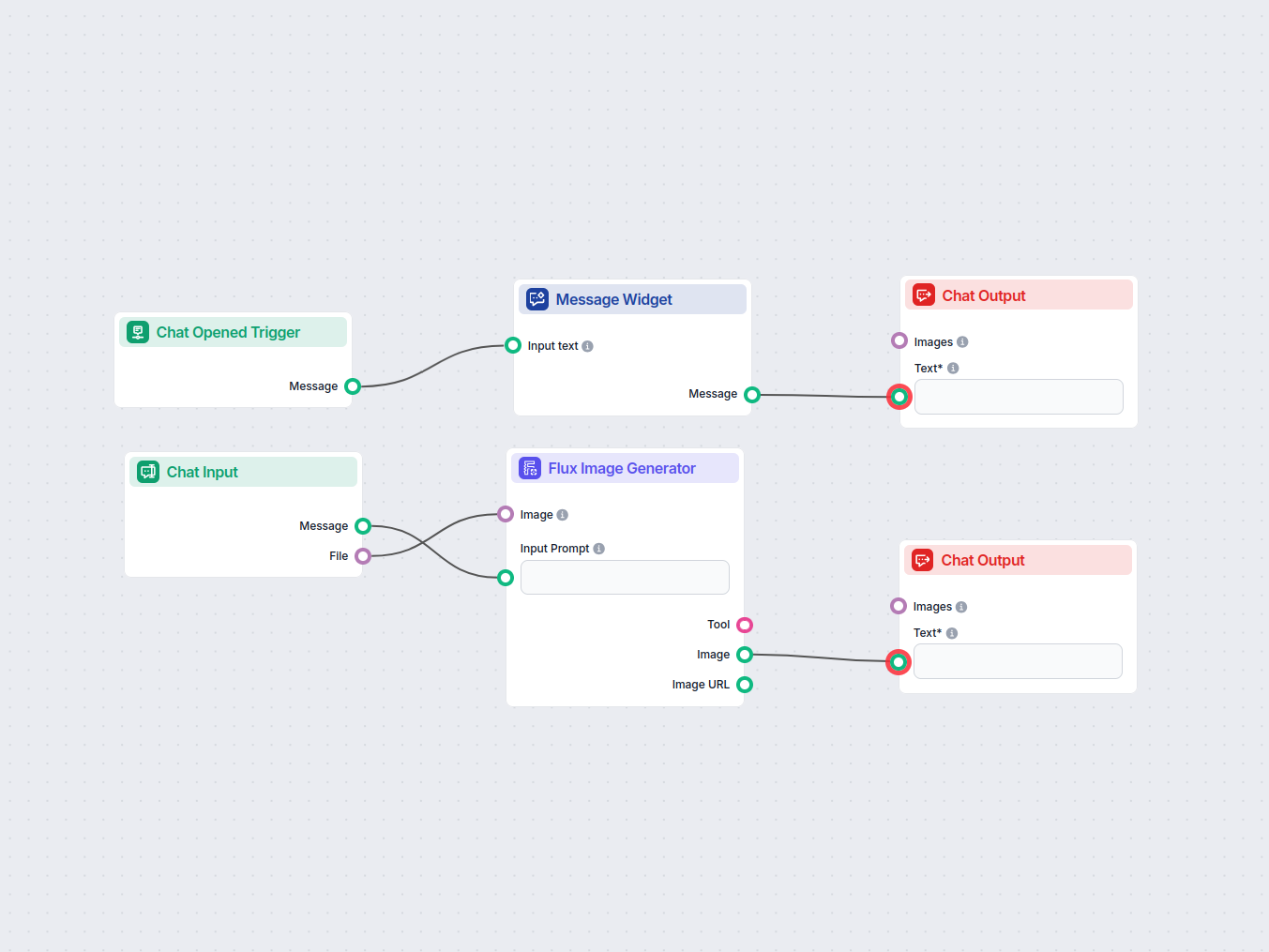
Transform your images using advanced AI with the Flux model. Upload an image, provide a creative prompt, and generate stunning new visuals instantly. Ideal for ...