オペレーション · Google Driveワークスペースエージェント

AI Google Drive ワークスペースエージェント

An autonomous agent that answers questions by searching your Drive files with citations, drafts new Docs, Sheets and Slides on request, and runs weekly tidying. Confirms before any bulk or destructive operation.

連携: google drive · google docs · google sheets · google slides · gmail · slack
live · ask google drive workspace agent
ai-google-drive-workspace-agent
Run google drive workspace agent for this week and show me the output. you · just now
D AI Google Drive Workspace Agent · thinking · 3 tool calls · 1.4s
  • Answer questions from your Drive with file citations
  • Draft new Docs / Sheets / Slides on request, matching your template
  • Audit weekly for duplicates, stale files and folder drift
Google Drive Workspace Agent — this week's run
draft · オペレーション · ready for review
ready
Highlights
  • Pulled the week's signals — kept the ones worth your attention
  • Drafted in your voice, sources cited inline
  • Posted to your review queue with one-click approval
Next
  • Schedules itself for the same time next week
  • Learns from every edit you make
▸ awaiting your approval · publish · edit · discard
実際の動作を見る

質問から引用付き回答まで、ステップバイステップ。

One real example showing exactly what happens when you ask the agent about your files.

1 YOUR PROMPT
RO
Robin Okafor
Head of Ops · Canopy
What's the latest version of the Q4 marketing plan? Also, flag any outdated versions floating around in shared drives.
just now
2 AGENT AT WORK running
Google Drive Searching for 'Q4 marketing plan' across all drives and shared folders
3 files found · 2 in Marketing folder · 1 in archived shared drive
Google Docs Reading file metadata: last modified, editor, version history
v3 modified 2 days ago by CMO · v2 last month · v1 in archive
LLM Analysis Comparing document contents to identify latest and outdated versions
v3 is current · v2 is superseded · v1 is stale archive copy
LLM Summary Summarizing key differences between versions
v3 adds updated budget allocations and new channel strategy
Slack Posting answer with file links and version comparison to #ops channel
answer posted · 3 files cited · outdated versions flagged
3 THE OUTPUT ready for review
Google Drive Search Result
GD

Found 3 versions. The latest is v3, updated 2 days ago.

📄 Q4 Marketing Plan v3 — Marketing/Q4-2025/ — edited 2 days ago by CMO. Includes updated budget allocations, new paid channel strategy, and revised KPI targets. This is the latest version.

📄 Q4 Marketing Plan v2 — Marketing/Q4-2025/ — edited 4 weeks ago. Missing budget revision and channel updates from v3. Candidate for archive.

📄 Q4 Marketing Plan (original) — Shared Drive/Archive/ — 3 months old. Original draft, no longer relevant.

Recommendation: rename v3 to remove the version suffix, move v2 to archive, delete the stale original. I will confirm before making any changes.

▸ open file · create doc · regenerate
Driveを整理整頓

回答、ドラフト作成、整理 — すべて自動パイロット。

Questions and tasks land in the queue. The agent searches your Drive, drafts documents, and flags file hygiene issues — all visible on the kanban. You wake up to answers and a cleaner workspace, not a disorganized Drive.

app.flowhunt.io/ai-projects/projects/ai-google-drive-workspace-agent/issues
ライブ
Google Drive Workspace Agent · marketing-workspace

Issue

実行中
未着手 0
進行中 0
完了 0
稼働中のエージェント
3 / 5
本日出荷
8
サイクルタイム
2h 14m
自動解決
62%
仕組み

散らかったDriveから整理されたワークスペースまで3ステップ。

Most users get their first cited answer within five minutes of connecting.

01
Google Driveを接続し、権限を設定します。
Link your Google Drive account — personal drive, shared drives, or both. Set which folders the agent can read and write to. Optionally connect Slack for Q&A and Gmail for document delivery. The agent indexes your files as knowledge sources, so search is fast and context-aware.
新規プロジェクト
Search, draft, and tidy my Google Drive.
Google DriveGoogle DocsSlack
下書きを保存 エージェントを開始 →
02
質問する。引用付きの回答を得る。
Ask the agent anything about your files — via Slack, the FlowHunt UI, or a scheduled task. It searches across your Drive, reads relevant documents, and responds with answers that cite the specific files and sections it found. No more digging through nested folders.
Drive Q&A
Asked
Latest Q4 plan?
Client contract terms?
Searching
Scanning 3 shared drives
Answered
Q4 plan found · 3 files cited
03
週次整理でDriveを清潔に保ちます。
On a schedule you set, the agent scans for duplicates, stale files, oversized documents and broken folder structures. It posts a cleanup report and waits for your approval before making any changes. Over time, it learns which files matter and which are safe to archive.
Weekly tidy report
Duplicates
8 duplicate files found
Stale
12 files untouched 6+ months
Action
Awaiting your approval
効果の理由

DriveにAIライブラリアンがいると何が変わるか。

01

Find any file in seconds, not minutes.

Instead of clicking through nested folders and guessing file names, ask the agent a natural-language question. It searches across all your drives, reads the content, and returns the answer with a link to the source file. No more 'which folder was that in?'

02

Draft documents from what you already have.

Need a new project brief? The agent pulls context from your existing Drive files — prior briefs, meeting notes, strategy docs — and drafts a new Google Doc in minutes. Every claim cites its source, so you can trace back to the original.

03

Your Drive gets cleaner every week, not messier.

The weekly tidy surfaces duplicates, stale files and broken folder structures. The agent recommends cleanup actions and waits for your approval before touching anything. After a few months, your Drive is organized — and stays that way.

機能

検索からクリーンアップまで、すべて対応。

Six capabilities that turn your Google Drive from a dumping ground into a searchable, organized knowledge base.

Natural-language file search with citations
Ask questions in plain English. The agent searches across personal and shared drives, reads file contents via RAG, and returns answers that cite the specific document, section and page. Faster and more accurate than Drive's built-in search.
Document drafting from existing files
Creates new Google Docs, Sheets and Slides by pulling context from your existing Drive files. Project briefs, meeting summaries, status reports — drafted in minutes with sources cited.
Cross-drive knowledge retrieval
Searches across your personal drive, shared drives, and folders shared with you. No more asking five teammates where the latest version lives — the agent finds it across all sources.
Weekly tidy and duplicate detection
Scans for duplicate files, stale documents, oversized files and broken folder structures on a schedule you set. Posts a cleanup report and waits for your approval before any changes.
Confirms before any destructive action
The agent never deletes, moves or renames files without your explicit approval. Bulk operations always require confirmation. You define which folders are read-only and which the agent can write to.
Full observability on every action
Every search, every draft, every tidy recommendation is logged and replayable. See exactly which files the agent read, what it cited, and why it recommended specific cleanup actions.
内部構造

本格的なエージェントインフラ上に構築。

The Google Drive agent runs on the same platform that powers 120+ autonomous agents. Open it in the visual editor and customize anything.

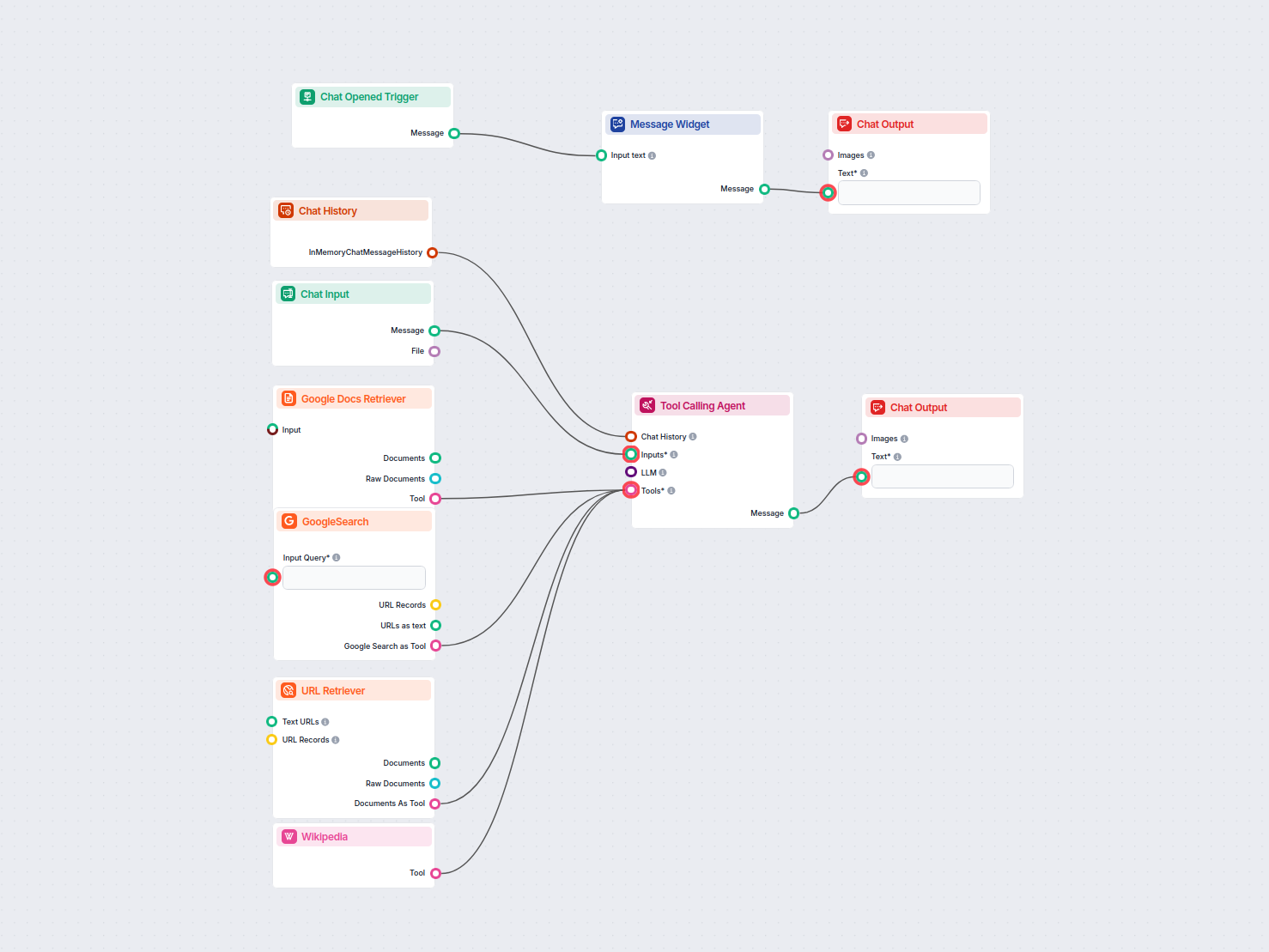
  • ビジュアルフローエディター. Every agent is a flow you can open and customize — swap the AI model, add tools, adjust permissions, wire in Slack or Gmail. No code.
  • ナレッジソースとRAG. Your Drive files are indexed as knowledge sources. The agent retrieves relevant content before answering any question — with full citation back to the original file.
  • 永続メモリ. Episodic, long-term and shared memory. The agent remembers which files you reference most, which folders contain current work, and which areas are safe to archive.
  • トリガーとスケジューリング. Run the weekly tidy on a cron schedule. Set up Q&A triggers from Slack. The agent runs on FlowHunt's trigger system — no server to maintain.
flowhunt · google-drive-workspace · flow
AGENT
Google Drive Workspace
S
Search
▸ ファイルを検索
D
Draft
▸ ドキュメントを作成
T
Tidy
▸ クリーンアップ
接続ツール
google.drive google.docs google.sheets google.slides gmail slack
メモリ · 963イベント
対象ユーザー

Driveは混乱しているが仕事はそれに依存しているチーム向け。

If your team lives in Google Workspace and spends too much time finding files or creating documents from scratch — this agent handles both.

OPS
オペレーションチーム
Answer 'where is that file?' questions instantly. The agent searches across all drives and returns cited answers — no more Slack threads asking teammates for links.
EA
エグゼクティブアシスタント
Draft briefing docs, find board decks, and surface meeting prep materials from Drive in seconds. The agent does the file research — you focus on the context only you can provide.
MKT
マーケティングチーム
Find the latest brand guidelines, campaign briefs and creative assets across shared drives. The agent cites the exact file and section, so you always reference the current version.
REMOTE
リモート&分散チーム
When your knowledge lives in 50 shared drives across 3 time zones, search stops working. The agent indexes everything and answers questions with citations — no matter where the file lives.
PMO
プロジェクトマネジメントオフィス
Draft status reports by pulling from project folders, meeting notes and sprint docs already in Drive. The agent compiles the information — you review and ship.
LEGAL
法務&コンプライアンスチーム
Search contract repositories, policy documents and regulatory filings across Drive with full citation. The agent finds the clause you need without you reading every document.
相性の良いエージェント

オペレーションチームの他のエージェントと組み合わせ。

Stack agents under a Supervisor and let them hand work to each other — your Drive agent can feed content to email digest, document drafting and reporting agents.

最初のDriveの回答、秒で引用付きで取得。

Start free. Connect Google Drive, ask a question, and watch the agent search. No credit card required — cancel anytime.

よくある質問

What is an AI Google Drive workspace agent?
An AI Google Drive workspace agent is an autonomous assistant that searches your Drive files, answers questions with citations, drafts new documents from existing content, and keeps your folders organized. FlowHunt's version uses RAG (retrieval-augmented generation) to read your files and cite specific documents and sections in every answer.
Can it access shared drives and files shared with me?
Yes. The agent can search across your personal drive, shared drives, and any files or folders shared with your account. You control which drives and folders the agent can access through permission settings.
Does it modify or delete files?
The agent never deletes, moves or renames files without your explicit approval. For the weekly tidy, it posts a cleanup report with recommendations and waits for your confirmation before making any changes. You define which folders are read-only and which the agent can write to.
How does the search work?
The agent indexes your Drive files as knowledge sources using RAG. When you ask a question, it retrieves the most relevant documents, reads their content, and returns an answer that cites the specific file, section and page. This is more accurate than Drive's built-in keyword search because it understands context and meaning.
Can it create new documents?
Yes. The agent can create new Google Docs, Sheets and Slides. It drafts content by pulling context from your existing Drive files — prior documents, meeting notes, templates — and cites its sources. You review and edit the draft before sharing.
What does the weekly tidy do?
The agent scans your Drive for duplicates, stale files (untouched for a configurable period), oversized documents, and broken folder structures. It posts a report with recommended actions — archive, delete, rename, reorganize — and waits for your approval before proceeding.
Can I customize the agent?
Yes. Every pre-built agent can be opened in FlowHunt's visual flow editor. You can swap the AI model, add or remove tools, adjust permissions, connect Slack for Q&A, or wire it into a multi-agent team. No coding required.
How much does it cost?
FlowHunt uses credit-based pricing — each credit is worth about one dollar. A typical Drive search and answer uses 0.3-1 credit. The weekly tidy uses 1-3 credits depending on drive size. You can try it free with 5 trial credits.