
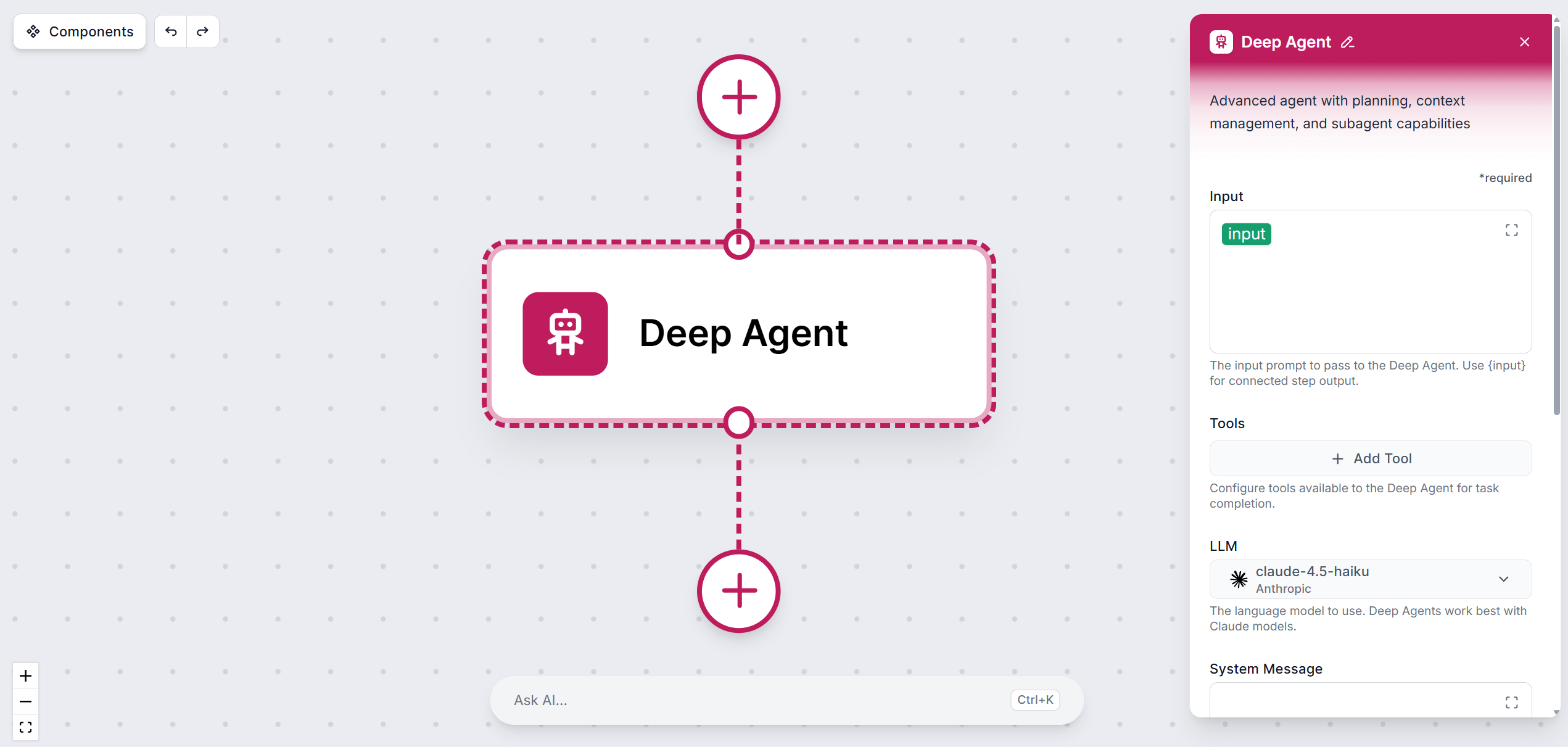
The Deep Agent is FlowHunt’s most capable agent type, built for tasks that go far beyond a single prompt-and-response cycle. Where a standard AI agent answers a question or performs a discrete action, a Deep Agent pursues a goal — breaking it down, executing steps, evaluating results, and adapting its approach until the objective is complete.
How a Deep Agent Differs from a Regular AI Agent
A standard AI agent processes your input it with an LLM, optionally calls a tool, and returns a response. It’s great for single-step or simpler multi-step tasks, conversations, summarizing document, or triggering action.
A Deep Agent is proactive and iterative. Given a high-level goal, it:
- Decomposes the goal into a sequence of concrete sub-tasks before taking any action
- Plans its approach, deciding which tools to use and in what order
- Executes steps iteratively, calling tools, processing results, and deciding what to do next based on what it finds
- Self-evaluates after each step — retrying, refining, or changing strategy if a result is insufficient
- Synthesizes a final output only after all sub-tasks are complete
The key practical difference: a regular agent can take several steps at best, but a Deep Agent can take dozens, and it knows when to stop.
When to Use a Deep Agent
Deep Agents are the right choice when:
- The task requires gathering and synthesizing information from multiple sources
- The workflow involves conditional logic, or in other words, when the next step depends on the outcome of previous steps
- You need the agent to verify or cross-check its own intermediate results
- The goal is too complex or open-ended to fully specify in a single prompt
- You want the agent to operate autonomously over a longer time period
Remember: For simple, well-scoped tasks, a standard AI Agent is faster and more cost-effective. Only use a Deep Agent when the complexity justifies the extra reasoning depth.

Ready to grow your business?
Start your free trial today and see results within days.
Deep Agent Settings
LLM
Pick the large language model the agent will use. You can choose from models across 6 major providers. The default model is always the latest mid-range model from OpenAI, which should be enough for most tasks.
Deep Agents benefit most from more advanced models with strong reasoning capabilities (e.g. latest GPT, latest Claude Sonnet or Opus models, Gemini Pro models), because they can plan across many steps, handle ambiguity, and make sound decisions at each stage without human guidance.
Tools
Tools are what gives the Deep Agent its ability to act in the world. With over 900 available tools (spanning APIs, databases, communication platforms, search engines, code execution environments), and MCP servers — you can equip the agent with exactly the capabilities its task requires.
How to connect tools
Click + Add Tool. The full list of available tools appears. You can filter by category or search by name:
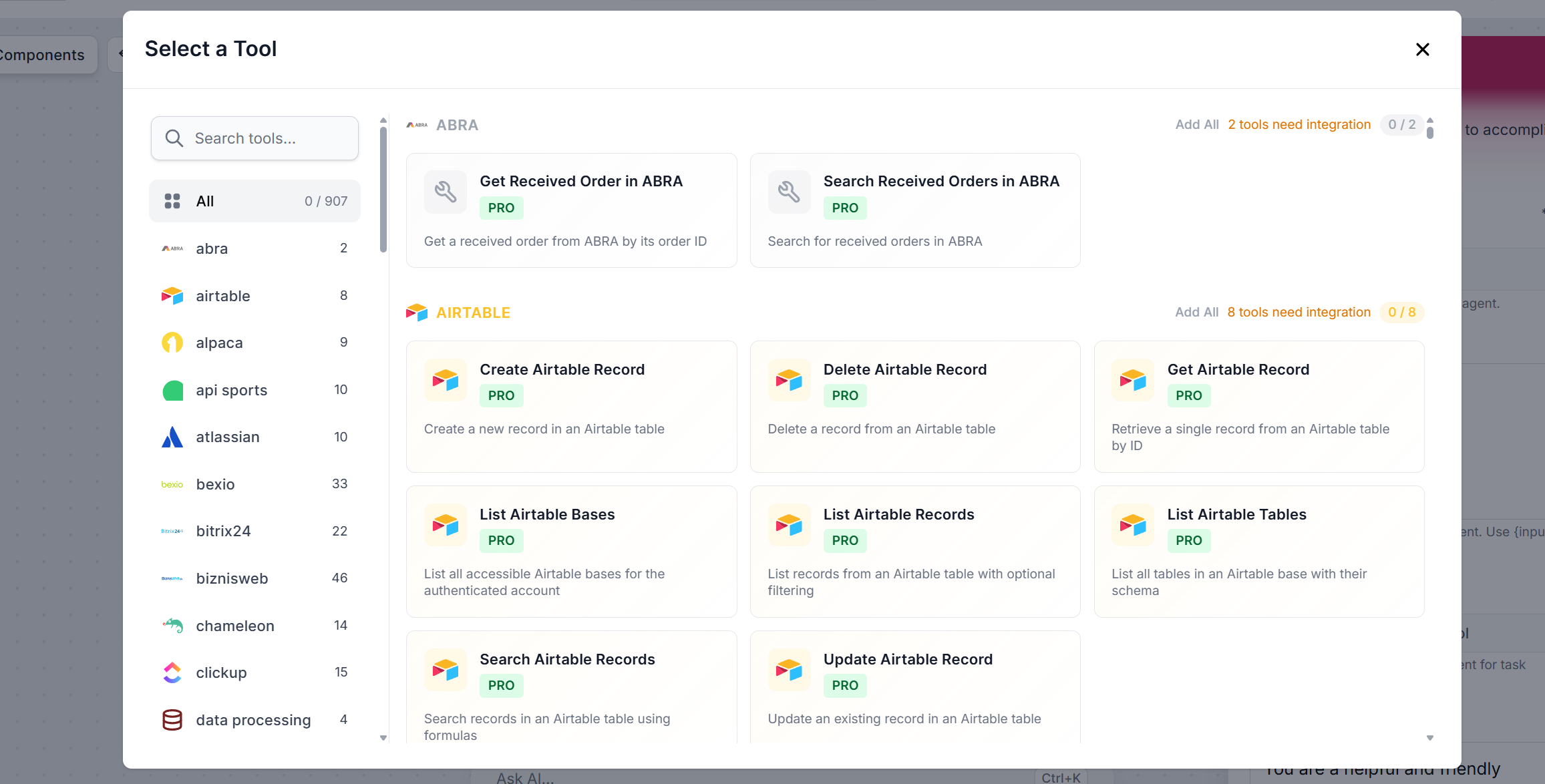
Each tool has its own settings. For each one, you can either let the AI decide how to use it based on context (recommended for Deep Agents, since the agent needs flexibility to adapt across many steps) or configure parameters manually to lock specific values.
To switch to the manual input, click the “AI Decides” button. Once a parameter is manually defined, it is fixed and the AI cannot override it.
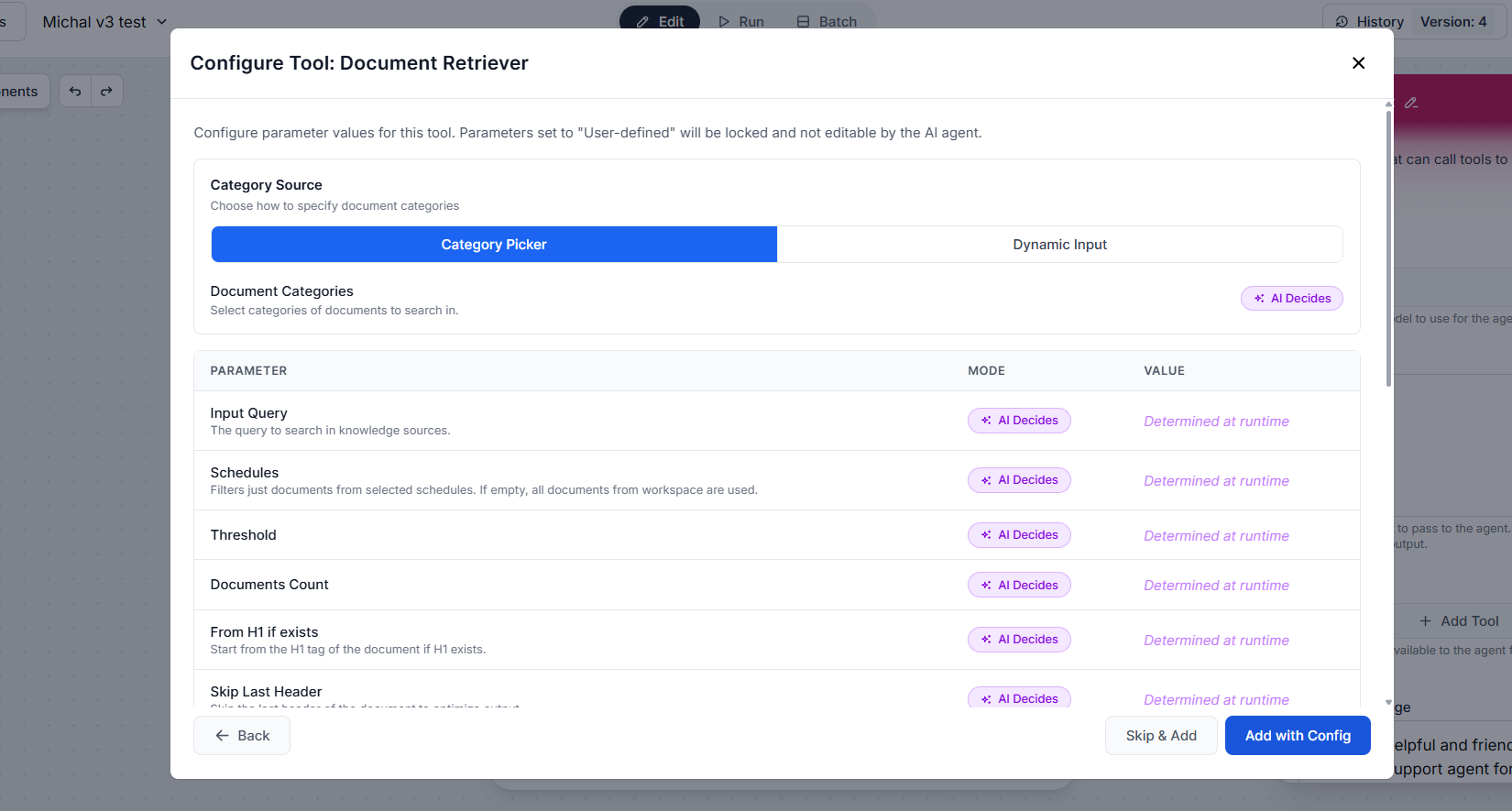
Once the tool is configured, click “Add with Config”, or skip the configuration entirely by clicking “Skip & Add”. You can then continue adding other tools.
For Deep Agents, a focused and relevant toolset leads to better decisions and faster execution than an overly broad one — the agent considers all available tools at every step, so unnecessary tools add noise.
System message
The system message is the most important configuration for a Deep Agent. It defines the agent’s role, objective, reasoning approach, and the constraints it must respect. It’s the primary mechanism for keeping an autonomous agent on track.
For Deep Agents, your system message should cover:
- The goal — what the agent is ultimately trying to achieve
- The expected output — format, length, structure
- Decision rules — what to do when it encounters missing data, conflicting sources, or tool failures
- Scope constraints — what the agent should and should not do
Example system message:
You are a deep research agent. Your goal is to produce a comprehensive, accurate, and well-structured report on any topic you are given.

Process:
1. Break the topic into 4–6 key research questions.
2. For each question, search for relevant information using the available tools.
3. Evaluate the quality and relevance of each source before using it.
4. Synthesize findings across all questions into a coherent report.
5. Include a summary, key findings, and a list of sources at the end.

Rules:
- Do not fabricate information. If you cannot find a reliable source, say so.
- If a tool call fails, retry once with a modified query before moving on.
- Do not stop until all research questions have been addressed or you have exhausted available sources.
- Keep the final report factual, neutral in tone, and free of speculation.

Output format: Markdown, with clear headings for each section.
Max recursion depth
Controls how many levels deep the agent can recurse when breaking down and executing sub-tasks. A higher value allows the agent to tackle more complex, nested problems, but increases execution time and resource usage. For most tasks, the default value is more than enough. Increase it only when the agent needs to pursue genuinely multi-level sub-goals.
Agent Chat History
Provides past chat messages as context for the current run. With history enabled, the Deep Agent can reference earlier exchanges, which is useful when the agent is part of an ongoing conversation or iterative workflow where prior context shapes the next step. Without history, the agent treats each run as fully independent.
Agent Memory
Controls whether the agent can read from and write to your Workspace memory. When enabled, the Deep Agent can persist findings, decisions, and accumulated knowledge across separate runs — making it possible to build up a knowledge base incrementally or resume long-running projects where picking up from scratch would be wasteful. If enabled, you’ll be asked to define the memory mode and behavior prompts that govern what gets stored and how it’s retrieved.
Note: Only the Tools input is strictly required; all other settings are optional but have a significant impact on the quality and reliability of a Deep Agent’s output.
How a Deep Agent Solves Tasks
Deep Agents follow a structured execution loop. This loop is exactly what makes Deep Agents capable of handling tasks that would overwhelm a standard agent:
- Goal decomposition: The agent analyzes the objective and breaks it into a sequence of sub-tasks.
- Iterative execution: The agent works through sub-tasks one at a time, calling tools, processing results, and deciding what to do next based on finished steps.
- Self-evaluation: After each step, the agent assesses whether the result is sufficient to move forward or whether it needs to retry, refine its query, or take an entirely different approach.
- Synthesis: Once all sub-tasks are complete, the agent combines intermediate results into a final, coherent output.
- Termination: The agent stops when the goal is achieved, when it reaches the configured limits, or when it determines it’s not able to complete the task with the available tools and information.
Join our newsletter
Get latest tips, trends, and deals for free.
Choosing the Right Model for a Deep Agent
The LLM is the reasoning engine behind every decision the Deep Agent makes. For deep, multi-step tasks, model quality has an outsized impact on performance.
- Frontier models (GPT-4o, Claude 3.5 Sonnet, Gemini 1.5 Pro): Best for complex reasoning, long-horizon planning, and tasks where the agent must handle ambiguity or make judgment calls without human input. The higher cost is usually justifiable for Deep Agent workloads.
- Mid-range models: A solid balance of capability and cost for moderately complex but well-defined tasks.
- Small language models: Not recommended as the primary model for Deep Agents. They lack the reasoning depth needed for reliable multi-step execution. That being said, they’re still suitable for simple sub-tasks within a larger workflow where speed and cost matter more than reasoning quality.
Start with a mid-range model and move up only if performance requires it. The right choice depends on your task complexity, acceptable latency, and budget.