AI会议纪要与后续跟进生成器

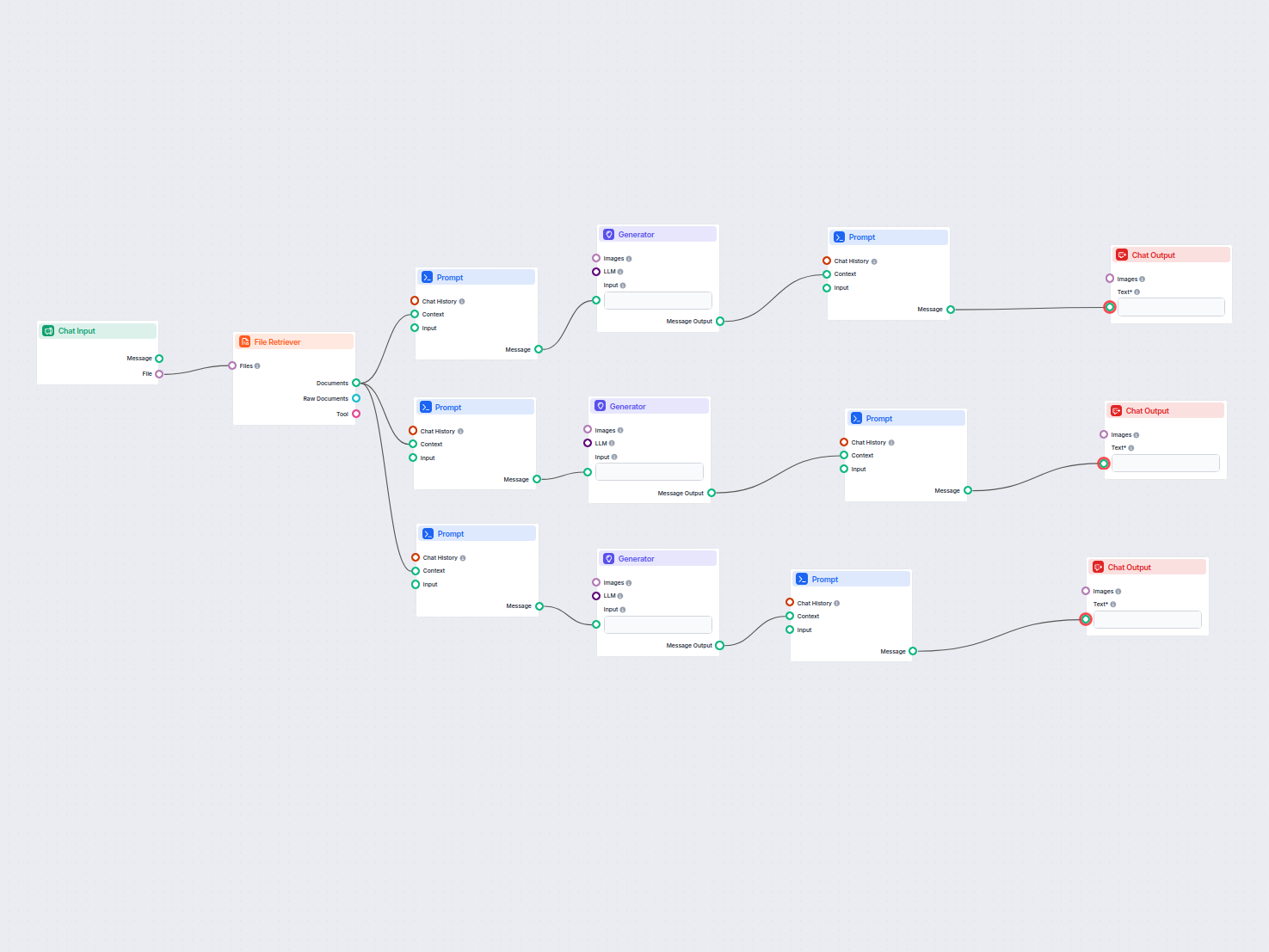
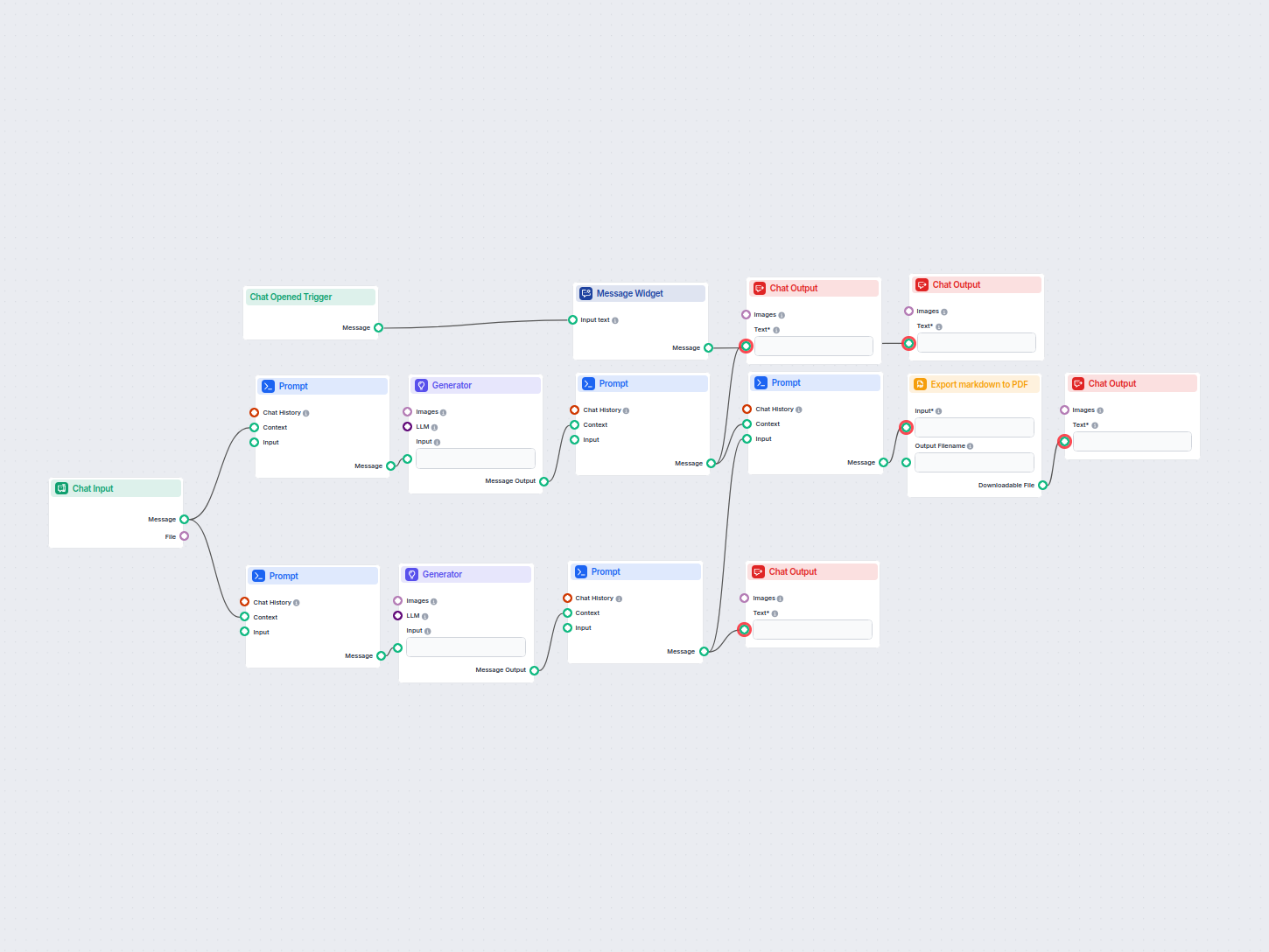
How the AI Flow works - AI会议纪要与后续跟进生成器

Flows

How the AI Flow works

Prompts used in this flow

会议纪要提示词模板

基于详细的会议纪要模板和提供的上下文生成会议纪要的提示词模板。

Here is the context of attachment that was attached given as CONTEXT
---CONTEXT
{context}
---


--TEMPLATE---
**Meeting Minutes Template**

**Meeting Title:**  
**Date:**  
**Time:**  
**Location:**  
**Meeting called by:**  
**Facilitator:**  
**Note-taker:**  
**Attendees:**  
- Name 1
- Name 2
- Name 3  
  *(List all attendees here)*

**Agenda:**  
1. Topic 1  
2. Topic 2  
3. Topic 3  
   *(List all agenda items here)*

**Meeting Summary:**

1. **Call to Order:**  
   - Time meeting was called to order.  
   - Opening remarks by the facilitator.

2. **Attendance:**  
   - Confirmation and acknowledgment of attendees.  
   - Mention of any apologies or absences.

3. **Approval of Previous Meeting Minutes:**  
   - Any corrections or approval status.
  
4. **Discussion and Updates:**

   - **Topic 1:**  
     - Brief summary of the discussion.  
     - Key points and decisions made.  
     - Action items and their owners.

   - **Topic 2:**  
     - Brief summary of the discussion.  
     - Key points and decisions made.  
     - Action items and their owners.

   - **Topic 3:**  
     - Brief summary of the discussion.  
     - Key points and decisions made.  
     - Action items and their owners.

   *(Continue as necessary for all agenda topics)*

5. **Other Business:**  
   - Any additional topics discussed outside the agenda.

6. **Next Steps / Action Items:**  
   - Summarize action items, responsible parties, and deadlines.

7. **Next Meeting:**  
   - Date and time of the next meeting.  
   - Location or method of meeting (if applicable).

8. **Adjournment:**  
   - Time meeting was adjourned.

**Additional Notes:**  
- Any items that were tabled for future discussion.  
- Important contextual notes or observations.

**Prepared by:**  
- [Name]  
- [Date of preparation]
---

Generate a meeting minutes based on the TEMPLATE

后续跟进邮件提示词模板

用于生成包含实际会议纪要及友好开场白的跟进邮件的提示词模板。

Here is the context of attachment that was attached given as CONTEXT
---CONTEXT
{context}
---

Generate a followup email including the actualy meeting minutes in below of the email with a nice intro

会议纪要输出格式化提示

用于格式化会议纪要输出部分的提示词。

## Meeting Minutes
{context}

跟进邮件输出格式化提示

用于格式化跟进邮件输出部分的提示词。

## Followup Email✉️
{context}

会议纪要与跟进邮件合并输出提示

使用动态变量输出会议纪要和跟进邮件合并内容的提示词。

## Meeting Minutes
{cotnext}

## Follow Up Email
{input}

简单模板直通提示

用于上下文和输入变量直通的简单模板。

{context}

{input}

Components used in this flow

Below is a complete list of all components used in this flow to achieve its functionality. Components are the building blocks of every AI Flow. They allow you to create complex interactions and automate tasks by connecting various functionalities. Each component serves a specific purpose, such as handling user input, processing data, or integrating with external services.

聊天输入

FlowHunt 中的聊天输入组件通过在 Playground 捕获消息来启动用户交互。它作为流程的起点,使工作流能够处理文本和基于文件的输入。

FlowHunt 中的提示(Prompt)组件

了解 FlowHunt 的 Prompt 组件如何让你定义 AI 机器人的角色和行为,确保回复相关且个性化。自定义提示和模板,打造高效、具备上下文感知的聊天机器人流程。

生成器

探索 FlowHunt 的生成器组件——利用您选择的 LLM 模型进行强大的 AI 驱动文本生成。通过结合提示词、可选的系统指令,甚至图片作为输入,轻松创建动态聊天机器人回复,使其成为构建智能对话流程的核心工具。

聊天输出

了解 FlowHunt 中的 Chat Output(聊天输出)组件——通过灵活的多部分输出完善聊天机器人回复。是实现流程顺畅结束和打造高级互动式 AI 聊天机器人的关键工具。

导出为 PDF

使用 FlowHunt 的导出为 PDF 组件,将文本转换为可下载的 PDF 文件。无缝地将工作流中的 markdown 或纯文本转换为 PDF 文档,适用于按需生成报告、摘要或格式化文档。

消息小部件

消息小部件组件可在您的工作流中显示自定义消息。非常适合欢迎用户、提供操作说明或显示任何重要信息,支持 Markdown 格式,并可设置为每个会话仅显示一次。

聊天开启触发器

聊天开启触发器组件能够检测聊天会话的开始,一旦用户打开聊天窗口,即刻触发工作流响应。它以用户的首条消息启动流程,是构建高响应、互动型聊天机器人的关键组件。

Flow description

Purpose and benefits

Learn more

AI 会议纪要与内容生成器
AI 会议纪要与内容生成器

AI 会议纪要与内容生成器

利用 AI 将您的会议附件转化为可执行的摘要、跟进邮件和博客文章。此工作流自动化地从会议文件中创建内容,帮您节省时间并提升生产力。...

1 min read
简单 AI 会议纪要生成器
简单 AI 会议纪要生成器

简单 AI 会议纪要生成器

使用简单会议纪要,这款由 AI 驱动的工具可将会议笔记秒变为专业文档,几秒钟内生成详尽的会议纪要与跟进邮件。通过即时处理和智能功能优化你的工作流程。...

1 min read
AI Meeting Minutes +4
AI会议记录生成器
AI会议记录生成器

AI会议记录生成器

发现FlowHunt的AI会议记录生成器——这是一款能够将会议纪要转化为详细会议记录、后续邮件和博客文章的工具。节省时间,提高专业沟通效率,让会议后文档处理变得高效便捷。...

1 min read
AI Meeting Reports +3