

Amazon Ads MCP Server
The Amazon Ads MCP Server bridges AI assistants and Amazon Advertising by providing seamless programmatic access to campaign management, reporting, recommendati...
5 min read
AI Automation
Advertising
+4

Automate Google Ads campaign management, performance monitoring, and optimization with AI-powered natural language control. Manage campaigns, analyze performance data, research keywords, and adjust bids directly through your AI assistant.
The Google Ads MCP Server delivers comprehensive AI-powered automation for Google Ads campaign management through the Model Context Protocol (MCP). This enterprise-grade integration enables marketing teams, agencies, and advertisers to manage entire Google Ads accounts using natural language commands through AI assistants like Claude, Cursor, Windsurf, and FlowHunt.
Unlike manual campaign management that requires constant dashboard navigation, the Google Ads MCP Server lets you analyze performance data, optimize campaigns, research keywords, adjust budgets and bids, create new campaigns, manage negative keywords, and generate custom reports through simple conversational requests. The server provides 30+ specialized tools covering account management, campaign operations, ad group control, keyword research and optimization, performance analysis, geographic and device segmentation, and batch operations for managing hundreds of changes simultaneously.
This powerful integration transforms time-consuming manual tasks into automated workflows. Marketing teams can instantly check campaign performance, identify optimization opportunities, adjust bids across multiple campaigns, add negative keywords to reduce wasted spend, research new keyword opportunities, and create comprehensive performance reports without leaving their AI assistant. The result is dramatically reduced campaign management time, faster response to performance changes, and more strategic focus on growth initiatives rather than operational tasks.
Show me all active campaigns from the last 30 days with their performance metrics
List all campaigns that spent more than $1000 last week with conversion rates below 2%
Compare campaign performance for the last 7 days versus the previous 30 days
Find campaigns with impression drops above 30% or cost increases above 40% in the last 7 days
Research keyword ideas for 'running shoes' targeting USA with high search volume
Show me all keywords with quality score below 5 that have spent more than $100 in the last 30 days
Find all search terms from the last 30 days with at least 3 conversions that aren't in my keyword list
Update keyword bids for all keywords with quality score above 7 and conversion rate above 5%
Pause all campaigns with CTR below 2% and cost above $500 in the last 14 days
Increase budgets by 50% on campaigns with conversion rates above 4% and ROAS above 300%
Reduce budgets by 30% for campaigns with ROAS below 200%
Create a new search campaign for 'eco-friendly water bottles' with $50 daily budget using maximize clicks bidding
Create a Performance Max campaign with $100 daily budget targeting conversions
Show me all search terms containing 'free', 'cheap', or 'alternative' with more than 20 clicks but 0 conversions
Add these 50 negative keywords to all search campaigns: [keyword list]
Show me campaign performance by state for the last 60 days ranked by ROAS
Compare conversion rates between mobile, desktop, and tablet for all campaigns in the last 30 days

Start your free trial today and see results within days.
No explicit resources are provided. The server connects directly to Google Ads accounts specified by customer_id. All account data, campaigns, ad groups, keywords, and performance metrics are accessed through the Google Ads API.
The Google Ads MCP Server provides 30 comprehensive tools organized into the following categories:
google_ads_list_accounts List all accessible Google Ads accounts including manager (MCC) accounts and their sub-accounts. Returns account IDs, names, types, and hierarchy information. Essential for multi-account management.
google_ads_get_account_info Get detailed information about a specific Google Ads account including currency, timezone, tracking settings, and test account status. Use this to verify account configuration before running campaigns.
google_ads_run_gaql Execute custom Google Ads Query Language (GAQL) queries for advanced reporting and data retrieval. Supports all GAQL features including metrics, segments, date ranges, filters, and joins. This is the most powerful tool for custom analytics and complex reporting needs.
google_ads_list_campaigns List all campaigns for an account with pagination and optional filtering by status (ENABLED, PAUSED, REMOVED) and campaign type (SEARCH, DISPLAY, SHOPPING, VIDEO, PERFORMANCE_MAX, DEMAND_GEN). Returns campaign IDs, names, budgets, and status information.
google_ads_get_campaign_performance Get comprehensive performance metrics for campaigns including impressions, clicks, cost, conversions, CTR (click-through rate), CPC (cost per click), and conversion rates. Supports flexible date ranges (TODAY, YESTERDAY, LAST_7_DAYS, LAST_14_DAYS, LAST_30_DAYS, THIS_MONTH, LAST_MONTH, LAST_90_DAYS) and pagination.
google_ads_update_campaign_status Update campaign status to ENABLED, PAUSED, or REMOVED. Use this to quickly activate or pause campaigns based on performance or business needs.
google_ads_update_campaign_budget Update campaign daily budget. Budget is specified in micros (1,000,000 micros = $1). Essential for scaling successful campaigns or reducing spend on underperforming ones.
google_ads_create_campaign Create a new campaign with specified budget and bidding strategy. Supports all major campaign types (SEARCH, DISPLAY, SHOPPING, VIDEO, PERFORMANCE_MAX, LOCAL, SMART, APP, DISCOVERY, DEMAND_GEN) and bidding strategies (MAXIMIZE_CLICKS, MANUAL_CPC, TARGET_CPA, TARGET_ROAS, MAXIMIZE_CONVERSIONS, MAXIMIZE_CONVERSION_VALUE). Campaigns start PAUSED by default for safety.
google_ads_list_ad_groups List all ad groups for an account with pagination and optional filtering by campaign and status. Returns ad group IDs, names, bids, and status information.
google_ads_get_ad_group_performance Get detailed performance metrics for ad groups including impressions, clicks, cost, conversions, CTR, and CPC. Supports filtering by campaign and flexible date ranges.
google_ads_update_ad_group_status Update ad group status to ENABLED, PAUSED, or REMOVED. Use this to control which ad groups are active within campaigns.
google_ads_update_ad_group_cpc_bid Update ad group CPC bid amount. Bid is specified in micros (1,000,000 micros = $1). Use this to optimize bids based on performance data.
google_ads_create_ad_group Create a new ad group within a campaign. Optionally set CPC bid and initial status (ENABLED or PAUSED). Ad groups start ENABLED by default.
google_ads_list_ads List all ads for an account with pagination and optional filtering by ad group, campaign, and status. Returns ad IDs, types, status, and ad content.
google_ads_get_ad_performance Get performance metrics for individual ads including impressions, clicks, cost, conversions, and CTR. Supports filtering by campaign, ad group, and minimum impressions threshold.
google_ads_update_ad_status Update ad status to ENABLED or PAUSED. Note: Ads cannot be REMOVED via API - delete the ad group instead if needed.
google_ads_create_responsive_search_ad Create a responsive search ad (RSA) with 3-15 headlines and 2-4 descriptions. Google Ads automatically tests combinations to find the best performing variants. Headlines max 30 characters each, descriptions max 90 characters each. Ads start PAUSED by default for review.
google_ads_keyword_planner Generate keyword ideas using Google Ads Keyword Planner. Returns search volume data, competition levels, and bid estimates for keywords. Accepts seed keywords or page URLs as input. Supports language and geographic targeting (defaults: English, USA).
google_ads_get_search_terms Get actual search terms that triggered your ads (search query report). Essential for identifying new keyword opportunities and negative keyword candidates. Returns queries with performance metrics. Supports filtering by campaign, ad group, minimum impressions, and minimum clicks.
google_ads_get_keyword_performance Get comprehensive performance metrics for keywords including text, match type (EXACT, PHRASE, BROAD), quality score, impressions, clicks, cost, conversions, and conversion value. Supports filtering by campaign, ad group, match type, and minimum thresholds.
google_ads_create_keyword Add a single keyword to an ad group. Specify keyword text, match type (EXACT, PHRASE, BROAD), optional CPC bid, and initial status. Keywords start ENABLED by default.
google_ads_batch_create_keywords Add up to 1000 keywords to an ad group in a single batch request. Much more efficient than adding keywords one by one. Each keyword can have its own match type, bid, and status.
google_ads_update_keyword_status Update keyword status to ENABLED, PAUSED, or REMOVED. Use this to control which keywords are active based on performance.
google_ads_update_keyword_cpc_bid Update individual keyword CPC bid amount. Bid is specified in micros (1,000,000 micros = $1). Essential for bid optimization based on keyword performance.
google_ads_batch_update_keyword_bids Update CPC bids for up to 1000 keywords in a single batch request. Much more efficient than updating bids one by one. Perfect for automated bid optimization workflows.
google_ads_add_negative_keyword Add a negative keyword at campaign or ad group level to prevent ads from showing for specific search terms. Helps reduce wasted spend on irrelevant traffic. Specify keyword text and match type (EXACT, PHRASE, BROAD).
google_ads_batch_add_negative_keywords Add up to 1000 negative keywords in a single batch request. All keywords must be at the same level (campaign-level OR ad group-level). Essential for efficiently implementing negative keyword strategies.
google_ads_list_conversion_actions List all conversion actions defined in the account. Returns conversion IDs, names, categories, status, and tracking settings. Essential for understanding which conversions are being tracked and optimizing toward the right goals.
google_ads_get_geographic_performance Get performance metrics segmented by geographic location (country/region). Identifies which locations drive the best results. Use this to optimize geographic targeting and budget allocation.
google_ads_get_device_performance Get performance metrics segmented by device type (mobile, desktop, tablet). Returns CTR, conversion rate, and cost per device. Essential for device bid adjustments and mobile optimization strategies.
Get latest tips, trends, and deals for free.
Business Challenge: Digital marketing agencies juggle dozens of client accounts, requiring 30-45 minutes per account just to check overnight performance. With 50 accounts, this means one person spends their entire morning (4-5 hours) simply gathering data before any optimization work begins. Critical issues like budget overspend or campaign pauses go unnoticed for hours.
MCP Solution: Create an automated morning briefing workflow using the google_ads_list_accounts and google_ads_get_campaign_performance tools. Simply ask: “Generate a performance summary for all my client accounts showing campaigns that spent more than 80% of budget, have CTR below 1.5%, or experienced 20%+ cost increases in the last 24 hours.” The AI queries all accounts simultaneously and delivers a prioritized alert list with specific account IDs, campaign names, and metrics.
Time Saved: 4-5 hours daily reduced to 10-15 minutes. That’s 20-25 hours per week freed up for actual optimization work.
ROI Impact: An agency billing $150/hour saves $3,000-3,750 weekly in labor costs. More importantly, catching budget overruns within hours instead of days prevents $5,000-15,000 monthly in client budget waste across the portfolio, dramatically improving client retention and satisfaction.
Business Challenge: Your flash sale started 3 hours ago, but conversion rates are tanking while ad spend accelerates. You’re burning through budget on ads that aren’t converting. You need to immediately pause poor performers across 15 campaigns and 200+ ad groups, but manually clicking through the interface would take 45-60 minutes while money hemorrhages.
MCP Solution: Execute an emergency optimization in under 2 minutes. Ask: “Show me all ads with more than 100 impressions in the last 3 hours but 0 conversions, then pause them immediately.” The AI uses google_ads_get_ad_performance to identify non-converters and google_ads_update_ad_status to pause them in batch. Follow up with: “Increase budgets by 50% on campaigns with conversion rates above 4% and ROAS above 300%.”
Time Saved: 45-60 minutes of frantic manual work reduced to 2-3 minutes. During a crisis, every minute counts.
Financial Impact: Stopping $3,000-5,000 in wasted ad spend during a 6-hour flash sale. Simultaneously scaling winners captures an additional $8,000-12,000 in revenue that would have been lost to budget caps. Net impact: $11,000-17,000 saved/earned in a single afternoon.
Business Challenge: Last quarter’s holiday campaign drove 3,500 conversions at $45 CPA. Now you need to replicate that structure for Q1 with updated creative and seasonal keywords. Manually recreating 8 campaigns, 45 ad groups, 600+ keywords, and 90 ads from screenshots and spreadsheets takes 12-15 hours and introduces errors.
MCP Solution: Use conversational campaign cloning. Ask: “Analyze my Q4 holiday campaigns and list the structure, budgets, bid strategies, and top-performing keywords.” Then: “Create a new campaign set for Q1 following the same structure but with these updated ad copy variations and add these 50 new seasonal keywords to the appropriate ad groups.” The AI uses google_ads_create_campaign, google_ads_create_ad_group, google_ads_batch_create_keywords, and google_ads_create_responsive_search_ad to rebuild everything with your updates.
Time Saved: 12-15 hours reduced to 45-60 minutes. Campaign launches happen same-day instead of next week.
Business Impact: Getting campaigns live 5-7 days earlier captures an additional week of seasonal search volume, typically generating 15-25% more conversions over the campaign lifetime. For a campaign targeting $150,000 in revenue, that’s $22,500-37,500 in incremental revenue from faster execution.
Business Challenge: Your company is expanding into a new geographic market, but you don’t know which keywords drive results in this region. Manually researching keywords, checking search volumes, evaluating competition levels, and analyzing your existing search terms takes 8-10 hours of spreadsheet work across multiple tools.
MCP Solution: Execute comprehensive competitive keyword research through AI. Ask: “Use keyword planner to generate ideas for ‘project management software’ targeting United Kingdom, focus on high search volume with low-to-medium competition.” Then: “Show me our current search terms report for similar US campaigns - which high-converting terms could work in the UK market?” The AI uses google_ads_keyword_planner and google_ads_get_search_terms to build a prioritized keyword list combining fresh research with proven converters.
Time Saved: 8-10 hours of manual research compressed into 30-40 minutes of guided AI exploration.
Market Entry Success: Starting with data-driven keyword selection instead of guesswork reduces the typical new market learning period from 60-90 days to 30-45 days. This means reaching profitability 1-2 months faster, saving $15,000-40,000 in learning costs while capturing market share before competitors react.
Business Challenge: Finance just informed you that marketing budget is cut by 30% effective immediately due to cash flow constraints. You manage 25 active campaigns across multiple product lines and must reduce spend strategically, protecting your best performers while cutting low-value campaigns. Manual budget adjustments checking performance metrics for each campaign would take 90-120 minutes.
MCP Solution: Execute strategic budget reallocation instantly. Ask: “Show me all campaigns ranked by ROAS for the last 30 days.” Then: “Reduce budgets by 50% for campaigns with ROAS below 200%, reduce by 25% for ROAS between 200-300%, and keep current budgets for ROAS above 300%.” The AI uses google_ads_get_campaign_performance for analysis and google_ads_update_campaign_budget for batch execution.
Time Saved: 90-120 minutes of stressful emergency work reduced to 8-10 minutes. You can execute the change before the next budget cycle starts.
Business Outcome: Intelligent budget cutting preserves 80-90% of conversion volume while achieving the required 30% spend reduction. Crude across-the-board cuts would lose 30% of conversions; strategic cuts lose only 10-20%. For accounts generating 1,000 monthly conversions worth $50 each, this saves $5,000-10,000 monthly in revenue.
Business Challenge: Low quality scores (4-6 range) are inflating your CPCs by 30-50% across hundreds of keywords. Improving quality scores requires analyzing keyword relevance, updating ad copy, improving landing pages, and adjusting bids. Manually identifying all low quality score keywords and their associated ads takes 6-8 hours before optimization even begins.
MCP Solution: Systematically identify and prioritize quality score issues. Ask: “Show me all keywords with quality score below 5 that have spent more than $100 in the last 30 days, grouped by ad group.” Then: “For each of these ad groups, show me the current ad copy so I can identify relevance issues.” Use google_ads_get_keyword_performance for discovery and google_ads_list_ads for ad audit.
Time Saved: 6-8 hours of manual export and Excel analysis reduced to 20-30 minutes of focused review.
Cost Savings: Improving quality scores from 4-5 to 7-8 typically reduces CPCs by 20-35%. For accounts spending $30,000/month, this saves $6,000-10,500 monthly in click costs while maintaining or improving ad positions. Annual impact: $72,000-126,000 in savings from a few hours of optimization work.
Business Challenge: Your broad match and phrase match keywords are showing your ads for thousands of search terms, but manually reviewing search terms reports to find high-converters you’re missing as exact match keywords is tedious. Most marketers review search terms quarterly at best, missing 90% of optimization opportunities.
MCP Solution: Automate search term mining and keyword expansion. Ask: “Show me all search terms from the last 30 days with at least 3 conversions that aren’t already in my keyword list.” Then: “Add the top 30 of these as exact match keywords with bids 20% higher than current ad group defaults.” The AI uses google_ads_get_search_terms for discovery and google_ads_batch_create_keywords for rapid expansion.
Time Saved: 4-5 hours monthly reviewing search terms reports and adding keywords manually, reduced to 15-20 minutes.
Revenue Impact: Adding 20-40 high-converting exact match keywords monthly (that were previously only triggered inconsistently by broad/phrase match) typically increases conversion volume by 12-18% while improving conversion rates by 15-25%. For accounts generating $80,000 monthly revenue, this adds $9,600-14,400 monthly through better keyword coverage.
Business Challenge: You’re running national campaigns but suspect performance varies dramatically by region. Some states might deliver 5x better ROAS than others. Analyzing geographic performance and creating location-specific campaigns or bid adjustments requires complex custom reports and 5-6 hours of analysis.
MCP Solution: Instantly reveal geographic performance patterns. Ask: “Show me campaign performance segmented by state for the last 60 days, ranked by conversion rate and ROAS.” Then make strategic decisions: “Create location bid adjustments increasing bids by 30% in top 5 performing states and decreasing by 20% in bottom 5 performing states.” Use google_ads_get_geographic_performance for insights and apply adjustments through custom commands.
Time Saved: 5-6 hours of manual reporting and pivot table analysis reduced to 10-15 minutes.
Performance Gain: Geographic bid optimization typically improves overall account ROAS by 15-25% by shifting impression share toward high-performing regions. For accounts spending $50,000 monthly, this generates an additional $7,500-12,500 monthly in conversion value from the same budget.
Business Challenge: Your campaigns show strong overall metrics, but you’re treating mobile and desktop identically. Mobile traffic often converts at different rates and different costs, but analyzing device performance and implementing device bid adjustments takes 3-4 hours per account.
MCP Solution: Quickly identify device-specific opportunities. Ask: “Show me device performance for all campaigns in the last 30 days - compare conversion rates and cost per conversion between mobile, desktop, and tablet.” Then optimize: “For campaigns where mobile conversion rate is below 50% of desktop, decrease mobile bids by 25%. For campaigns where mobile performs equally or better, increase mobile bids by 15%.” Use google_ads_get_device_performance for analysis.
Time Saved: 3-4 hours of manual segmentation analysis reduced to 15 minutes.
Efficiency Gain: Device-specific bid adjustments typically reduce wasted mobile spend by 15-30% for accounts where mobile underperforms, while capturing 20-35% more mobile conversions for accounts where mobile performs well. Net result: 10-15% improvement in overall account efficiency, saving $3,000-7,500 monthly on a $50,000 budget.
Business Challenge: Google announced a core update or your industry experiences sudden market shifts (competitor exits, regulatory changes, supply chain disruptions). You need to quickly understand how your account is affected and respond. Checking hundreds of campaigns manually to assess impact takes 3-4 hours, during which performance may deteriorate further.
MCP Solution: Execute rapid diagnostic and response workflows. Ask: “Compare campaign performance for the last 7 days versus the previous 30 days - show me campaigns with impression drops above 30% or cost increases above 40%.” Then respond strategically: “For campaigns with impression drops, show me average positions and share of impression lost to rank. For campaigns with cost spikes, show me the specific keywords driving the increase.” Use google_ads_get_campaign_performance with date comparisons and google_ads_get_keyword_performance for diagnostics.
Time Saved: 3-4 hours of frantic dashboard clicking reduced to 20-30 minutes of systematic analysis.
Crisis Management Value: Responding to market shifts or algorithm changes within hours instead of days prevents 5-10% monthly performance degradation during transition periods. For accounts generating $100,000 monthly revenue, quick response preserves $5,000-10,000 that would be lost to delayed reaction.
Business Challenge: Your account tracks 12 different conversion actions, but you’re not sure which ones actually drive business value. Some conversions might be low-value (newsletter signups) while others are high-value (purchases). You’re optimizing toward all conversions equally, distorting campaign performance. Auditing conversion actions and reconfiguring campaigns takes 4-5 hours.
MCP Solution: Quickly audit conversion tracking and optimize. Ask: “List all conversion actions tracked in this account with their categories and status.” Then analyze: “Show me campaign performance broken down by individual conversion actions - which campaigns drive the most valuable conversions?” Use google_ads_list_conversion_actions and google_ads_run_gaql for custom conversion analysis.
Time Saved: 4-5 hours of export analysis reduced to 30 minutes of guided exploration.
Optimization Impact: Shifting optimization focus from all conversions to high-value conversions typically improves revenue per conversion by 35-60% while reducing total conversion volume by only 10-20%. For SaaS companies, this might mean 30% fewer trial signups but 50% more paid conversions, dramatically improving marketing ROI.
Business Challenge: Competitors, comparison sites, and irrelevant searches are triggering your ads on terms like “your-brand complaints,” “your-brand vs competitor,” and “free your-product alternatives.” These clicks cost money but rarely convert. Building comprehensive negative keyword lists manually by reviewing thousands of search terms takes 5-6 hours per account.
MCP Solution: Systematically identify and block non-converting terms. Ask: “Show me all search terms containing ‘vs’, ‘alternative’, ‘free’, ‘cheap’, ‘review’, or ‘complaint’ that have driven more than 20 clicks but 0 conversions.” Then: “Add these 100 terms as negative phrase match keywords across all campaigns.” Use google_ads_get_search_terms for identification and google_ads_batch_add_negative_keywords for implementation.
Time Saved: 5-6 hours quarterly reduced to 30-40 minutes. Can now be done monthly instead of quarterly.
Brand Protection Value: Reducing low-intent traffic by 15-25% while maintaining high-intent traffic improves conversion rates by 20-35% and reduces cost per acquisition by 15-25%. For brands spending $60,000/month, this saves $9,000-15,000 monthly while improving brand perception by reducing irrelevant ad appearances.
Business Challenge: Black Friday, holiday shopping, back-to-school, or industry-specific seasonal peaks require bid adjustments to capture increased search volume. But you manage 40+ campaigns and need to increase bids by different amounts based on historical performance. Planning and executing seasonal bid changes manually takes 6-8 hours and often happens too late to capture early season traffic.
MCP Solution: Execute data-driven seasonal bid strategies rapidly. Ask: “Show me last year’s Q4 performance compared to Q3 by campaign - which campaigns saw the biggest conversion rate improvements during peak season?” Then: “Increase bids by 40% for campaigns that improved by 50%+ during peak season, 25% for campaigns that improved by 25-50%, and 10% for all others.” Use google_ads_get_campaign_performance with historical date ranges and google_ads_batch_update_keyword_bids for execution.
Time Saved: 6-8 hours of analysis and manual bid changes reduced to 45 minutes. Can be executed the day peak season starts instead of 3-4 days late.
Revenue Capture: Starting aggressive bidding on day one of peak season instead of midway through captures 15-25% more impression share during high-conversion periods. For retailers doing $250,000 in Q4 PPC revenue, capturing peak season from day one generates $37,500-62,500 in additional revenue.
Business Challenge: Your agency reports to 35 clients monthly. Each client wants customized reports showing their specific KPIs: some want ROAS, others want CPA, some focus on impression share, others on conversion volume. Manually pulling data and creating 35 custom reports takes 2.5-3 days of full-time work (20-24 hours).
MCP Solution: Generate customized client reports instantly. Ask: “For customer ID 123-456-7890, generate a 30-day performance report showing total spend, impressions, clicks, conversions, ROAS, and year-over-year comparison.” Then: “Now do the same for these 34 other customer IDs with the same format.” The AI uses google_ads_get_campaign_performance and google_ads_run_gaql to pull custom data for each client in batch.
Time Saved: 20-24 hours monthly reduced to 2-3 hours. That’s an entire person-week saved every month.
Agency Economics: Saving 20 hours monthly at $100/hour agency rate = $2,000/month = $24,000/year in labor costs. More importantly, faster reporting allows account managers to spend saved time on optimization and client strategy, improving client retention and enabling the agency to take on 8-10 additional clients with the same team size.
Business Challenge: You manage accounts with strict monthly budgets. Some months you underspend by 15-20% (leaving money and conversions on the table), other months you burn through budget by day 22 and go dark for the final week. Checking daily spend rates and projecting month-end totals manually takes 30-45 minutes daily.
MCP Solution: Automate budget pacing monitoring. Ask daily: “Calculate current spend pace for all campaigns - which campaigns are projected to underspend by more than 10% by month end, and which will run out of budget before month end?” Then take action: “For campaigns projected to underspend, increase daily budgets by 25%. For campaigns running hot, reduce budgets by 15%.” Use google_ads_get_campaign_performance with date math and google_ads_update_campaign_budget for adjustments.
Time Saved: 30-45 minutes daily checking budget pacing (10-15 hours monthly) reduced to 5 minutes daily (2.5 hours monthly). Saves 7.5-12.5 hours monthly.
Budget Utilization: Maintaining 95-100% budget utilization (instead of 80-90% or 100% too early) captures 10-20% more conversions monthly. For accounts with $40,000 monthly budgets generating 800 conversions, better pacing delivers 80-160 additional conversions monthly worth $4,000-8,000 in business value.
Before setting up the Google Ads MCP Server, you need:
For detailed instructions on obtaining these credentials, visit the Google Ads API documentation .
mcpServers configuration:{
"mcpServers": {
"google-ads-mcp": {
"command": "python3",
"args": ["-m", "google_ads_mcp"],
"env": {
"GOOGLE_ADS_DEVELOPER_TOKEN": "your_developer_token",
"GOOGLE_ADS_CLIENT_ID": "your_client_id",
"GOOGLE_ADS_CLIENT_SECRET": "your_client_secret",
"GOOGLE_ADS_REFRESH_TOKEN": "your_refresh_token"
}
}
}
}
{
  "mcpServers": {
    "google-ads-mcp": {
      "command": "python3",
      "args": ["-m", "google_ads_mcp"],
      "env": {
        "GOOGLE_ADS_DEVELOPER_TOKEN": "your_developer_token",
        "GOOGLE_ADS_CLIENT_ID": "your_client_id",
        "GOOGLE_ADS_CLIENT_SECRET": "your_client_secret",
        "GOOGLE_ADS_REFRESH_TOKEN": "your_refresh_token"
      }
    }
  }
}
{
  "mcpServers": {
    "google-ads-mcp": {
      "command": "python3",
      "args": ["-m", "google_ads_mcp"],
      "env": {
        "GOOGLE_ADS_DEVELOPER_TOKEN": "your_developer_token",
        "GOOGLE_ADS_CLIENT_ID": "your_client_id",
        "GOOGLE_ADS_CLIENT_SECRET": "your_client_secret",
        "GOOGLE_ADS_REFRESH_TOKEN": "your_refresh_token"
      }
    }
  }
}
{
  "mcpServers": {
    "google-ads-mcp": {
      "command": "python3",
      "args": ["-m", "google_ads_mcp"],
      "env": {
        "GOOGLE_ADS_DEVELOPER_TOKEN": "your_developer_token",
        "GOOGLE_ADS_CLIENT_ID": "your_client_id",
        "GOOGLE_ADS_CLIENT_SECRET": "your_client_secret",
        "GOOGLE_ADS_REFRESH_TOKEN": "your_refresh_token"
      }
    }
  }
}
Never hardcode credentials in configuration files. Always use environment variables for sensitive information:
To integrate the Google Ads MCP Server into your FlowHunt workflow, start by adding the MCP component to your flow and connecting it to your AI agent:
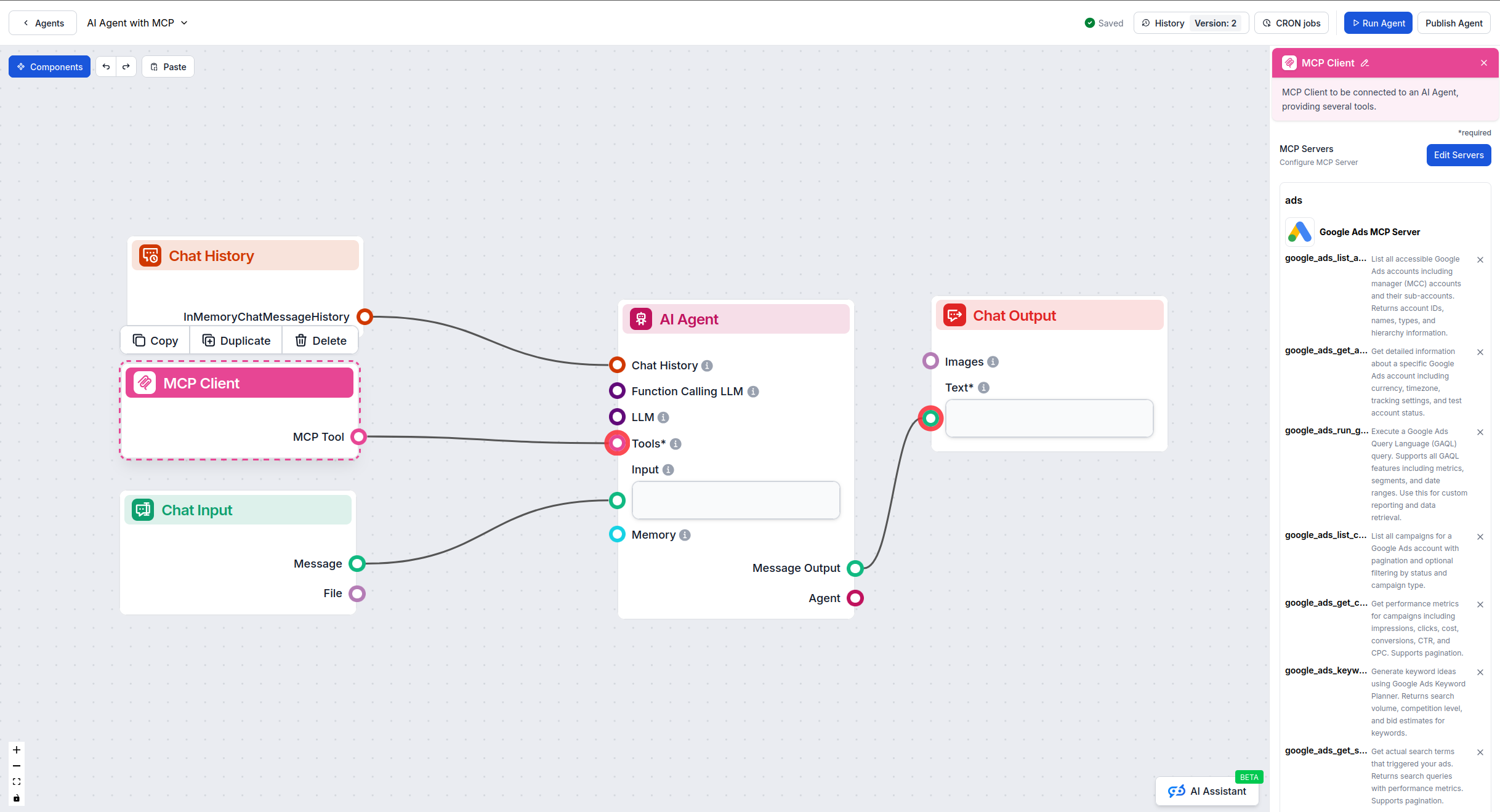
Click on the MCP component to open the configuration panel. In the system MCP configuration section, insert your MCP server details using this JSON format:
{
  "google-ads-mcp": {
    "transport": "streamable_http",
    "url": "https://yourmcpserver.example/google-ads-mcp"
  }
}
Once configured, your AI agent can access all 30 Google Ads management tools. The agent can now:
Example workflow: Create an automated campaign optimization flow that checks performance every morning, identifies underperforming campaigns, pauses keywords with high cost and low conversions, increases bids on high-performing keywords, and sends a summary report to your team.
Remember to replace “google-ads-mcp” with your actual MCP server name and update the URL to your deployed MCP server endpoint.
| Section | Availability | Details/Notes |
|---|---|---|
| Overview | ✅ | Comprehensive server documentation |
| List of Prompts | ⚠️ | No predefined templates (natural language supported) |
| List of Resources | ⚠️ | Direct API integration (no explicit resources) |
| List of Tools | ✅ | 30 comprehensive tools across all campaign aspects |
| Securing API Keys | ✅ | Environment variable configuration required |
| MCC (Manager Account) Support | ✅ | Full multi-account management support |
| GAQL Query Support | ✅ | Advanced custom reporting capabilities |
| Batch Operations | ✅ | Bulk updates for keywords, bids, and negatives |
| Campaign Creation | ✅ | All major campaign types supported |
| Performance Reporting | ✅ | Comprehensive metrics with flexible date ranges |
The Google Ads MCP Server is an enterprise-grade solution that transforms Google Ads management from a time-consuming manual process into an AI-powered automated workflow. With 30 specialized tools covering every aspect of campaign management, this server enables marketing teams to manage campaigns through natural language commands, dramatically reducing operational overhead.
The server excels in three key areas: comprehensive functionality (covering everything from account management to bid optimization), efficiency (batch operations for managing hundreds of changes simultaneously), and flexibility (GAQL query support for custom reporting needs). The inclusion of MCC account support makes it ideal for agencies managing multiple clients.
While the server doesn’t provide predefined prompt templates, the natural language interface means you can interact with Google Ads using your own words rather than learning specific command syntax. The extensive tool documentation makes it clear what capabilities are available.
Best suited for: Marketing teams, agencies, and enterprises managing significant Google Ads spend who want to automate routine tasks, respond faster to performance changes, and free up time for strategic work. The server requires Google Ads API access and basic understanding of Google Ads concepts (campaigns, ad groups, keywords, etc.).
Time savings potential: Organizations typically report 50-70% reduction in campaign management time, with many routine tasks going from hours to minutes. This allows teams to manage 2-3x more campaigns with the same resources.
| Has a LICENSE | ✅ (Proprietary) |
|---|---|
| Has comprehensive tools | ✅ (30 tools) |
| MCC Account Support | ✅ |
| Batch Operations | ✅ |
| Campaign Creation | ✅ |
| GAQL Query Support | ✅ |
| Performance Reporting | ✅ |
| Keyword Research | ✅ |
| Bid Management | ✅ |
| Negative Keyword Management | ✅ |
| Overall Functionality Score | Excellent |
FlowHunt provides an additional security layer between your internal systems and AI tools, giving you granular control over which tools are accessible from your MCP servers. MCP servers hosted in our infrastructure can be seamlessly integrated with FlowHunt's chatbot as well as popular AI platforms like ChatGPT, Claude, and various AI editors.
The Google Ads MCP Server is a comprehensive bridge between Google Ads and AI assistants using the Model Context Protocol (MCP). It enables natural language control of Google Ads campaigns, allowing you to manage campaigns, analyze performance, research keywords, update budgets and bids, and create new campaigns through conversational AI commands.
Key use cases include: automated performance reporting and analysis, AI-driven campaign optimization, natural language keyword research, budget management across multiple campaigns, automated bid adjustments based on performance data, competitor keyword analysis, negative keyword management, and creating campaigns and ad groups through conversational commands.
Store all sensitive credentials as environment variables. Never hardcode your developer token, client ID, client secret, or refresh token in configuration files. Use the 'env' field in your MCP server config to pass credentials securely. Additionally, restrict API access through Google Cloud Console permissions.
Yes, the server supports manager (MCC) accounts. Use the login_customer_id parameter to access sub-accounts under your MCC account. This enables centralized management of multiple client accounts through a single AI interface.
The server supports all major Google Ads campaign types including SEARCH, DISPLAY, SHOPPING, VIDEO, PERFORMANCE_MAX, DEMAND_GEN, LOCAL, SMART, APP, and DISCOVERY campaigns. You can create, manage, and optimize any campaign type through natural language commands.
The google_ads_run_gaql tool allows you to execute Google Ads Query Language (GAQL) queries for custom reporting. You can access any Google Ads data using SQL-like syntax, retrieve specific metrics and dimensions, apply filters and date ranges, and combine data from multiple resources for comprehensive analysis.
Yes, the server provides multiple bid management tools including individual keyword bid updates, batch bid updates for up to 1000 keywords at once, ad group CPC bid adjustments, and automated bid optimization based on performance metrics. Bids are specified in micros (1,000,000 micros = $1).
Add the MCP component to your FlowHunt flow and connect it to your AI agent. In the MCP configuration panel, insert your Google Ads MCP server details in JSON format. Once configured, your AI agent can access all Google Ads management capabilities for automated campaign optimization and reporting workflows.
Automate your Google Ads workflows, eliminate manual campaign management tasks, and empower your marketing team to optimize campaigns through natural language commands.
The Amazon Ads MCP Server bridges AI assistants and Amazon Advertising by providing seamless programmatic access to campaign management, reporting, recommendati...

The Facebook Ads MCP Server integrates FlowHunt with the Facebook Ads platform, enabling AI-driven automation and management of ad campaigns, performance analyt...
The Google Tasks MCP Server bridges AI assistants with Google Tasks, enabling seamless management and automation of tasks directly through standardized protocol...
Cookie Consent
We use cookies to enhance your browsing experience and analyze our traffic. See our privacy policy.