

PowerBI MCP Server
Integrate Microsoft PowerBI with FlowHunt through MCP to manage business intelligence dashboards, data analysis, and reporting workflows seamlessly. Create repo...
5 min read
PowerBI
Business Intelligence
+6

Connect your Mailchimp account to FlowHunt for intelligent email marketing automation and campaign management workflows.
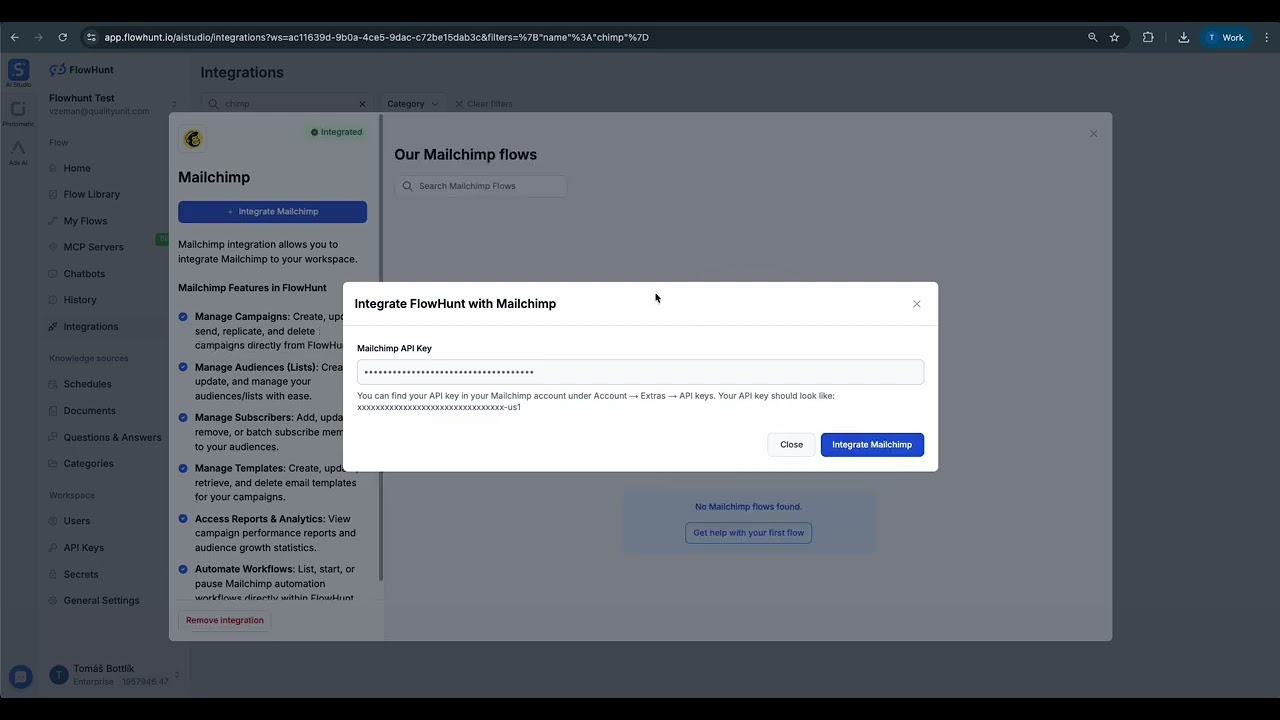
MCP INTEGRATION
The following tools are available as part of the Mailchimp MCP integration:
List, create, update, delete, send, and replicate email campaigns with advanced filtering and scheduling options.
Retrieve, create, and manage email lists/audiences with comprehensive subscriber data and segmentation capabilities.
Add, update, remove, and bulk manage subscribers with detailed member information and subscription preferences.
Create, update, and delete email templates with drag-and-drop design capabilities and responsive layouts.
Get detailed campaign performance metrics, audience growth history, and comprehensive email marketing insights.
List, start, and pause automation workflows for triggered email sequences and behavioral marketing campaigns.
Retrieve and manage all members of specific audiences with detailed subscriber information and activity tracking.
Bulk add and update subscribers across multiple lists with efficient batch processing and error handling.
Duplicate existing campaigns with all settings, content, and targeting parameters for efficient campaign scaling.
Schedule campaigns for optimal delivery times with timezone support and audience-specific timing preferences.
Track audience growth over time with detailed metrics on subscriber acquisition, retention, and engagement trends.
Start automation workflows for specific subscribers based on triggers, behaviors, and customer journey stages.
📝 Note: You can modify or add tools later based on your evolving email marketing and automation needs.

Start your free trial today and see results within days.
{
  "mcp": {
    "transport": "streamable_http",
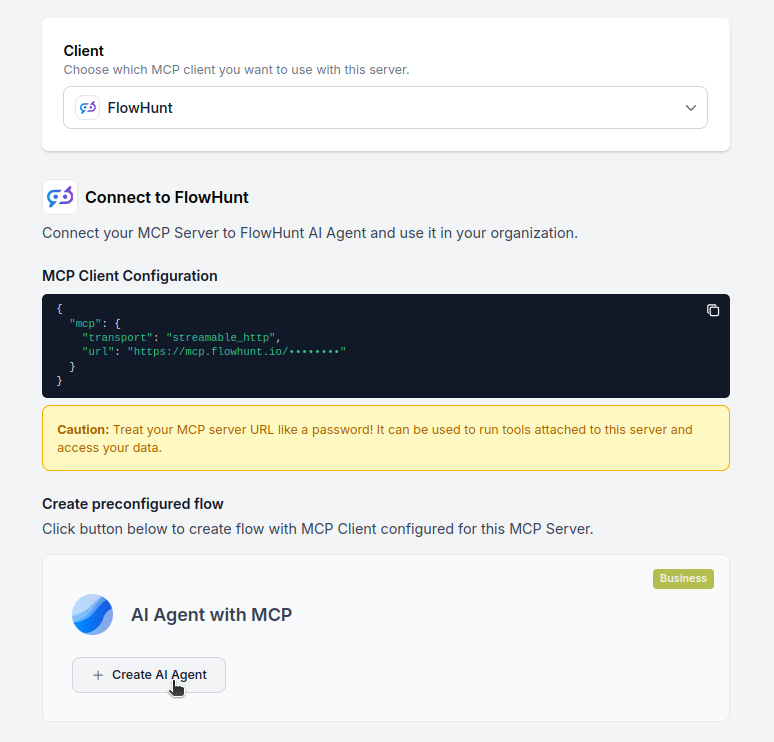
    "url": "https://mcp.flowhunt.io/••••••••"
  }
}
🔒 Important: Treat your MCP server URL as a password. It provides direct access to your Mailchimp data and server tools. Never share it publicly or commit it to version control.
You have two powerful options for implementing your Mailchimp automation:
Best for: Getting started quickly with proven email marketing automation patterns
Generate Flow: In your MCP Server configuration, click “Create Preconfigured Flow”.
Select Template: Choose “AI Agent with MCP” to create a ready-to-use workflow.
Customize Logic: Use FlowHunt’s visual flow builder to tailor the automation:
Activate: Save and activate your flow to begin automated email marketing operations.
Best for: Specific email marketing requirements or existing campaign enhancement
{
  "mcp": {
    "transport": "streamable_http",
    "url": "https://mcp.flowhunt.io/••••••••"
  }
}
Design Workflow: Create custom logic that leverages the MCP server tools:
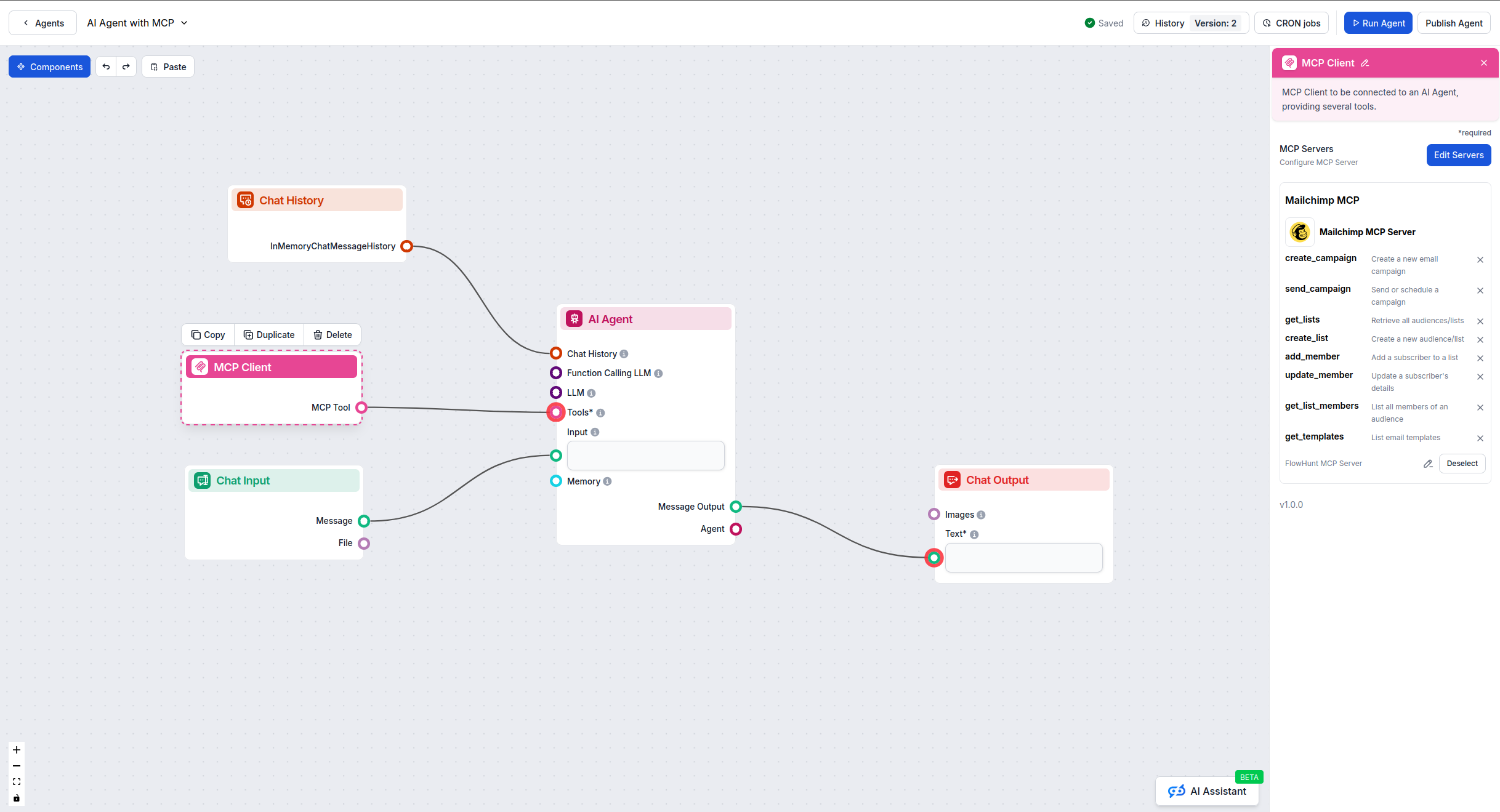
Deploy: Save your configuration and activate the flow.
Get latest tips, trends, and deals for free.
Here are practical prompts you can use with the Mailchimp MCP Server to automate your email marketing workflows:
Show me all my email campaigns from the last 30 days with their open rates and click rates
Create a new email campaign for our spring product launch targeting customers who purchased in the last 90 days
What are my top 3 performing email templates based on engagement metrics?
Add these 50 new subscribers to my "Newsletter" audience and tag them as "Website Signup"
Generate a performance report comparing all campaigns sent this month vs last month
Schedule a welcome email campaign to send tomorrow at 10 AM EST to all new subscribers
Show me which automation workflows are currently active and their completion rates
Update the email template for our weekly newsletter with the new brand colors and logo
Remove all unengaged subscribers who haven't opened an email in 6 months from my main list
Create a segment of subscribers who clicked on product links in the last campaign but didn't purchase
What's my audience growth rate over the last quarter broken down by month?
Replicate last month's highest-performing campaign and update it with this week's product offers
Pause all automation workflows while we update our email templates and brand guidelines
Show me detailed subscriber information for everyone who joined through our Black Friday campaign
Generate a comprehensive analytics report showing campaign performance, audience growth, and top converting emails for the executive team
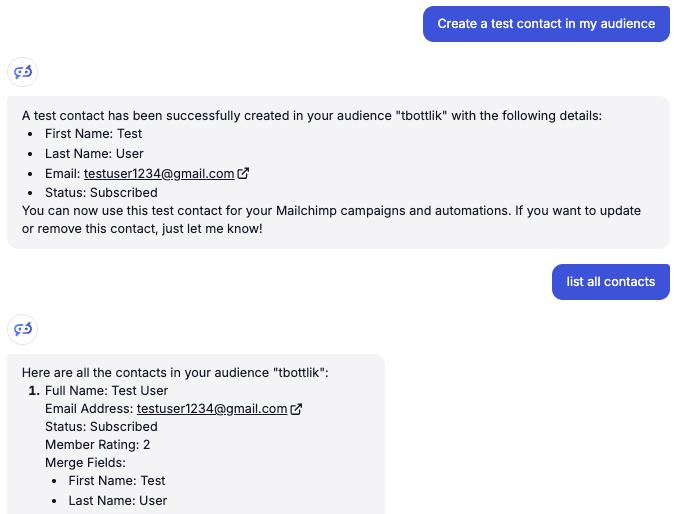

Integrating Mailchimp MCP Server with FlowHunt.io creates a powerful foundation for intelligent email marketing automation. Whether you’re streamlining campaign management, automating subscriber segmentation, or enhancing email template workflows, this integration empowers your AI agents to work seamlessly with your critical email marketing data.
Start with a simple automation and gradually expand your workflows as you become more comfortable with the platform. The combination of Mailchimp’s comprehensive email marketing capabilities and FlowHunt’s AI-driven automation will transform how you manage campaigns and engage with your audience.
Ready to get started? Begin your integration today and unlock the full potential of AI-powered email marketing automation!
FlowHunt provides an additional security layer between your internal systems and AI tools, giving you granular control over which tools are accessible from your MCP servers. MCP servers hosted in our infrastructure can be seamlessly integrated with FlowHunt's chatbot as well as popular AI platforms like ChatGPT, Claude, and various AI editors.
Start managing your email marketing campaigns intelligently with AI-powered automation and seamless Mailchimp integration.
Integrate Microsoft PowerBI with FlowHunt through MCP to manage business intelligence dashboards, data analysis, and reporting workflows seamlessly. Create repo...

Integrate WordPress with FlowHunt through MCP to manage content, media, users, and site administration seamlessly. Create posts, manage pages, handle media, and...

Integrate Microsoft SharePoint with FlowHunt through MCP to manage document libraries, lists, sites, and collaboration workflows seamlessly. Search sites, manag...
Cookie Consent
We use cookies to enhance your browsing experience and analyze our traffic. See our privacy policy.