



Mailchimp MCP Server
Integrate Mailchimp with FlowHunt through MCP to manage email marketing campaigns, audience management, and automation workflows seamlessly. Create campaigns, m...
5 min read
Mailchimp
Email Marketing
+6

Connect your WordPress site to FlowHunt for intelligent content management and automated publishing workflows.

The following tools are available as part of the WordPress MCP integration:
List, create, update, and delete WordPress posts with advanced filtering, content management, and publishing automation.
Manage WordPress pages including creation, updates, deletion, and content organization for static site content.
Upload, manage, and organize media files including images, videos, and documents with metadata and optimization.
Create, update, and manage WordPress users with role assignments, permissions, and profile management.
Organize content with category creation, updates, and management for improved content structure and navigation.
Create and manage content tags for enhanced content discoverability and SEO optimization.
Moderate, approve, and manage user comments with spam protection and engagement monitoring.
List, activate, and manage WordPress plugins for enhanced functionality and site optimization.
Retrieve WordPress site metadata, configuration details, and system information for monitoring and management.
Search and filter content across posts, pages, and media with advanced query capabilities and content analysis.
Automate content creation, scheduling, and management workflows with AI-powered content generation and optimization.
Monitor content performance, user engagement, and publishing metrics for data-driven content strategy.
📝 Note: You can modify or add tools later based on your evolving content management and publishing needs.

Start your free trial today and see results within days.
{
  "mcp": {
    "transport": "streamable_http",
    "url": "https://mcp.flowhunt.io/••••••••"
  }
}
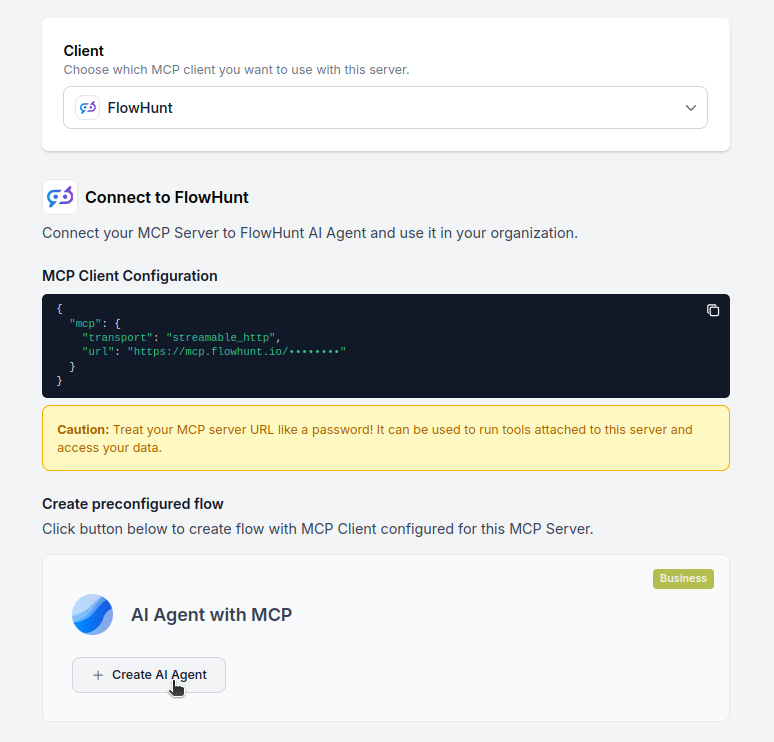
🔒 Important: Treat your MCP server URL as a password. It provides direct access to your WordPress site and server tools. Never share it publicly or commit it to version control.
You have two powerful options for implementing your WordPress automation:
Best for: Getting started quickly with proven content management automation patterns
Generate Flow: In your MCP Server configuration, click “Create Preconfigured Flow”.
Select Template: Choose “AI Agent with MCP” to create a ready-to-use workflow.
Customize Logic: Use FlowHunt’s visual flow builder to tailor the automation:
Activate: Save and activate your flow to begin automated content management operations.
Best for: Specific content management requirements or existing WordPress workflow enhancement
{
  "mcp": {
    "transport": "streamable_http",
    "url": "https://mcp.flowhunt.io/••••••••"
  }
}
Design Workflow: Create custom logic that leverages the MCP server tools:
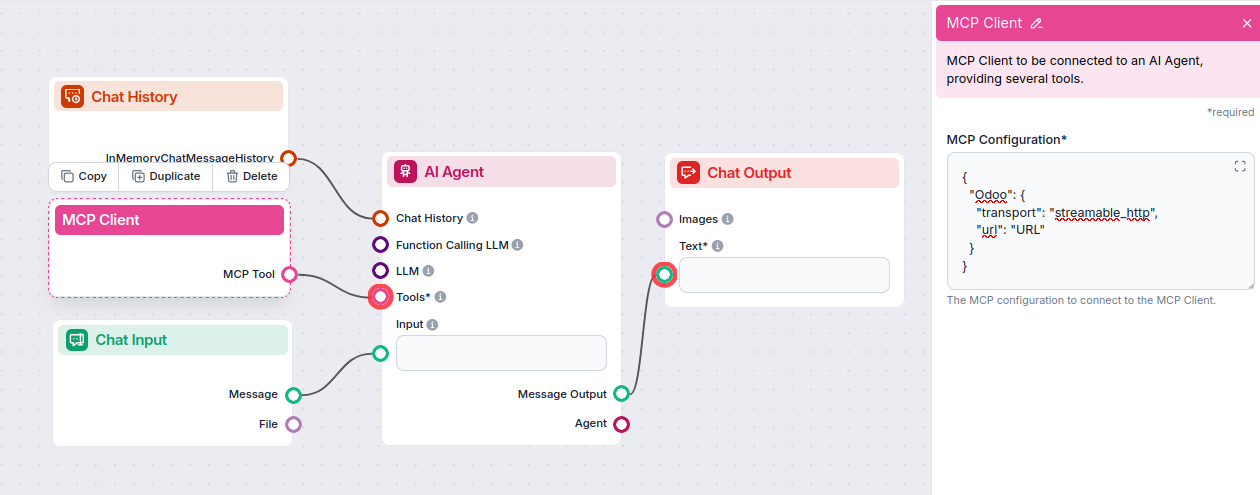
Deploy: Save your configuration and activate the flow.
Get latest tips, trends, and deals for free.

Here are practical examples demonstrating how to use the WordPress MCP Server with your AI agents. These prompts showcase real-world content management and publishing scenarios:
Create a new blog post titled 'Top 10 Marketing Strategies for 2026' with SEO-optimized content, add relevant tags, and publish it immediately
Draft a new post about 'AI in Content Marketing' and save it as a draft for review. Include meta description and featured image
Update my latest blog post to add a call-to-action section at the end and change the featured image
Schedule 5 blog posts for next week, one per day, covering different aspects of our new product launch
List all published posts from the last 30 days and show me their view counts and engagement metrics
Find all draft posts that are older than 3 months and compile them into a list for review
Create a new category called 'Case Studies' and move all posts tagged with 'customer-success' into this category
Search for all posts containing the keyword 'outdated-product-name' so I can update them with our new branding
Upload this product image to the WordPress media library and add it to all posts in the 'Product Reviews' category
Optimize all images in my media library that are larger than 2MB to improve site loading speed
Create a gallery of all media files uploaded in December 2025 and organize them by type
Create a new landing page for our 'Summer Sale 2026' campaign with sections for hero, features, testimonials, and CTA
Update the About Us page to include our new team members and their bios
Get the current site information including total posts, pages, active plugins, and WordPress version
Create 5 new author accounts for our guest writers with appropriate permissions and send them welcome emails
Review all pending comments from the last week and approve those that are legitimate while marking spam
Update user roles for all contributors who have published more than 10 posts to change them to authors
Analyze all posts published in Q4 2025 and suggest SEO improvements for titles and meta descriptions
Create XML sitemap entries for all new posts published this month to improve search engine indexing
Update all posts in the 'Tutorials' category to include internal links to related content
Set up an automated workflow that creates a monthly content performance report and emails it to the marketing team
Monitor all new comments in real-time and automatically flag any containing profanity or spam keywords
Create a content calendar for the next quarter with weekly blog post placeholders and suggested topics based on trending keywords
These prompts demonstrate the versatility of the WordPress MCP integration across common content management workflows including publishing, SEO optimization, media handling, and site administration.
Integrating WordPress MCP Server with FlowHunt.io creates a powerful foundation for intelligent content management and publishing automation. Whether you’re streamlining content creation, automating media management, or enhancing user engagement workflows, this integration empowers your AI agents to work seamlessly with your critical WordPress content.
Start with a simple automation and gradually expand your workflows as you become more comfortable with the platform. The combination of WordPress’s comprehensive content management capabilities and FlowHunt’s AI-driven automation will transform how you create, manage, and optimize your website content.
Ready to get started? Begin your integration today and unlock the full potential of AI-powered WordPress automation!
Start managing your WordPress content intelligently with AI-powered automation and seamless WordPress integration.
Integrate Mailchimp with FlowHunt through MCP to manage email marketing campaigns, audience management, and automation workflows seamlessly. Create campaigns, m...

Integrate Microsoft SharePoint with FlowHunt through MCP to manage document libraries, lists, sites, and collaboration workflows seamlessly. Search sites, manag...

Integrate LinkedIn with FlowHunt through MCP to manage professional networking, content publishing, and company page management seamlessly. Create posts, share ...
Cookie Consent
We use cookies to enhance your browsing experience and analyze our traffic. See our privacy policy.