

Hosted MCP Server for GitHub
The GitHub MCP Server enables seamless integration between AI tools and GitHub, allowing automated workflows to manage repositories, issues, and pull requests d...
6 min read
AI
GitHub
+5
Integrate FlowHunt with Zoho CRM via the Zoho CRM MCP Server to automate sales tasks, manage records and deals, and connect your AI workflows to real-time Zoho CRM data.
Host MCP Servers using FlowHunt
FlowHunt's platform lets users create AI Agents for any service without the usual hassles of MCP servers. Host MCP servers for any service, automate workflows, connect with external tools, and use analytics to improve performance. FlowHunt makes AI Agent creation simple and efficient for all users.
Access FlowHunt Dashboard: Log in to your FlowHunt.io dashboard .
Navigate to Integrations: Find the “Integrations” section in the left sidebar.
Select Zoho CRM: Click on the Zoho CRM integration option to begin the setup process.
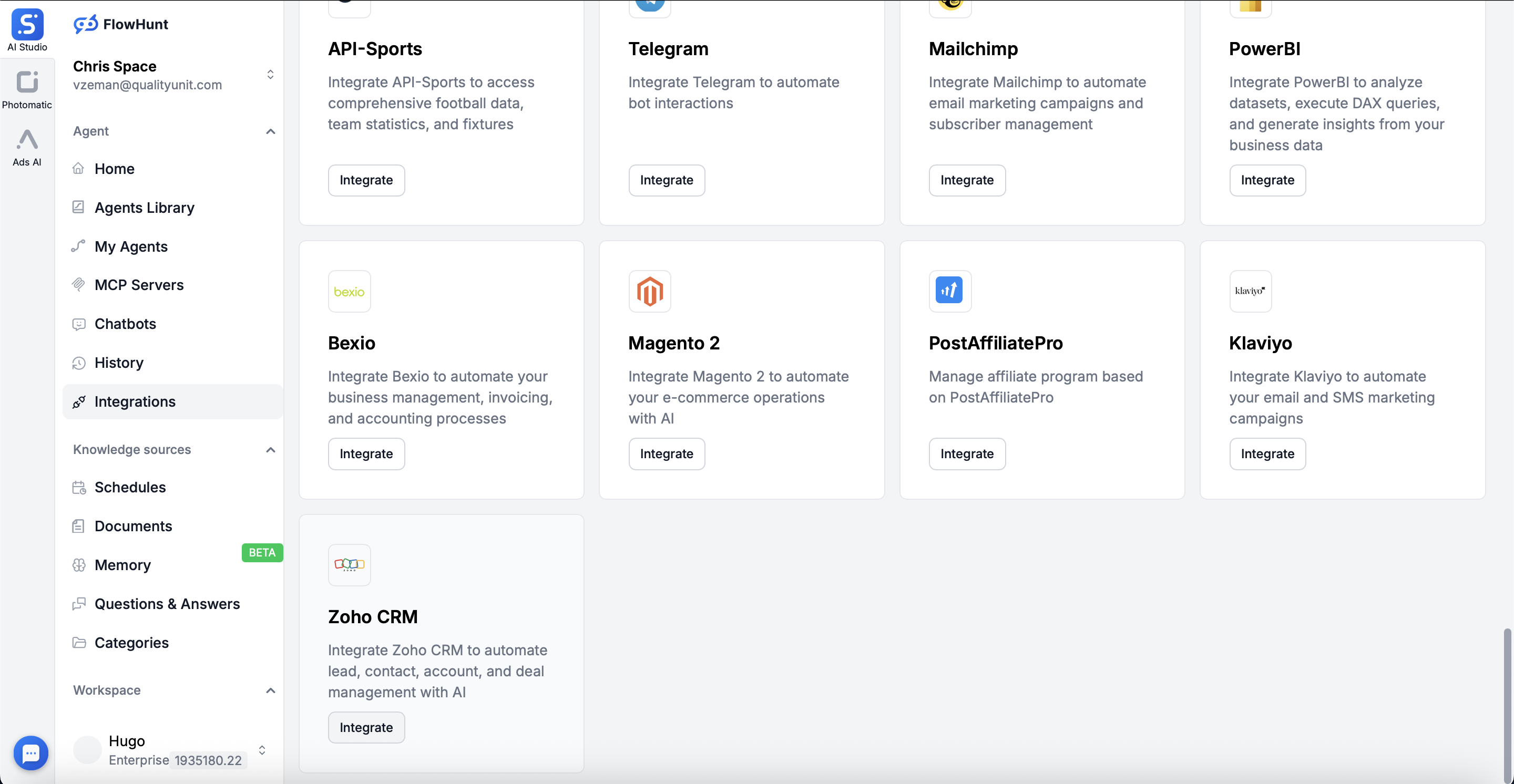
Click Connect Zoho CRM: Click the blue “Connect Zoho CRM” button to initiate the OAuth 2.0 authentication flow.
💡 Pro Tip: Zoho CRM uses OAuth 2.0 authentication with access and refresh tokens for secure, scoped access. You’ll be redirected to Zoho’s login page to authorize FlowHunt.
Sign in to Zoho: After clicking “Connect Zoho CRM”, you’ll be redirected to Zoho’s authentication page.
Authorize FlowHunt: Log in with your Zoho credentials and grant FlowHunt permission to access your CRM data.
Complete Connection: Once authorized, you’ll be redirected back to FlowHunt.
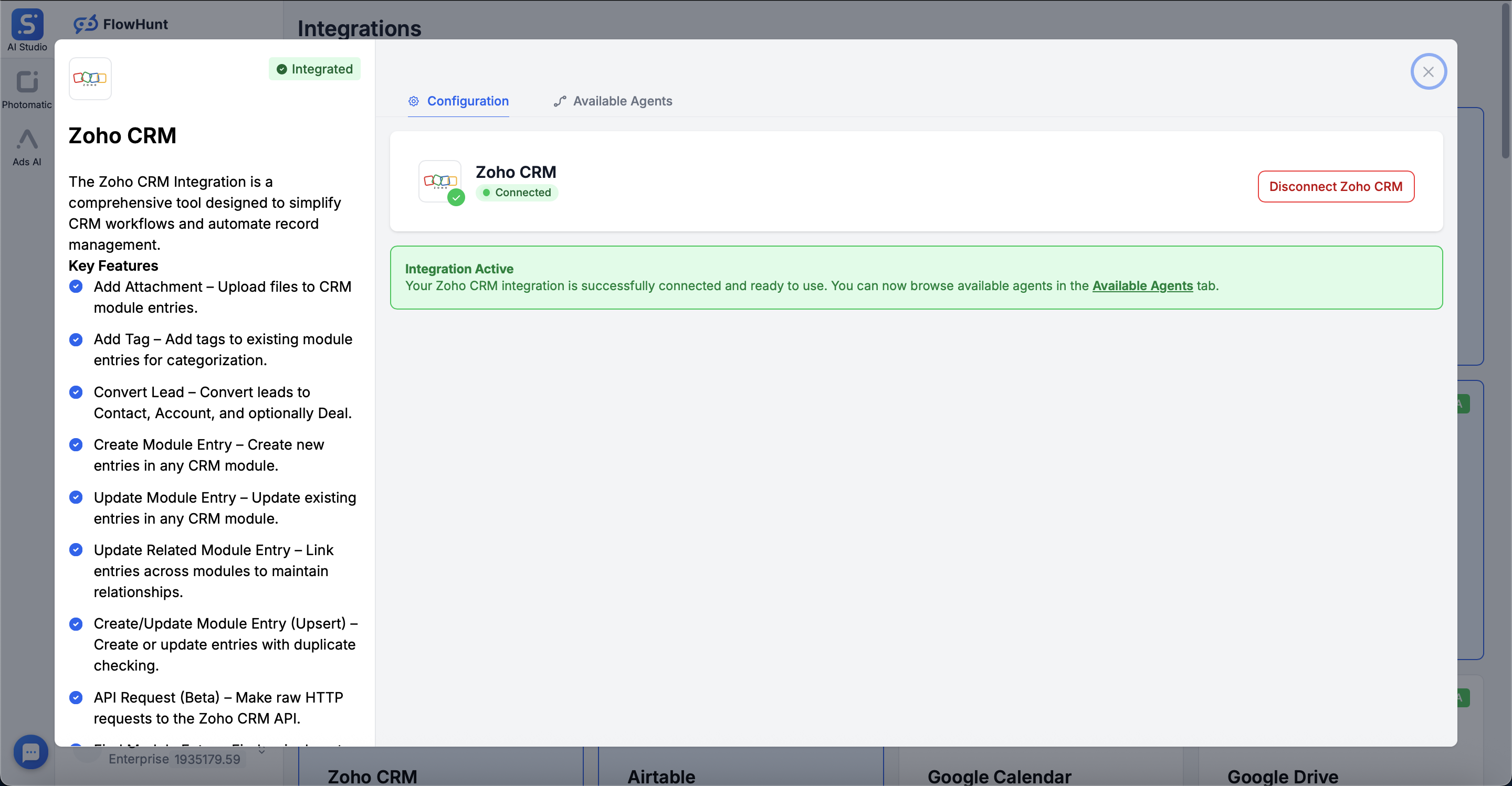
Confirmation: You’ll see a success message: “Zoho CRM was successfully integrated” with a green checkmark.

Start your free trial today and see results within days.
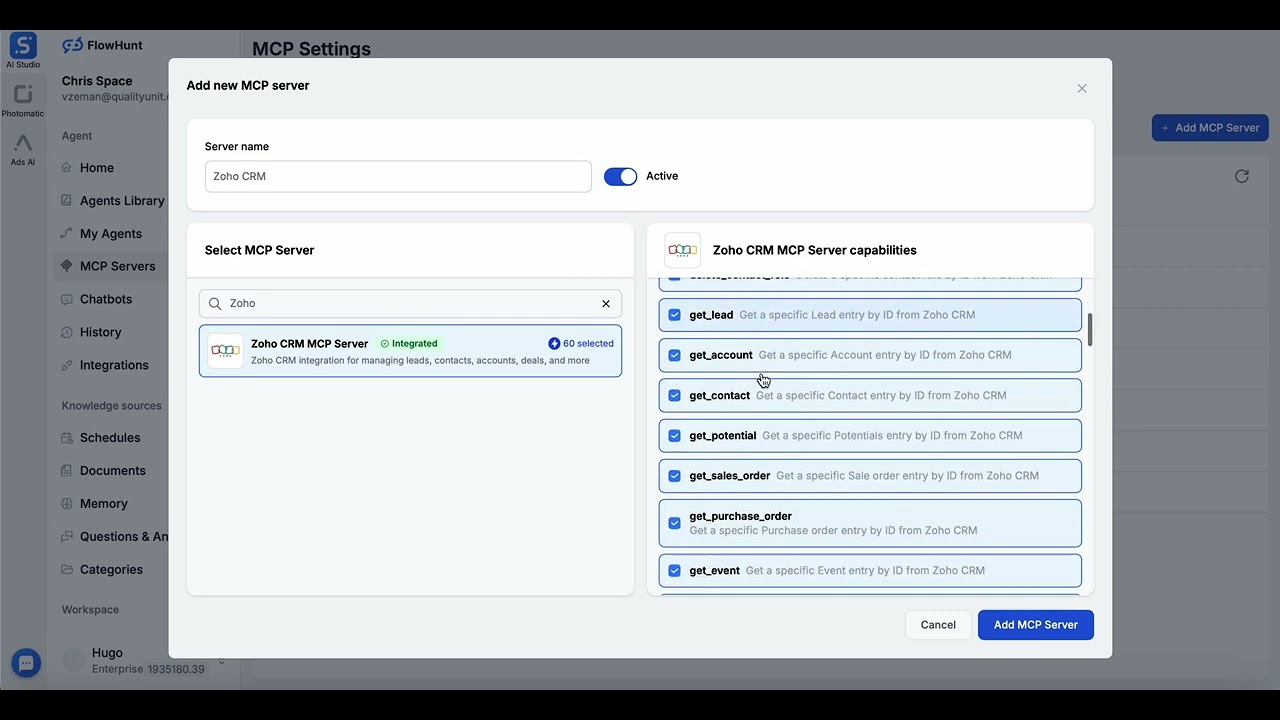
Navigate to MCP Servers: Go to the “MCP Servers” tab in your FlowHunt dashboard.
Add New Server: Click “Add New MCP Server”.
Select Zoho CRM: Choose “Zoho CRM MCP Server” from the available options.
Configure Server Tools: Select the tools you want to enable for your MCP server.
MCP INTEGRATION
The following tools are available as part of the Zoho CRM MCP integration:
Add attachment to a Zoho CRM module entry (Leads, Contacts, Accounts, Deals, etc.)
Convert an existing lead to Contact, Account, and optionally Deal in Zoho CRM
List all contact roles from Zoho CRM
Get a specific contact role by ID from Zoho CRM
Create a contact role from Zoho CRM
Delete a specific contact role by ID from Zoho CRM
Get a specific Lead entry by ID from Zoho CRM
Get a specific Account entry by ID from Zoho CRM
Get a specific Contact entry by ID from Zoho CRM
Get a specific Potentials entry by ID from Zoho CRM
Get a specific Sale order entry by ID from Zoho CRM
Get a specific Purchase order entry by ID from Zoho CRM
Get a specific Event entry by ID from Zoho CRM
Get a specific Solution entry by ID from Zoho CRM
Get a specific Case entry by ID from Zoho CRM
Find a lead based on criteria in Zoho CRM
Find an account based on criteria in Zoho CRM
Find a potential based on criteria in Zoho CRM
Find a contact based on criteria in Zoho CRM
Find a sales order based on criteria in Zoho CRM
Find a purchase order based on criteria in Zoho CRM
Find an event based on criteria in Zoho CRM
Find a solution based on criteria in Zoho CRM
Find a case based on criteria in Zoho CRM
List leads with fields in Zoho CRM
List accounts with fields in Zoho CRM
List contacts with fields in Zoho CRM
List potentials with fields in Zoho CRM
List Sales Orders with fields in Zoho CRM
List Purchase Orders with fields in Zoho CRM
List Events with fields in Zoho CRM
List Solutions with fields in Zoho CRM
List Cases with fields in Zoho CRM
Delete a specific Lead entry by ID from Zoho CRM
Delete a specific Account entry by ID from Zoho CRM
Delete a specific Contact entry by ID from Zoho CRM
Delete a specific Potential entry by ID from Zoho CRM
Delete a specific Sales Order entry by ID from Zoho CRM
Delete a specific Purchase Order entry by ID from Zoho CRM
Delete a specific Event entry by ID from Zoho CRM
Delete a specific Solution entry by ID from Zoho CRM
Delete a specific Case entry by ID from Zoho CRM
Create a new lead in Zoho CRM Leads module
Create a new account in Zoho CRM Accounts module
Create a new contact in Zoho CRM Contacts module
Create a new potential in Zoho CRM Potentials module
Create a new sales order in Zoho CRM Sales Orders module
Create a new purchase order in Zoho CRM Purchase Orders module
Create a new event in Zoho CRM Events module
Create a new solution in Zoho CRM Solutions module
Create a new case in Zoho CRM Cases module
Update an existing lead in Zoho CRM module
Update an existing account in Zoho CRM module
Update an existing contact in Zoho CRM module
Update an existing potential in Zoho CRM module
Update an existing sales order in Zoho CRM module
Update an existing purchase order in Zoho CRM module
Update an existing event in Zoho CRM module
Update an existing solution in Zoho CRM module
Update an existing case in Zoho CRM module
📝 Note: No API keys or secret keys are required - Zoho CRM uses secure OAuth 2.0 tokens with automatic refresh managed by FlowHunt.
Access MCP Tab: Navigate to the “MCP” tab in your FlowHunt Dashboard.
Choose Server: Select your Zoho CRM MCP server from the list of created MCP servers.

Get latest tips, trends, and deals for free.
Best for: Getting started quickly with proven automation patterns
Generate Flow: In your MCP Server configuration, click “Create Preconfigured Flow”.
Select Template: Choose “AI Agent with MCP” to create a ready-to-use workflow.
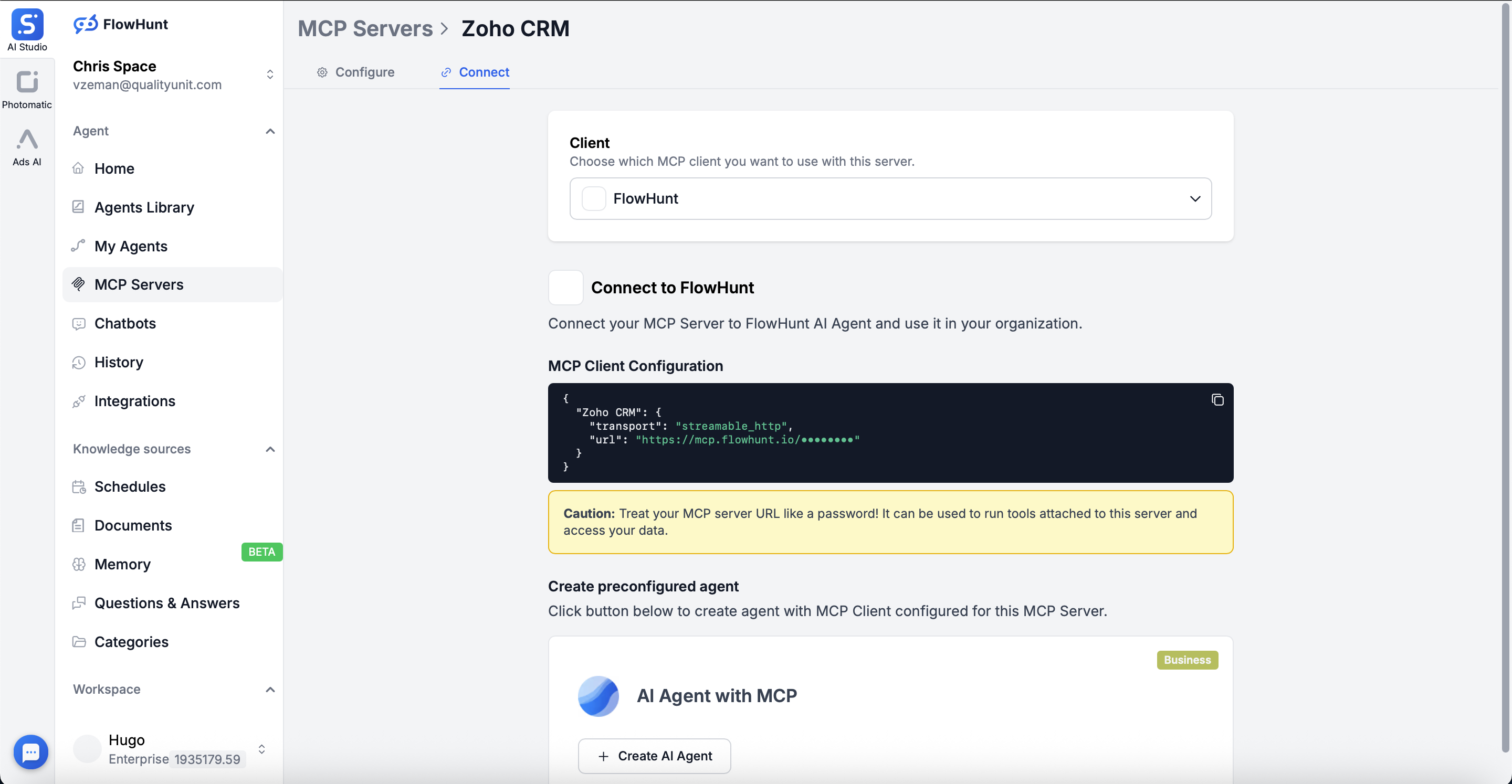
Customize Logic: Use FlowHunt’s visual flow builder to tailor the automation:
Activate: Save and activate your flow to begin automated operations.
Best for: Specific automation requirements or existing workflow enhancement
Create/Edit Flow: Open FlowHunt’s flow builder and start with a new or existing flow.
Add MCP Client Component: Drag the “MCP Client” component onto your canvas.
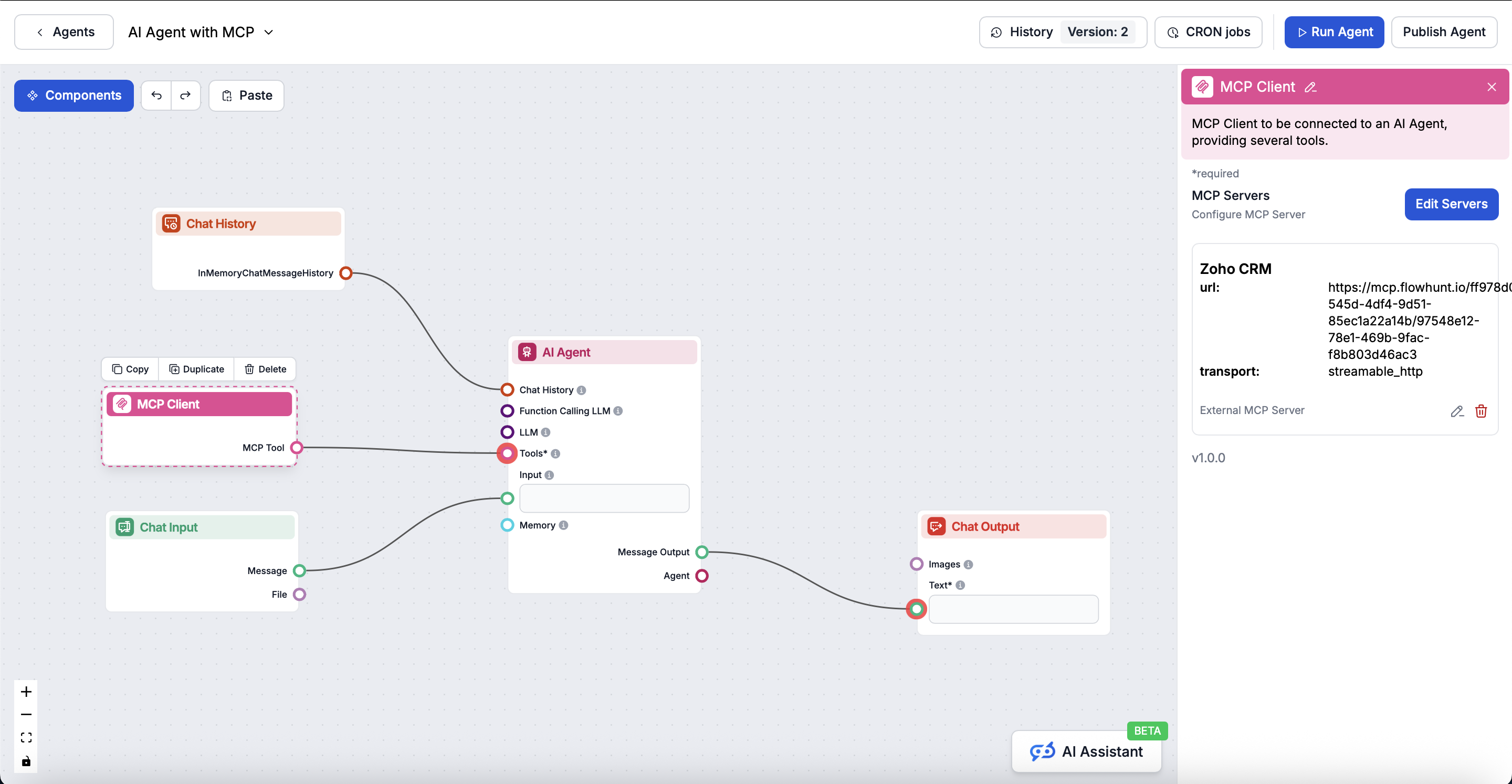
Connect to AI Agent: The MCP Client component automatically connects to your selected Zoho CRM MCP server, providing access to all Zoho CRM tools directly within your AI agent workflow.
Design Workflow: Create custom logic that leverages the MCP server tools:
Deploy: Save your configuration and activate the flow.
Below are practical example prompts showing how to manage your Zoho CRM data using natural language commands for leads, contacts, accounts, deals, and more.
Show me all new leads from the last 7 days
Get the full details for lead John Smith including contact info and lead source
Convert lead ID 12345 into a contact and create an associated deal
List all leads with status "Qualified" that haven't been contacted this month
Create a new contact for Sarah Johnson at Acme Corp with email sarah.j@acme.com
Get all contacts associated with the account "Tech Solutions Inc"
Show me the contact details for jane.doe@company.com including recent interactions
List all accounts in the Enterprise tier with annual revenue over $1M
Show me all deals in the "Negotiation" stage
Create a new deal "Q1 Enterprise License" for Acme Corp worth $50,000 with close date March 31
Get details of deal ID 67890 including associated contacts and activities
List all deals closing this quarter sorted by value
Log a call with Michael Chen at TechStart discussing product demo
Create a task to follow up with prospect ABC Inc by Friday
Show me all upcoming meetings this week related to the Enterprise deals
List all overdue tasks assigned to the sales team
Show me the total pipeline value for this quarter
Get conversion rates from lead to opportunity for the last 90 days
List top 10 accounts by revenue this year
Show me win/loss ratios by sales rep for Q4
List all contact roles for the "Global Expansion" deal
Create a contact role for Jessica Martinez as "Decision Maker" in deal 456
Show me all influencers and decision makers in the pipeline
Add attachment "proposal.pdf" to deal ID 789
Show me all records modified today
Find duplicate contacts with the same email address
Export all contacts from the "VIP Customers" segment
These prompts demonstrate how the Zoho CRM MCP Server makes sales automation intuitive, enabling you to manage your entire sales pipeline through natural, conversational commands.
Integrating Zoho CRM MCP Server with FlowHunt.io creates a powerful foundation for intelligent sales automation. Whether you’re streamlining lead management, automating deal progression, or enhancing customer relationship workflows, this integration empowers your AI agents to work seamlessly with your critical Zoho CRM data.
Start with a simple automation and gradually expand your workflows as you become more comfortable with the platform. The combination of Zoho CRM’s comprehensive sales capabilities and FlowHunt’s AI-driven automation will transform how you manage your sales pipeline and customer relationships.
Ready to get started? Begin your integration today and unlock the full potential of AI-powered CRM automation!
FlowHunt provides an additional security layer between your internal systems and AI tools, giving you granular control over which tools are accessible from your MCP servers. MCP servers hosted in our infrastructure can be seamlessly integrated with FlowHunt's chatbot as well as popular AI platforms like ChatGPT, Claude, and various AI editors.
Unlock the power of AI-driven automation for your Zoho CRM workspace. Easily manage leads, contacts, deals, and records from within FlowHunt.
The GitHub MCP Server enables seamless integration between AI tools and GitHub, allowing automated workflows to manage repositories, issues, and pull requests d...

The Airtable MCP Server enables seamless integration between AI tools and Airtable, allowing automated workflows to manage bases, tables, records, and fields di...

The Microsoft Outlook Contacts MCP Server enables seamless integration between AI tools and Microsoft Outlook Contacts, allowing automated workflows to manage c...
Cookie Consent
We use cookies to enhance your browsing experience and analyze our traffic. See our privacy policy.