AI invoice data extraction reads any invoice format. A PDF, scan, or photo, and returns structured data in seconds. Here’s the exact process and what to verify first.
An AI invoice data extractionreads any invoice format, and outputs structured data in seconds. Here’s the exact process, and what to verify before it touches your accounting system.
The Hidden Cost of Manual Invoice Processing
Every invoice that lands in a shared inbox triggers the same sequence. Someone opens it, reads the fields, types them into a spreadsheet or ERP, and files the original. Multiply that by hundreds or thousands of invoices a month and the cost adds up fast. Manual invoice processing runs $12-16 per invoice fully loaded
once you factor in labor, error correction, and late-payment penalties, against $2-5 for automated processing.
The bigger issue is that the error rate doesn’t stay flat as volume grows. A single mistyped total or transposed invoice number is a minor annoyance at ten invoices a month. At a thousand, that same 1.6-4% error rate turns into dozens of invoices with wrong data sitting in your books, each one a potential mismatch during reconciliation or an audit flag down the line.
There’s also a scaling problem that has nothing to do with accuracy. Manual processing time is roughly linear. Twice the invoice volume means roughly twice the headcount hours, whether that means overtime for an existing team or a new hire. None of that time is spent on judgment calls, but rather on reading numbers off a page and retyping them somewhere else. This is the exact thing an AI invoice processing tool solves.
How AI Invoice Data Extraction Works
An invoice OCR AItool combines two layers. Optical character recognition reads the text on the page, and a language model interprets what that text means, recognizing that a number near the word “Total” is the invoice total, regardless of where it sits on the page or what language the invoice is in.
This is different from a general document Q&A tool. If you need to ask open-ended questions about a contract or a long PDF report, a tool like Chat with PDF
is built for that kind of conversational retrieval. Invoice extraction is narrower and more structured by design. It always looks for the same fields and always returns them in the same format, which is what makes the output usable without manual cleanup.
That structure is also what makes the tool template-free. Traditional OCR software that isn’t paired with a language model typically needs a template per vendor layout. An AI invoice processing tool looks for items conceptually (“the total amount,” “the invoice number”), not where to look on the page, so a new supplier’s invoice works on the first upload.
Ready to grow your business?
Start your free trial today and see results within days.
FlowHunt’s Invoice Data Extractor
runs as a simple chat flow. Here’s what happens end to end:
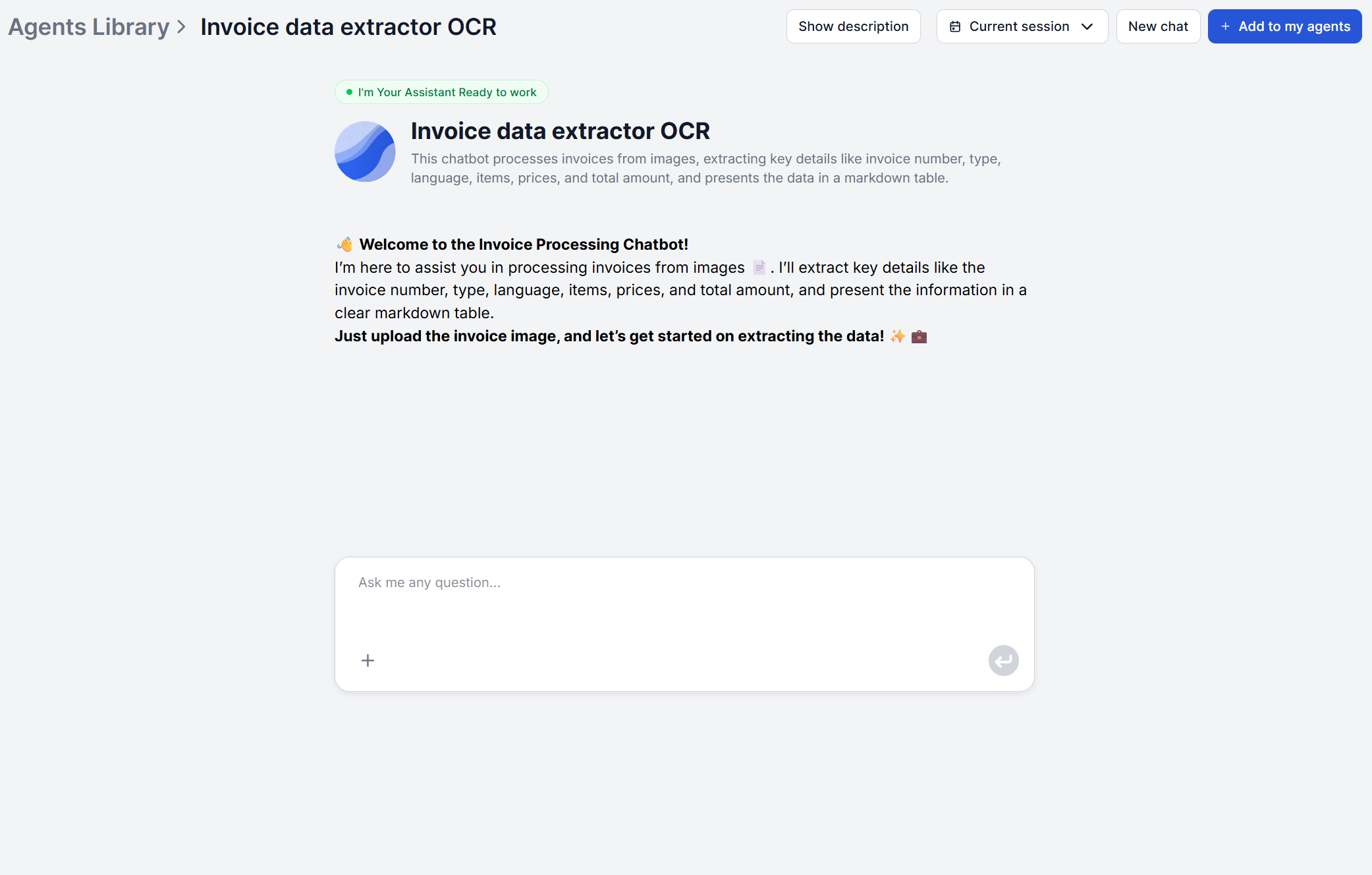
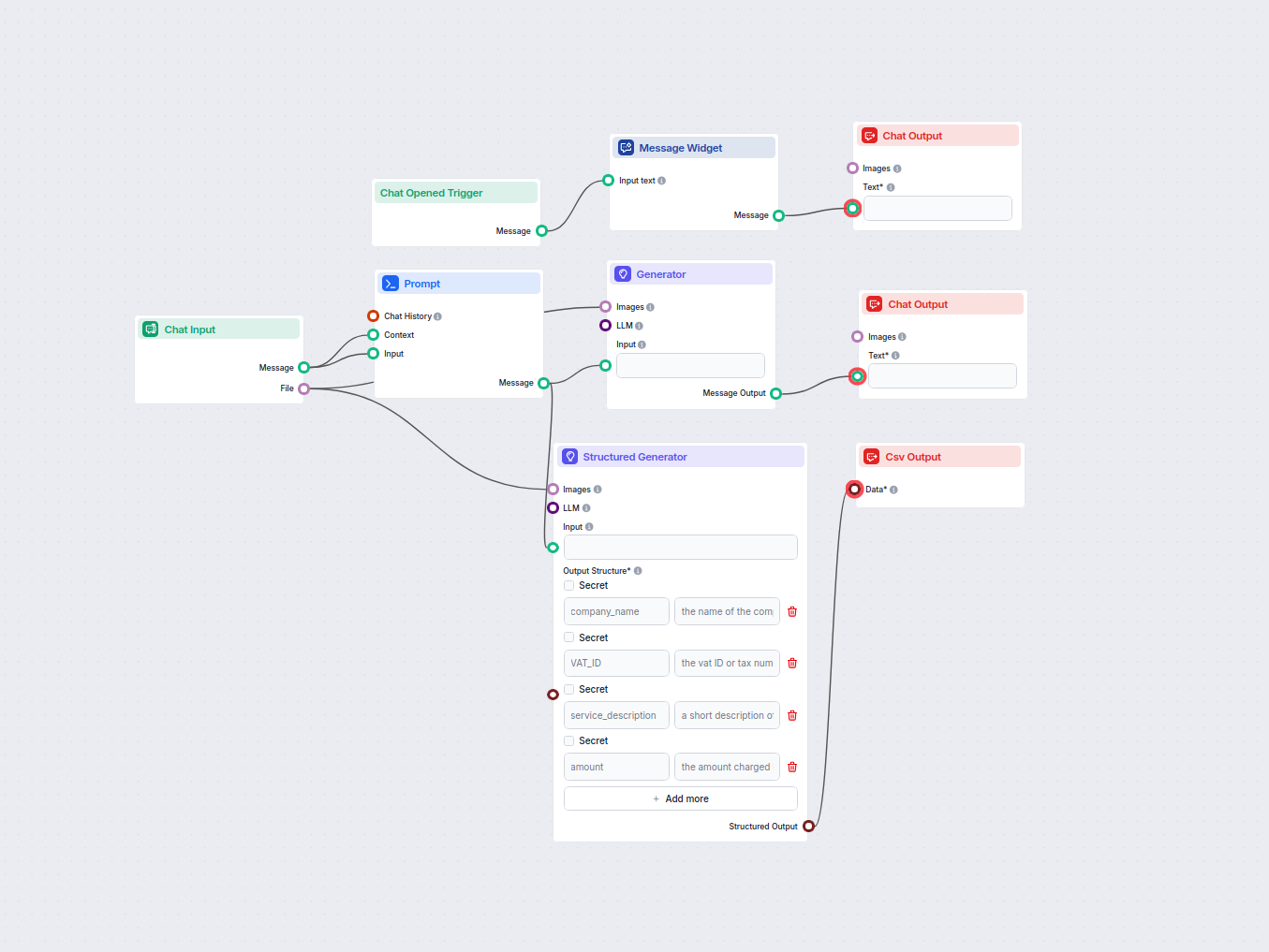
Open the chatbot. A welcome message explains what to upload. You don’t need to configure anything.
Upload the invoice image. Scanned documents, photos, or digital screenshots all work.
The AI reads and extracts the data. A structured prompt drives the model to perform OCR and pull out all the fields.
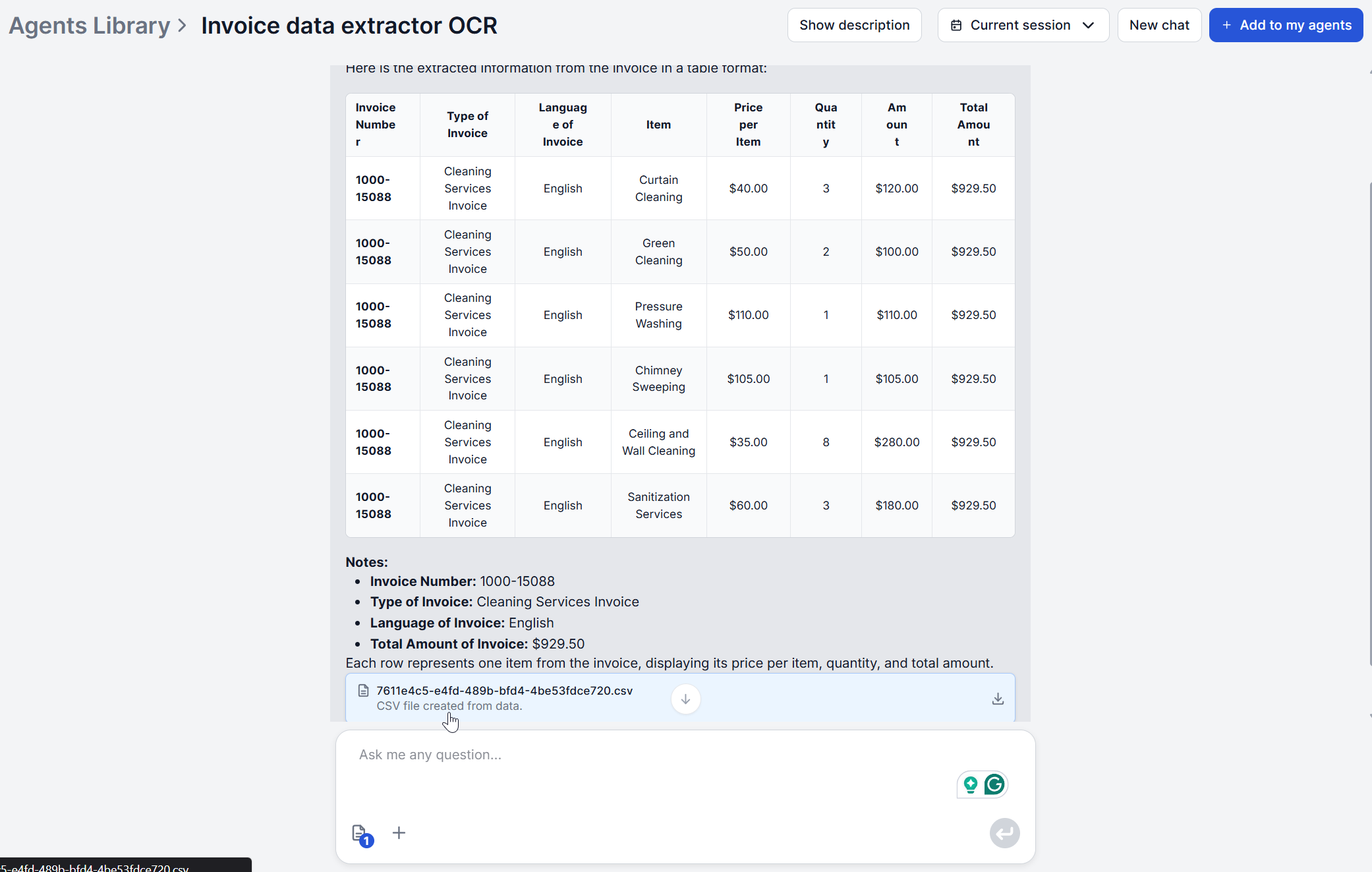
Review the markdown table. Results come back in the chat with one row per invoice line item, so you can check them at a glance.
Get the structured export. In parallel, the workflow generates a detailed CSV, ready to download and drop into your accounting system.
Use Case: AP Automation for Finance Teams
Accounts payable teams are the clearest fit. A finance team processing a few hundred supplier invoices a month spends a meaningful chunk of a full-time role just on data entry. opening each PDF or scan, checking the total against the PO, and typing the numbers into the ledger.
Feeding invoices through automatic invoice data entry instead turns that into upload-and-review. The extractor handles the reading and structuring, and the team’s time shifts to reconciliation and exceptions instead of transcription.
Because the CSV output includes VAT ID and company name alongside the amount, it’s built to slot into existing AP workflows rather than requiring a new system. Where the accounting platform is Xero, FlowHunt’s Xero integration
via MCP lets extracted data move into the accounting workflow directly instead of a manual CSV import.
The other thing that changes for AP teams specifically is what a month-end close looks like. When every invoice has already been read, structured, and exported the same way, matching invoices to purchase orders and flagging discrepancies becomes a review task instead of a data-collection task.
Join our newsletter
Get latest tips, trends, and deals for free.
Use Case: Expense Management for SMEs
Smaller teams run into the same problem at a different scale. Instead of a steady stream of supplier invoices, it’s employees submitting expense receipts. Photos taken on a phone, in whatever language and currency the vendor happened to use. An invoice automation tool that works from a photo rather than a clean scan matters here, since expense receipts are rarely pristine documents.
The founder or office manager who currently reconciles a shoebox of receipts at the end of the month gets a table of structured line items instead. No re-typing required, and nothing depends on remembering what a faded receipt said three weeks later.
And when the question isn’t “what does this receipt say” but “does this expense report match our travel policy,” that’s a good moment to pair extraction with a document Q&A tool like Chat with PDF
to check the policy document itself. Run the receipt through extraction for the numbers, then ask the policy document directly whether a given expense category is reimbursable — two narrow tools doing what each is built for, instead of one tool trying to do both.
Accuracy and Validation: What to Check Before Posting
No OCR-based system is 100% accurate, and it’s worth knowing where the risk actually sits. OCR-only systems typically land at 85-95% accuracy
, while combining OCR with AI/LLM reasoning pushes accuracy into the high-90s, with some benchmarks citing close to 99% on machine-readable documents.
Before posting extracted data into your accounting system, it’s worth checking a few things. Check totals against line-item sums (a good sanity check on any extraction run), VAT IDs and invoice numbers on international or unfamiliar vendors, and anything handwritten, since cursive and irregular fonts remain the hardest case for any OCR pipeline. Treat the output as a first pass that’s right the overwhelming majority of the time.
A practical validation habit is to spot-check a sample rather than every invoice. Pull a handful from each new vendor when you first start processing their invoices, confirm the fields line up, and then scale confidence up from there. Once a vendor’s invoice format has been extracted correctly a few times in a row, the format itself hasn’t changed, so the risk of a new error on that same vendor drops sharply. New vendors, unusually formatted invoices, and large one-off amounts are where a second look is worth the extra thirty seconds.
Ready to stop typing invoice data by hand?Try the Invoice Data Extractor
and see your first invoice turned into structured data in under a minute.
Frequently asked questions
FlowHunt's Invoice Data Extractor accepts invoice images directly in the chat interface — scanned documents, photos, and screenshots all work. If your invoice is a PDF, converting the page to an image first and uploading that gets you the same six fields and CSV. If what you actually need is to ask questions about a text-based PDF invoice or contract rather than extract structured fields, [Chat with PDF](/ai-tools/chat-with-pdf/) is FlowHunt's tool for that.
Accuracy depends on the underlying technology. Traditional OCR-only systems typically reach 85-95% accuracy on clean documents, while OCR combined with AI/LLM reasoning, which is how FlowHunt's extractor works, pushes into the high-90s and, on well-scanned invoices, close to 99%. Handwritten fields, poor scan quality, and unusual layouts are the main things worth spot-checking before the data goes into your accounting system.
Yes, the tool automatically detects the invoice's language and returns it as one of the extracted fields, so multilingual invoices from international suppliers don't need separate configuration. Currency isn't converted, prices and totals are extracted exactly as they appear on the invoice, so if you need multi-currency conversion, that step happens downstream in your accounting tool.
The tool is built for printed and typed invoices in any layout. Standard invoices, credit notes, proformas. Handwritten or cursive text is a known weak point for OCR-based systems generally, so handwritten invoices are the one category worth a manual double-check rather than posting straight through.
Yes, and more broadly than a fixed integration list suggests. Because FlowHunt connects to external systems through MCP servers, it can generally be wired into any accounting or ERP tool that exposes an MCP server or API — for custom triggers as well as custom output destinations. FlowHunt already has a direct Xero integration built this way. Manual CSV import remains available as a fallback where a direct connection isn't set up.
Maria is a copywriter at FlowHunt. A language nerd active in literary communities, she's fully aware that AI is transforming the way we write. Rather than resisting, she seeks to help define the perfect balance between AI workflows and the irreplaceable value of human creativity.
Maria Stasová
Copywriter & Content Strategist
Extract Invoice Data Without Manual Entry
FlowHunt's Invoice Data Extractor reads any invoice image and returns structured, line-item-level data in seconds — no templates, no manual typing. Try it free and see your first invoice processed in under a minute.
Manual Invoice Entry Is Costing Your Business More Than You Think
Manual invoice processing runs $12-30 per invoice once you count labor, errors, and delays. Here's the full cost breakdown and how AI invoice processing changes...
AI OCR Invoice Data Extraction with a Simple Python Script
Discover a scalable Python solution for invoice data extraction using AI-based OCR. Learn how to convert PDFs, upload images to FlowHunt’s API, and retrieve str...
Automate invoice processing by uploading invoice images and extracting key invoice data, such as invoice number, type, language, items, prices, and total amount...
3 min read
Cookie Consent We use cookies to enhance your browsing experience and analyze our traffic. See our privacy policy.