12 Przykładów Automatyzacji Marketingu, Które Naprawdę Działają w 2026
Prawdziwe przykłady automatyzacji marketingu w e-mailu, treściach, nurturingu leadów, mediach społecznościowych i SEO — z workflow krok po kroku i narzędziami do wdrożenia już dziś.
Marketing automation has matured from a nice-to-have into a baseline competitive requirement. The question in 2026 isn’t whether to automate your marketing — it’s which workflows to automate first and how to add AI to make them genuinely intelligent.
This guide covers 12 concrete marketing automation examples, organized from most common to most sophisticated, with implementation details you can act on.
Czym jest Marketing Automation?
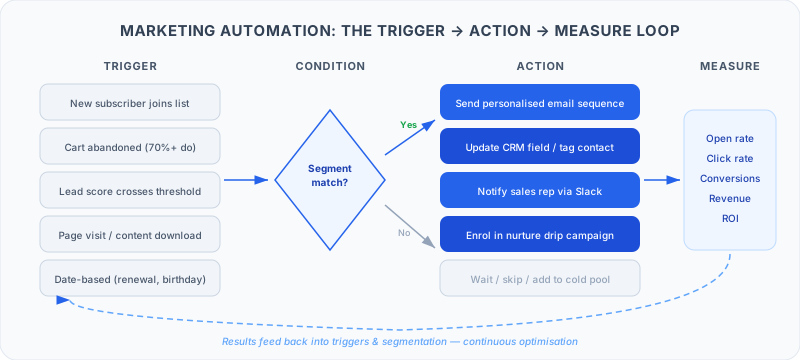
Marketing automation uses software — and increasingly AI — to execute marketing tasks without manual effort for each instance. Instead of manually sending a follow-up email after every demo request, you build a workflow: when a demo is booked, send email A; if they don’t open in 48 hours, send email B; if they click the pricing page, notify the sales rep.
The best marketing automation in 2026 goes beyond simple triggers. AI-powered workflows generate content dynamically, score leads intelligently, monitor competitors continuously, and adapt messaging based on behavior patterns — things that would require a full marketing team to do manually.
12 Marketing Automation Examples
1. Welcome Email Sequence Automation
What it is: When someone subscribes to your list, signs up for your product, or downloads a lead magnet, they automatically receive a sequence of emails introducing your brand, product, and value proposition over 5-7 days.
Why it works: New subscribers have peak engagement in the first 48-72 hours. A well-timed welcome sequence can generate 4x the open rates of standard campaigns.
How to implement: In HubSpot or ActiveCampaign, create a contact-based workflow triggered by list subscription. Build 4-6 emails with 24-48 hour delays. Use dynamic content to personalize based on which lead magnet or page triggered the subscription.
FlowHunt angle: Use FlowHunt to dynamically generate the welcome email body based on each subscriber’s source, industry, and company size — making each sequence feel genuinely personalized rather than templated.
2. Lead Nurturing Drip Campaigns
What it is: Automatically send a series of educational emails to leads who aren’t ready to buy yet, keeping them engaged until they’re ready.
Why it works: Only 3-5% of your target market is actively buying at any time. Nurture sequences keep you top of mind with the other 95%.
How to implement: Segment leads by topic interest (based on what content they downloaded), then build topic-specific email sequences. Track engagement and adjust frequency based on open/click rates.
FlowHunt angle: Build a FlowHunt agent that monitors which blog posts and resources each lead engages with, then automatically recommends and schedules the next most relevant content for their sequence.
3. Abandoned Cart Recovery
What it is: When an e-commerce customer adds items to their cart but doesn’t purchase, automatically send a sequence of recovery emails (and optionally SMS) reminding them and offering incentives.
Why it works: 70%+ of shopping carts are abandoned. Recovery sequences recover 5-15% of those — pure revenue that would otherwise be lost.
How to implement: Klaviyo has the most powerful abandoned cart automation for Shopify/WooCommerce, with pre-built flows that trigger 1 hour, 24 hours, and 72 hours post-abandonment. Include the specific cart items dynamically and A/B test discount timing.
4. Social Media Content Scheduling and Publishing
What it is: Build a content calendar, create posts in batches, and schedule them to publish automatically at optimal times across LinkedIn, Twitter/X, and Instagram.
Why it works: Consistent posting is required for social media algorithm performance, but doing it daily is a time sink. Batch creation and scheduled publishing 10x your efficiency.
How to implement: Use a social media scheduling tool (Hootsuite, Buffer, Sprout Social) combined with FlowHunt to automate parts of content creation. Build a workflow that takes your blog posts and generates 3-5 social variations per post automatically.
5. Blog Content Generation and Publishing
What it is: Use AI to draft, optimize, and in some cases fully publish blog content based on keyword research and content briefs.
Why it works: Content velocity is a competitive advantage. Teams that publish 4-8 high-quality posts per month consistently outrank teams publishing 1-2, at every domain authority level.
How to implement with FlowHunt: Build a workflow that takes a keyword + content brief → generates a full draft with AI → runs a readability check → formats for your CMS → posts to a review queue. Human editors review and approve before publishing.
6. Lead Scoring and Routing
What it is: Automatically assign point values to prospect behaviors (page visits, email opens, content downloads, pricing page views), calculate a total score, and route high-scoring leads to sales automatically.
Why it works: Sales teams waste 50-60% of time on leads that aren’t ready or aren’t a good fit. Lead scoring focuses effort where it’s most likely to convert.
How to implement: HubSpot and Marketo both have native lead scoring. Define your ICP attributes (company size, industry, role = demographic score) and behavioral attributes (pricing page view = +30 points, job posting engagement = +10 points). Set a threshold for MQL routing.
FlowHunt angle: Replace static scoring models with an AI agent that evaluates each lead’s complete behavior pattern and qualifies them contextually — not just by point totals.
7. Webinar Follow-Up Automation
What it is: When a webinar ends, automatically segment attendees by behavior (attended live, watched replay, no-show) and send tailored follow-up sequences for each segment.
Why it works: Most webinar leads are not followed up with effectively. Segmented, timely follow-up converts 2-3x better than a generic “thanks for attending” email.
How to implement: Connect your webinar platform (Zoom, Demio, ON24) to your marketing automation via Zapier or FlowHunt. Build three sequences: attendee (high engagement → direct sales follow-up), replay viewer (medium engagement → nurture), no-show (low engagement → re-invitation with replay link).
8. Competitive Intelligence Monitoring
What it is: Automatically monitor competitor websites, pricing pages, job postings, G2/Capterra reviews, and press releases for changes — then receive alerts or briefings.
Why it works: Competitive intelligence that used to require a dedicated analyst can now be automated entirely.
How to implement with FlowHunt: Build an agent that checks competitor pricing pages, new product announcements, and review sites weekly. Summarizes changes in a Slack message. Flags significant shifts (price changes, new features) for immediate review.
9. SEO Content Generation at Scale
What it is: Build a content pipeline where target keywords enter at the top and publication-ready first drafts emerge at the bottom — automatically.
Why it works: SEO at scale requires volume. Manual drafting limits how much content you can produce per month; AI-assisted generation removes that constraint.
How to implement: FlowHunt workflow: keyword input → SERP research → competitor gap analysis → content brief generation → AI draft → editor review queue. The automation handles research and drafting; humans handle editing and optimization.
10. Personalized Ad Retargeting Triggers
What it is: When a lead takes a specific high-intent action (pricing page visit, feature comparison view, free trial signup), automatically add them to targeted ad audiences across Google and LinkedIn.
Why it works: High-intent visitors convert at 3-5x the rate of cold traffic when retargeted. Coordinating your email nurture with retargeting ads creates consistent multi-channel follow-up without manual audience management.
How to implement: Use HubSpot’s ads integration or Zapier/FlowHunt to sync lead segments to Google Ads Customer Match and LinkedIn Matched Audiences. Trigger audience addition based on CRM lifecycle stage changes.
11. Customer Re-Engagement Campaigns
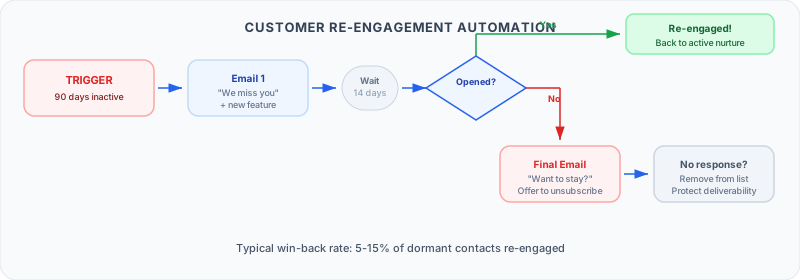
What it is: Identify customers or leads who have gone cold (no email opens in 90 days, no product logins in 30 days) and automatically send re-engagement campaigns.
Why it works: Reactivating an existing contact costs significantly less than acquiring a new one. A good re-engagement sequence recovers 5-15% of dormant contacts.
How to implement: Set up a workflow triggered by inactivity. Send a “we miss you” email with a compelling offer or new feature highlight. If no engagement in 14 days, send a final email offering to unsubscribe. Clean unresponsive contacts to protect deliverability.
12. Monthly Newsletter Curation with AI
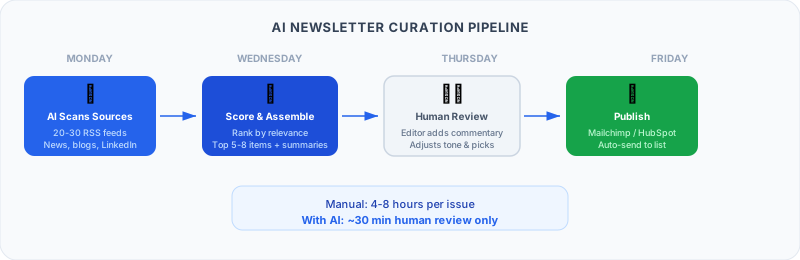
What it is: Build an AI agent that monitors industry sources (RSS feeds, newsletters, LinkedIn posts, news), curates the most relevant content each week, writes brief summaries, and assembles a draft newsletter — ready for human review and publication.
Why it works: Consistent newsletters build audience relationships and drive inbound leads, but curation and writing takes 4-8 hours per issue manually.
How to implement with FlowHunt: Monday: FlowHunt agent scans 20-30 RSS feeds and source URLs, reads articles, scores relevance to your audience. Wednesday: agent assembles top 5-8 items with AI-written summaries. Thursday: human editor reviews and adds commentary. Friday: publish via Mailchimp/HubSpot.
Gotowy na rozwój swojej firmy?
Rozpocznij bezpłatny okres próbny już dziś i zobacz rezultaty w ciągu kilku dni.
How to Implement with FlowHunt: 3 Specific Workflows
Workflow 1: AI Lead Qualification on Form Submit
Contact submits a demo request form
FlowHunt receives the form webhook
Agent enriches the contact: pulls company data, checks LinkedIn, reviews firmographic fit
Agent scores the lead (A/B/C grade) based on ICP criteria
If Grade A: create CRM deal, notify AE in Slack, send personalized confirmation email
If Grade B: add to nurture sequence, schedule SDR follow-up in 48 hours
If Grade C: add to newsletter list, send resource email, no rep notification
Workflow 2: Competitive Intelligence Weekly Brief
Every Monday morning, FlowHunt agent runs
Checks 5 competitor pricing pages for changes
Reads competitor blog RSS feeds for new content
Scans G2 and Capterra for new competitor reviews
Summarizes findings in a structured brief
Posts to #competitive-intel Slack channel with highlights flagged
Workflow 3: Blog-to-Social Content Pipeline
New blog post published → webhook fires to FlowHunt
Agent reads the full blog post
Generates 5 social post variations: 1 LinkedIn long-form, 2 LinkedIn short-form, 2 Twitter/X posts
Adds all variations to Buffer/Hootsuite scheduling queue
Sends Slack notification to social media manager with preview
Tools You Need for Marketing Automation
Narzędzie
Role
Darmowy Tier
Cena Startowa
FlowHunt
AI workflow orchestration
✅
Usage-based
HubSpot
CRM + email automation
✅
$800/month (Marketing Pro)
ActiveCampaign
Email + behavioral automation
✅
$15/month
Marketo
Enterprise marketing automation
❌
$895/month
Klaviyo
E-commerce email/SMS
✅
$20/month
Pardot
B2B marketing (Salesforce)
❌
$1,250/month
Start with one automation — the welcome email sequence is the highest-ROI starting point. Get that working, measure results, then layer in lead scoring and content automation. See our business process automation
guide for broader automation strategy, and our workflow automation beginners guide
for getting started step by step.
Najczęściej zadawane pytania
Marketing automation is the use of software to automate repetitive marketing tasks — sending emails, scoring leads, posting to social media, personalizing web experiences, and more. The goal is to deliver the right message to the right person at the right time, without doing it manually every time.
The most widely implemented are: welcome email sequences (triggered when someone signs up), lead nurturing drip campaigns (timed email sequences based on content interest), abandoned cart recovery (for e-commerce), lead scoring (assigning point values to prospect actions), and webinar follow-up sequences. These five alone can significantly improve conversion rates.
It varies widely. HubSpot's Marketing Hub starts at $800/month for the professional tier. ActiveCampaign starts at $15/month for basic email automation. Klaviyo has a free tier for up to 250 contacts. FlowHunt is usage-based with a free tier. For SMBs, a basic marketing automation stack can be assembled for $100-300/month. Enterprise platforms (Marketo, Pardot) typically cost $10,000+/year.
Email marketing sends the same message to a list — typically a newsletter or campaign blast. Marketing automation sends different messages to different people based on their behavior, stage in the funnel, and attributes. It's personalization at scale: the right email sent automatically when someone takes a specific action (downloads a guide, visits a pricing page, abandons a cart).
A basic welcome email sequence can be live in an afternoon. A full lead nurturing system with scoring, segmentation, and multi-channel sequences typically takes 2-4 weeks to plan, build, and test. Advanced implementations with AI-generated content and dynamic personalization may take 1-3 months to do properly.
Arshia jest Inżynierką Przepływów Pracy AI w FlowHunt. Z wykształceniem informatycznym i pasją do sztucznej inteligencji, specjalizuje się w tworzeniu wydajnych przepływów pracy, które integrują narzędzia AI z codziennymi zadaniami, zwiększając produktywność i kreatywność.
Arshia Kahani
Inżynierka Przepływów Pracy AI
Automate Your Marketing with AI — Wypróbuj FlowHunt Za Darmo
FlowHunt łączy Twoje modele AI, istniejące narzędzia i prawdziwe dane w zautomatyzowane przepływy pracy. Zbuduj swój pierwszy flow w kilka minut — bez kodu.
10 Najlepszych Platform Automatyzacji Marketingu w 2026: Ranking i Recenzje
10 najlepszych platform oprogramowania do automatyzacji marketingu w 2026, ocenionych pod kątem możliwości AI, łatwości użycia i cen. Znajdź platformę odpowiedn...
AI w Marketingu: Czym Jest, Jak Działa i Jak Go Wykorzystać w 2026
Odkryj, jak AI w marketingu działa, od automatyzacji marketingu po treści oparte na AI i generowanie leadów, z rzeczywistymi przypadkami użycia, narzędziami i s...
Integracja AI z narzędziami automatyzacji marketingu: Kompletny przewodnik po nowoczesnym marketingu
Odkryj, jak zintegrować AI z platformami automatyzacji marketingu, aby zwiększyć personalizację, analitykę predykcyjną i zaangażowanie klientów. Poznaj najlepsz...
15 min czytania
AI
Marketing Automation
+3
Zgoda na Pliki Cookie Używamy plików cookie, aby poprawić jakość przeglądania i analizować nasz ruch. See our privacy policy.