


Prompt
Prompt template for instructing the LLM to translate input text into English with preserved formatting.
This workflow allows users to instantly translate any input text into English using AI. Users enter or upload text, which is then processed and translated with accurate formatting, making it easy to understand content in English.
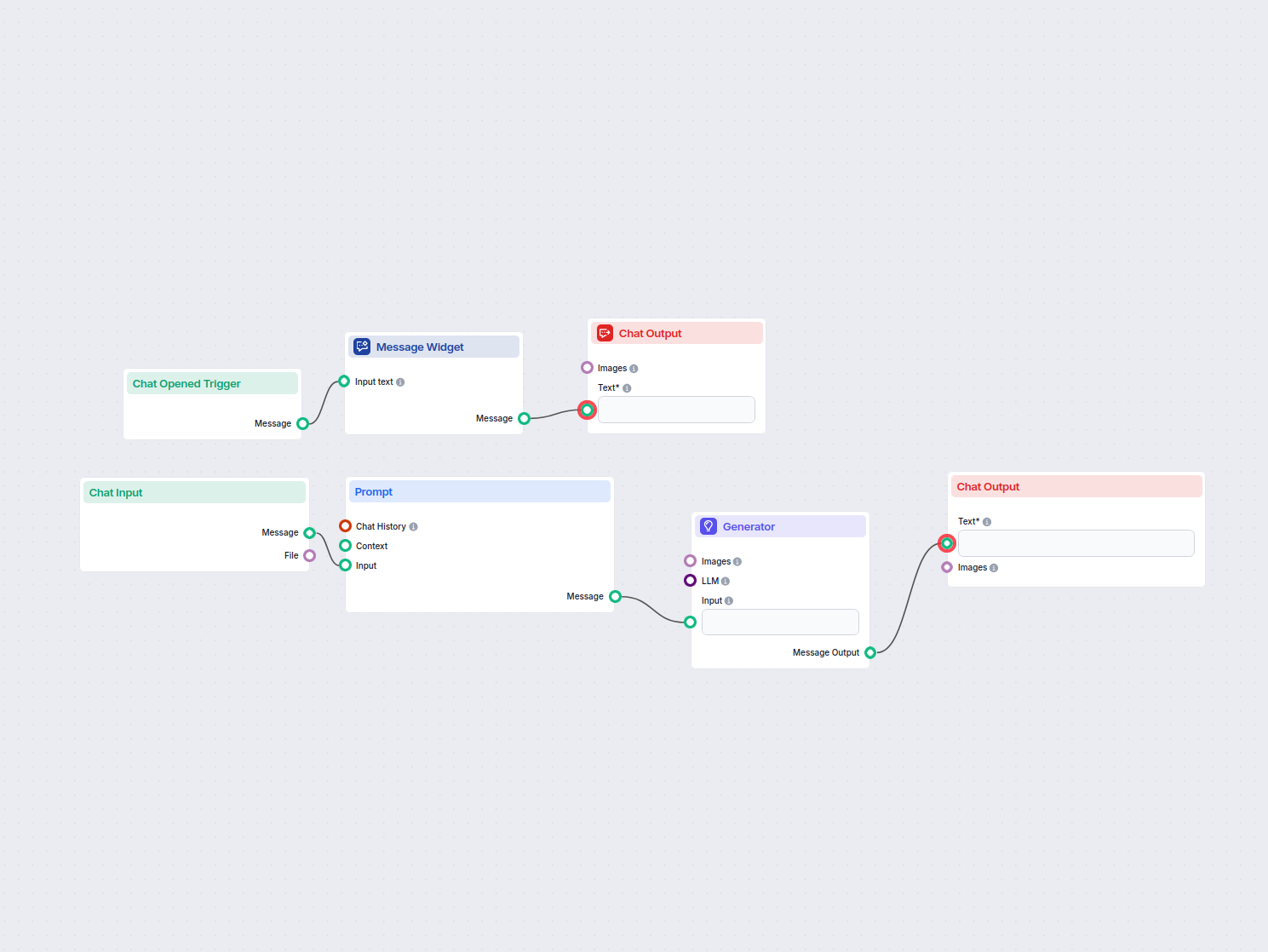

Flows
Prompt template for instructing the LLM to translate input text into English with preserved formatting.
Below is a complete list of all components used in this flow to achieve its functionality. Components are the building blocks of every AI Flow. They allow you to create complex interactions and automate tasks by connecting various functionalities. Each component serves a specific purpose, such as handling user input, processing data, or integrating with external services.

The Chat Input component in FlowHunt initiates user interactions by capturing messages from the Playground. It serves as the starting point for flows, enabling the workflow to process both text and file-based inputs.

Learn how FlowHunt's Prompt component lets you define your AI bot’s role and behavior, ensuring relevant, personalized responses. Customize prompts and templates for effective, context-aware chatbot flows.

Explore the Generator component in FlowHunt—powerful AI-driven text generation using your chosen LLM model. Effortlessly create dynamic chatbot responses by combining prompts, optional system instructions, and even images as input, making it a core tool for building intelligent, conversational workflows.

Discover the Chat Output component in FlowHunt—finalize chatbot responses with flexible, multi-part outputs. Essential for seamless flow completion and creating advanced, interactive AI chatbots.

The Message Widget component displays custom messages within your workflow. Ideal for welcoming users, providing instructions, or showing any important information, it supports Markdown formatting and can be set to appear only once per session.

The Chat Opened Trigger component detects when a chat session starts, enabling workflows to respond instantly as soon as a user opens the chat. It initiates flows with the initial chat message, making it essential for building responsive, interactive chatbots.
Flow description
This workflow is designed to automate the process of translating any user-provided text into English. It provides a seamless chat-based experience, making it user-friendly and highly scalable for various translation needs. Below is a detailed breakdown of each step and component involved in the workflow.
The translation workflow consists of several interconnected nodes, each handling a specific part of the process:
| Step | Node Name | Purpose |
|---|---|---|
| 1 | ChatOpenedTrigger | Detects when the chat is opened |
| 2 | MessageWidget | Displays a welcome message to the user |
| 3 | ChatInput | Accepts user input (text to be translated) |
| 4 | PromptTemplate | Formats the input and instructions for translation |
| 5 | Generator | Uses an AI model to generate the English translation |
| 6 | ChatOutput | Displays both messages and translated results to the user |
You are the professional translator.
Your task is to translate INPUT TEXT into English.
Keep the same format of input text also in translated text.

TRANSLATE into English:
{input}
| Node | Function |
|---|---|
| ChatOpenedTrigger | Detects when user enters the chat |
| MessageWidget | Shows a welcome/instruction message |
| ChatInput | Collects the text to be translated |
| PromptTemplate | Prepares the translation instruction for the AI |
| Generator | Produces the English translation |
| ChatOutput | Shows messages and translated text to the user |
This workflow provides an efficient, reliable, and scalable solution for translating any text into English, streamlining communication and information access across language barriers.
Discover the AI Translator Tool by FlowHunt—an AI-driven solution delivering quick, accurate, context-aware translations by detecting language automatically. Id...
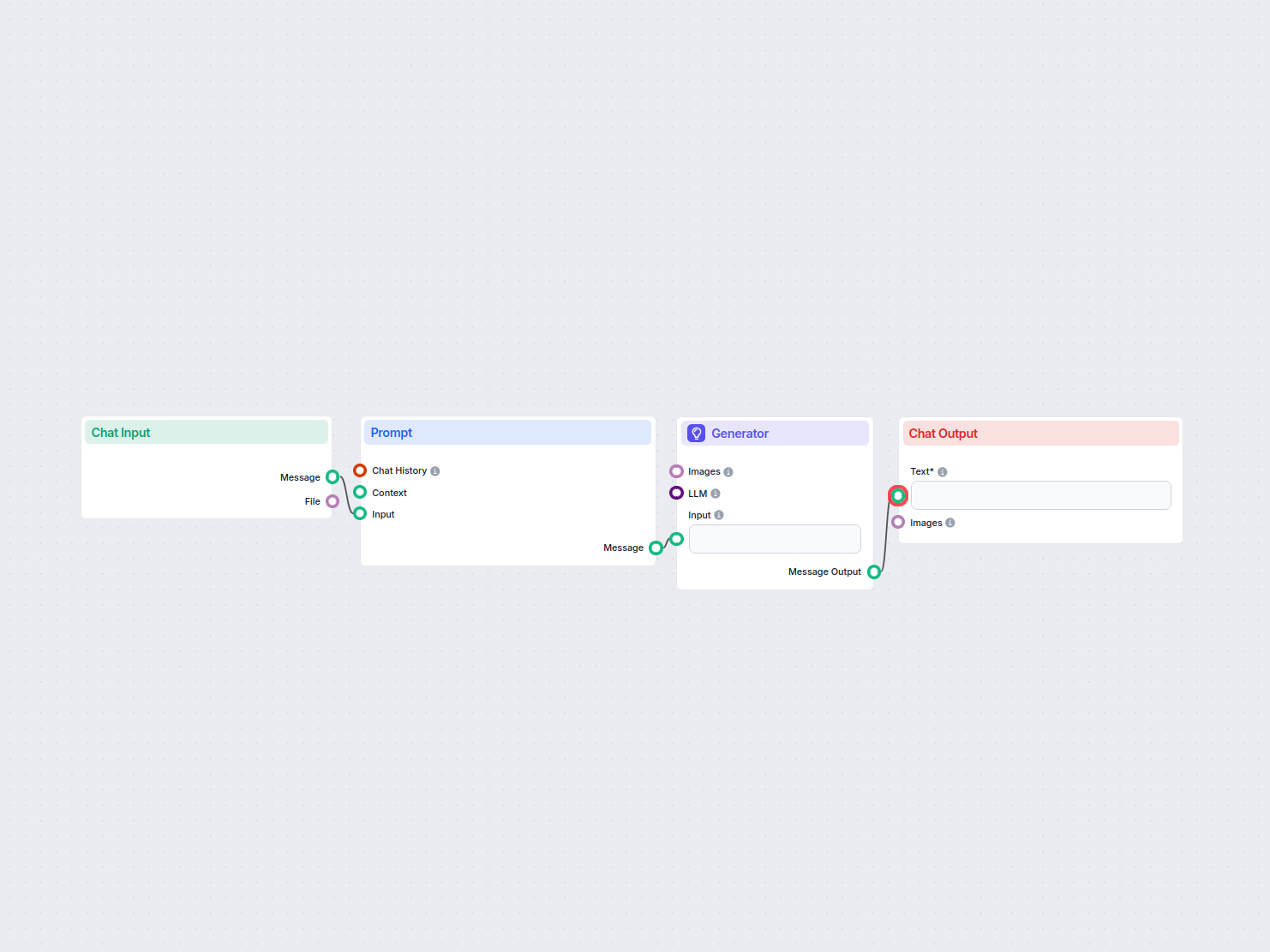
Translate web content between languages while preserving HTML structure, using AI and UrlsLab plugin. Email addresses and URLs remain unchanged, ensuring accura...
Transform your English text into natural, fluent Russian with our AI-powered translation tool. Leveraging advanced language models, this translator ensures accu...
Cookie Consent
We use cookies to enhance your browsing experience and analyze our traffic. See our privacy policy.