


AI OCR Invoice Data Extraction with a Simple Python Script
Discover a scalable Python solution for invoice data extraction using AI-based OCR. Learn how to convert PDFs, upload images to FlowHunt’s API, and retrieve str...
7 min read
AI
OCR
+6
Not every invoice workflow has the same bottleneck. Here are 5 finance workflows where AI invoice processing saves the most time per week, and what that time savings actually looks like.
Not all invoice processing workflows have the same bottleneck. A high-volume accounts payable team is fighting a completely different problem than a freelancer chasing down five client invoices a month. AI invoice processing use cases vary just as much as the teams running them. Here are five specific workflows where it saves the most time per week, and what the time savings look like in each case.
This is the clearest case for AP automation AI. A team processing hundreds of supplier invoices a month is paying for that volume twice over. Once in the $12-30 fully loaded cost per invoice that manual processing carries, and again in the staff hours that scale linearly with invoice count.
At 500 invoices a month and 10-15 minutes of hands-on time each, that’s roughly 80-125 hours of pure data entry before anyone gets to the actual finance work of reconciliation and reporting.
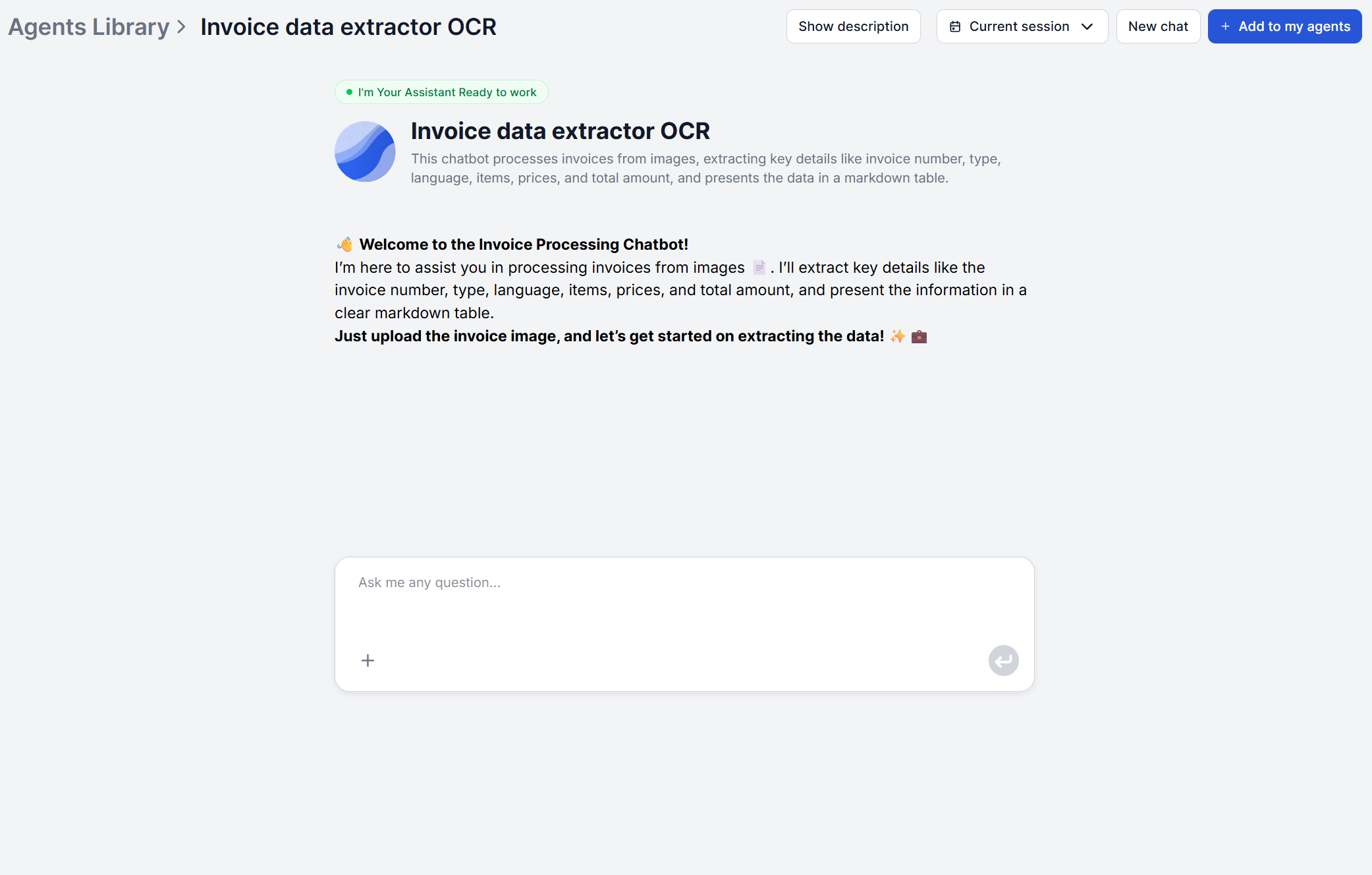
Running the same volume through the Invoice Data Extractor turns that into an upload-and-review process. Each invoice comes back as a structured table plus a CSV file, ready to import into the ledger. The team’s time shifts from typing numbers to checking exceptions and matching invoices to purchase orders, which is where AP staff are actually needed.
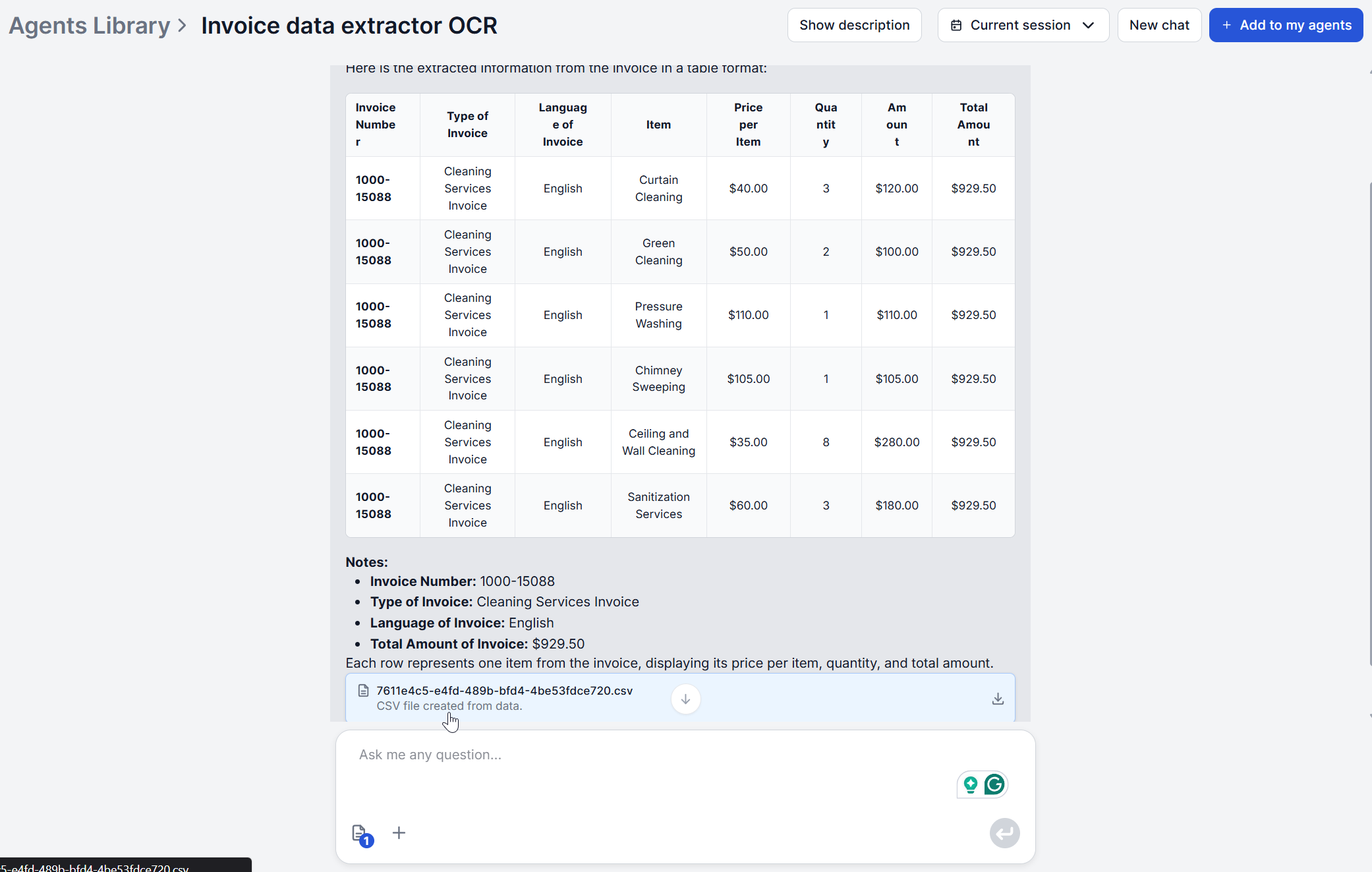
The time savings compound at month-end close specifically. When every invoice processed that month already exists as a consistent row of structured data, closing the books becomes a matter of reviewing totals and flagging mismatches rather than re-reading a stack of PDFs to reconstruct what was actually billed.
For AP teams supporting international suppliers, FlowHunt’s automatic language detection removes another recurring bottleneck. Invoices no longer need to be routed to whichever team member happens to read that vendor’s language before they can be processed at all.
Expense reports have their own version of the same problem, at a different scale. The GBTA Foundation puts the average cost of processing one expense report at $58 and 20 minutes of staff time , with a further 18 minutes needed to correct each report that contains an error (and 19% of expense reports do). For an employee filing ten expense reports a month, that’s already over three hours of pure administrative work before errors are factored in.
Because the extractor works from photos as readily as scans, an employee’s phone photo of a receipt goes through the same OCR-plus-AI pipeline as a formal supplier invoice. That matters for finance AI tools SME use in particular, since smaller teams rarely have a dedicated expense system and most receipts arrive as photos rather than clean PDFs.
The correction time is really the part worth targeting. Most of the 18 minutes GBTA measures per erroneous report goes to tracking down the employee, clarifying what a smudged total or an illegible merchant name actually says, and re-submitting.
Structured extraction doesn’t eliminate every ambiguous receipt, but it does remove the far more common failure mode of a manually transcribed total simply being typed wrong, which is the error category most likely to slip past a first review.

Start your free trial today and see results within days.
Procurement teams juggling dozens or hundreds of active vendors run into the fact that every vendor formats their invoices differently, and building a parsing template per vendor doesn’t scale. This is where invoice workflow automation built on AI rather than fixed templates earns its keep. The model looks for what a field means, not where it’s positioned, so a new vendor’s invoice works the first time it’s uploaded, with no configuration step in between.
Once line items and totals are structured consistently across every vendor, matching invoices against purchase orders becomes a comparison task instead of a re-reading task. For procurement teams that also need to check vendor contract terms during reconciliation, Chat with PDF is a useful pairing — extract the invoice data with one tool, then query the actual contract document with the other when a line item needs a second look.
Freelancers and small agencies sit at the opposite end of the volume spectrum from enterprise AP teams, and that’s exactly why the pay-per-use model matters here. A freelancer processing a handful of subcontractor invoices a week doesn’t have the volume to justify a $200-800/month AP automation subscription, but manual entry still costs the same 10-15 minutes per invoice regardless of how few there are.
Because FlowHunt’s extraction runs on fractions of a cent per invoice rather than a flat subscription, FlowHunt’s OCR cost benchmark puts it at roughly 0.01-0.02 credits per invoice, there’s no minimum volume needed to come out ahead. The model is also subscription based, but the same subscription gives you access to an entire automation platform, with hundreds of other tools and use cases.
The bigger win for solo freelancers and small agencies is often less about hours saved and more about what stops falling through the cracks. A subcontractor invoice photographed on a phone and forwarded in a chat message is easy to lose track of when it has to wait for someone to sit down and type it into a spreadsheet. Extracting it into a structured row the moment it arrives means the invoice is logged before it has a chance to be forgotten, which matters more at low volume than the minutes-per-invoice math suggests on its own.
Get latest tips, trends, and deals for free.
Recurring invoices from SaaS tools, vendors on retainer, and subscription services create a quieter version of the volume problem: the same invoice shape repeats every month, but so does the manual entry, and recurring billing is exactly where duplicate charges tend to slip through.
Extraction handles the reading and structuring consistently every month, and pairing it with a Conditional Router step that checks the extracted invoice number or amount against a log of previously processed invoices turns reconciliation into an ongoing check instead of a monthly scramble.
Recurring invoices also tend to be where quiet price creep hides. Because extraction returns the same structured fields every month rather than a total someone glances at and approves, month-over-month comparisons on line items become straightforward instead of requiring someone to remember what last month’s invoice actually itemized.
Before automating anything, it’s worth doing the arithmetic on your own invoice volume rather than assuming the case for it. Start with how many invoices you process a month, and how many minutes each one takes manually. 10 to 15 minutes per invoice is a reasonable industry baseline if you haven’t timed your own process. Multiply the two, and you have your current monthly time cost in hours.
That number is what AI extraction is competing against, not a flat subscription fee. Dedicated AP automation platforms typically need real volume to pay back their monthly cost, with organizations processing 5,000+ invoices a month often see payback within a quarter on that kind of platform.
FlowHunt’s subscription starts at $50 and only charges you credits for the invoices you actually process. You’re then free to use the rest of the monthly allowance on the hundreds of other AI workflows and tools included in the platform. The break-even point is simply whether the minutes saved per invoice are worth more to you than the extraction cost which, at a fraction of a cent per invoice, is true at almost any volume.
Ready to see what your own invoice volume is costing you? Try the Invoice Data Extractor on your next batch and compare the time against your current process.
Whether you're processing hundreds of supplier invoices a month or a handful of client invoices a week, FlowHunt's Invoice Data Extractor turns invoice images into structured data in seconds. Try it free on your next invoice.
Discover a scalable Python solution for invoice data extraction using AI-based OCR. Learn how to convert PDFs, upload images to FlowHunt’s API, and retrieve str...
FlowHunt, Rossum, Docsumo, Nanonets, and Klippa compared on invoice format handling, integrations, and premium pricing. See which AI invoice processing tool fit...

AI invoice data extraction reads any invoice format. A PDF, scan, or photo, and returns structured data in seconds. Here's the exact process and what to verify ...
Cookie Consent
We use cookies to enhance your browsing experience and analyze our traffic. See our privacy policy.