We knew FlowHunt needed an MCP server, and we didn’t think it would help us much. It ended up helping us most.
Key takeaways
- We always knew FlowHunt needed an MCP server. We saw it as a feature users expect, and we were sure it would do nothing for us as developers. That turned out to be wrong.
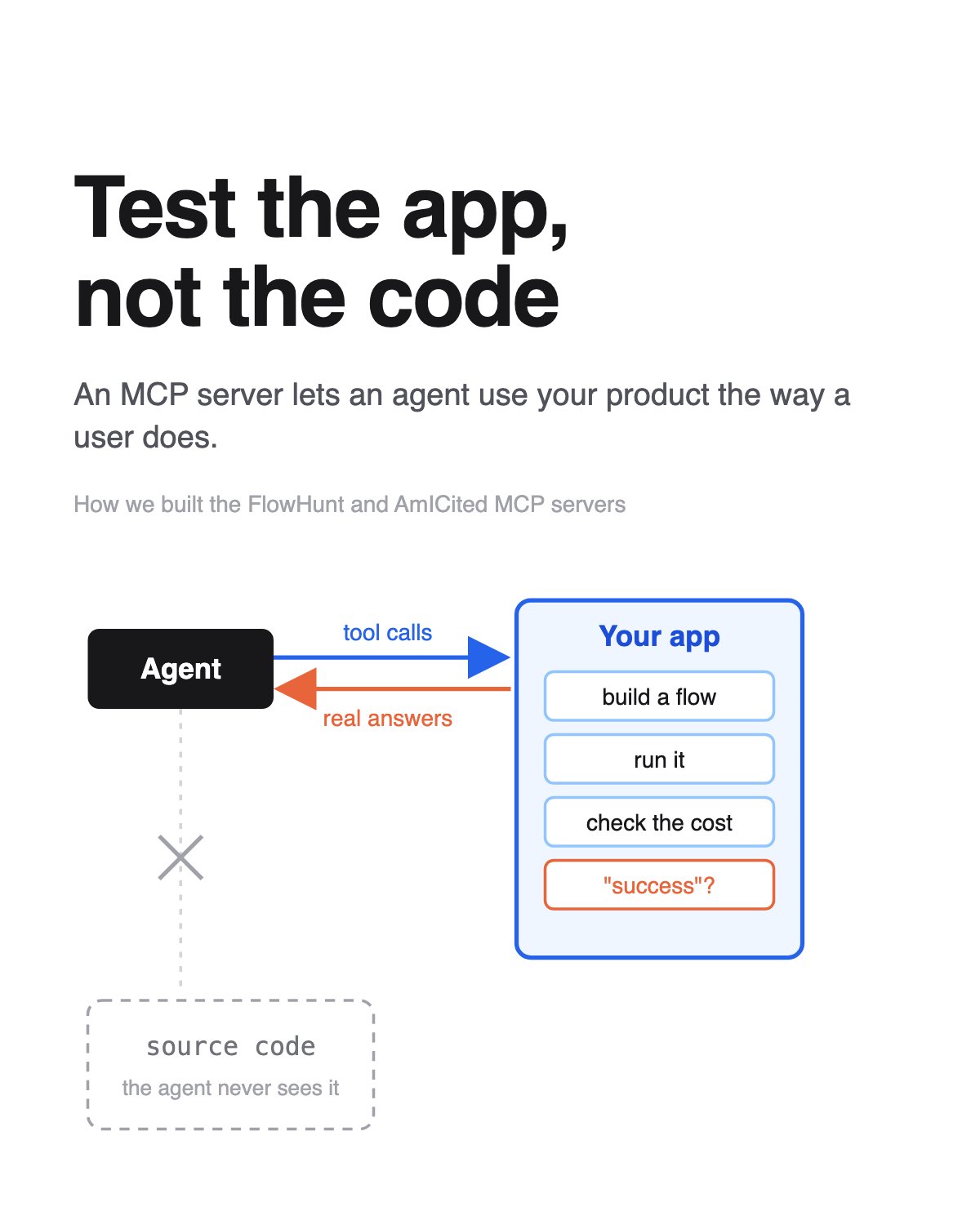
- An agent connected to an MCP server cannot see the code. It only sees the tools and their answers, so it tests the app the way a user would. In our testing before launch it found runs that reported zero cost, bulk actions that said “success” for ids that didn’t exist, and a batch of 11 rows that reported 16 done. We fixed all of them before the server shipped.
- It also showed us where our design didn’t match how an agent thinks. Six agents building flows all failed their first call because of one argument name.
- Building it with a coding agent was fairly quick, because our API already existed. Most of the work was choosing what to expose and making it safe.
- Both servers are live: AmICited for SEO, GEO and AEO, and AI Studio for automation, where your agent builds flows from the know-how in our Agents Library. Connection steps are at the end.
Why build an MCP server if your app already has an API?
An MCP server exposes your app to AI agents over the Model Context Protocol , the open standard that lets an MCP client such as Claude, ChatGPT or Cursor discover your tools and call them. If you’re new to it, our guide to what an MCP server is covers the basics.
For a long time, FlowHunt didn’t have a proper MCP server. Every popular app seemed to be shipping one, and we had a beta here and there, but nobody took the time to finish it.
We knew we needed one. With AmICited it was obvious, because people want to ask an agent “how is my brand cited in AI search this week” without opening a dashboard. AI Studio, our visual flow builder, needed one too. We just saw it as a checkbox: something users expect, worth having, nothing special. And we were sure it had nothing to offer us as developers. It would be one more API surface to maintain.
The opposite turned out to be true. The MCP server became one of the most useful things we built in 2026, and the people it helped most were us.

Ready to grow your business?
Start your free trial today and see results within days.
How to build an MCP server for an existing app
If you already have an app, you already have most of an MCP server. The functions and API routes exist. What’s left is mostly decisions, and a coding agent makes those fast. For the code itself (installing the SDK, defining a tool, running the server), see our MCP server development guide .
Turn your API routes into MCP tools
- Ask your agent to list every function and API route the app has.
- Decide which of them an agent should be able to use. For us that was nearly everything a user can do in the dashboard.
- Have the agent wrap each one as a tool: a name, a description written in the words a user would search for, and a call to the existing endpoint.
- Do the security work.
- Submit the server to the connector directories of Anthropic and other AI providers, so people can find it where they already look.
Our MCP tools are thin wrappers. Each one calls an existing endpoint and returns its existing response, so the agent can list flows, read a flow’s canvas, edit it, run it and read the result. Permissions and credit checks live below that wrapper, so the agent gets exactly the rights the user has in the dashboard.
Secure the MCP server
The security work took the most thought, and it was still a matter of focused sessions with Claude, not weeks. In those sessions we:
- moved sign-in to OAuth, with grants the user can see and revoke from the dashboard
- bound every connection to one workspace, so no tool takes a workspace id an agent could change
- capped import sizes and concurrency
- marked every tool that writes data, and flagged deletes and anything that spends money as destructive
None of that is exotic. It’s the same checklist you’d run on any public API. Claude was good at finding the places where we’d missed one. Our MCP security checklist and the post on MCP authentication with OAuth go deeper.
How is MCP server testing different from unit tests?
This is the part I didn’t see coming.
When agents write code for you, they mostly test the code. They run the unit tests. Sometimes they do a verification pass, or click through the web UI in a browser. All of that checks that the code does what the code says. None of it checks whether a person, or an agent, can actually get their job done with the product.
An MCP server changes that. The agent connected to it can’t see the source. It only sees the tools, their descriptions and the answers they return. That’s the same position a real user is in, so when the agent uses the MCP server it’s testing the app.
What the agents found before launch
Our black-box test before launch did exactly that. We gave agents tasks and let them use AI Studio through the MCP server on our internal test environment, and they found problems no unit test had caught:
- A finished run reported a cost of zero, even though it had spent credits.
- Bulk actions said “success” for ids that didn’t exist.
- A batch of 11 rows reported 16 rows done, because replayed steps counted finished rows a second time.
- A stopped run looked like it was still running, and it stayed that way forever.
- Changing an FAQ’s answer didn’t update its alternative questions.
- Tools accepted settings the product can’t use, like a model name that isn’t in the catalogue, and saved them without complaint.
None of these reached our users. Internal testing found them, and we fixed them before the server launched. Unit tests had passed over every one of them, and a person clicking through the UI could easily miss them too, refreshing the page or shrugging at an odd number. An agent doesn’t. It takes the answer at face value and does the wrong thing next, which shows you exactly where the answer was wrong.
Join our newsletter
Get latest tips, trends, and deals for free.
What tool design gaps did the agents expose?
The second kind of finding was more interesting. These weren’t bugs. They were gaps between how we designed a tool and how an agent actually tried to use it.
Argument names an agent guesses
In one test, six agents each built a flow over the MCP server. All six failed their first call to look up a component, because they guessed the argument was called type and we’d named it component_type. One agent spent about ten calls looking for Google search, because our search ranked a “Search Received Orders” step from an ERP integration above “Google Search Retriever” when you typed “search”.
You’d never catch that in a code review, because the code was correct. The tool did what it said. It just didn’t match what anyone would reasonably try first. So we renamed the arguments to the names the search results return, and we ranked search results by how well they match. Agents stopped stumbling.
Playbooks tested the same way
We also wrote short playbooks, served through the MCP server as skills, that tell an agent how to build a good flow: check the library first, test the draft before publishing, keep the guardrails out of the final answer. Then we tested the playbooks the same way. Fresh agents rebuilt the same tasks with only the playbook to read, and a separate model judged the results without knowing which was which. With the final playbook, builders finished in roughly a third of the time they took with the draft. The runs also exposed gaps in the playbook itself, like the fact that search has no date filter unless you put after:YYYY-MM-DD in the query. That went back into the text.
That’s a feedback loop we never had before. The agent uses the app, gets stuck somewhere specific, and we fix that spot.
How an MCP server changes pull request review
Reviewing a pull request is different now. Before, verifying a change meant reading the diff, running the tests and maybe clicking through the UI. Now the test scenario is a sentence: “connect to the MCP server, build a flow that does X, run it, check the cost.” The agent drives the real app, and the result is something you can paste into the pull request as evidence.
The scenarios became clearer because they’re written as user tasks, not as test functions. They also cost fewer tokens. Driving an app through MCP tools is much cheaper than having an agent read screenshots and hunt for buttons in a browser. And they find the gaps between features, which is where most of our real problems were hiding.
What an MCP server changes for your users
FlowHunt is a big application. AI Studio alone has flows, agents, chatbots, knowledge bases, schedules, batches, integrations and more than a thousand components. AmICited has its own long list of reports. A lot of people find it hard to get started. Even people who do get started miss features, or find them by accident months later.
With the MCP server, that matters much less. You tell your agent what you want, and the agent finds the tool that does it. It reads the description, knows which feature fits, and uses it. Apart from copying the connection URL, you don’t have to open the dashboard. People end up using more of what the product can do, and I think they value it more, because they actually see all of it.
How to connect the FlowHunt and AmICited MCP servers
Both servers are live, and I’d like everyone to try them: companies, agencies, marketing teams, founders who do their own SEO. You connect the agent you already use, sign in, pick a workspace, and start asking.
AmICited MCP server for SEO, GEO and AEO
AmICited tracks how AI search engines cite your brand, and it connects Search Console, GA4, site audits, backlinks, competitors, ad platforms and marketing mix models. Through MCP, your agent can use all of it. The server also ships 29 playbooks the agent can read, written from the way we run these analyses ourselves: traffic drop triage, AI visibility audit, competitor gap analysis, cannibalization cleanup, paid waste review, “did our change work”, and more. You ask a question in plain words and the agent follows the playbook that fits:
- “Why did organic traffic drop last week?”
- “Which prompts cite my competitors but not us, and what content would fix that?”
- “Which ad campaigns spend money without converting?”
- “Audit the site and tell me the five fixes worth doing first.”
You don’t need to know which report holds the answer. The agent knows.
FlowHunt AI Studio MCP server for workflow automation
This part surprised me the most. The FlowHunt Agents Library has 264 published flows that we’ve built and refined over years, and customers hire some of them every day. We distilled what makes those flows work into a playbook the MCP server hands to your agent, weighted toward the 28 flows customers hire most. So when you ask your agent to automate something, it doesn’t start from a blank canvas. It checks the library for a close template, reads how that flow is built (the tools, the prompt, the output format, the guardrails), applies the pattern to your task, tests a draft, and only then publishes it.
In practice, you describe the job and get a working flow that uses years of our know-how:
- “Every morning, summarize the news about our competitors and send it to Slack.”
- “Read new support tickets, answer the ones the knowledge base covers, and tag the rest.”
- “Build a chatbot for our pricing page that answers from our docs.”
You can build complex flows this way: agents that call other agents, routers, scheduled runs, batches over a spreadsheet. That kind of flow takes a while to learn in the visual editor. Your agent gets there in minutes, and you can still open the canvas afterwards to see what it built.
Connect in Claude Code, Claude or ChatGPT
Connecting takes a minute. Add the server to any MCP client that supports remote servers. In Claude Code, run:
claude mcp add --transport http flowhunt-aistudio https://api.flowhunt.io/mcp/aistudio
claude mcp add --transport http flowhunt-amicited https://api.flowhunt.io/mcp/amicited
In Claude and ChatGPT, add the same URL as a custom connector. Your client opens a sign-in page, you choose the workspace, and the agent sees only that workspace. You can see and revoke connected clients from the dashboard at any time. The connection docs have the steps for each client.
Plans and pricing
You can connect an agent on the 7-day trial and on the Pro, Agency and Enterprise plans . Starter doesn’t include MCP access. On AI Studio, the MCP calls themselves are free, up to an hourly cap that depends on your plan: 120 calls on the trial, 600 on Pro, 2,000 on Agency, and no cap on Enterprise. Anything that spends credits in the dashboard, like running a flow, spends the same credits through MCP. On AmICited, each MCP request costs 0.001 credit, so a thousand requests cost one credit.
Next steps: build an MCP server, and try ours
If you own an app, build the MCP server. Do it even if you think it’s only a feature for users and won’t do anything for your developers. We thought that too, and we were wrong. It’s a test client that uses your product the way a stranger would, and it reports every confusing argument name, every wrong number and every “success” that wasn’t one. If you already have an API, building it is quick, and the security work is a few focused sessions, not a project.
If you work in marketing, SEO or operations, connect your agent to FlowHunt and AmICited and give it a real task from your week. You’ll find features you didn’t know we had, and you won’t have to learn the dashboard to use them.
MCP servers aren’t only for your users. They’re one of the best tools your developers can have. And for your users, they’re the fastest way to get the most out of your product.