

OneDrive MCP Server
Integrate Microsoft OneDrive with FlowHunt through MCP to manage cloud storage, file operations, and document workflows seamlessly. Upload, download, organize, ...
5 min read
OneDrive
Cloud Storage
+6

Connect your Microsoft PowerBI to FlowHunt for intelligent business intelligence automation and data visualization workflows.
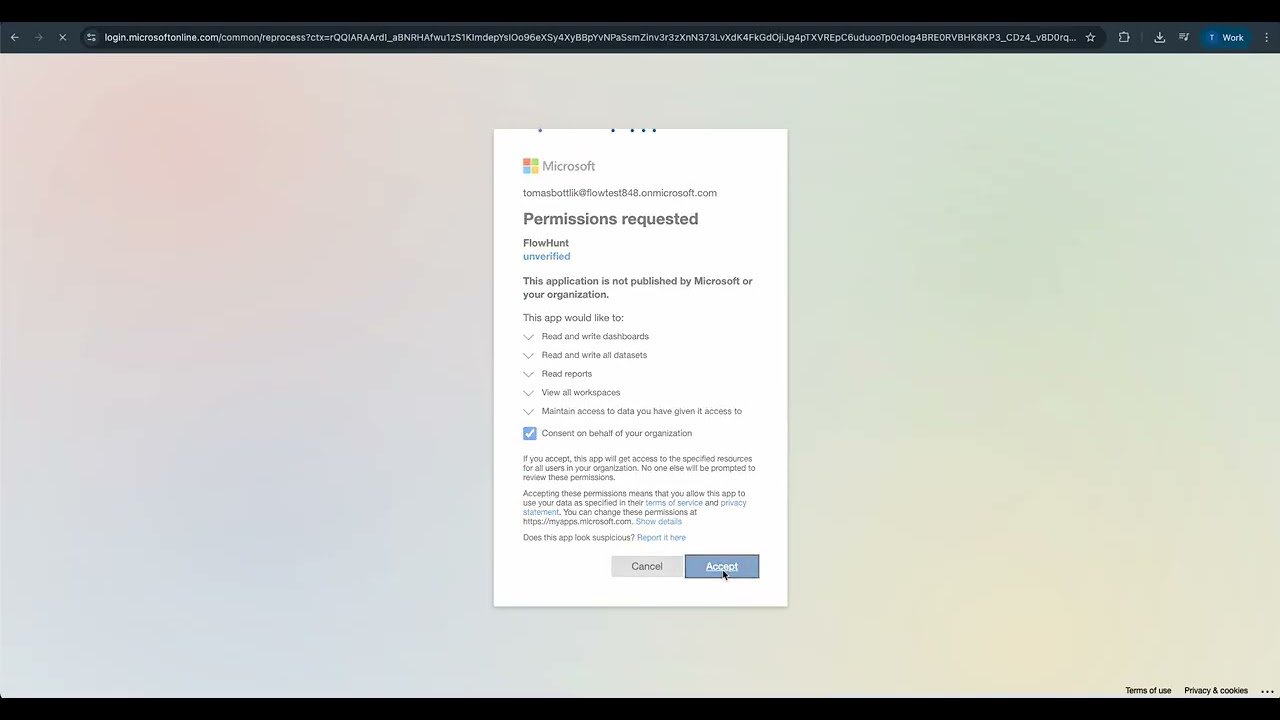
MCP INTEGRATION
The following tools are available as part of the PowerBI MCP integration:
List all accessible PowerBI workspaces with details about permissions, content, and collaboration settings.
Retrieve detailed information about a specific PowerBI workspace including metadata, users, and content overview.
List all datasets within a PowerBI workspace with information about data sources, refresh status, and metadata.
Retrieve comprehensive details of a specific dataset including tables, columns, relationships, and data model structure.
Trigger a manual refresh of a PowerBI dataset to update data from connected sources and maintain data currency.
Execute Data Analysis Expressions (DAX) queries on PowerBI datasets for advanced data analysis and custom calculations.
List all reports within a PowerBI workspace with details about ownership, creation date, and modification history.
Retrieve detailed information about a specific report including pages, visuals, filters, and configuration settings.
List all dashboards in a PowerBI workspace with information about tiles, layout, and sharing permissions.
Retrieve tiles from a specific dashboard including visual content, data sources, and interactive elements.
📝 Note: You can modify or add tools later based on your evolving business intelligence and analytics needs.

Start your free trial today and see results within days.
{
  "mcp": {
    "transport": "streamable_http",
    "url": "https://mcp.flowhunt.io/••••••••"
  }
}
🔒 Important: Treat your MCP server URL as a password. It provides direct access to your PowerBI data and server tools. Never share it publicly or commit it to version control.
You have two powerful options for implementing your PowerBI automation:
Best for: Getting started quickly with proven business intelligence automation patterns
Generate Flow: In your MCP Server configuration, click “Create Preconfigured Flow”.
Select Template: Choose “AI Agent with MCP” to create a ready-to-use workflow.
Customize Logic: Use FlowHunt’s visual flow builder to tailor the automation:
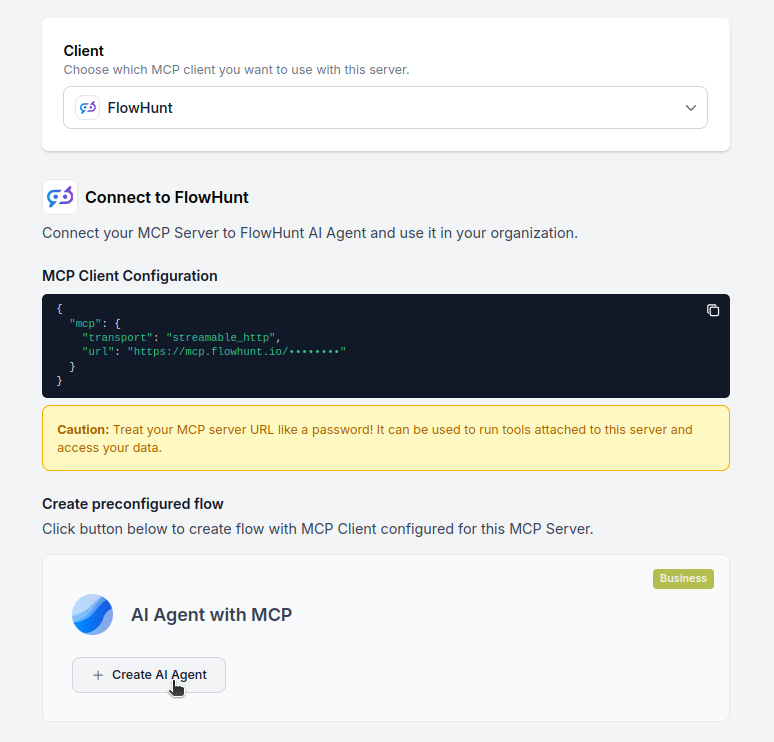
Activate: Save and activate your flow to begin automated business intelligence operations.
Best for: Specific analytics requirements or existing BI workflow enhancement
{
  "mcp": {
    "transport": "streamable_http",
    "url": "https://mcp.flowhunt.io/••••••••"
  }
}
Design Workflow: Create custom logic that leverages the MCP server tools:
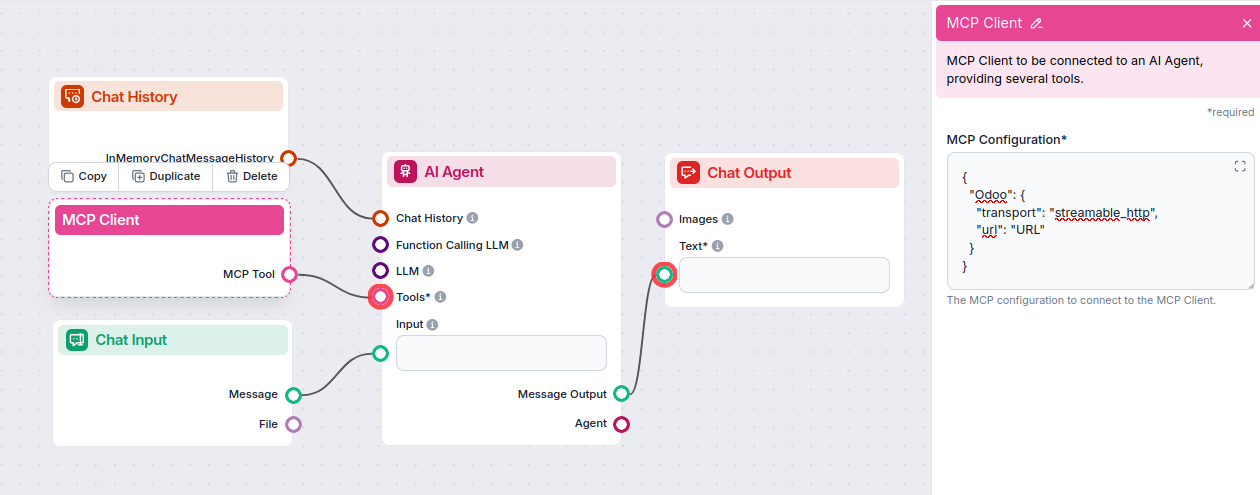
Deploy: Save your configuration and activate the flow.
Get latest tips, trends, and deals for free.
Below are example prompts demonstrating how to interact with Power BI workspaces, datasets, and reports using natural language commands.
Show me all Power BI workspaces I have access to
Get the full details of the "Sales Analytics" workspace including members and datasets
List all workspaces that contain the word "Finance" in their name
List all datasets in the Marketing workspace
Get detailed information about the "Customer Insights" dataset including its refresh history
Refresh the "Sales Dashboard" dataset to get the latest data
Show me all datasets that haven't been refreshed in the last 24 hours
List all reports in the Executive Dashboard workspace
Get details about the "Q1 Performance" report including its pages and visuals
Show me all reports that use the "Revenue Analysis" dataset
Find all reports created or modified this week
Execute this DAX query on the Sales dataset: EVALUATE TOPN(10, Sales, [Revenue], DESC)
Get the total revenue by region from the Sales dataset
Show me the top 10 products by sales volume using DAX
Calculate year-over-year growth for the current quarter
Check the last refresh status for all datasets in the Operations workspace
Show me which reports are failing to refresh
List all datasets with refresh errors from the past week
Get performance metrics for the "Customer Analytics" report
These prompts illustrate how the Power BI MCP Server enables you to manage analytics workflows, refresh data, query datasets, and monitor report performance through intuitive natural language commands.
Integrating PowerBI MCP Server with FlowHunt.io creates a powerful foundation for intelligent business intelligence and data analytics automation. Whether you’re streamlining report generation, automating dashboard creation, or enhancing data visualization workflows, this integration empowers your AI agents to work seamlessly with your critical business intelligence data.
Start with a simple automation and gradually expand your workflows as you become more comfortable with the platform. The combination of PowerBI’s comprehensive analytics capabilities and FlowHunt’s AI-driven automation will transform how you manage business intelligence and make data-driven decisions.
Ready to get started? Begin your integration today and unlock the full potential of AI-powered business intelligence automation!
FlowHunt provides an additional security layer between your internal systems and AI tools, giving you granular control over which tools are accessible from your MCP servers. MCP servers hosted in our infrastructure can be seamlessly integrated with FlowHunt's chatbot as well as popular AI platforms like ChatGPT, Claude, and various AI editors.
Start managing your business intelligence and data analytics intelligently with AI-powered automation and seamless PowerBI integration.
Integrate Microsoft OneDrive with FlowHunt through MCP to manage cloud storage, file operations, and document workflows seamlessly. Upload, download, organize, ...

Integrate Microsoft SharePoint with FlowHunt through MCP to manage document libraries, lists, sites, and collaboration workflows seamlessly. Search sites, manag...

Integrate Bexio business management software with FlowHunt through MCP to manage contacts, invoices, quotes, projects, and business operations seamlessly. Autom...
Cookie Consent
We use cookies to enhance your browsing experience and analyze our traffic. See our privacy policy.