


Documents
Your chatbot can instantly access and utilize documents, HTML pages, and even YouTube videos to tailor your unique context. Perfect for adding information you d...
2 min read
AI Chatbot
Knowledge Management
+3
A detailed guide for importing only specific sections of docs.cpanel.net into your FlowHunt chatbot, so it becomes an expert in targeted cPanel topics without ingesting the entire documentation portal.
Many organizations want their FlowHunt chatbots to serve as domain experts for specific technical products, such as cPanel & WHM. However, cPanel’s documentation site (docs.cpanel.net) is vast and covers a wide range of topics, many of which may be irrelevant or even confusing for your intended bot users. Importing the entire documentation site can overwhelm your chatbot, lead to longer indexing times, and make responses less precise.
Fortunately, FlowHunt’s Document Retriever allows you to focus your bot’s knowledge on selected documentation pages. This article walks you through the process of handpicking only the cPanel docs you need, importing them step-by-step into FlowHunt, and ensuring your chatbot remains up-to-date and relevant. Whether you want your chatbot to answer only about cPanel DNS, API, security, or user management, this approach empowers you to fine-tune its expertise without the noise of unrelated documentation.
By following these steps, you’ll avoid unnecessary data overload, reduce maintenance headaches, and deliver faster, more accurate answers to your end users. The guide below covers not only the technical process but also best practices for long-term success.
FlowHunt is a no-code platform designed to empower organizations to build, train, and deploy AI chatbots that leverage both internal and external knowledge sources. Its Document Retriever component bridges the gap between static documentation (like manuals, guides, and API references) and dynamic chatbot interaction, allowing you to connect your bot to specific URLs or files.
Unlike some chatbot frameworks that require you to crawl and index entire websites, FlowHunt enables targeted ingestion. This means you can add individual web pages, documentation sections, or even PDFs, giving you granular control over your bot’s knowledge. The Document Retriever parses the imported content, indexes it, and makes it available for context-aware answers in real time.
Common use cases include customer support bots trained on product manuals, onboarding bots focused on HR policies, or technical assistants with expertise in only select areas of a product. For cPanel, this means you can build a bot that knows everything about, say, DNS management, but nothing about unrelated modules like security or mail.

Start your free trial today and see results within days.
The cPanel documentation portal (docs.cpanel.net) is organized into a clear, hierarchical structure, with every topic or feature having its own unique URL. For example, there are dedicated pages for “Domains,” “API 2 Functions,” “Managing Users,” and more. Each page is generally static, with a consistent URL that makes it easy to link or bookmark.
To select the documentation your chatbot should ingest, start by browsing the docs.cpanel.net homepage or using its search function. Each section or topic opens in a new page, and the URL in your browser’s address bar is the direct link to that documentation. For example:
By copying only the URLs of the sections relevant to your organization or users, you can restrict your chatbot’s knowledge base to those topics alone. This approach is especially useful if your support team handles only certain cPanel modules, or if you want to exclude beta, deprecated, or partner-only documentation.
Before importing into FlowHunt, you need to create a curated list of the documentation URLs you want your chatbot to understand. Here’s a step-by-step process:
Identify your topics of interest: Decide which cPanel features, modules, or guides are essential for your chatbot’s domain. For example, you may want only the “Domains,” “SSL/TLS,” and “API Tokens” sections.
Browse and copy URLs: Go to https://docs.cpanel.net and use the sidebar or search bar to navigate to each topic. For every page you want to include, copy its full URL from your browser.
Organize your list: Paste each URL into a spreadsheet (Google Sheets, Excel) or a plain text file. Group them by topic if desired. This will help you keep track of what’s imported and make updates easier later.
Verify content stability: Make sure the pages you select are not marked as deprecated or under construction, as these may change or disappear. Prefer stable, well-maintained sections for best results.
Optional – Note update frequency: If certain docs change often (for example, API references), make a note to revisit and refresh these URLs periodically in FlowHunt.
Example URL List:
https://docs.cpanel.net/cpanel/domains/domains/
https://docs.cpanel.net/whm/api/api-functions/
https://docs.cpanel.net/knowledge-base/security/
Get latest tips, trends, and deals for free.
With your curated list in hand, you’re ready to import the selected documentation into FlowHunt. The process uses the Document Retriever component, which supports both bulk and single URL imports. Here’s how to do it:
Log into your FlowHunt workspace and navigate to the chatbot you want to train. Go to the “Knowledge Base” or “Document Retriever” section in your bot’s settings.
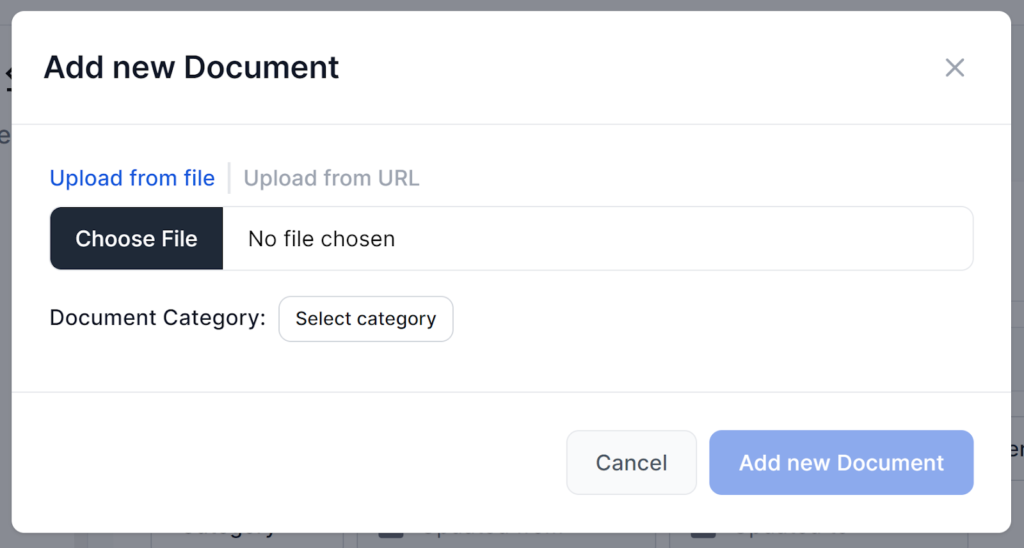
Look for an “Add Source” or “Add Document” button. Select the option to add a URL (not a file upload).
FlowHunt may offer advanced options to tweak how the Document Retriever ingests the content:
Adjust these settings if you notice the chatbot is referencing navigation, footers, or unrelated page elements.
After adding your URLs, click “Save” or “Index.” FlowHunt will process the pages, extract the main content, and add it to your chatbot’s knowledge base.
Once the import is complete, use the chatbot’s test feature to ask questions related to the imported docs. If you notice missing answers, irrelevant details, or outdated information, revisit your URL list or tweak the parsing options.
Note: If the documentation is updated on docs.cpanel.net, you will need to manually re-import those URLs to refresh your chatbot’s knowledge.
By following the guidelines above, you’ll empower your FlowHunt chatbot to deliver precise, up-to-date answers about cPanel without the noise and overhead of the full documentation set. This approach keeps your bot responsive, accurate, and tailored to your audience’s needs.
Your chatbot can instantly access and utilize documents, HTML pages, and even YouTube videos to tailor your unique context. Perfect for adding information you d...
A live demo of an AI assistant powered by FlowHunt's internal documentation. See how AI answers questions from a real knowledge base — then start a free trial, ...
Step-by-step: from uploading your knowledge base to deploying a working support chatbot on your website, including how to configure escalation and test before g...
Cookie Consent
We use cookies to enhance your browsing experience and analyze our traffic. See our privacy policy.