


PPC 최적화와 키워드 그룹화 이해하기
PPC 캠페인을 최적화하고 키워드 그룹화로 더 높은 연관성, 향상된 품질 점수, 더 나은 ROI, 효과적인 캠페인 관리를 달성하는 방법을 알아보세요. 광고 그룹 구조화, 랜딩 페이지 정렬, 제외 키워드 활용을 위한 실질적인 팁, 도구, 모범 사례를 확인하세요....
8 분 읽기
PPC
Keyword Grouping
+4
FlowHunt는 AI로 Google Ads 부정 키워드 관리를 자동화하여, 기업이 비용을 절감하고, 광고비를 최적화하며, 캠페인 성과를 손쉽게 개선할 수 있도록 돕습니다.
불필요한 키워드 광고비는 광고가 실제 판매하는 상품과 맞지 않는 검색 결과에 노출될 때 발생합니다. 이런 경우 관련 없는 클릭에도 비용이 지출되고, 실제 구매로 이어지지 않아 예산이 빠르게 소진될 수 있습니다. 예를 들어, 고급 가죽 신발을 판매하는 회사가 “신발 구매”와 같이 광범위한 키워드를 타겟팅하면, 운동화나 샌들에 관심 있는 사람들의 클릭까지 유입될 수 있습니다. 이렇게 키워드 타겟팅이 미스매치되면 광고비가 낭비되고 ROI도 떨어집니다. 기업은 이 개념을 명확히 이해하고 예산을 적절한 키워드에 집중해야 불필요한 손실을 막을 수 있습니다.
부정 키워드는 Google Ads 캠페인에서 필수적인 도구입니다. 광고주가 특정 검색어를 제외시켜, 오직 관련성 높은 검색에만 광고가 노출되도록 할 수 있습니다. 예를 들어, “저렴한”, “할인”과 같은 부정 키워드를 활용하면 고급 제품을 원하는 고객만 타깃팅할 수 있습니다. 부정 키워드 리스트를 세심하게 관리하면, 불필요한 클릭을 줄이고 광고비의 효율을 개선하여 캠페인 성과를 극대화할 수 있습니다.
인공지능(AI)은 광고주가 Google Ads 캠페인을 관리하는 방식을 혁신하고 있습니다. FlowHunt와 같은 AI 도구는 키워드 그룹핑에 최적화되어, 연관된 키워드를 효과적으로 식별하고 조직화할 수 있도록 돕습니다. 이 자동화는 긍정/부정 키워드 모두를 손쉽게 찾을 수 있게 하며, 캠페인 관리에 필요한 수작업을 크게 줄여줍니다. AI 기반 키워드 관리는 실시간 성과 데이터에 따라 즉각적인 변경이 가능하여, 광고비가 항상 최고의 ROI로 운용되도록 보장합니다.
불필요한 키워드 광고비를 줄이기 위해, 기업은 다음과 같은 전략을 도입해야 합니다:

최신 팁, 트렌드 및 특가 정보를 무료로 받아보세요.
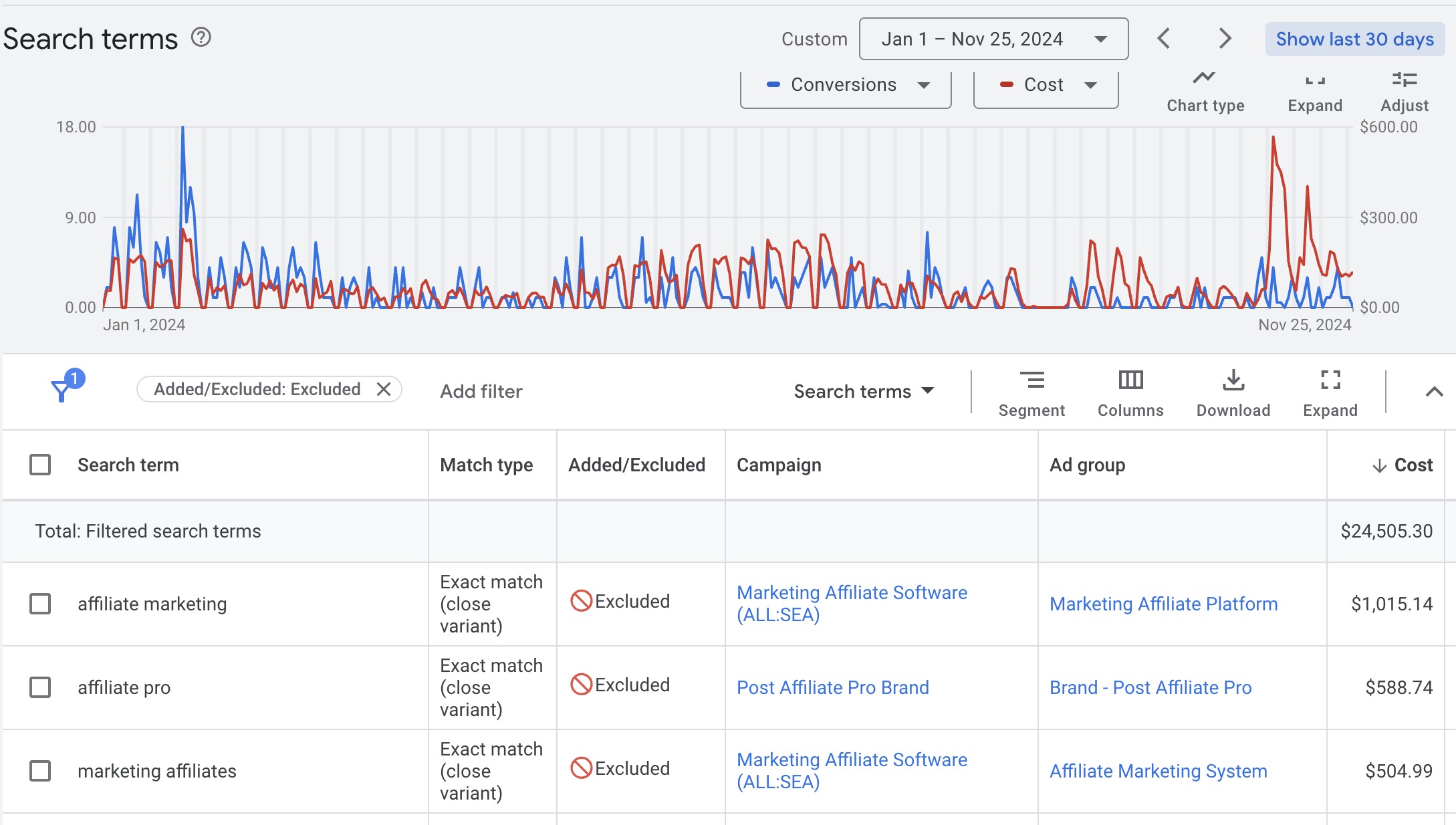
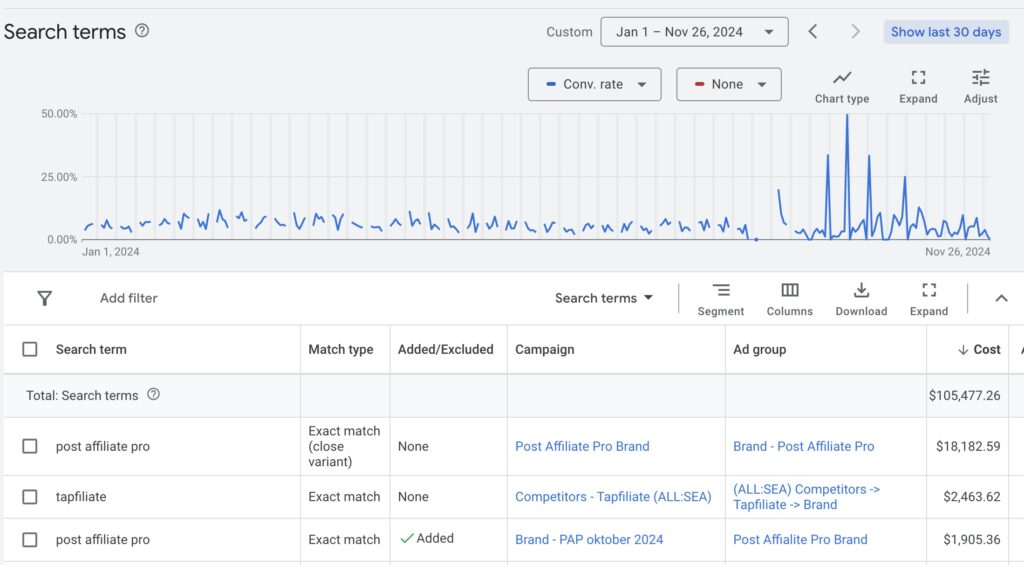
PostAffiliatePro는 매달 광고비 집행에서 원하는 ROI를 얻지 못해 어려움을 겪고 있었습니다. 이들은 문제 해결을 위해 AI 도입을 결정했습니다. AI 기반 도구를 도입한 이후, 키워드 관리가 자동화되어 긍정/부정 키워드를 더욱 정확하게 식별할 수 있었습니다. 이 변화로 광고비를 최적화하고 비용을 크게 절감했으며, 캠페인 효율도 높아졌습니다. 이 경험은 AI 기술로 키워드 광고비를 효과적으로 관리할 수 있음을 보여줍니다. 각 신규 키워드에 대한 분석은 첫 노출 후 1시간 이내에 진행되어, 방문자가 Google 광고를 클릭하기 전에 부정 키워드를 신속히 차단할 수 있습니다.
효과적인 키워드 관리와 AI 최적화에 대해 더 알고 싶다면, 다음 자료를 참고하세요:
아래는 키워드 클러스터 평가를 위해 매 시간 실행하는 저희의 스크립트입니다.
이 스크립트는 Google Ads 캠페인 관리를 위한 여러 작업을 자동화합니다. 설정 및 구성을 위해 Google Sheets와 연동되고, Google Ads 계정에서 검색어 분석, 키워드 추가/제외, 그리고 FlowHunt API를 통한 AI 기반 키워드 클러스터링 작업을 수행합니다.
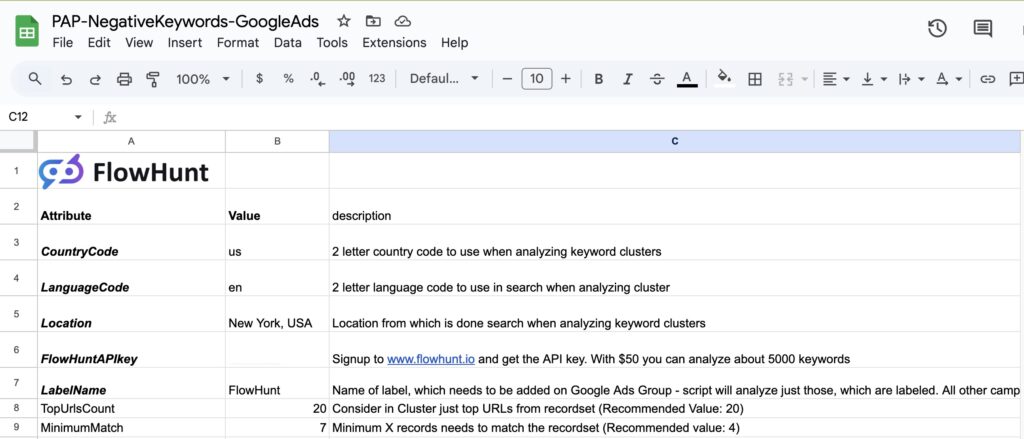
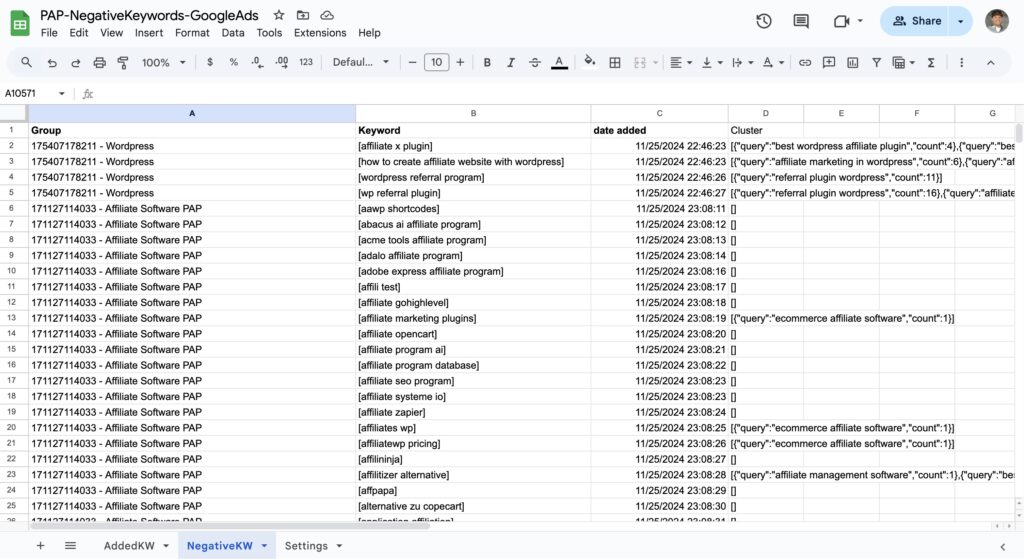
main() 함수에 있습니다. 이 함수는 spreadsheetURL에 명시된 Google Sheets 문서를 열고, apiKey, country, language 등 필요한 설정 정보를 불러옵니다.minimumMatch 기준에 따라 필터링합니다.callFlowHuntApi() 함수를 통해 FlowHunt API와 연동하여 워크스페이스 ID 조회, 키워드 클러스터링 등을 수행합니다.이 스크립트를 배포하려면, 다음 단계를 따라야 합니다:
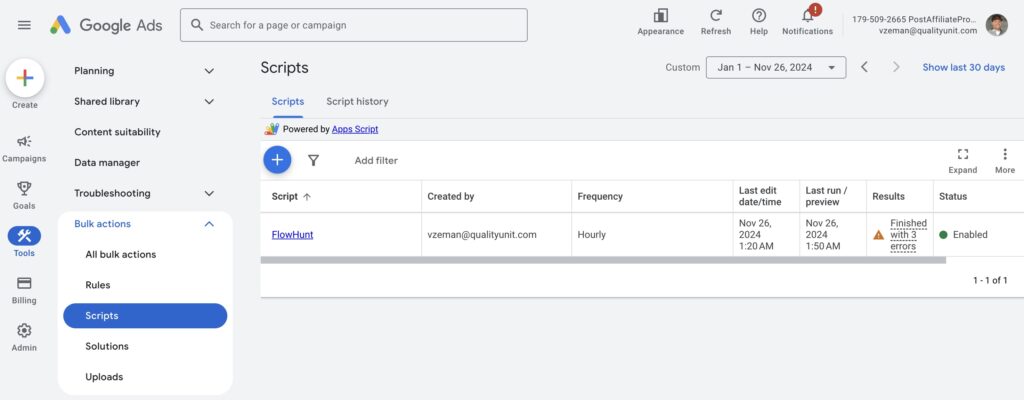
실제 Google Sheet 문서의 링크를 꼭 입력해야 합니다. 나머지는 저희가 책임집니다. 캠페인에 속한 키워드를 식별하고, 부정/긍정 키워드 모두를 자동으로 관리합니다.
//Global variables
var spreadsheetURL;
var spreadsheet;
var sheetSettings;
var sheetAddedKW;
var sheetNegativeKW;
var apiKey;
var labelName;
var country;
var language;
var location;
var urlsCount;
var minimumMatch;
var workspaceId;

function main() {
    // Provide the Google Sheets URL here
  spreadsheetURL = "https://docs.google.com/spreadsheets/d/....... FULL URL TO GOOGLE SHEET";
  spreadsheet = SpreadsheetApp.openByUrl(spreadsheetURL);
  sheetSettings = spreadsheet.getSheetByName("Settings");
  sheetAddedKW = spreadsheet.getSheetByName("AddedKW");
  sheetNegativeKW = spreadsheet.getSheetByName("NegativeKW");
  apiKey = getSettingValue("FlowHuntAPIkey")
  labelName = getSettingValue("LabelName")
  country = getSettingValue("CountryCode")
  language = getSettingValue("LanguageCode")
  location = getSettingValue("Location")

  urlsCount = getSettingValue("TopUrlsCount")
  minimumMatch = getSettingValue("MinimumMatch")
  workspaceId = getWorkspaceId()

  if (workspaceId.length < 10) {
    Logger.log("Failed to load workspace id from FlowHunt, check API key");
    return;
  }

  Logger.log("FlowHunt WorkspaceId: " + workspaceId);

  if (addPositiveKWsToCluster() == 0) {
    // Analyze new keywords just if all positive keywords added already
    analyzeNotAssignedWords();
  }
}

function analyzeNotAssignedWords() {
  Logger.log("*** START Checking not assigned keywords");

  // Iterate through all ad groups in the account
  var adGroupsIterator = AdsApp.adGroups().get();

  while (adGroupsIterator.hasNext()) {
    var adGroup = adGroupsIterator.next();
    var groupName = adGroup.getId() + " - " + adGroup.getName();
    if (hasLabel(adGroup, labelName)) {
      // Get the search terms for the current ad group ordered by clicks in the last X days
      var searchTermsQuery = "SELECT Query FROM SEARCH_QUERY_PERFORMANCE_REPORT " +
        "WHERE AdGroupId = " + adGroup.getId() +
        " AND QueryTargetingStatus = \"NONE\" " +
        "DURING TODAY";

      var searchTermsIterator = AdsApp.report(searchTermsQuery).rows();
      var adGroupKeywords = [];
      while (searchTermsIterator.hasNext()) {
        var searchTerm = searchTermsIterator.next();
        var searchTermText = searchTerm["Query"].trim();
        var similarQueries = getSimilarQueries(groupName, searchTermText)
        var filteredSimilarQueries = getFilteredSimilarQueries(similarQueries);
        if (filteredSimilarQueries.length > 0) {
          var keywordOperation = adGroup.newKeywordBuilder().withText("[" + searchTermText + "]").build();
          if (keywordOperation.isSuccessful()) {
            adGroupKeywords.push(searchTermText);
            var rowData = [groupName, searchTermText, new Date(), "ADDING AS POSITIVE, REVIEW!", JSON.stringify(filteredSimilarQueries)];
            sheetAddedKW.appendRow(rowData);
          } else {
            Logger.log("Failed to add keyword as positive:" + searchTermText)
          }
        } else {
          // add to negative
           adGroup.createNegativeKeyword("[" + searchTermText + "]");
          Logger.log("Excluded search term in ad group '" + groupName + "': " + searchTermText);
          var rowData = [groupName, "[" + searchTermText + "]", new Date(), JSON.stringify(similarQueries)];
          sheetNegativeKW.appendRow(rowData);
        }
      }
      if (adGroupKeywords.length > 0) {
        //Add all keywords in the list to FlowHunt Cluster
        addKeywordsToFlowHunt(groupName, adGroupKeywords);
      }
    }
  }
  Logger.log("*** FINISHED Checking not assigned keywords");
}

function getSimilarQueries(groupName, query) {
  result = callFlowHuntApi("/serp/serp/cluster/query_intersections?workspace_id="+workspaceId, "POST", {
    "query": query,
    "country": country,
    "language": language,
    "location": location,
    "group_name": groupName,
    "live_mode": true,
    "max_position": urlsCount
  });
  Logger.log(result)
  if (result.status=="SUCCESS") {
    return JSON.parse(result.result);
  }
  return []
}

function getFilteredSimilarQueries(similarQueries) {
  filtered = [];
  for (var i=1; i<similarQueries.length; i++){
    if (similarQueries[i].count>=minimumMatch) {
      filtered.push(similarQueries[i]);
    }
  }
  return filtered;
}

function addPositiveKWsToCluster() {
  Logger.log("*** START Checking new campaign keywords");
  // Iterate through all ad groups in the account
  var adGroupsIterator = AdsApp.adGroups().get();
  var processedKWs = sheetAddedKW.getDataRange().getValues();
  var processedKWsMap = {};
  var rowsAdded = 0;

  for (var i = 1; i < processedKWs.length; i++) { // Start at 1 to skip header row if exists
    var groupName = processedKWs[i][0];
    var keyword = processedKWs[i][1];
    processedKWsMap[groupName + '|' + keyword] = true;
  }

  while (adGroupsIterator.hasNext()) {
    var adGroup = adGroupsIterator.next();
    var groupName = adGroup.getId() + " - " + adGroup.getName();
    if (hasLabel(adGroup, labelName)) {
      var keywordsIterator = adGroup.keywords().get();
      var adGroupKeywords = [];
      while (keywordsIterator.hasNext()) {
        var keyword = keywordsIterator.next();
        if (keyword.isEnabled()) {
          var key = groupName + '|' + keyword.getText();
          if (!processedKWsMap[key]) {
            adGroupKeywords.push(keyword.getText());
            var rowData = [groupName, keyword.getText(), new Date(), "Already present in campaign"];
            sheetAddedKW.appendRow(rowData);
            processedKWsMap[key] = true;
          }
        }
      }
      if (adGroupKeywords.length > 0) {
        //Add all keywords in the list to FlowHunt Cluster
        addKeywordsToFlowHunt(groupName, adGroupKeywords);
      } else {
        Logger.log("No new keywords in Group: " + groupName);
      }
      rowsAdded = rowsAdded + adGroupKeywords.length
    }
  }
  Logger.log("*** FINISHED Checking new campaign keywords");
  return rowsAdded;
}

function addKeywordsToFlowHunt(GroupName, adGroupKeywords) {
  requests = []
  adGroupKeywords.forEach(function(keyword) {
    requests.push(
        {
          "query": keyword,
          "country": country,
          "language": language,
          "location": location,
          "group_name": GroupName,
          "count_urls": 30
        }
      );
    });
  callFlowHuntApi("/serp/serp/cluster/add_queries?workspace_id="+workspaceId, "POST", {"requests":requests});
}

function getSettingValue(settingName) {
    var data = sheetSettings.getDataRange().getValues();
    for (var i = 0; i < data.length; i++) {
        if (data[i][0] === settingName) {
            return data[i][1];
        }
    }
    return null;
}

function getWorkspaceId() {
  result = callFlowHuntApi("/auth/me", "GET")
  if (result !== null) {
    return result.api_key_workspace_id;
  }
}

function callFlowHuntApi(endpoint, method, requestBody) {
    var url = "https://api.flowhunt.io/v2" + endpoint;
    var headers = {
        "Api-Key": apiKey,
        "Content-Type": "application/json"
    };
    var options = {
        "method" : method,  // or "post", "put", etc.
        "headers" : headers,
        "payload": JSON.stringify(requestBody)
    };

    try {
        var response = UrlFetchApp.fetch(url, options);
        var responseData = JSON.parse(response.getContentText());
        Logger.log(responseData);
        return responseData;
    } catch (e) {
        Logger.log("An error occurred: " + e.message);
    }
    return null;
}

function hasLabel(adGroup, labelName) {
  var labels = adGroup.labels().get();
  while (labels.hasNext()) {
    var label = labels.next();
    if (label.getName() === labelName) {
      Logger.log("Processing Adgroup " + adGroup.getName());
      return true;
    }
  }
  return false;
}
빅토르 제만은 QualityUnit의 공동 소유주입니다. 20년이 넘는 기간 동안 회사를 이끌어왔지만, 여전히 주로 소프트웨어 엔지니어로서 AI, 프로그램적 SEO, 백엔드 개발을 전문으로 하고 있습니다. 그는 LiveAgent, PostAffiliatePro, FlowHunt, UrlsLab 등 수많은 프로젝트에 기여해왔습니다.

Google Ads ROI를 극대화할 준비가 되셨나요? AI 기반 자동화가 부정 키워드를 관리하고 광고비를 최적화하는 방법을 확인해보세요.
PPC 캠페인을 최적화하고 키워드 그룹화로 더 높은 연관성, 향상된 품질 점수, 더 나은 ROI, 효과적인 캠페인 관리를 달성하는 방법을 알아보세요. 광고 그룹 구조화, 랜딩 페이지 정렬, 제외 키워드 활용을 위한 실질적인 팁, 도구, 모범 사례를 확인하세요....

Transform Google Ads campaign management with AI-powered automation using the Google Ads MCP Server. Seamlessly integrate Google Ads data and operations with AI...
FlowHunt의 AI 에이전트와 워크플로우 자동화를 통해 포괄적이고 SEO에 최적화된 용어집 페이지를 자동으로 생성하는 방법을 알아보세요. 키워드 리서치부터 콘텐츠 발행까지 전체 과정을 소개합니다....
쿠키 동의
당사는 귀하의 브라우징 경험을 향상시키고 트래픽을 분석하기 위해 쿠키를 사용합니다. See our privacy policy.