


Welcome Message
Displays a welcome message and brief instructions to the user about the Google Docs Research Assistant and its capabilities.
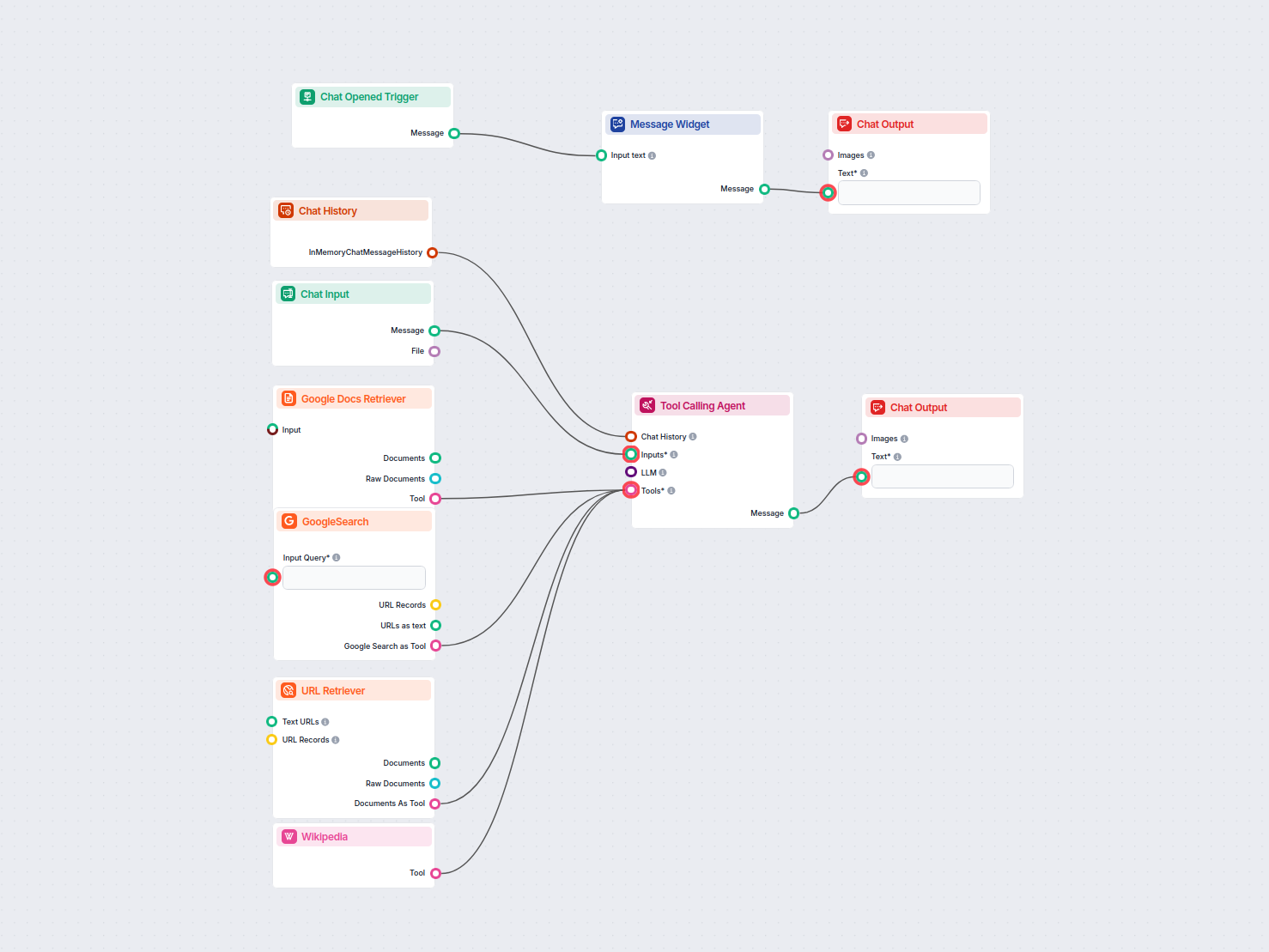
This AI-powered workflow extracts specific information from a Google Doc and then expands on it by researching across sources like Google Search, Wikipedia, and URLs. Ideal for users who want fast, contextual answers that combine internal documents with up-to-date web knowledge.

Flows
Displays a welcome message and brief instructions to the user about the Google Docs Research Assistant and its capabilities.
System message that instructs the AI agent on how to use the Google Docs Retriever and research tools to answer user queries.
Below is a complete list of all components used in this flow to achieve its functionality. Components are the building blocks of every AI Flow. They allow you to create complex interactions and automate tasks by connecting various functionalities. Each component serves a specific purpose, such as handling user input, processing data, or integrating with external services.

The Chat Opened Trigger component detects when a chat session starts, enabling workflows to respond instantly as soon as a user opens the chat. It initiates flows with the initial chat message, making it essential for building responsive, interactive chatbots.

The Chat Input component in FlowHunt initiates user interactions by capturing messages from the Playground. It serves as the starting point for flows, enabling the workflow to process both text and file-based inputs.

Discover the Chat Output component in FlowHunt—finalize chatbot responses with flexible, multi-part outputs. Essential for seamless flow completion and creating advanced, interactive AI chatbots.

The Message Widget component displays custom messages within your workflow. Ideal for welcoming users, providing instructions, or showing any important information, it supports Markdown formatting and can be set to appear only once per session.

The Chat History component in FlowHunt enables chatbots to remember previous messages, ensuring coherent conversations and improved customer experience while optimizing memory and token usage.

Integrate your workflows with Google Docs using the Google Docs Retriever component—seamlessly fetch document content for use in automations, chatbots, or knowledge workflows. Ideal for accessing, processing, and leveraging your Google Docs within FlowHunt flows.

Explore the Tool Calling Agent in FlowHunt—an advanced workflow component that enables AI agents to intelligently select and use external tools to answer complex queries. Perfect for building smart AI solutions that require dynamic tool usage, iterative reasoning, and integration with multiple resources.

FlowHunt's GoogleSearch component enhances chatbot accuracy using Retrieval-Augmented Generation (RAG) to access up-to-date knowledge from Google. Control results with options like language, country, and query prefixes for precise and relevant outputs.

Unlock web content in your workflows with the URL Retriever component. Effortlessly extract and process the text and metadata from any list of URLs—including web articles, documents, and more. Supports advanced options like OCR for images, selective metadata extraction, and customizable caching, making it ideal for building knowledge-rich AI flows and automations.

Effortlessly chat with any Wikipedia page using FlowHunt's AI Agents. Get concise summaries, source links, and turn hours of research into interactive insights.
Flow description
This workflow, titled Google Docs AI Agent Researcher, is designed to help users efficiently extract information from a Google Document and then expand, validate, or enrich that information using AI research tools. It automates the process of combining document retrieval with advanced research capabilities, making it valuable for anyone needing deeper insights from their documents or requiring rapid fact-checking and context gathering.
Upon launching, the workflow greets the user and waits for their query. The user provides a prompt (i.e., what they’re looking for) and optionally attaches a Google Doc. The system then retrieves the content of the Google Doc and analyzes it using an AI agent. This agent is equipped with multiple tools, including:
The AI agent combines these sources to extract the requested information, enrich it, and present the findings back to the user in the chat interface.
| Step | Action | Tool/Component | Purpose |
|---|---|---|---|
| 1 | User opens chat | Chat Opened Trigger & Message Widget | Displays a welcome message and instructions |
| 2 | User submits query and/or attaches Google Doc | Chat Input | Captures user prompt and document |
| 3 | Chat history is maintained | Chat History | Supports context-aware responses |
| 4 | Google Docs content is retrieved | Google Docs Retriever | Makes document content available to the AI agent |
| 5 | AI agent processes request | Tool Calling Agent | Uses all research tools to find, analyze, and synthesize the answer |
| 6 | Agent leverages external tools | Google Search, URL Retriever, Wikipedia | Expands, validates, and enriches the information |
| 7 | Final answer displayed to user | Chat Output | Presents results in the chat interface |
This workflow is especially useful for scaling repetitive research or document analysis tasks, as it:
| Component | Functionality |
|---|---|
| Chat Input/Output | User interface for queries and responses |
| Message Widget | Displays welcome and instructional messages |
| Chat History | Maintains conversational context |
| Google Docs Retriever | Extracts document content |
| Google Search | Finds relevant web content |
| URL Retriever | Pulls content from specific URLs |
| Wikipedia Tool | Provides factual background and explanations |
| Tool Calling Agent | Coordinates all tools and synthesizes the answer |
By automating both the extraction and enrichment of information, this workflow empowers users to get more value from their documents—faster and with greater confidence.
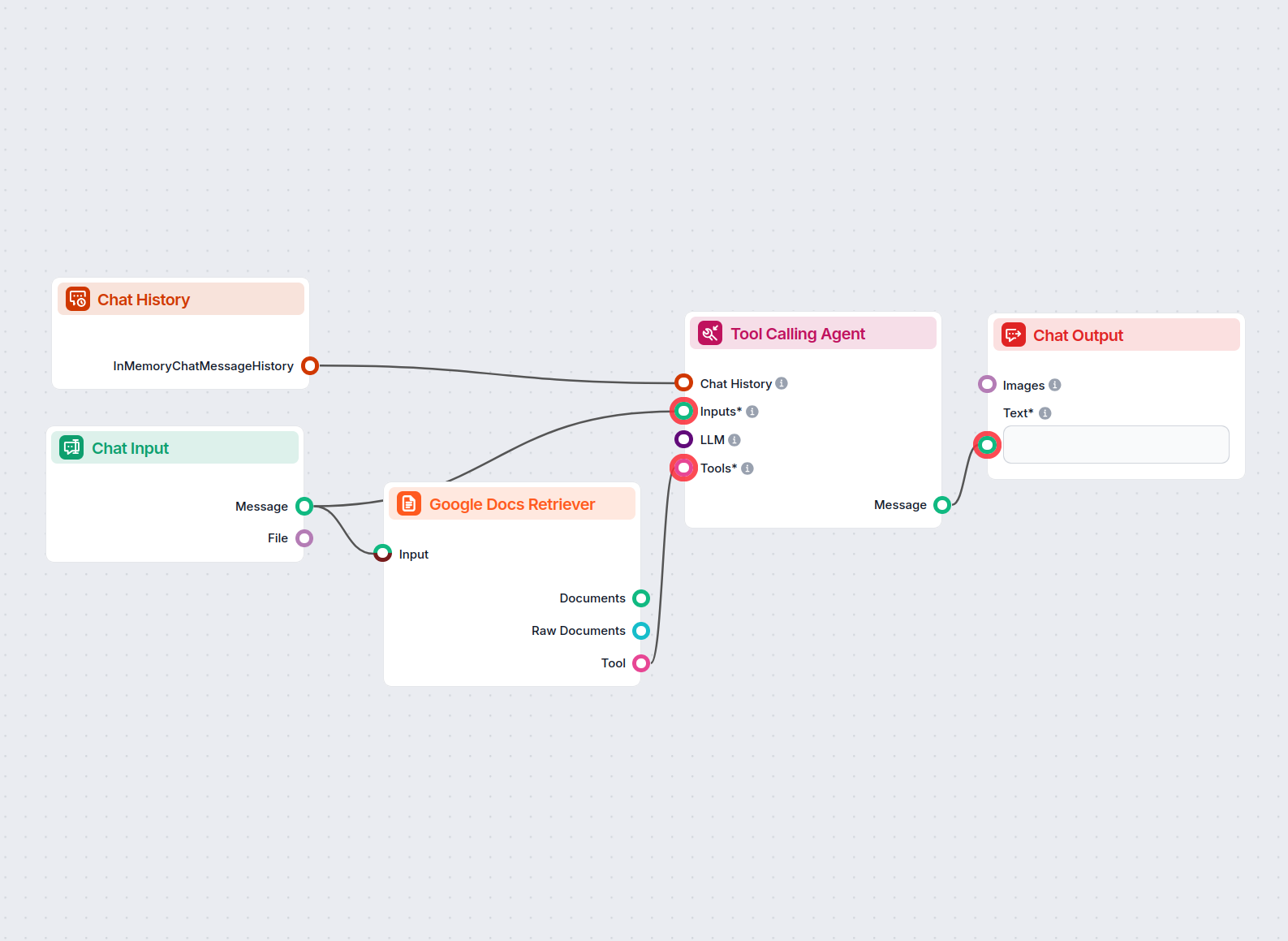
An AI-powered chatbot that provides precise answers to user questions based strictly on the content from a supplied Google Document. Ideal for research, content...
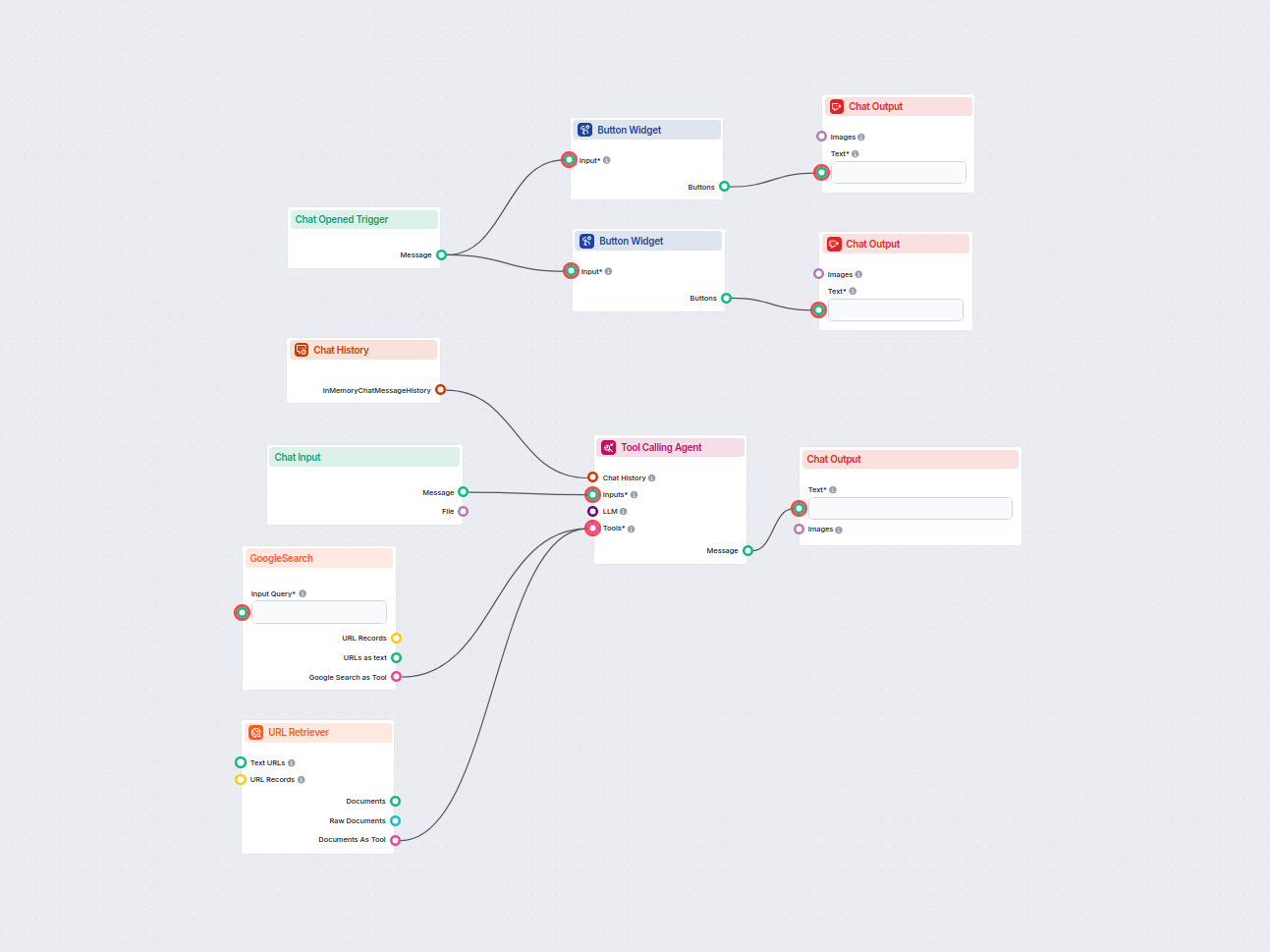
An AI chatbot that provides instant, up-to-date answers to any question by searching Google and retrieving relevant website content, always including source lin...
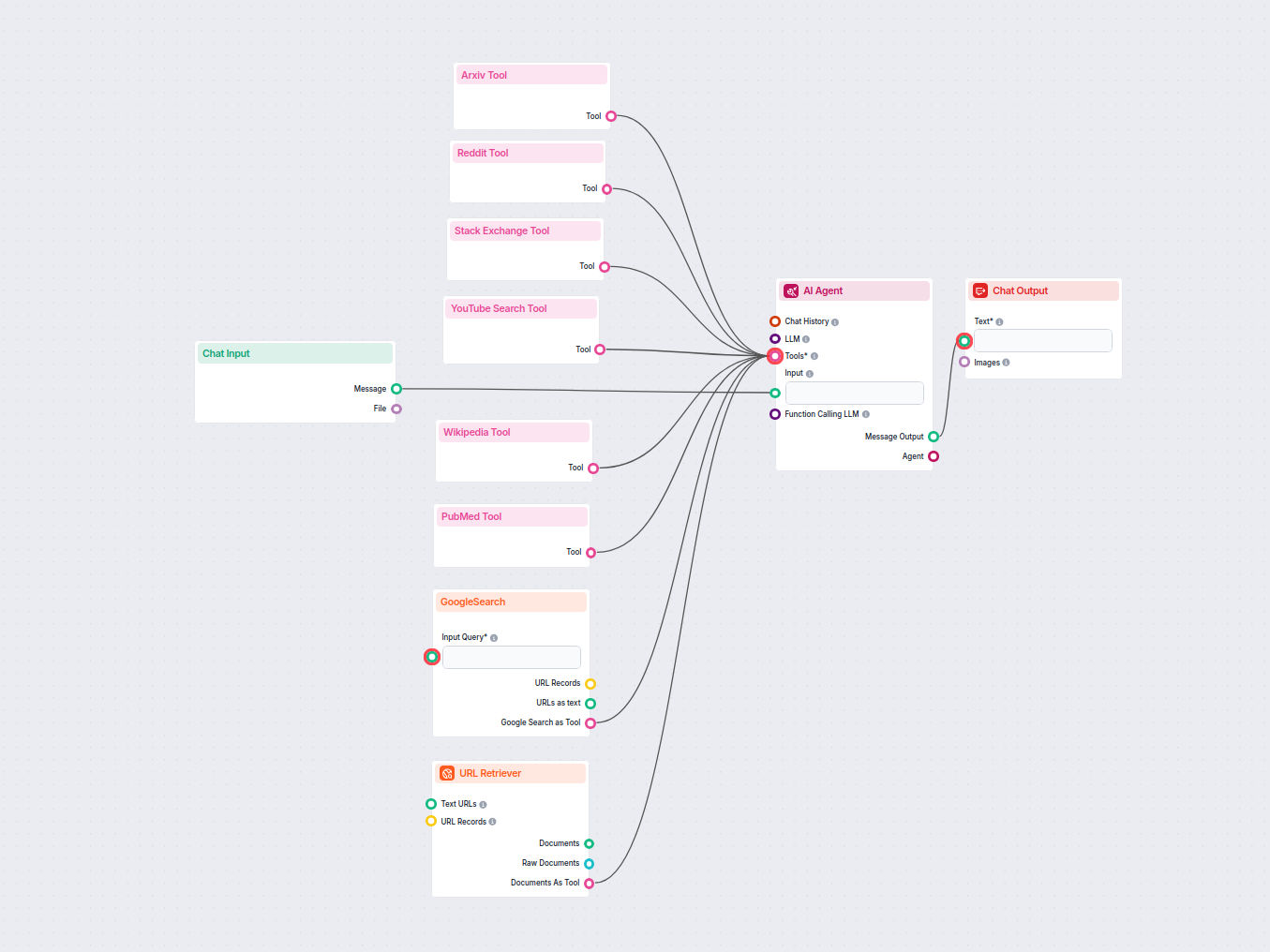
A powerful AI chatbot that answers user questions in real-time by retrieving and synthesizing information from Google, Reddit, Wikipedia, Arxiv, Stack Exchange,...
Cookie Consent
We use cookies to enhance your browsing experience and analyze our traffic. See our privacy policy.