


Prompt
A simple prompt template for passing through context and input to LLM.
Automatically generates a short, engaging paragraph for your website that includes links to the most relevant related articles. This AI-powered workflow analyzes your site’s content to recommend further reading, helping increase user engagement and session duration.

Flows
A simple prompt template for passing through context and input to LLM.
Prompt to instruct LLM to write a readable, concise paragraph with markdown links to related articles for a web page.
Prompt to generate a list of useful keywords and context for further LLM steps.
Below is a complete list of all components used in this flow to achieve its functionality. Components are the building blocks of every AI Flow. They allow you to create complex interactions and automate tasks by connecting various functionalities. Each component serves a specific purpose, such as handling user input, processing data, or integrating with external services.

The Chat Input component in FlowHunt initiates user interactions by capturing messages from the Playground. It serves as the starting point for flows, enabling the workflow to process both text and file-based inputs.

FlowHunt's Document Retriever enhances AI accuracy by connecting generative models to your own up-to-date documents and URLs, ensuring reliable and relevant answers using Retrieval-Augmented Generation (RAG).

Learn how FlowHunt's Prompt component lets you define your AI bot’s role and behavior, ensuring relevant, personalized responses. Customize prompts and templates for effective, context-aware chatbot flows.

Explore the Generator component in FlowHunt—powerful AI-driven text generation using your chosen LLM model. Effortlessly create dynamic chatbot responses by combining prompts, optional system instructions, and even images as input, making it a core tool for building intelligent, conversational workflows.

Analyze your texts to discover the most frequent and significant keywords using the Keyword Frequency Evaluator component in FlowHunt. Automatically extract top keywords, filter out common stopwords, and fine-tune results based on frequency, word length, and keyword overlap—ideal for text analysis, information extraction, and content summarization workflows.

Discover the Chat Output component in FlowHunt—finalize chatbot responses with flexible, multi-part outputs. Essential for seamless flow completion and creating advanced, interactive AI chatbots.

The Message Widget component displays custom messages within your workflow. Ideal for welcoming users, providing instructions, or showing any important information, it supports Markdown formatting and can be set to appear only once per session.

The Chat Opened Trigger component detects when a chat session starts, enabling workflows to respond instantly as soon as a user opens the chat. It initiates flows with the initial chat message, making it essential for building responsive, interactive chatbots.
Flow description
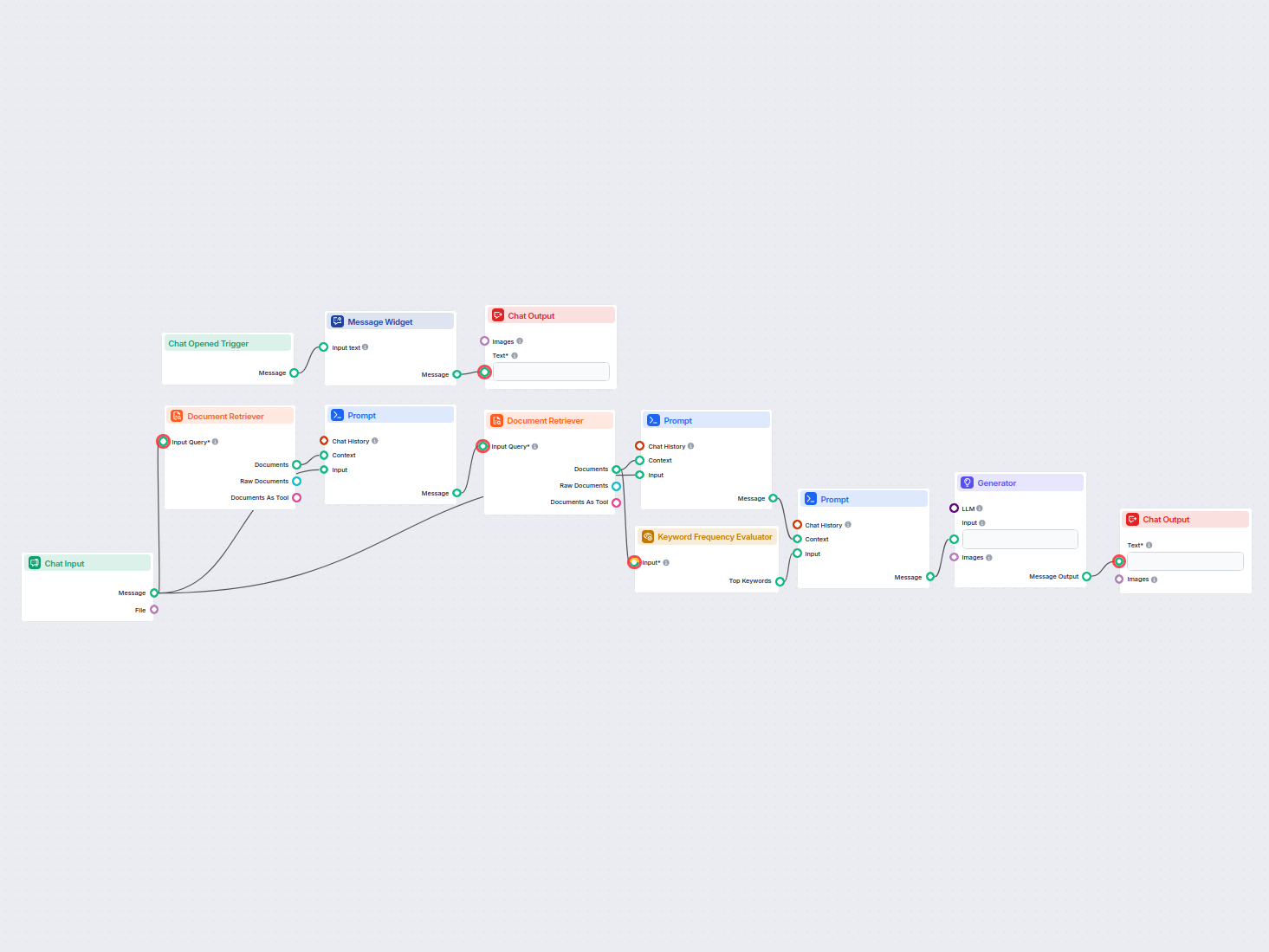
This workflow is designed to automatically generate a short, engaging paragraph for a given webpage or topic. The generated paragraph contains links to the most relevant articles on your website, helping visitors seamlessly navigate to related content. This automation is especially useful for scaling the creation of “Related Articles” sections, boosting user engagement, and improving SEO by interlinking your content efficiently and consistently.
The process can be summarized in the following steps:
User Interaction & Welcome
Input Handling
Initial Document Retrieval
Prompt Construction (Contextualization)
Related Articles Retrieval
Paragraph Generation Prompt
Keyword Extraction
Final Prompt Assembly
AI Generation
Output Display
| Step | Component | Purpose |
|---|---|---|
| 1. Chat Opened | ChatOpenedTrigger + MessageWidget | Greet user and introduce functionality |
| 2. User Input | ChatInput | Capture topic or URL from user |
| 3. Retrieve Main Document | DocumentRetriever (1 doc) | Find most relevant document for context |
| 4. Build Initial Prompt | PromptTemplate | Combine input and context for further retrieval |
| 5. Retrieve Related | DocumentRetriever (6 docs) | Get up to 6 most relevant related articles |
| 6. Prepare Paragraph Prompt | PromptTemplate (detailed instructions) | Instruct AI on how to generate the paragraph with links |
| 7. Extract Keywords | KeywordFrequencyEvaluator | Find top keywords for anchor text |
| 8. Assemble Final Prompt | PromptTemplate | Merge keywords and context for AI generation |
| 9. Generate Paragraph | Generator (LLM) | Generate the related articles paragraph |
| 10. Display Output | ChatOutput | Present the result to the user |
Scalability:
Automates the creation of related articles paragraphs for any page or topic, saving manual editorial time.
Consistency:
Ensures every page receives a consistently formatted, high-quality related articles section.
SEO & Engagement:
Smart internal linking through relevant keywords as anchor text helps with SEO. Engaging, contextual suggestions keep users browsing your site longer.
Localization:
The paragraph is generated in the same language as the related articles, supporting multilingual sites.
Customization:
Prompts are carefully crafted to avoid generic filler text and to focus on actionable, helpful suggestions for readers.
flowchart LR
    A[User opens chat] --> B[Welcome message]
    B --> C[User enters topic or URL]
    C --> D[Retrieve main document for context]
    D --> E[Build context-aware prompt]
    E --> F[Retrieve related articles (up to 6)]
    F --> G[Extract top keywords]
    G --> H[Create AI prompt with links/keywords]
    H --> I[AI generates paragraph]
    I --> J[Display paragraph to user]
This workflow leverages document retrieval, prompt engineering, keyword analysis, and generative AI to automate the creation of high-quality, linked “Related Articles” paragraphs. It is a robust solution for any content-rich website looking to scale and optimize internal linking and user engagement with minimal effort.

Generate well-researched, coherent paragraphs instantly with our AI-powered tool that combines web research capabilities with advanced language processing. Perf...
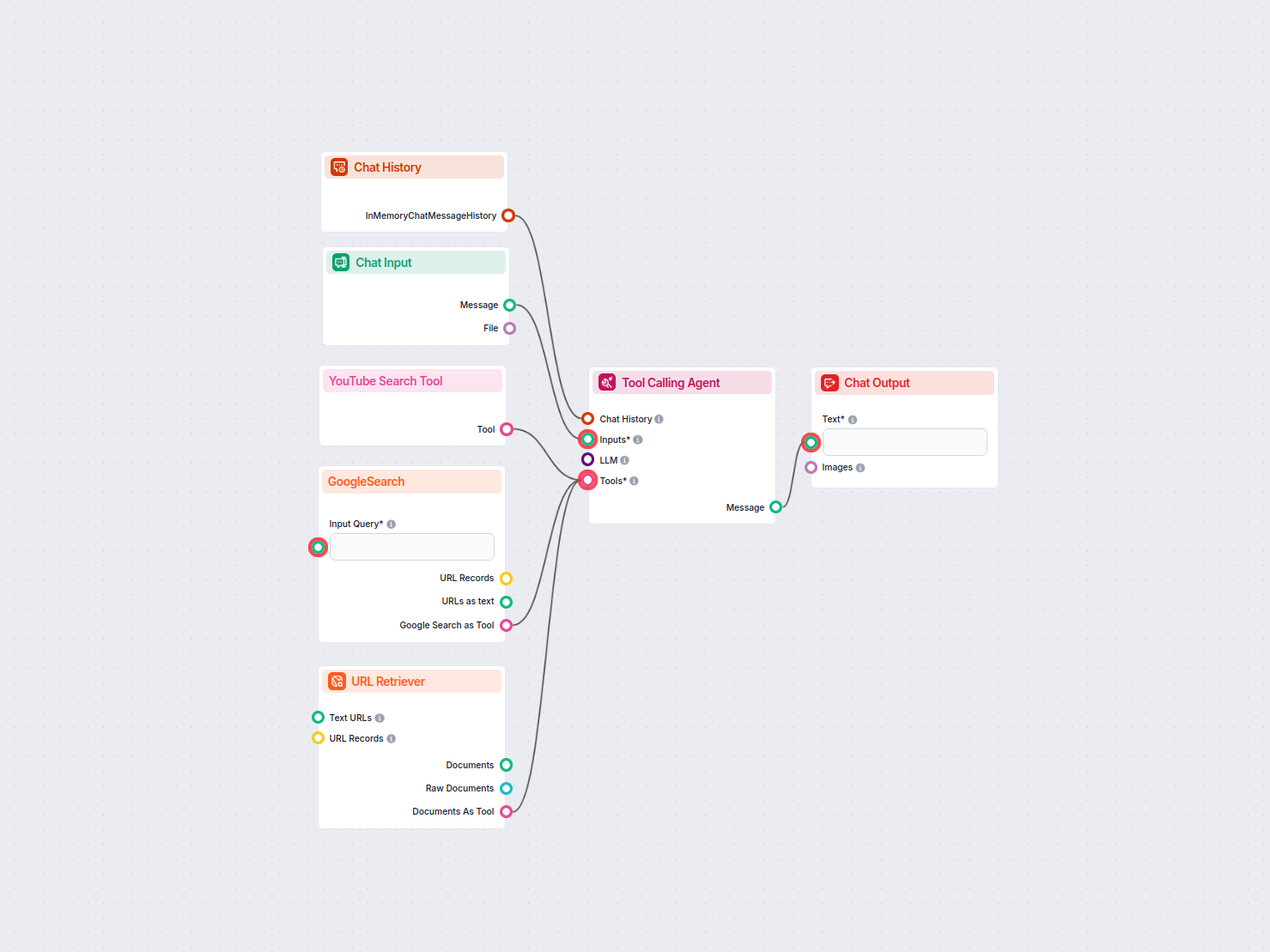
Automatically generates up-to-date news articles on any chosen topic by searching the latest trending articles on Google and YouTube, extracting key content, an...
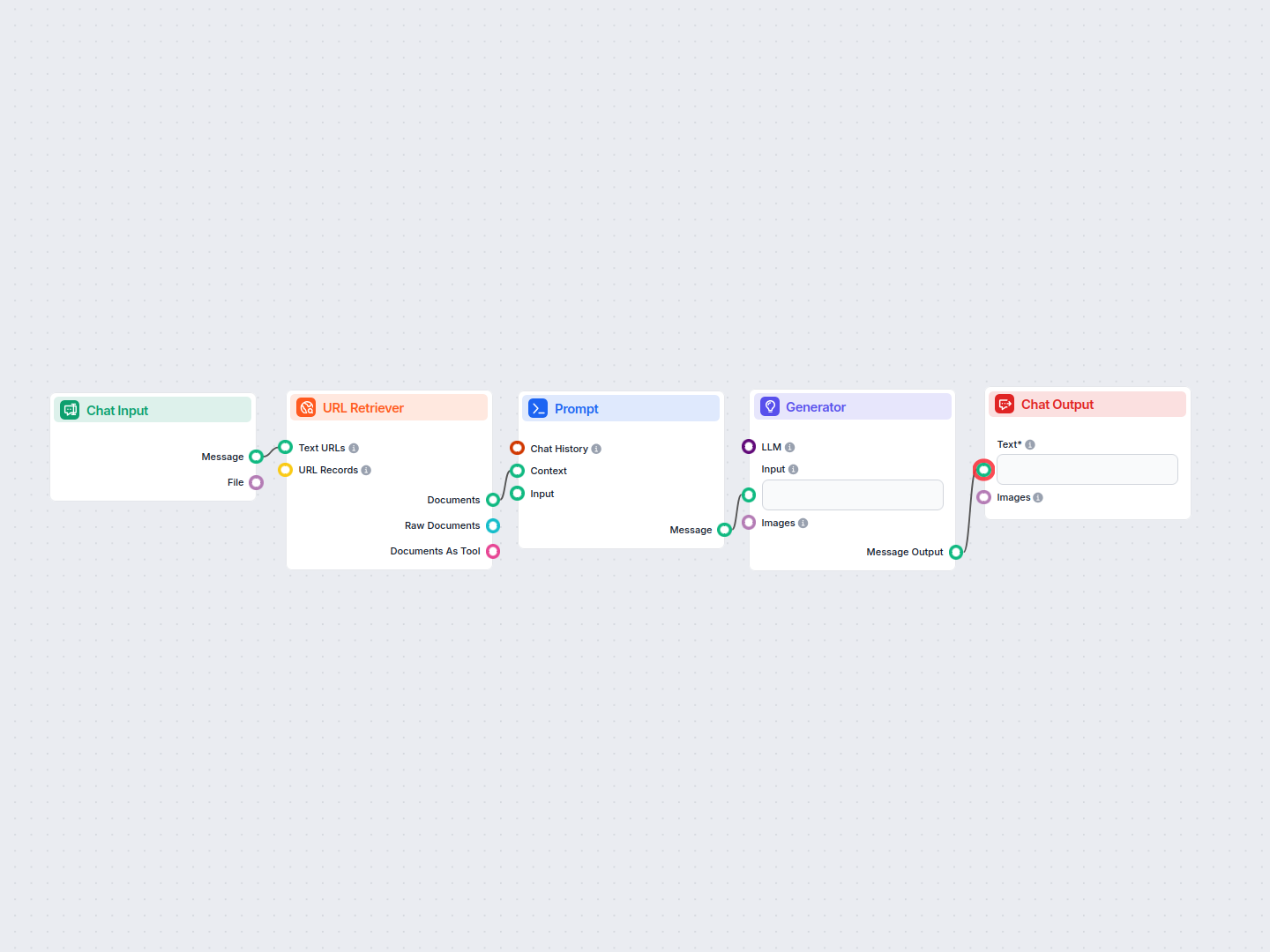
Effortlessly create engaging LinkedIn post text from any web page URL. This automated workflow extracts content from your site and turns it into a professional ...
Cookie Consent
We use cookies to enhance your browsing experience and analyze our traffic. See our privacy policy.