


Filesystem MCP Server
The Filesystem MCP Server enables secure, programmatic access to the local filesystem via the Model Context Protocol (MCP). It empowers AI assistants and client...
5 min read
MCP Server
AI Automation
+4
Learn how Model Context Protocol (MCP) allows Claude and other AI assistants to interact with your local files securely through sandboxed, permission-driven operations. See practical examples and best practices for safe implementation.
Model Context Protocol (MCP) provides a secure framework for applications to interact with filesystems through sandboxed operations. This guide explains how MCP works, its key features, and walks through a practical example using the MCP Filesystem Server.
Model Context Protocol (MCP) is a powerful security framework designed to enable controlled interactions between applications (like AI assistants) and external systems, particularly filesystems. Acting as a secure bridge, MCP allows tools to perform operations such as reading, writing, or searching files in a sandboxed, permission-driven environment.
The protocol is particularly valuable for developers looking to integrate filesystem operations into applications like VS Code, Claude Desktop, or other development environments while maintaining robust security boundaries.
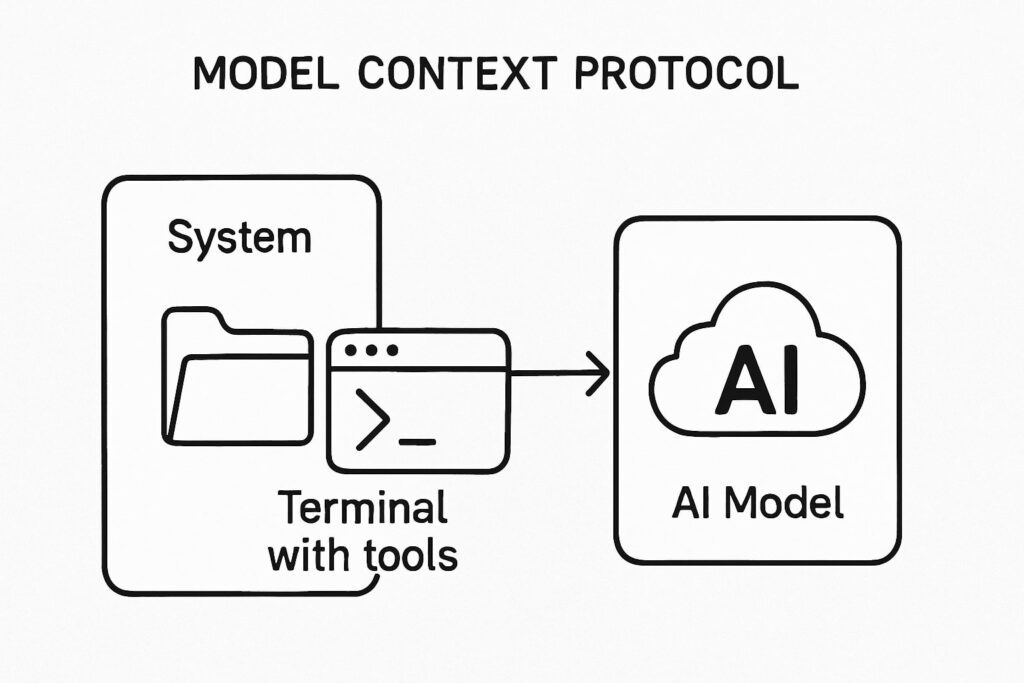
The MCP Filesystem Server is a Node.js implementation specifically built for filesystem operations within the Model Context Protocol framework. It provides a comprehensive toolkit for interacting with files and directories in a controlled manner.
Here’s a breakdown of the core functionality:
All these tools are accessible via the file://system resource, which serves as the interface for MCP filesystem operations.

Start your free trial today and see results within days.
To illustrate how MCP works in practice, let’s walk through a real example of using the MCP Filesystem Server with Claude, an AI assistant, to perform common filesystem operations.
The first step was determining which directories Claude could access. We used the list_allowed_directories tool, which revealed two permitted locations:
/Users/arshia/Desktop/Users/arshia/DownloadsThis confirmed that Claude’s operations were restricted to these directories only, keeping the rest of the filesystem secure.
Next, we used the list_directory tool to see what files were available. The results showed:
For /Users/arshia/Desktop:
For /Users/arshia/Downloads:
This revealed a file named shrek.txt in the Downloads directory, along with other files and a directory for Visual Studio Code.
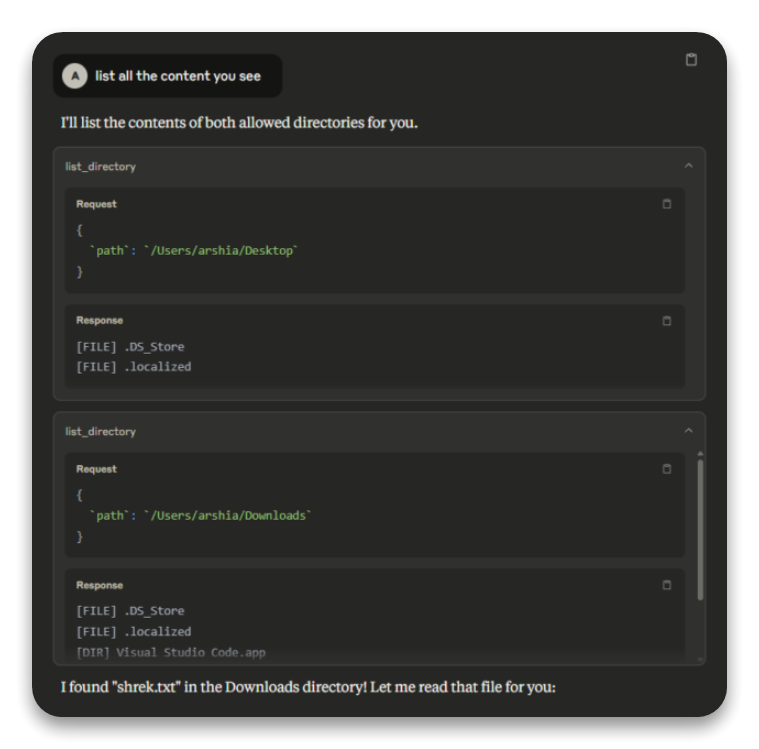
Screenshot showing the list_directory requests and responses for Desktop and Downloads directories
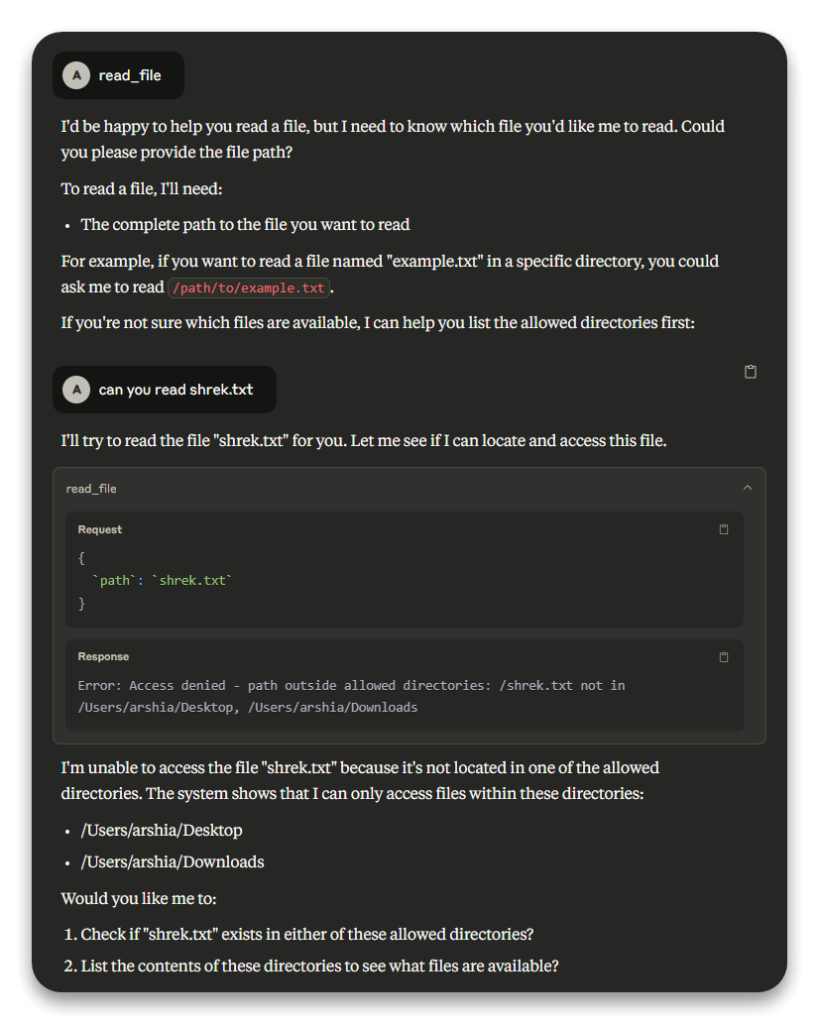
With shrek.txt identified, we tried to read its contents using the read_file tool. Initially, we provided just the filename shrek.txt, assuming the tool would search in the allowed directories.
This resulted in an error:
“Access denied – path outside allowed directories: /shrek.txt not in /Users/arshia/Desktop, /Users/arshia/Downloads.”
The error occurred because MCP requires complete file paths for security purposes.
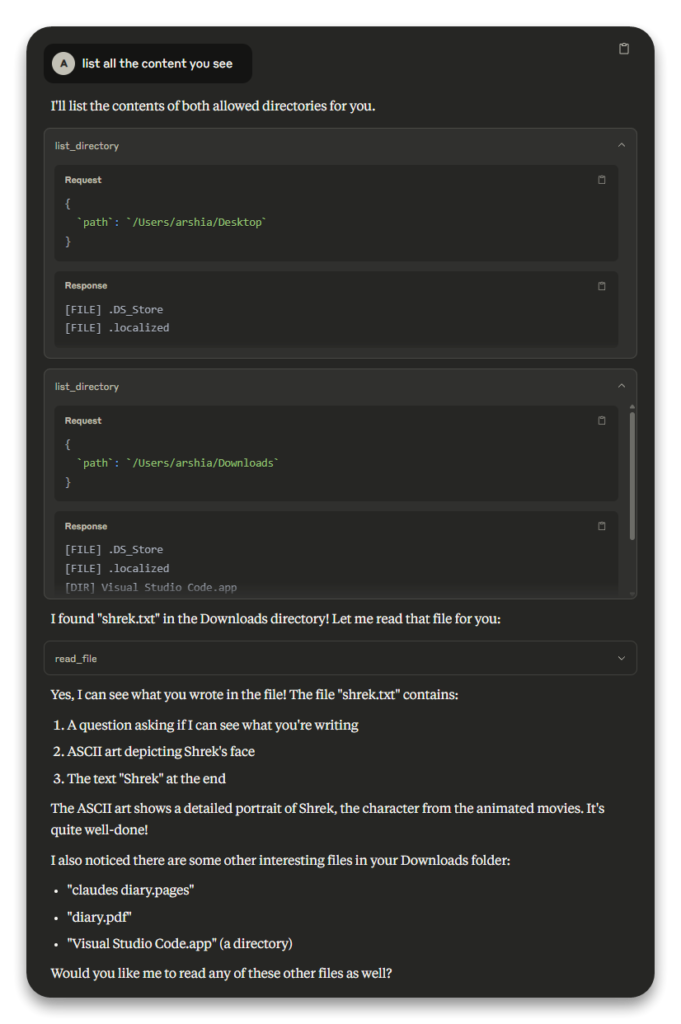
Image 2: Screenshot showing the failed read_file attempt with the error message
After correcting our approach, we provided the full path /Users/arshia/Downloads/shrek.txt to the read_file tool. This time, the operation succeeded, returning the file’s contents:
Request
{
  `path`: `/Users/arshia/Downloads/shrek.txt`
}
Response

Can you see what im writing here? If you do check this out:

⢀⡴⠑⡄⠀⠀⠀⠀⠀⠀⠀⣀⣀⣤⣤⣤⣀⡀⠀⠀⠀⠀⠀⠀⠀⠀⠀⠀⠀⠀
⠸⡇⠀⠿⡀⠀⠀⠀⣀⡴⢿⣿⣿⣿⣿⣿⣿⣿⣷⣦⡀⠀⠀⠀⠀⠀⠀⠀⠀⠀
⠀⠀⠀⠀⠑⢄⣠⠾⠁⣀⣄⡈⠙⣿⣿⣿⣿⣿⣿⣿⣿⣆⠀⠀⠀⠀⠀⠀⠀⠀
⠀⠀⠀⠀⢀⡀⠁⠀⠀⠈⠙⠛⠂⠈⣿⣿⣿⣿⣿⠿⡿⢿⣆⠀⠀⠀⠀⠀⠀⠀
⠀⠀⠀⢀⡾⣁⣀⠀⠴⠂⠙⣗⡀⠀⢻⣿⣿⠭⢤⣴⣦⣤⣹⠀⠀⠀⢀⢴⣶⣆
⠀⠀⢀⣾⣿⣿⣿⣷⣮⣽⣾⣿⣥⣴⣿⣿⡿⢂⠔⢚⡿⢿⣿⣦⣴⣾⠁⠸⣼⡿
⠀⢀⡞⠁⠙⠻⠿⠟⠉⠀⠛⢹⣿⣿⣿⣿⣿⣌⢤⣼⣿⣾⣿⡟⠉⠀⠀⠀⠀⠀
⠀⣾⣷⣶⠇⠀⠀⣤⣄⣀⡀⠈⠻⣿⣿⣿⣿⣿⣿⣿⣿⣿⣿⡇⠀⠀⠀⠀⠀⠀
⠀⠉⠈⠉⠀⠀⢦⡈⢻⣿⣿⣿⣶⣶⣶⣶⣤⣽⡹⣿⣿⣿⣿⡇⠀⠀⠀⠀⠀⠀
⠀⠀⠀⠀⠀⠀⠀⠉⠲⣽⡻⢿⣿⣿⣿⣿⣿⣿⣷⣜⣿⣿⣿⡇⠀⠀⠀⠀⠀⠀
⠀⠀⠀⠀⠀⠀⠀⢸⣿⣿⣷⣶⣮⣭⣽⣿⣿⣿⣿⣿⣿⣿⠀⠀⠀⠀⠀⠀⠀
⠀⠀⠀⠀⠀⣀⣀⣈⣿⣿⣿⣿⣿⣿⣿⣿⣿⣿⣿⣿⣿⠇⠀⠀⠀⠀⠀⠀⠀
⠀⠀⠀⠀⠀⢿⣿⣿⣿⣿⣿⣿⣿⣿⣿⣿⣿⣿⣿⣿⠃⠀⠀⠀⠀⠀⠀⠀⠀
⠀⠀⠀⠀⠀⠀⠹⣿⣿⣿⣿⣿⣿⣿⣿⣿⣿⡿⠟⠁⠀⠀⠀⠀⠀⠀⠀⠀⠀
⠀⠀⠀⠀⠀⠀⠀⠀⠉⠛⠻⠿⠿⠿⠿⠛⠉

Shrek
The successful operation confirmed that MCP could read files when provided with the correct path within allowed directories.
This practical walkthrough highlights several important aspects of using MCP:
Get latest tips, trends, and deals for free.
Based on our experience and the features of the MCP Filesystem Server, we recommend these best practices:
dryRun: true before applying.The Model Context Protocol (MCP) and its Filesystem Server provide a robust, secure approach to filesystem operations in controlled environments. Our example with Claude demonstrates practical usage of tools like list_directory and read_file, while highlighting important principles like using full paths and understanding permission boundaries.
By following the best practices outlined here, you can effectively leverage MCP to safely integrate filesystem operations into your applications or development workflows.
For developers looking to implement MCP in their projects, the official documentation on GitHub provides comprehensive details and implementation guides.
Arshia is an AI Workflow Engineer at FlowHunt. With a background in computer science and a passion for AI, he specializes in creating efficient workflows that integrate AI tools into everyday tasks, enhancing productivity and creativity.

See how FlowHunt's AI tools leverage MCP for secure, controlled interactions with your local files. Build your own AI workflows safely and efficiently.
The Filesystem MCP Server enables secure, programmatic access to the local filesystem via the Model Context Protocol (MCP). It empowers AI assistants and client...
The ModelContextProtocol (MCP) Server acts as a bridge between AI agents and external data sources, APIs, and services, enabling FlowHunt users to build context...
The mcp-server-commands MCP Server bridges AI assistants with secure system command execution, allowing LLMs to interact with the shell, automate development ta...
Cookie Consent
We use cookies to enhance your browsing experience and analyze our traffic. See our privacy policy.