Odysseyus: Building a Powerful Local AI Assistant on Your MacBook
Discover how Odysseyus enables you to run advanced language models locally on your computer with a beautiful UI, built-in task management, and AI-powered automation capabilities.
The rise of artificial intelligence has democratized access to powerful language models, but running them locally remains a challenge for many users. Odysseyus changes this paradigm by providing an elegant, open-source platform that brings advanced AI capabilities directly to your computer. Whether you’re using a MacBook Air or a high-end Linux workstation, Odysseyus offers a comprehensive solution for hosting and interacting with language models while maintaining complete privacy and control over your data. This guide explores the platform’s capabilities, setup process, and why it’s becoming an increasingly popular choice for developers and AI enthusiasts.
What Is Odysseyus and Why It Matters
Odysseyus is an innovative open-source project that transforms how individuals interact with large language models. Rather than relying on cloud-based APIs or proprietary services, Odysseyus enables you to download and run models directly on your local hardware. This approach offers significant advantages: complete data privacy, no API costs, offline functionality, and the ability to customize models to your specific needs.
The platform addresses a critical gap in the AI ecosystem. While tools like ChatGPT and Claude offer powerful capabilities, they come with privacy concerns and ongoing subscription costs. Conversely, running models locally has historically required deep technical knowledge of frameworks like Ollama, Docker, and various Python libraries. Odysseyus abstracts away this complexity, presenting a polished, intuitive interface that makes local AI accessible to everyone.
Ready to grow your business?
Start your free trial today and see results within days.
Why Local Language Models Matter for Personal Productivity
Running language models locally provides tangible benefits that extend beyond technical considerations. First, there’s the privacy advantage—your conversations, documents, and data never leave your computer. For professionals handling sensitive information, this is invaluable. Second, there’s the cost factor. Once downloaded, models run free of charge, eliminating the per-token pricing that accumulates with API-based solutions. Third, local models offer reliability. Without internet dependency or rate-limiting concerns, you can interact with AI tools whenever you need them, however frequently you want.
Beyond individual benefits, local AI enables new use cases:
Offline productivity — Work on flights, remote locations, or areas with poor connectivity
Real-time automation — Integrate AI directly into your workflows without API latency
Custom training — Fine-tune models on your own data for specialized tasks
System integration — Control your computer, manage files, and automate tasks through AI
Experimentation — Test different models and configurations without committing to a service
These capabilities make Odysseyus particularly valuable for developers, researchers, and anyone seeking to build AI-powered automation into their daily work.
Understanding Model Sizes and Hardware Requirements
One of Odysseyus’s standout features is its transparent approach to model selection. The platform provides a detailed cookbook that lists available models alongside their specifications, performance metrics, and hardware requirements. This transparency helps you make informed decisions about which models suit your setup.
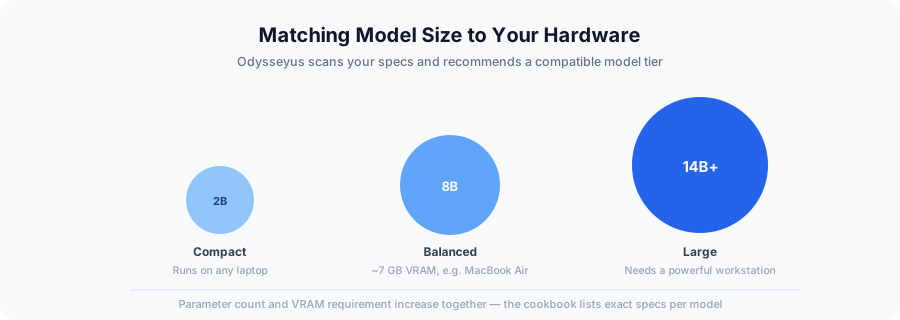
Model sizes range dramatically, from compact 2-billion-parameter models to larger 14-billion-parameter variants. The relationship between model size and performance isn’t linear—a well-designed 8-billion-parameter model often outperforms a poorly optimized 14-billion-parameter alternative. Context window size also matters significantly. A model with a 125,000-token context window can process substantially longer documents and conversations than one limited to 4,000 tokens.
Odysseyus includes a hardware detection feature that scans your system and recommends suitable models. On a MacBook Air with 11-12 GB of VRAM, for example, the LFM2 8-billion-parameter model emerges as an optimal choice, offering excellent performance-to-resource ratio while maintaining reasonable speed and a generous context window.
Join our newsletter
Get latest tips, trends, and deals for free.
The Cookbook: Simplified Model Management with FlowHunt-Inspired Automation
The Odysseyus cookbook represents a paradigm shift in how users interact with language models. Rather than navigating command-line interfaces or managing Docker containers separately, you can browse available models, view their specifications, and download them with a single click. This democratization of AI model management aligns with FlowHunt’s philosophy of simplifying complex automation tasks through intuitive interfaces.
The cookbook interface provides several critical functions:
Once downloaded, models appear in your running instances. You can configure them with different profiles—quality prioritizes accuracy, balanced offers middle-ground performance, and speed optimizes for responsiveness. These configurations save as named profiles, allowing you to switch between setups instantly.
Connecting External APIs and Expanding Capabilities
While local models provide tremendous value, Odysseyus also supports connecting to external APIs. By integrating with NVIDIA’s API infrastructure, you can access larger, more capable models while still maintaining the platform’s unified interface. This hybrid approach gives you flexibility: use local models for privacy-sensitive or cost-conscious tasks, and leverage API-based models when you need maximum capability.
Setting up external APIs is straightforward. You generate an API key from your provider (such as NVIDIA’s build.nvidia.com), copy the base URL, and paste both into Odysseyus’s API configuration panel. The platform automatically detects available models and adds them to your model list. Now you can toggle between locally-hosted and API-based models seamlessly, choosing the right tool for each task.
Productivity Features: Notes, Projects, and Task Management
Beyond language model interaction, Odysseyus includes a suite of productivity tools that transform it into a comprehensive personal assistant platform. The notes feature functions as both a to-do list and reminder system, allowing you to capture tasks and set notifications. Projects enable you to organize work around specific initiatives, and the gallery feature lets you store and reference images for context.
An image editor is built directly into the platform, eliminating the need to switch between applications. The customizable interface—with themes ranging from cyberpunk to Claude-inspired designs—ensures the platform feels personal and engaging. These features combine to create an environment where AI assistance is seamlessly integrated into your daily workflow rather than being a separate tool you access occasionally.
Deep Research, Web Search, and Advanced Dependencies
Odysseyus supports advanced features like deep research capabilities and web search functionality, though these require installing specific dependencies. The settings panel provides a user-friendly interface for managing all required packages, eliminating the need to manually install libraries or manage environments. This dependency management system exemplifies FlowHunt’s approach to automation—removing friction from technical setup so users can focus on results.
When you enable web search, the AI can retrieve current information and incorporate it into responses, making it suitable for research tasks that require up-to-date data. Deep research features enable more thorough analysis of complex topics. These capabilities transform Odysseyus from a simple chat interface into a research assistant capable of sophisticated information gathering and analysis.
Practical Considerations: Running Odysseyus on Consumer Hardware
Running Odysseyus on a MacBook Air demonstrates the platform’s accessibility, though realistic expectations matter. The 8-billion-parameter LFM2 model provides excellent performance on this hardware, with response times that are reasonable though noticeably slower than smaller models. The trade-off is clear: larger models deliver better quality responses but consume more resources and take longer to generate output.
VRAM management is critical. The LFM2 model requires approximately 6.8 GB of VRAM, leaving comfortable headroom on a 12 GB system. This prevents system slowdown from memory pressure. If you’re considering Odysseyus on consumer hardware, check your available VRAM and cross-reference it with the cookbook’s requirements before downloading models.
System Integration and Automation Potential
A particularly compelling aspect of Odysseyus is its potential for system automation. The platform includes Model Context Protocols (MCPs) that grant AI access to your computer’s file system, allowing it to organize files, create folders, delete items, and manage your digital workspace. This is the same building block behind intelligent agents more broadly — a standardized way for a model to act on its environment rather than just answer questions. Combined with prompt injection capabilities, this creates possibilities for sophisticated automation workflows, similar in spirit to what a hosted AI agent platform offers for teams that want that automation without managing local hardware themselves.
Supercharge Your Workflow with FlowHunt
Experience how FlowHunt automates your AI content and SEO workflows — from research and content generation to publishing and analytics — all in one place.
The Open-Source Advantage and Community-Driven Development
Odysseyus’s open-source nature creates significant long-term value. The codebase is publicly available, meaning developers can contribute improvements, create specialized forks for specific use cases, and build upon the foundation. This collaborative approach has historically produced superior software to closed-source alternatives, as communities identify and solve problems collectively.
The project’s creator has demonstrated remarkable technical capability, and the open-source model ensures that Odysseyus will evolve and improve through community contributions. Specialized versions tailored to specific workflows—whether content creation, research, coding, or system administration—are likely to emerge from the community.
Practical Setup: From Installation to First Conversation
Getting started with Odysseyus involves several steps. First, you download and install the platform on your computer. Next, you access the cookbook to browse available models. The hardware scanner helps you identify which models your system can run effectively. You then download your chosen model—a process that takes time proportional to the model’s size but requires zero technical knowledge.
Once downloaded, you configure your model using one of the preset profiles or custom settings. You can adjust context window size, parallel processing capabilities, and GPU allocation. Finally, you can start interacting with your locally-hosted model through the clean, intuitive chat interface.
For users wanting to leverage external APIs, the process is similarly straightforward: generate an API key from your provider, paste it into Odysseyus’s settings, and begin using those models alongside your local ones.
Conclusion
Odysseyus represents a significant step forward in democratizing AI access. By combining powerful language models with an intuitive interface, comprehensive dependency management, and integrated productivity tools, it transforms local AI from a technical endeavor into an accessible platform for everyday users. Whether you’re running it on a MacBook Air or a high-performance workstation, Odysseyus provides the tools to build a personal AI assistant that respects your privacy, costs nothing to run, and integrates seamlessly into your workflow. As the open-source community continues developing and improving the platform, Odysseyus is positioned to become an increasingly valuable tool for anyone seeking to harness AI’s potential on their own terms.
Frequently asked questions
Odysseyus is an open-source AI assistant platform that allows you to run language models locally on your computer with a user-friendly interface, task management, and productivity tools built in.
Yes, Odysseyus can run on MacBook Air, though performance depends on your specific hardware. The platform includes a hardware scanner that detects your specs and recommends compatible models.
Odysseyus supports a wide range of models from 2 billion to 14+ billion parameters. Smaller models (2-8 billion parameters) run efficiently on consumer hardware, while larger models may require more powerful systems.
Odysseyus includes a dependency management system in the settings where you can easily install all required packages for various features like web search, image processing, and other integrations.
Arshia is an AI Workflow Engineer at FlowHunt. With a background in computer science and a passion for AI, he specializes in creating efficient workflows that integrate AI tools into everyday tasks, enhancing productivity and creativity.
Arshia Kahani
AI Workflow Engineer
Streamline Your AI Workflows with FlowHunt
Automate your content research, generation, and deployment with FlowHunt's AI-powered workflow platform.
How to Install OpenClaw: A Step-by-Step Setup Guide
Install OpenClaw, your own private AI assistant that runs on your computer, in a few minutes. A simple, beginner-friendly walkthrough from the one-line install ...
Claude Opus 4.5: The AI Model Redefining Coding, Agentic Tasks, and Enterprise Workflows
Discover how Claude Opus 4.5 sets new standards in AI-powered coding, agentic task automation, and enterprise productivity. Learn why this breakthrough model is...
The Remote MacOs Use MCP Server enables AI agents to securely automate, control, and manage remote macOS systems without extra software. It bridges AI assistant...
5 min read
AI
macOS
+4
Cookie Consent We use cookies to enhance your browsing experience and analyze our traffic. See our privacy policy.