


AI Agents
Learn how to build, configure, and orchestrate AI agents in FlowHunt. From simple agents to deep agents and full crews, find all the guides you need here.
3 min read
Agents
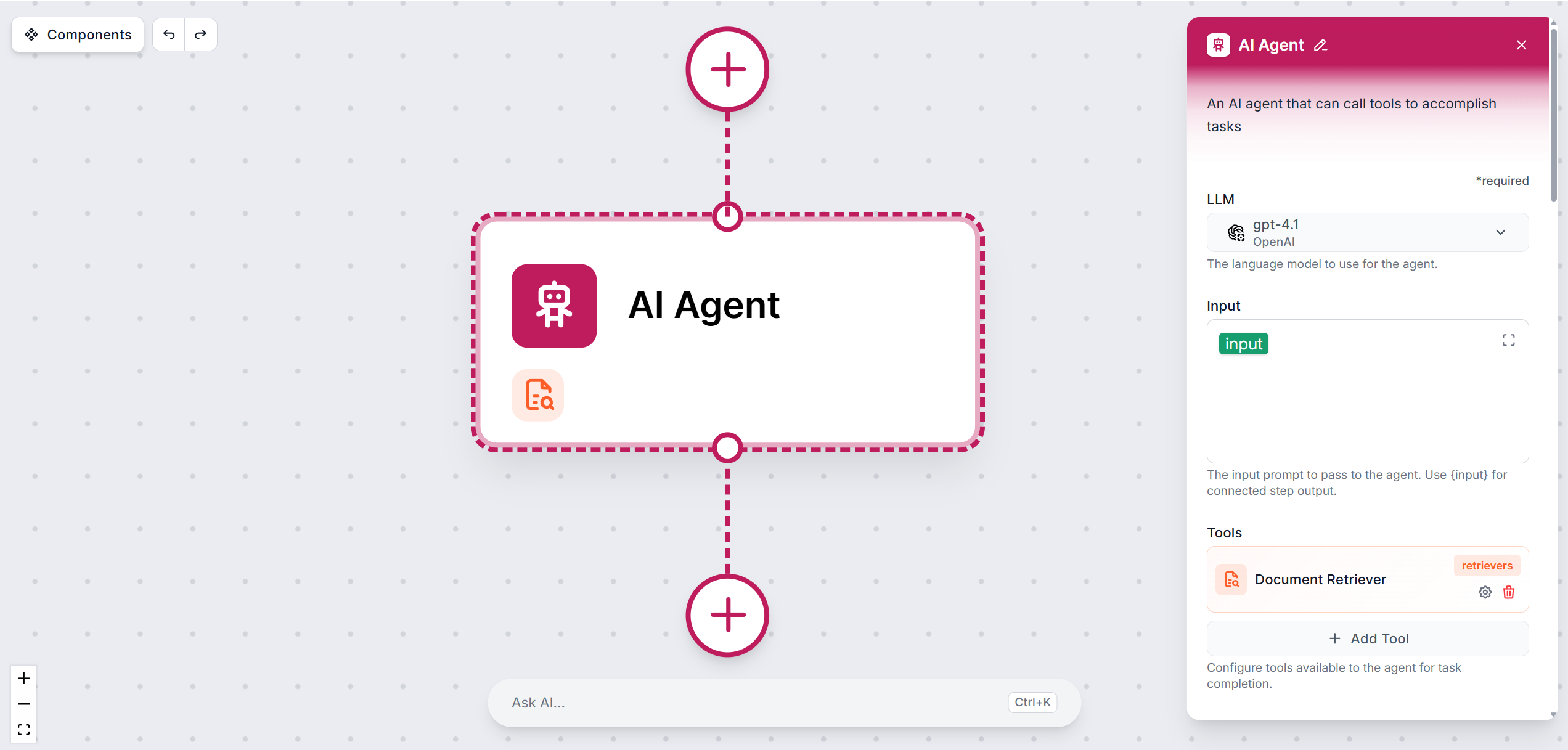
Comprehensive guide to the AI Agent component - FlowHunt’s intelligent workflow building block for automated task execution.
The AI Agent component is a versatile building block designed to act as an intelligent agent within an AI workflow. This agent leverages large language models (LLMs), can connect to external tools, and is configurable for a wide range of use-cases such as conversational AI, complex automation, and dynamic task execution.

Get latest tips, trends, and deals for free.
The AI Agent processes input prompts, considers conversation history (optionally), and can use external tools to generate context-aware responses. Its capabilities can be tailored by specifying a backstory, role, and goal, allowing the agent to behave according to a specific persona or objective. The agent can also perform function calling, enabling it to interact programmatically with APIs or external systems through enabled tools.
Pick the large language model the agent will use. You can choose from a variety of models from 6 major providers. The default model is the latest mid-range model from OpenAI.
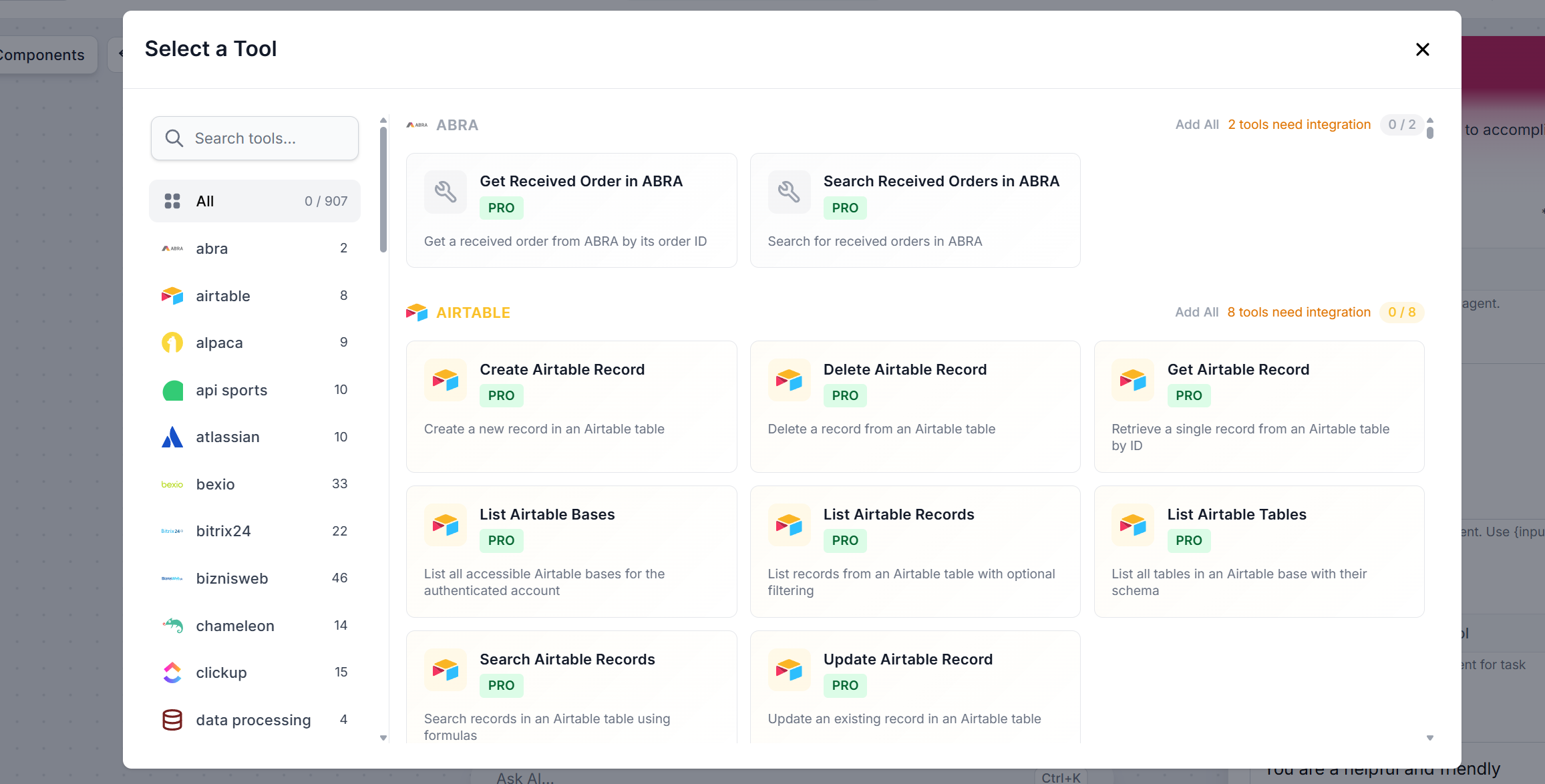
This is where you give the agent all of its tools. There’s more tha 900 items you can connect as tools. These range from new capabilities to simple actions performed in integrated tools. Virtually any interface, database or communication app can become a tool via API and MCP servers.
Click + Add Tool. The full list of all available tools. You can filter it by category or via search:
Each tool comes with unique settings. For each item, you can either decide to let AI decide to use it however it needs, or configure paratemers manually. You can switch to manual input by clicking the “AI Decides” button. Once you define a parameter, it is locked and not editable to the AI.
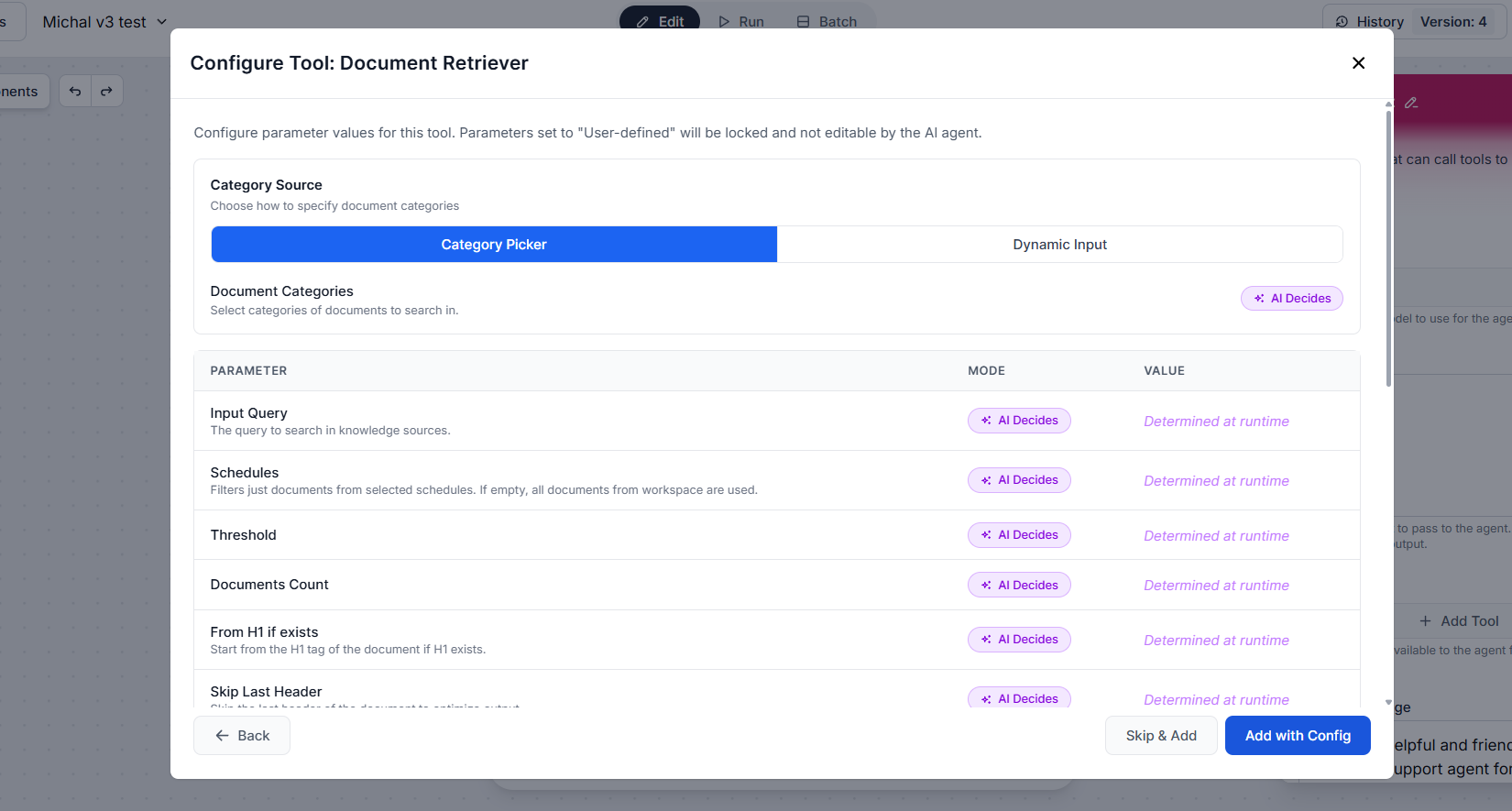
You can skip the parameter configuration by clicking “Skip & Add”. Once the tool is configured, click “Add with Config”. You can then continue adding other tools.
This is the main prompt where you define the agent’s role, task, behavior and any other instructions.
Example system message:
You are Sam, a friendly and knowledgeable customer service assistant for FlowHunt, an AI workflow automation platform.

Your primary goal is to resolve customer issues quickly and satisfactorily, leaving every customer feeling heard, helped, and valued. You aim to reduce escalations by handling the majority of requests independently and efficiently.

Instructions:
Always greet the customer warmly and use their name if provided.
Stay calm, patient, and empathetic — even if the customer is frustrated.
Be concise but thorough; never leave a question unanswered.
Avoid jargon. Speak like a helpful human, not a policy document.
Never argue with a customer or be dismissive of their concerns.
If you don't know something, say so honestly and offer to find out or escalate.
Handle common requests directly, including: order status, returns and refunds, product questions, shipping issues, and account help.
Escalate to a human agent if: the issue involves a complaint beyond your authority, legal matters, or if the customer explicitly requests a human.
Confirm resolution at the end of every interaction — ask if there's anything else you can help with.
Never share internal policies verbatim, make promises outside your authority, or invent information you don't have.

Tone: Warm, professional, and reassuring — like a knowledgeable friend, not a corporate script.
Limits the time (seconds) the agent can spend on a task (default: 300).
Maximum number of thinking steps (default: 10)
Limits requests per minute (default: 100).
Optionally define your agent’s role. Think of the role as your Agent’s job title. Do you need your Agent to write blog posts? Call it a ‘Content writer’.
The goal is the Agent’s task and the ideal outcome. For example, the task ogf a content writer may be to create new posts or to proofread and revise existing content.
You always bring your personality, way of speaking, and experiences to anything you do. It’s your backstory and what divides you and your work from others. The backstory is where you give your Agent a story, personality, and work experience.
Provides past chat messages as context. Without history enabled, the agent works on a per-message basis.
Weather the agent can read and write the memory of your Workspace. If enabled, you’ll be asked to define the mode and behavior prompts.
Note: Only the Tools input is strictly required; all other settings are optional, providing additional customization and stable quality of output.
The power behind an AI agent is its AI model. The right model makes all the difference to its function and performance. Check this blog for an ultimate comparison based on benchmark tests.
Ultimately, it is your agent task complexity, your availability of data, and your budget that will make your right model. It is finding that sweet spot of power versus practicality that is important.
AI agents do not only react but actively act on stated goals. The process generally goes through these key milestones:
That makes AI agents possible to employ on a vast range of apps, from automated client servicing to content generation.
Create powerful AI-driven workflows with the AI Agent component — connect tools, automate tasks, and scale your operations.
Learn how to build, configure, and orchestrate AI agents in FlowHunt. From simple agents to deep agents and full crews, find all the guides you need here.
New to FlowHunt? Start here. Learn the basics of building AI workflows, deploying chatbots, and connecting knowledge sources — all without writing code.
Integrate FlowHunt with the PAIML MCP Agent Toolkit to enable advanced multi-agent orchestration, centralized management, and dynamic task coordination in your ...
Cookie Consent
We use cookies to enhance your browsing experience and analyze our traffic. See our privacy policy.