


5 Ways Teachers Use AI Lesson Planning to Reclaim Hours Every Week
From first-year teachers to curriculum coordinators, here are five concrete ways AI tools for teachers cut lesson planning time without cutting quality.
6 min read
AI
Education
+4
Teachers work far beyond contracted hours on planning and admin alone. Here’s how reduce teacher workload AI tools eliminate the mechanical part of the job so teaching itself gets the attention it deserves.
Teachers often aren’t burning out because of the students in front of them. They’re burning out because of everything they have to do before and after those students walk in, and a meaningful share of it is repetitive, structural work that doesn’t require a teaching credential to execute, just the time no one has enough of. Reducing teacher workload with AI tools is the answer to this.
RAND’s 2025 State of the American Teacher survey found that 53% of K-12 teachers report burnout. It’s down from 60% the year before, but it’s still the majority of the profession, and still worse than the general working population. The named causes, per EdWeek’s coverage of the survey , include student behavior and low pay, but the two structural drivers underneath most of it are administrative work and unpaid overtime. More than 80% of teachers reported working beyond their contracted hours, averaging 10 extra hours a week, and only half said they were satisfied with their workload.
Student behavior and compensation are systemic issues that a quick tool can’t fix. Ten hours a week of uncompensated structural work spent on writing plans, filling out paperwork, mapping standards, on the other hand is. It’s exactly the kind of load a properly scoped AI teacher productivity tool can bring down to less than half.
A nationally representative survey by the EdWeek Research Center, commissioned by Merrimack College’s Winston School of Education and Social Policy, found teachers reporting a median 54-hour workweek, with only 46% of that time spent actually teaching. Of the rest, teachers reported 5 hours a week planning or preparing lessons and another 3 hours on general administrative work . This is 8 hours weekly that never touch a classroom but still have to happen.
Stack that 8 hours against RAND’s finding of 10 unpaid extra hours a week, and the picture is consistent across the two independent surveys. A large, recurring block of a teacher’s week goes to work that’s necessary but not, in itself, teaching.
Run that 8 hours a week out across a standard 36-week school year and it’s roughly 288 hours, or the equivalent of seven full 40-hour workweeks spent on planning and administrative tasks alone. That’s on top of everything that happens in the classroom. That’s the scale of time available to claw back, not by teaching less, but by spending less of it re-deriving the same structural work from scratch every single week.

Start your free trial today and see results within days.
Given a topic, grade level, and teaching goals, FlowHunt’s AI Lesson Plan Generator produces standards-aligned objectives (CCSS for ELA/Math, NGSS for science), a materials and concepts list, a sequenced set of activities, suggested timing, and formative and summative assessment ideas.
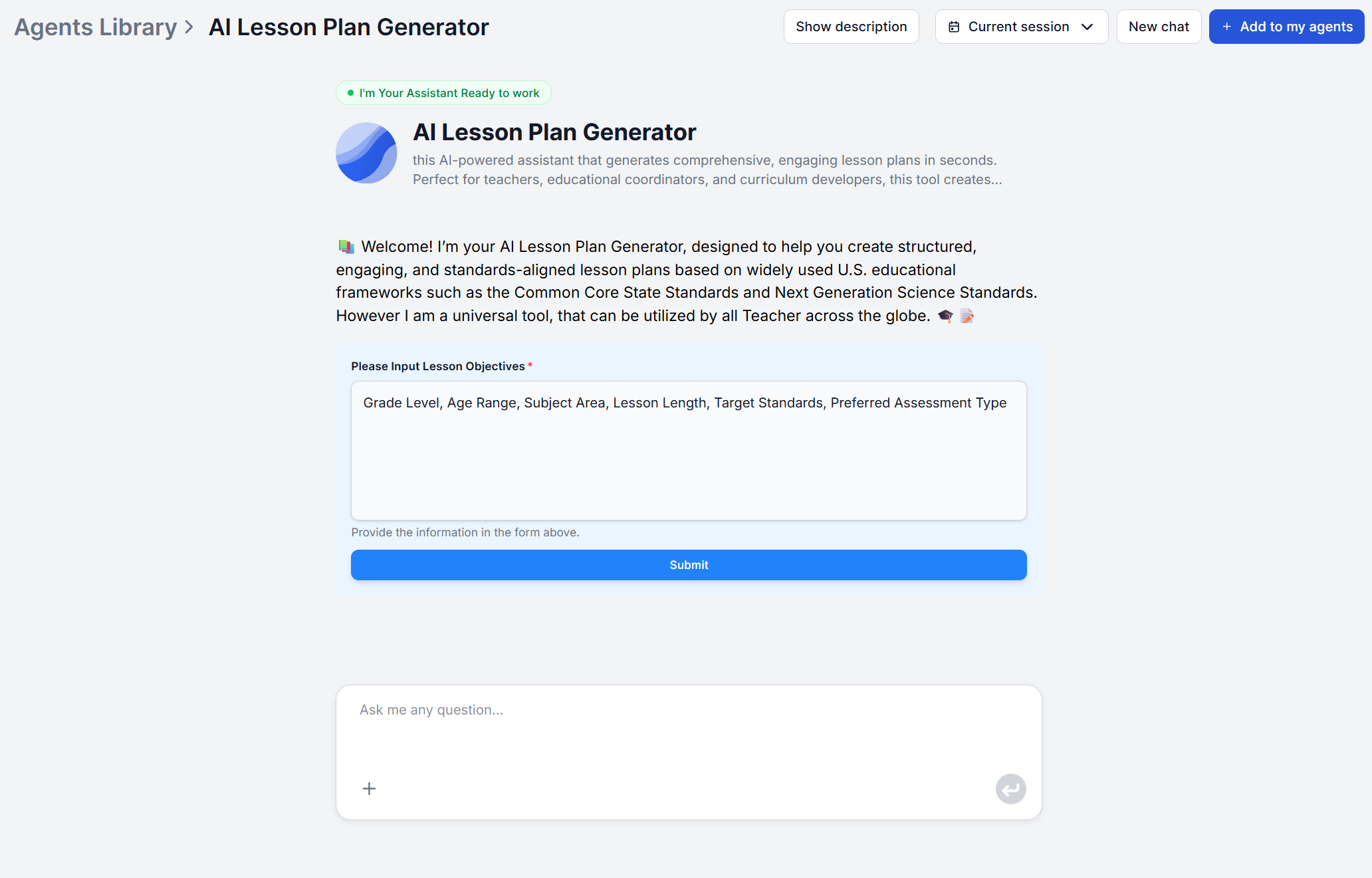
By default, the lesson plan generator adheres to CCSS and NGSS standards. If you need compliance with local curriculum requirements, the workflow can be easily adjusted in the visual editor . Simply point it to official sources for the standard as a knowledge source and adjust the agent prompt to adhere to it.
What it doesn’t automate is the knowledge of your specific students (accommodations, behavior dynamics, prior performance), and the actual judgment calls made mid-lesson that no generated plan can anticipate. The tool removes the blank-page problem, not the teacher’s style or unique classroom dynamics.
This is also why the tool is built around three plain-language inputs. The topic, grade level and teaching goals. First-year teachers without a personal lesson library yet, curriculum developers building plans across grade bands, and instructional coaches producing model lessons for professional development all use the same three inputs. What changes is what they do with the draft afterward, not how they generate it.
Picture a typical week of five lessons across two subjects. Manually, each one means writing objectives, check them against a standard, list materials, sequence activities, estimate timing, and design a way to check the understanding. That’s the work behind the reported 5 hours of weekly planning.
Generating a first draft for each lesson from a topic, grade level, and goal statement compresses that structuring work into minutes per lesson. The remaining time goes to reviewing the draft against your actual roster and materials on hand, not building the structure from nothing. With a workflow cleverly adjusted to your actual needs and standards in the visual editor , the time editing can be minimized even further.
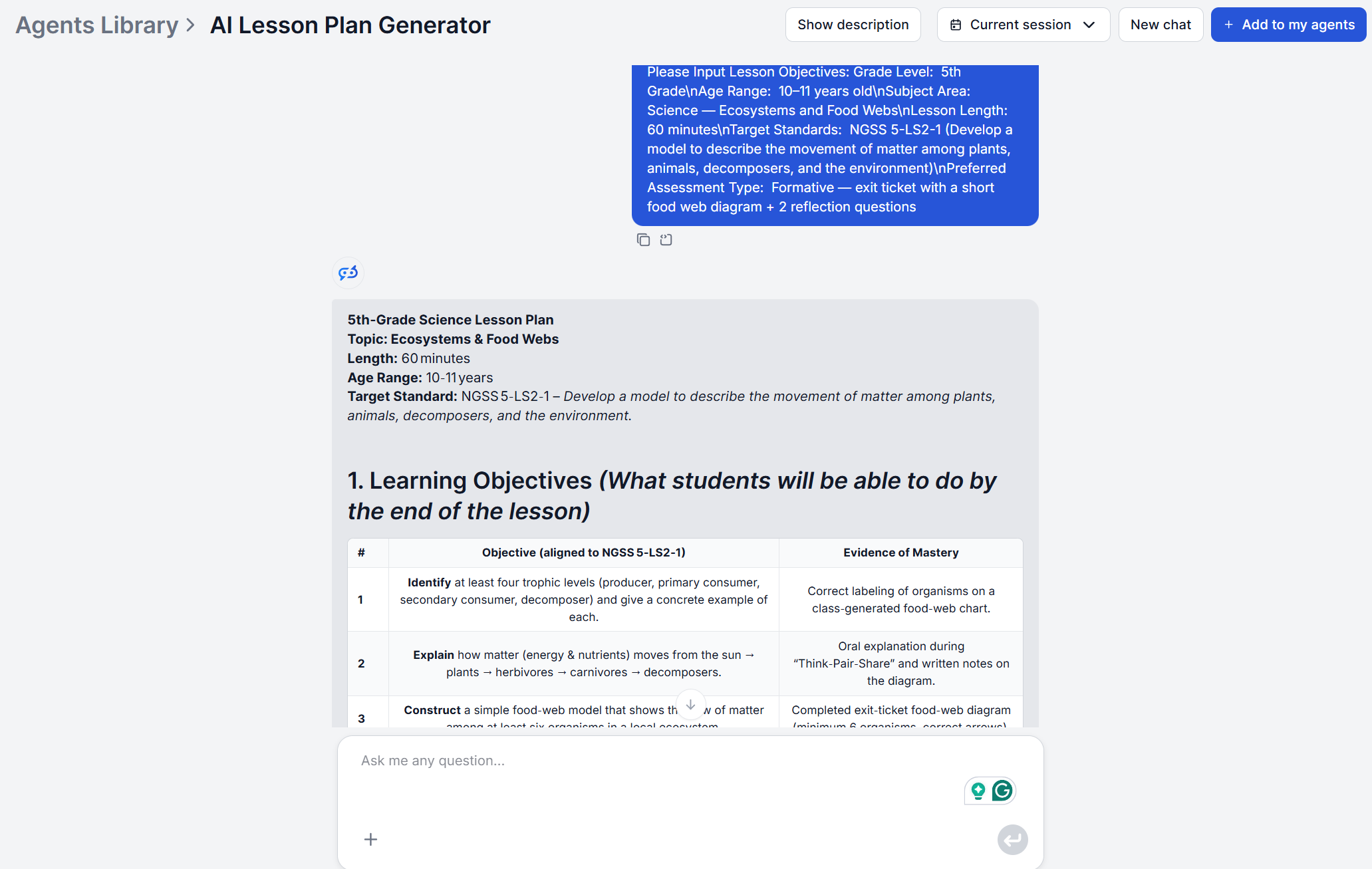
The same math holds when the week isn’t five different lessons but one lesson taught three different ways. For example, a general education section, an honors section, and a section with students needing extra care. Regenerating the plan per section with an adjusted grade level or goal statement produces three tailored starting points instead of one plan manually reworked twice.
Get latest tips, trends, and deals for free.
Formal AI training in schools is inconsistent. RAND’s American School District Panel found that by the start of the 2025-26 school year, district leaders expected nearly all low-poverty districts to have trained teachers on AI use, versus only about six in ten high-poverty districts. That gap means most teachers adopting these tools are doing so without institutional guidance, which argues for starting small rather than school-wide:
TIP: Teachers who also need background research before building a new unit — a topic they haven’t taught before, or a standard they need to understand in more depth — use the AI Research Assistant to get a structured overview with sourced references first, then bring that into the planning step.
The pattern to reduce burnout looks the same regardless of which tool is used. AI produces the structural first draft with objectives, materials, sequencing, timing, assessment ideas, and the teacher spends their time on editing and adding their unique style.
It also means the metric worth tracking isn’t “how many plans did AI generate” but “what did the reclaimed hours actually go toward.” If the answer is more unpaid overtime absorbed elsewhere, the tool hasn’t solved the burnout problem, only moved it. If the answer is a shorter evening, more time with individual students who need it, or simply enough margin to not be planning at 9 p.m., that’s the actual fix the RAND and EdWeek data point toward. Not necessarily less work overall, but less of the specific work that doesn’t require a teacher to do it.
Maria is a copywriter at FlowHunt. A language nerd active in literary communities, she's fully aware that AI is transforming the way we write. Rather than resisting, she seeks to help define the perfect balance between AI workflows and the irreplaceable value of human creativity.

Generate complete, standards-aligned lesson plans in seconds. Give it a topic, grade level, and teaching goals, and get objectives, activities, timing, and assessments — ready to teach from.
From first-year teachers to curriculum coordinators, here are five concrete ways AI tools for teachers cut lesson planning time without cutting quality.

An AI lesson plan generator turns a topic, grade level, and duration into a complete, standards-aligned lesson plan in minutes. Here's how it works.
Automate lesson planning, literature reviews, grading, and research workflows with AI agents—no code required.
Cookie Consent
We use cookies to enhance your browsing experience and analyze our traffic. See our privacy policy.