


AI Lesson Plan Generator
Generate complete, standards-aligned lesson plans in seconds with FlowHunt's AI Lesson Plan Generator. Provide a topic, grade level, and teaching objectives to ...
3 min read
Education
AI
+3

An AI lesson plan generator turns a topic, grade level, and duration into a complete, standards-aligned lesson plan in minutes. Here’s how it works.
A well-structured lesson plan involves a lot of unglamorous work before a single student walks in. You need to write measurable objectives, map them to a standard, sequence activities, budget time, and design a way to check whether any of it landed. Teachers do this hundreds of times a year, and the time actually set aside for it rarely matches the time it takes to do thoroughly.
Public schools give teachers an average of just four hours and 26 minutes of dedicated planning time per week, according to School Pulse Panel data reported by EdSurge , and a separate survey covered by Education World found teachers spend roughly seven hours a week just searching for instructional materials, plus another five hours creating their own.
An AI lesson plan generator compresses that scramble into minutes. Just give it a topic, a grade level, and your teaching goals. It hands you back a complete, standards-aligned plan. Here’s how the generation actually works, what a complete plan should include, and how to use one without losing the judgment that makes teaching work.
The hours cited above don’t even capture the full picture. They cover finding and building materials, not the separate work of writing objectives, aligning them to a standard, and structuring a class period around them. That’s the part that turns a simple topic into a finished plan, and it’s the part most likely to get compressed into ten minutes the night before.
The problem is that structuring a lesson well, every time, for every class, and at the pace a school year demands, doesn’t scale. Standards alignment alone adds a layer most weeknight planning sessions don’t have time for. An automatic lesson planning tool doesn’t replace the instructional judgment teachers bring to a classroom. It simply removes the repetitive structuring work. In other words, AI won’t know and understand your students, but it will let you stop reformatting Word documents at 11 p.m.
The AI Lesson Plan Generator only requires three inputs: the topic, a grade level, and your teaching goals. From those, it produces a complete plan containing the learning objectives, key concepts and materials, step-by-step activities, suggested timing, and assessment ideas.
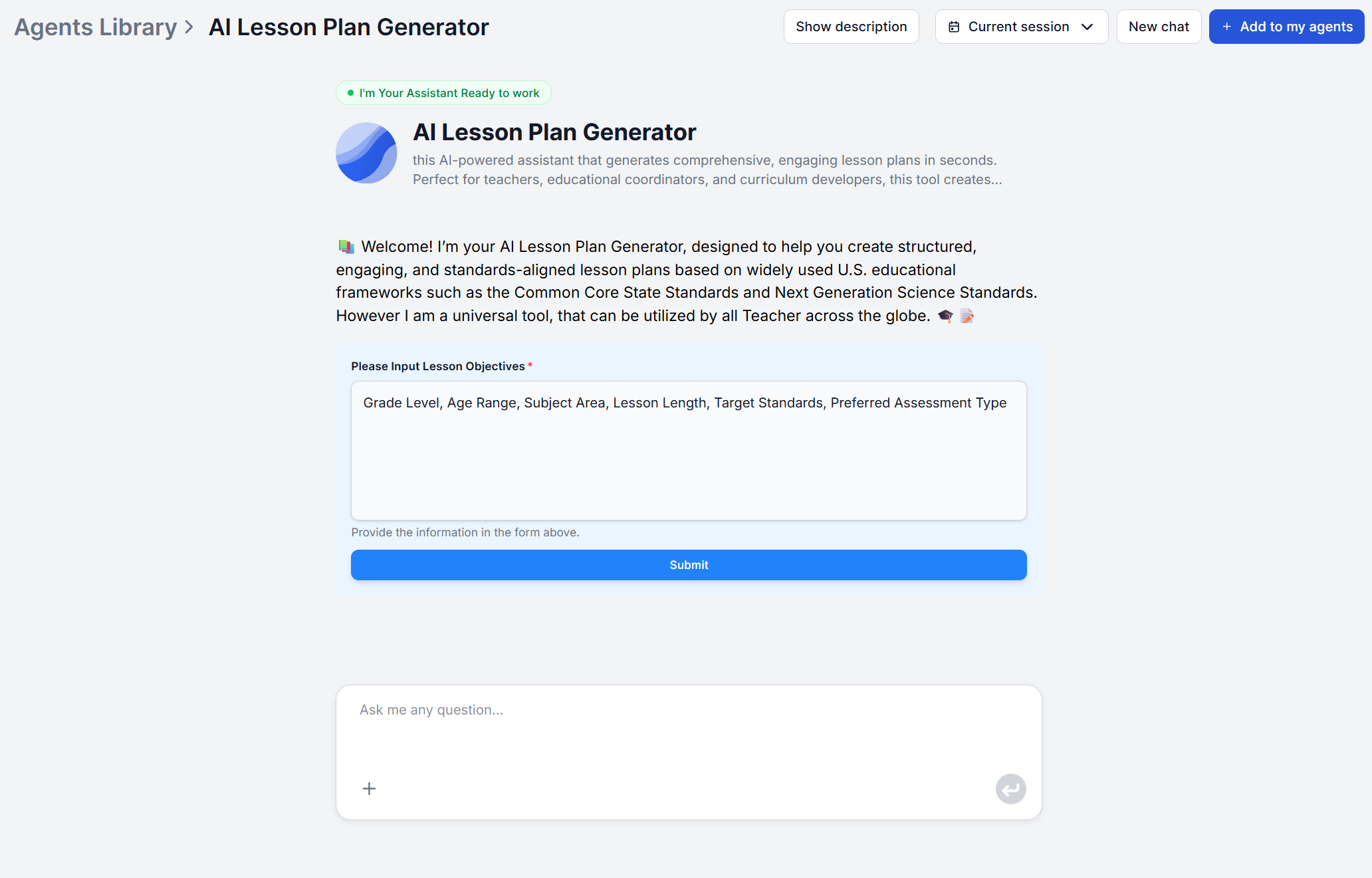
What makes it a genuine AI lesson plan creator rather than a fill-in-the-blank template is that the standards alignment is built in from the start. Objectives are written to match the relevant Common Core State Standards (CCSS) for English Language Arts and Mathematics, or Next Generation Science Standards (NGSS) for science topics. Activities, vocabulary, and pacing are also calibrated to the grade level itself, so a plan for third graders and a plan for tenth graders on a related topic won’t just differ in difficulty, but also in structure.
TIP: If your school follows a different regional or state standard, or you teach a subject outside of CCSS/NGSS, you can easily edit the workflow to fit your needs. Open the flow in FlowHunt’s visual editor , upload your official standards documents as knowledge sources , and add the GoogleSearch component so the agent can bridge any gaps by searching the web instead of relying on the uploaded documents alone. Adjust the prompt to reference those sources, and every future plan will align to your standard.

Start your free trial today and see results within days.
The workflow itself is short:
Step 1: Describe your topic. State the lessons topic while being as specific or broad as the lesson requires.
Step 2: Set the grade level. This determines the reading level, vocabulary, activity complexity, and which standards framework (CCSS or NGSS) the objectives align to.
Step 3: State your teaching goals. What should students be able to do by the end of the lesson? This shapes the objectives the plan is built around.
Step 4: Let it generate the plan. From those three inputs, you get objectives, key concepts and materials, a step-by-step activity sequence, suggested timing per section, and assessment ideas.
Step 5: Review before class. Read through the objectives, check the materials list against what you actually have on hand, and adjust anything that doesn’t fit your classroom.
That’s the entire loop to generate a lesson plan with AI. Three inputs in, one complete plan out, ready for you to review and edit.
A finished plan is built around five parts:
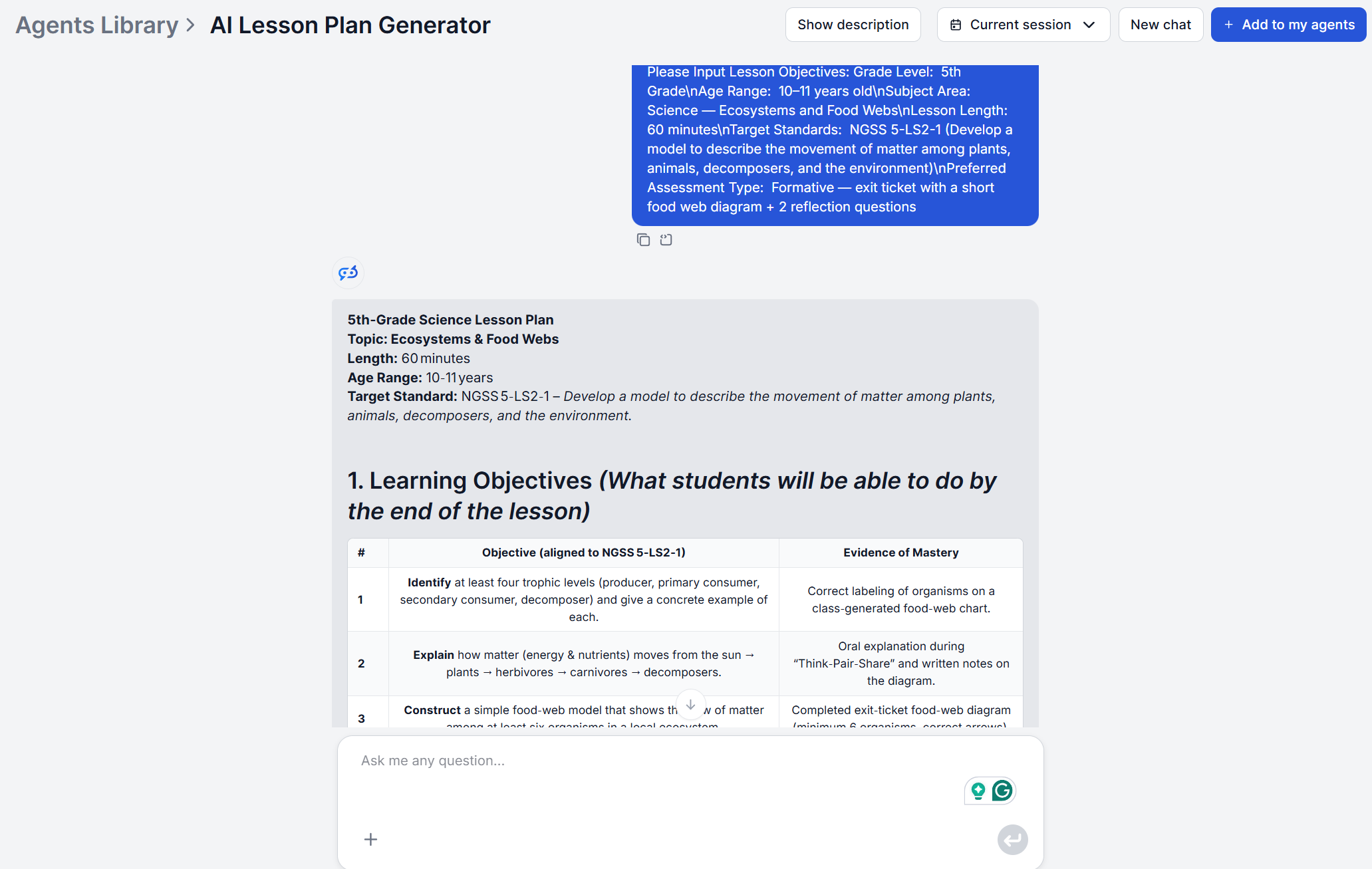
That last category is worth dwelling on. Good assessment design is its own skill, distinct from writing objectives or sequencing activities, and it’s often the piece that gets skipped under time pressure. Having formative and summative ideas generated alongside the rest of the plan means checking for understanding isn’t an afterthought bolted onto the lesson later.
Get latest tips, trends, and deals for free.
Student teachers and first-year educators know what good instruction looks like in theory, but they haven’t yet built the internal template that experienced teachers rely on to turn a topic into a class period. An AI lesson plan generator gives them that structure immediately.
Instead of staring at a blank lesson plan format wondering how much time to allot to guided practice versus independent work, they get a complete, professionally structured plan to start from, and can focus their energy on delivery and classroom management instead of document formatting.
This is what the best teacher AI tools do well. They don’t hand a new teacher a shortcut around learning to teach, they hand them a scaffold that reflects established lesson plan structure, so the first few months aren’t spent reinventing a format from scratch.
Experienced teachers face the opposite problem. They have plenty of experience structuring a lesson plan, but they may struggle structuring the same topic six different ways across sections with different ability levels. Because the generator produces a fresh plan from whatever grade level and goals you enter, re-running it with adjusted inputs is faster than manually re-editing a plan written for a different class.
Instructional coaches use the same approach to build model lesson plans for professional development, generating a baseline plan and then adjusting the underlying flow itself if they want a different structure or emphasis to become the standard template their department uses going forward.
A department teaching the same unit across a general education section, an honors section, and a section with several students on IEPs used to mean writing one plan and manually reworking it multiple times with different pacing, different vocabulary load, and more. Regenerating the plan per section with an adjusted grade level or goal statement gets closer to a usable first draft for each group in a fraction of the time, leaving the teacher’s editing time for the details that actually require knowing the students in the room.
A generated plan is complete, not final. Before teaching from it, it’s worth checking:
None of this takes long, because the plan is already built. It’s just editing, not authoring from a blank page.
Once a plan is ready, it doesn’t have to stay a copy-paste job either. FlowHunt’s integrations can route the finished plan straight into your LMS, shared drive, or Google Docs, so it lands where your team already works instead of sitting in a chat window.
An AI lesson plan generator doesn’t replace the judgment that makes teaching work. It replaces the part that was never really teaching to begin with, the writing objectives from scratch, the mapping them to a standard, and other administrative tasks. What’s left for you to do is the part only you can do. Checking it against your students, your materials, and your classroom.
Maria is a copywriter at FlowHunt. A language nerd active in literary communities, she's fully aware that AI is transforming the way we write. Rather than resisting, she seeks to help define the perfect balance between AI workflows and the irreplaceable value of human creativity.

Generate complete, standards-aligned lesson plans in seconds. Give it a topic, grade level, and teaching goals, and get objectives, activities, timing, and assessments — ready to teach from.
Generate complete, standards-aligned lesson plans in seconds with FlowHunt's AI Lesson Plan Generator. Provide a topic, grade level, and teaching objectives to ...
From first-year teachers to curriculum coordinators, here are five concrete ways AI tools for teachers cut lesson planning time without cutting quality.
Step-by-step FlowHunt lesson plan tutorial, from entering your topic and grade level to reviewing a complete, standards-aligned plan with objectives, activities...
Cookie Consent
We use cookies to enhance your browsing experience and analyze our traffic. See our privacy policy.