



Google Sheets
Integra FlowHunt con Google Sheets per automatizzare la creazione di fogli di calcolo, il recupero dei dati e aggiornamenti dinamici nei tuoi flussi di lavoro g...
2 min di lettura
AI
Google Sheets
+3
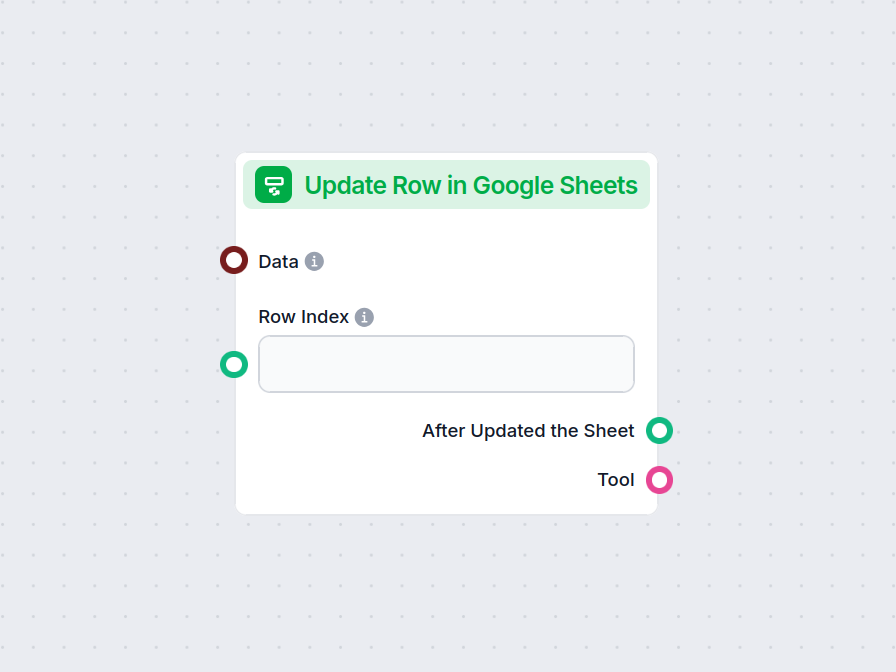
Il componente Aggiorna Riga in Google Sheets consente al tuo flusso di modificare i dati in una riga specifica di qualsiasi Google Sheet collegato, semplificando aggiornamenti in tempo reale e l’automazione dei workflow.
Descrizione del componente
The Update Row in Google Sheets component allows you to update a specific row in an existing Google Sheets document directly from your AI workflow. This is particularly useful for automating data management tasks, such as modifying entries, correcting mistakes, or updating records as part of a larger process.
Main Function:
This component updates the values in a specified row of a Google Sheets document. You provide the row index and the data to be updated, and the component will apply these changes to the corresponding cells.
Use Case:
Ideal for workflows where AI needs to interact with spreadsheet data, such as updating results of data processing, recording outcomes of analysis, or integrating feedback into shared documents.
Here are the inputs you can provide to the component:
| Name | Type | Required | Description |
|---|---|---|---|
| Data | Data | No | Data to be updated. Each key of the data corresponds to a column in the sheet. |
| Document | Google Sheets Document | Yes | The target Google Sheets document to update. Selected via Google Drive picker. |
| Row Index | String/Number | No | The index (number) of the row you want to update. |
| Tool Description | String (advanced) | No | Description of the tool, useful for agents to understand its purpose. |
| Tool Name | String (advanced) | No | Custom name to refer to the tool in agent workflows. |
| Verbose | Boolean (advanced) | No | Whether to print verbose output for debugging or logging purposes. |
Note: Advanced fields like Tool Description, Tool Name, and Verbose are typically used for agent-based workflows or for debugging.
Upon execution, the component provides the following outputs:
After Updated the Sheet (Message):
A message indicating the result after the update operation, which you can use as input for subsequent steps in your workflow.
Tool:
A reference to the update tool itself, useful if you’re chaining multiple tool-based operations or integrating with agent frameworks.
| Feature | Description |
|---|---|
| Updates Google Sheets | Modifies a specific row in a chosen Google Sheet |
| Customizable Input | Specify data, row, and document |
| Agent Integration | Advanced fields for use with AI agents |
| Verbose Mode | Optional detailed output for debugging |
| Two Outputs | Message after update, and the tool reference |
This component is a building block for any workflow that requires programmatic, reliable updates to spreadsheet data as part of a modern AI process.
Per aiutarti a iniziare rapidamente, abbiamo preparato diversi modelli di flusso di esempio che mostrano come utilizzare efficacemente il componente Aggiorna Riga in Google Sheets. Questi modelli presentano diversi casi d'uso e best practice, rendendo più facile per te comprendere e implementare il componente nei tuoi progetti.
Integra FlowHunt con Google Sheets per automatizzare la creazione di fogli di calcolo, il recupero dei dati e aggiornamenti dinamici nei tuoi flussi di lavoro g...
Migliora il tuo workflow aggiornando istantaneamente Google Sheets da qualsiasi fase del tuo processo. Prova ora il componente Aggiorna Riga in Google Sheets.
Integra FlowHunt con Google Sheets per automatizzare la creazione di fogli di calcolo, il recupero dei dati e aggiornamenti dinamici nei tuoi flussi di lavoro g...

Automatizza le formule di Google Sheets e risparmiati il mal di testa. Prova il nostro Generatore di Formule Google Sheets con IA e scopri come crearne uno tuo.
Consenso Cookie
Usiamo i cookie per migliorare la tua esperienza di navigazione e analizzare il nostro traffico. See our privacy policy.