



Google Sheets
Integrujte FlowHunt s Google Sheets a automatizujte tvorbu tabuliek, získavanie údajov a dynamické aktualizácie vo vašich AI workflowoch.
2 min čítania
AI
Google Sheets
+3
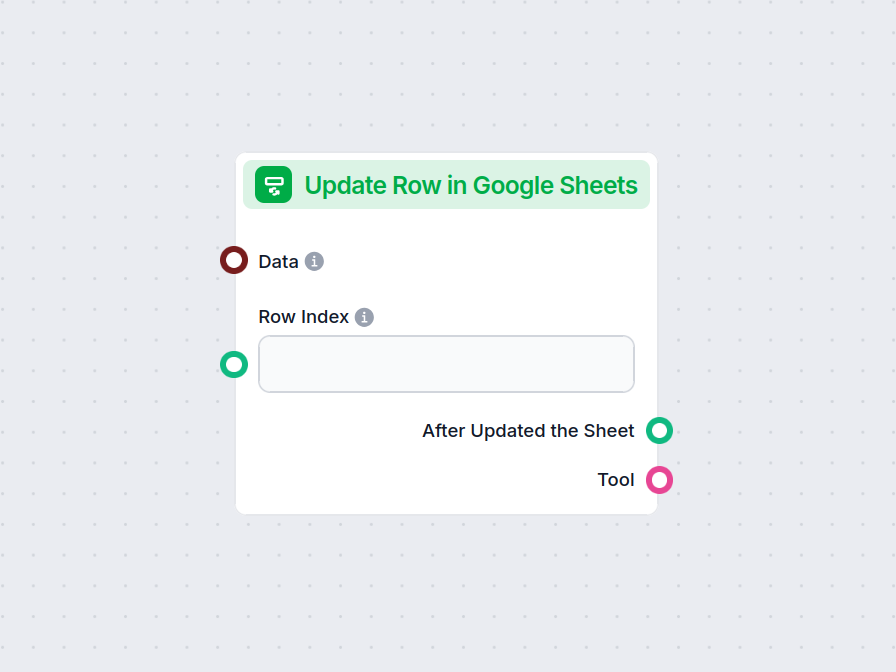
Komponent Aktualizovať riadok v Google Sheets umožňuje vášmu workflowu upravovať údaje v konkrétnom riadku ľubovoľného prepojeného Google Sheet súboru, čím zjednodušuje aktualizácie v reálnom čase a automatizáciu workflowov.
Opis komponentu
The Update Row in Google Sheets component allows you to update a specific row in an existing Google Sheets document directly from your AI workflow. This is particularly useful for automating data management tasks, such as modifying entries, correcting mistakes, or updating records as part of a larger process.
Main Function:
This component updates the values in a specified row of a Google Sheets document. You provide the row index and the data to be updated, and the component will apply these changes to the corresponding cells.
Use Case:
Ideal for workflows where AI needs to interact with spreadsheet data, such as updating results of data processing, recording outcomes of analysis, or integrating feedback into shared documents.
Here are the inputs you can provide to the component:
| Name | Type | Required | Description |
|---|---|---|---|
| Data | Data | No | Data to be updated. Each key of the data corresponds to a column in the sheet. |
| Document | Google Sheets Document | Yes | The target Google Sheets document to update. Selected via Google Drive picker. |
| Row Index | String/Number | No | The index (number) of the row you want to update. |
| Tool Description | String (advanced) | No | Description of the tool, useful for agents to understand its purpose. |
| Tool Name | String (advanced) | No | Custom name to refer to the tool in agent workflows. |
| Verbose | Boolean (advanced) | No | Whether to print verbose output for debugging or logging purposes. |
Note: Advanced fields like Tool Description, Tool Name, and Verbose are typically used for agent-based workflows or for debugging.
Upon execution, the component provides the following outputs:
After Updated the Sheet (Message):
A message indicating the result after the update operation, which you can use as input for subsequent steps in your workflow.
Tool:
A reference to the update tool itself, useful if you’re chaining multiple tool-based operations or integrating with agent frameworks.
| Feature | Description |
|---|---|
| Updates Google Sheets | Modifies a specific row in a chosen Google Sheet |
| Customizable Input | Specify data, row, and document |
| Agent Integration | Advanced fields for use with AI agents |
| Verbose Mode | Optional detailed output for debugging |
| Two Outputs | Message after update, and the tool reference |
This component is a building block for any workflow that requires programmatic, reliable updates to spreadsheet data as part of a modern AI process.
Aby sme vám pomohli rýchlo začať, pripravili sme niekoľko ukážkových flow šablón, ktoré demonštrujú efektívne využitie komponentu Aktualizovať riadok v Google Sheets. Tieto šablóny prezentujú rôzne prípady použitia a osvedčené postupy, čo vám uľahčí pochopenie a implementáciu komponentu vo vašich vlastných projektoch.
Integrujte FlowHunt s Google Sheets a automatizujte tvorbu tabuliek, získavanie údajov a dynamické aktualizácie vo vašich AI workflowoch.
Vylepšite svoj workflow okamžitou aktualizáciou Google Sheets z akejkoľvek časti vášho procesu. Vyskúšajte komponent Aktualizovať riadok v Google Sheets už teraz.
Integrujte FlowHunt s Google Sheets a automatizujte tvorbu tabuliek, získavanie údajov a dynamické aktualizácie vo vašich AI workflowoch.

Automatizujte vzorce v Google Sheets a ušetrite si starosti. Vyskúšajte náš AI generátor vzorcov pre Google Sheets a naučte sa, ako si vytvoriť vlastný....
Súhlas s cookies
Používame cookies na vylepšenie vášho prehliadania a analýzu našej návštevnosti. See our privacy policy.