


Playwright MCP
Integrate FlowHunt with Playwright MCP Server to enable advanced browser automation, real-time testing, web scraping, and intelligent workflows powered by AI ag...
4 min read
AI
Automation
+4
Automate browsers and interact with web APIs directly from your AI-powered development tools using the Playwright MCP Server.
The Playwright MCP (Model Context Protocol) Server is designed to automate browsers and APIs, integrating seamlessly with AI development environments such as Claude Desktop, Cline, Cursor IDE, and more. By acting as a bridge between AI assistants and external web automation capabilities, it empowers AI agents to interact programmatically with websites, perform automated browser actions, and access web APIs. This enhances development workflows by enabling tasks such as automated testing, data extraction, website monitoring, and direct browser manipulation. The Playwright MCP Server is particularly valuable for developers seeking to augment their AI tools with robust browser automation, enabling more sophisticated agentic behaviors and streamlined integration with external web resources.
No specific prompt templates were found in the available repository files or documentation.
No explicit resources exposed by the Playwright MCP Server were detailed in the repository’s visible files or documentation.
No detailed tool definitions were found in server.py or the visible repository files. However, based on the name, the server likely provides browser automation tools, but no specifics are present in the files.
Automated Browser Testing
Developers can use the Playwright MCP Server to automate end-to-end testing of web applications directly from their AI-powered development environments, reducing manual testing overhead and improving reliability.
Web Scraping and Data Extraction
AI agents can programmatically navigate websites, extract structured data, and deliver it back to developers, enabling easy data collection for research or business intelligence.
API Interaction and Automation
The server can facilitate automation of API calls or integration testing, allowing developers to validate endpoints and workflows within a controlled, automated browser context.
UI Workflow Automation
Developers can automate complex user interface interactions, such as form submissions, navigation, and dynamic content handling, streamlining repetitive tasks.
Continuous Integration Enhancement
By integrating browser automation into CI/CD pipelines, teams can ensure application consistency and catch issues early in the deployment process.
mcpServers section with the appropriate command and arguments.{
"mcpServers": {
"playwright-mcp": {
"command": "npx",
"args": ["@executeautomation/mcp-playwright@latest"]
}
}
}
mcpServers.{
"mcpServers": {
"playwright-mcp": {
"command": "npx",
"args": ["@executeautomation/mcp-playwright@latest"]
}
}
}
mcpServers block.{
"mcpServers": {
"playwright-mcp": {
"command": "npx",
"args": ["@executeautomation/mcp-playwright@latest"]
}
}
}
{
  "mcpServers": {
    "playwright-mcp": {
      "command": "npx",
      "args": ["@executeautomation/mcp-playwright@latest"]
    }
  }
}
Securing API Keys using Environment Variables
To keep API keys secure, use environment variables. Example configuration:
{
  "mcpServers": {
    "playwright-mcp": {
      "command": "npx",
      "args": ["@executeautomation/mcp-playwright@latest"],
      "env": {
        "API_KEY": "${API_KEY}"
      },
      "inputs": {
        "apiKey": "${API_KEY}"
      }
    }
  }
}
Using MCP in FlowHunt
To integrate MCP servers into your FlowHunt workflow, start by adding the MCP component to your flow and connecting it to your AI agent:

Click on the MCP component to open the configuration panel. In the system MCP configuration section, insert your MCP server details using this JSON format:
{
  "playwright-mcp": {
    "transport": "streamable_http",
    "url": "https://yourmcpserver.example/pathtothemcp/url"
  }
}
Once configured, the AI agent is now able to use this MCP as a tool with access to all its functions and capabilities. Remember to change “playwright-mcp” to whatever the actual name of your MCP server is and replace the URL with your own MCP server URL.
| Section | Availability | Details/Notes |
|---|---|---|
| Overview | ✅ | High-level description from repo and project title. |
| List of Prompts | ⛔ | No prompt templates found. |
| List of Resources | ⛔ | No explicit resources listed. |
| List of Tools | ⛔ | No tool details present in visible files. |
| Securing API Keys | ✅ | Provided a generic method using environment variables. |
| Sampling Support (less important in evaluation) | ⛔ | No information found. |
Based on the documentation and file availability, the MCP server is well-known and widely adopted, but lacks significant detail in the public files about prompts, resources, and tool specifics. The project is highly starred and forked, indicating strong community interest and use. However, the lack of detailed documentation for prompts, resources, and tools limits its immediate out-of-the-box usability for new users.
| Has a LICENSE | ✅ (MIT) |
|---|---|
| Has at least one tool | ⛔ |
| Number of Forks | 326 |
| Number of Stars | 3.9k |
Our Opinion:
This MCP server scores a 6/10. It is popular and widely used, but the lack of visible prompt, resource, and tool definitions in the repository limits its usability without deeper exploration or documentation. The presence of a LICENSE and strong GitHub metrics are positives, but more transparent and accessible internal structure would improve its score.
Integrate Playwright MCP Server with FlowHunt or your favorite AI development environment for reliable browser automation, web data extraction, and seamless workflow enhancement.
Integrate FlowHunt with Playwright MCP Server to enable advanced browser automation, real-time testing, web scraping, and intelligent workflows powered by AI ag...
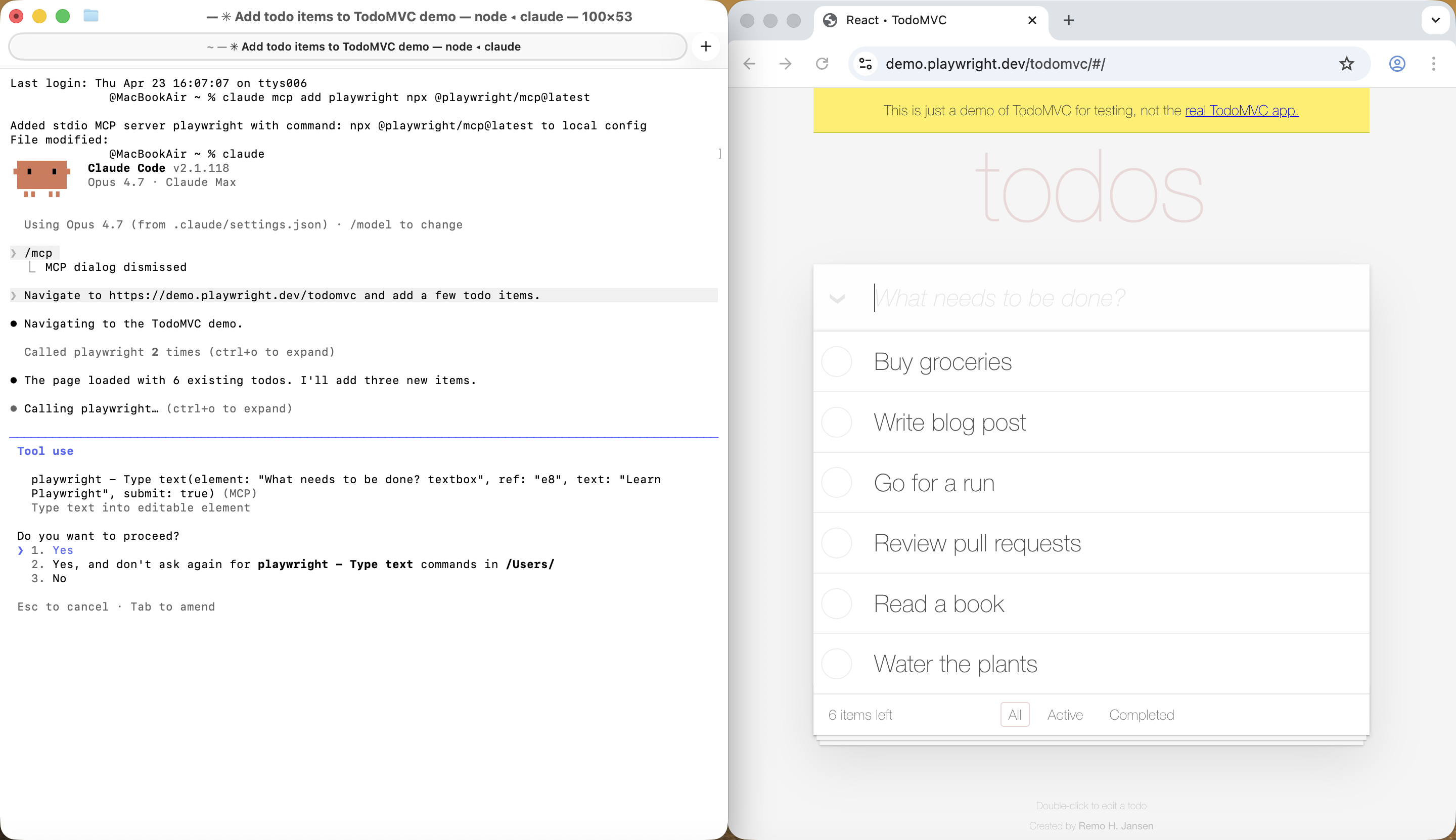
Connect Claude Code to Playwright MCP and turn your terminal into a browser-automation powerhouse. Learn how to install the server, run your first interaction, ...

The browser-use MCP Server empowers AI agents to control web browsers programmatically using the browser-use library. It enables automated browsing, data extrac...
Cookie Consent
We use cookies to enhance your browsing experience and analyze our traffic. See our privacy policy.