


Company Analysis Agent: Your First Full Company Report in 5 Minutes
Step-by-step guide on generating a complete AI intelligence report, including what each section means and how to act on it.
7 min read
AI
Tutorial
+3
Step-by-step from entering your market or industry to downloading a complete market intelligence report, including how to customise focus areas and interpret each section.
This FlowHunt market analysis tutorial covers exactly what to enter, what each output section contains, and how to interpret the findings before passing them to a stakeholder or using them in a decision. For a conceptual overview of what market analysis covers and how different teams use it, see how to do market analysis with AI in under 30 minutes .
Three things before your first run:
Founders running pre-build validation will find a use-case-first walkthrough in AI market analysis for startups .
The tool works out of the box with no API keys, data connectors, or configuration steps required. The agent handles the research layer automatically once you provide the market definition.
Open the Agent Library and search for the Market Analysis Agent. Open the tool and type your market or industry into the chat input. The agent takes a market name, industry category, or product as the starting point. All three are valid inputs and the agent adapts to what you provide.
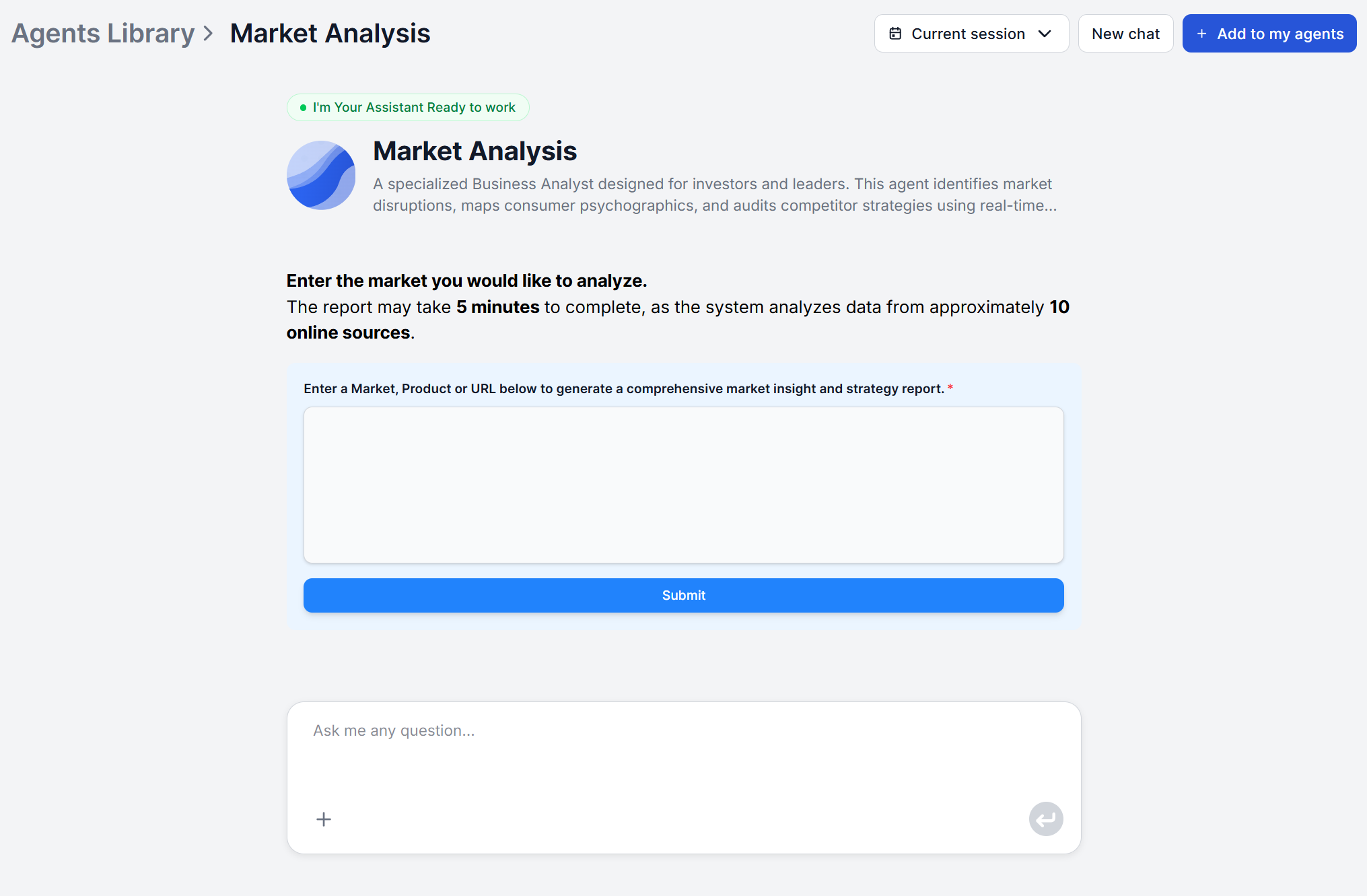
Be as specific as the decision requires. “E-commerce logistics in Southeast Asia” will produce a more targeted report than “logistics.” or “B2B SaaS project management tools for construction firms” will surface more relevant competitive and customer data than just “project management software.”
To scope the analysis geographically, include the region, country, or market geography directly in your input. The agent treats the geographic qualifier as a core constraint on sourcing and synthesis “electric vehicles in Germany” and “electric vehicles globally” will produce meaningfully different reports.
Input tips:
Once you submit, the agent begins querying multiple credible online sources, selecting non-redundant sources to ensure broad, diverse coverage across the full market picture. Generating the report may take up to 5 minutes.

Start your free trial today and see results within days.
The default run produces a full-spectrum report covering six analytical dimensions:
For a first-time run with an unfamiliar market, leave the default in place. The full output frequently surfaces relevant context you did not know to look for. If your use case is narrower, direct the focus through the chat interface. After the initial report lands, follow up with a specific prompt to go deeper on the dimension you care about:
This market analysis workflow AI approach is most useful once you have read a full-spectrum first report and know which dimensions drive your specific decision. On a first run, the default output gives you the baseline. Subsequent sessions can narrow from there.
The report opens with a market overview, which the anchoring context that makes the rest of the report interpretable. Read this first before diving into specific sections.
The market overview frames what the market is, how it is typically segmented, what stage of maturity it is in, and what the macro forces shaping it are. It gives you the shared language and structure you need to read the more detailed sections accurately. For a new market you are exploring for the first time, this section alone can save hours of orientation research.
Following the overview is the market trends section, surfacing growth dirvers, emerging opportunities and technological disruptions. Read the market trends section as a dynamic picture, not a static snapshot. The agent queries live sources at the time of each run, so the trends reflect current conditions, not what was true 18 months ago when a static report was commissioned.
Get latest tips, trends, and deals for free.
The competitor analysis section maps the competitive structure of the market. This is the section that answers “who else is in this space and what are they doing?”
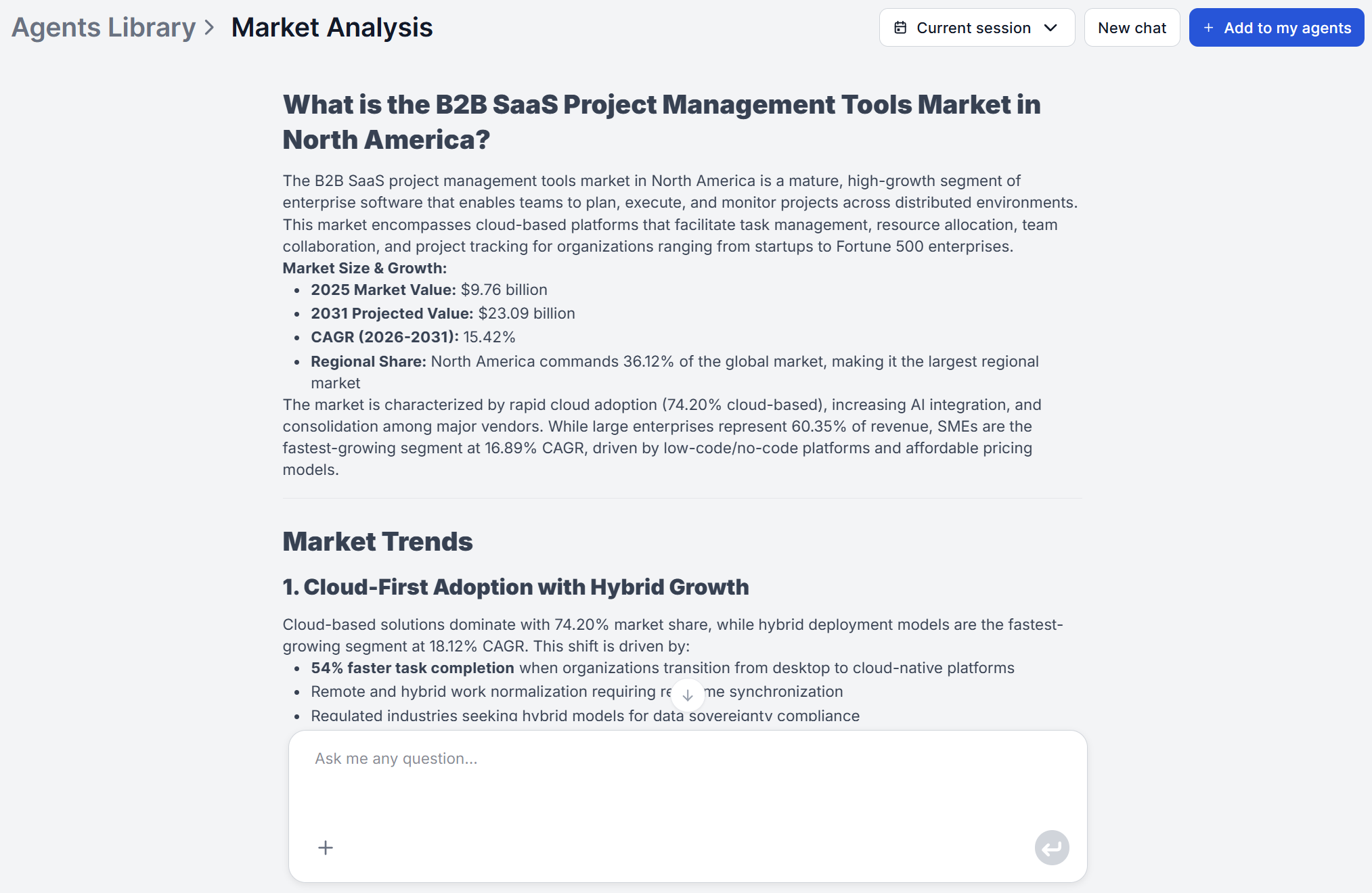
Read this section looking for three things:
Who the reference players are. The agent identifies the companies most prominently associated with this market in current sources. These are the benchmarks any new entrant or adjacent player will be measured against.
How players are differentiated. Pricing strategy differences, positioning angles, and geographic concentration reveal where incumbents are vulnerable and where white space might exist for a differentiated entry or offering.
Where disruption risk sits. The section surfaces emerging entrants and the structural threats they pose to established players. For a market entry decision, this tells you whether the competitive window is opening or closing.
For any specific company surfaced in this section that merits a deeper look, follow up with a dedicated company analysis run on that company. The market analysis identifies who is worth examining; the company analysis delivers the organizational detail.
The customer segments section and the summary and strategic recommendations section are where the report moves from descriptive to actionable.
Customer segments covers who actually buys in this market: demographics, psychographics, purchasing motivations, behavioral patterns, and unmet needs across key buyer groups. For B2B markets, this section is particularly valuable for separating economic buyers (who pays) from users (who operates the product) and from champions (who drives internal adoption).
The summary and strategic recommendations section closes the report with a SWOT synthesis, and a set of actionable strategic recommendations oriented toward decision-makers. This is the section to share when a stakeholder needs the bottom line without reading the full report.
For a breakdown of how AI applies SWOT and other strategic frameworks in depth, see AI market analysis frameworks .
The Market Analysis Agent outputs clean Markdown, but you don’t have to copy it anywhere manually. FlowHunt connects to the tools your team already works in, so the report can land exactly where it needs to without a copy-paste step.
Native integrations let you route the output directly to Slack , Notion , Google Docs , and more.
MCP (Model Context Protocol) extends this to virtually any tool. FlowHunt supports MCP servers, which means you can connect the workflow output to your CRM, a proprietary internal system, a legacy reporting tool, or any platform that exposes an MCP-compatible endpoint.
For teams that need market analysis on a recurring cadence, combine scheduled workflow runs with an integration output, and the report appears in the right place automatically, every time, without manual intervention.
The real value of the Market Analysis Agent compounds when it becomes a repeatable, connected workflow rather than a one-off task. Set it up once, wire it to where the output needs to go, and your team always has a current market picture when they need it. Find more tools and step-by-step guides in the academy . Comparing tools before committing? See AI market research tools compared for a side-by-side breakdown of FlowHunt and three alternatives.
FlowHunt's Market Analysis Agent delivers a structured, executive-ready report covering market trends, customer segments, competitive landscape, and SWOT synthesis — from a single input. No setup required.
Step-by-step guide on generating a complete AI intelligence report, including what each section means and how to act on it.
FlowHunt's Market Analysis Agent delivers executive-level strategic reports covering market trends, customer segments, competitive landscape, logistics, and pay...
Step-by-step: from entering the product URL to interpreting the competitive report and sharing it with your team. Includes tips for getting the most detailed ou...
Cookie Consent
We use cookies to enhance your browsing experience and analyze our traffic. See our privacy policy.