



초보자를 위한 AI로 회의록 작성하는 방법
AI를 활용하여 5분 이내에 간단한 회의록을 만드는 단계별 가이드입니다.
6 분 읽기
ChatGPT
Use Case
+2
모든 전문가가 기술 지식 없이도 AI를 활용해 회의록에서 명확하고 범용적인 요약을 빠르게 생성하는 방법을 알아보세요. 이 가이드는 HR, 관리자, 코디네이터 등 빠르고 신뢰할 수 있는 회의 기록 방법을 찾는 분들에게 완벽합니다.
회의를 요약하면 팀이 목표를 공유하고, 의사결정을 추적하며, 실행 항목을 따라갈 수 있습니다. 하지만 요약문 작성은 번거롭고 시간이 오래 걸릴 수 있습니다. ChatGPT나 Flowhunt 같은 AI 도구를 활용하면, 어떤 회의록이든 즉시 다듬어진 공유용 요약문으로 변환되어 더 가치 있는 일에 시간을 쓸 수 있습니다.
지금 바로 무료로 사용해 보세요: 급하게 필요하거나 바로 끝내고 싶으신가요? Flowhunt의 즉시 사용 가능한 도구를 이용해보세요. 프롬프트가 미리 설정되어 있어 별도 준비 없이 바로 사용 가능합니다.
👉AI 회의 보고서 생성기에 맡기세요.
HR, 관리자, 프로젝트 코디네이터 등 어떤 분이든 AI로 회의 요약을 만드는 것은 쉽습니다. 몇 분이면 할 수 있는 방법을 안내합니다.
명확한 회의록은 AI 요약의 핵심 입력값입니다. 대부분의 최신 회의 플랫폼(Zoom, Teams, Google Meet)은 자동으로 회의록을 생성합니다. 아젠다나 메모가 있다면 함께 준비하세요. 필수는 아니지만, 추가 맥락 제공에 도움이 됩니다.
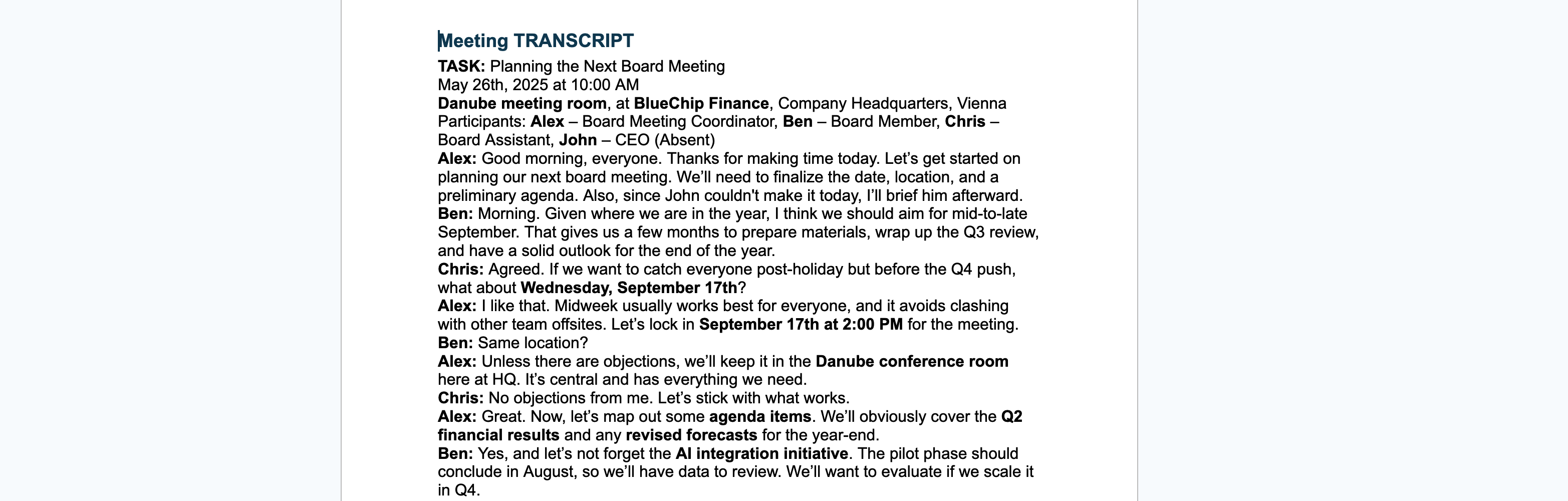
AI에 제공하는 프롬프트가 요약의 품질을 좌우합니다. 범용적이고 전문적인 회의 요약을 원한다면, 특정 역할이나 부서에 한정되지 않으면서 명확하고 구체적인 프롬프트를 사용하세요.
You are an expert at summarizing meetings. Given the following transcript (and optional agenda/notes), generate a concise, readable summary suitable for sharing with all participants. Focus on the main discussion points, key decisions, and any action items. Avoid role-specific details or jargon, and make sure the summary is easy to understand for anyone who attended. If an agenda or notes are provided, use them to organize the summary, but otherwise use your best judgment to structure it logically.
[PASTE YOUR TRANSCRIPT HERE]
회의록과(선택적으로) 아젠다 또는 메모를 복사해 프롬프트와 함께 ChatGPT, Flowhunt, 또는 어떤 AI 챗봇 도구에 붙여넣으세요. 잠시 기다리면, 바로 공유할 수 있는 잘 정리된 요약문이 생성됩니다.
아래는 프롬프트가 완전히 작성된 예시입니다.
You are an expert at summarizing meetings. Given the following transcript (and optional agenda/notes), generate a concise, readable summary suitable for sharing with all participants. Focus on the main discussion points, key decisions, and any action items. Avoid role-specific details or jargon, and make sure the summary is easy to understand for anyone who attended. If an agenda or notes are provided, use them to organize the summary, but otherwise use your best judgment to structure it logically.[TRANSCRIPT BEGINS] Moderator (Anna): Good morning, everyone. Let’s start with the first item on the agenda: Q3 marketing results. James: We’ve seen a 12% uptick in engagement across social media, mostly driven by the new video campaign. However, email click-through rates dropped by 5%. Priya: We might want to revisit our email strategy. The content hasn’t been updated in months. Anna: Noted. Let’s set a follow-up meeting with the content team next week. Next item—website redesign. Mark, can you give us an update? Mark: The dev team completed 80% of the front-end work. We’re behind on mobile optimization due to unexpected issues with the CMS. Anna: When can we expect that to be back on track? Mark: We’ve adjusted the timeline. Mobile optimization should be done by August 10. Anna: Great, thank you. Lastly, any updates on the client onboarding process? Lena: We’ve added a walkthrough video and reduced the number of forms. Early feedback has been positive, especially from EU clients. Anna: Excellent. Please compile that feedback and share it in the Slack channel. Any final comments? James: Just a reminder that the Q4 planning session is on the 15th. Anna: Thanks. Meeting adjourned. [TRANSCRIPT ENDS]
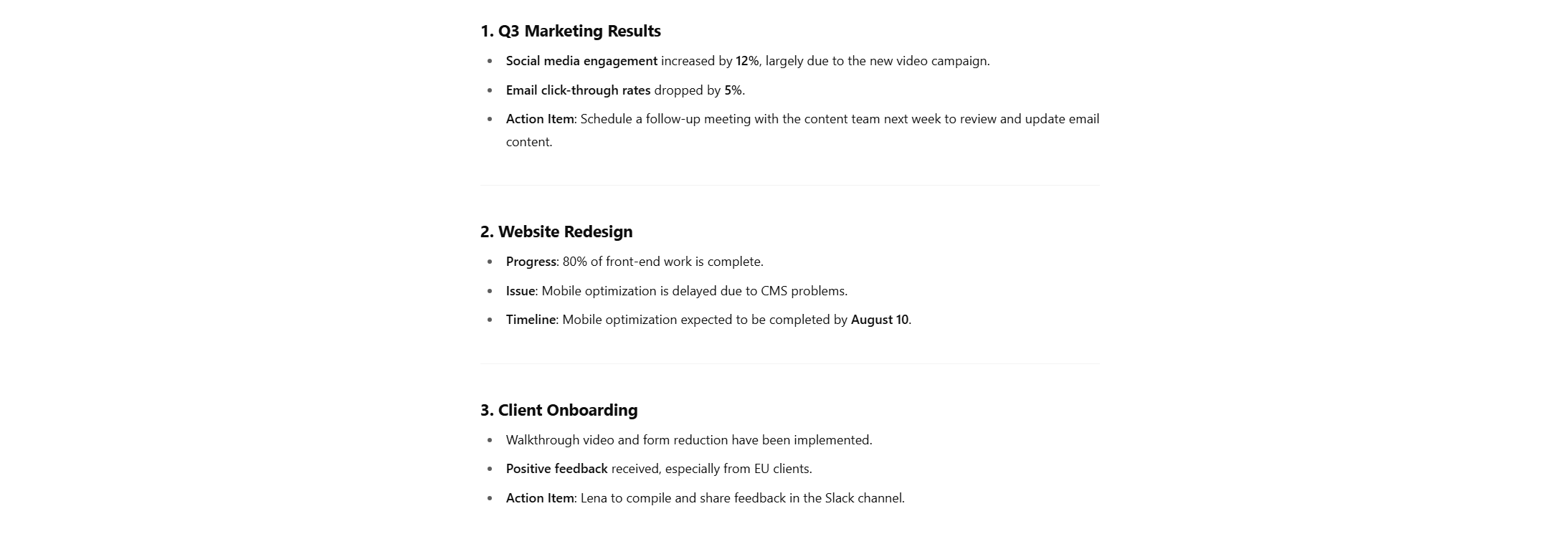
회의는 길고, 그 안에서 필요한 정보를 뽑아내는 것이 까다로울 수 있지만, 회의에서 논의된 내용을 기록해두었거나, 더 나아가 전체 회의록이 있다면 언제든 쉽게 할 수 있습니다.
최상의 결과를 위해 시작 전에 다음을 준비하세요:

좋은 프롬프트는 AI에게 정확히 원하는 바를 알려줍니다. 다음은 활용하거나 응용할 수 있는 템플릿입니다:
You are an expert meeting summarizer.Here is a transcript from a recent meeting: [PASTE TRANSCRIPT HERE]
The meeting agenda/topics were: [PASTE AGENDA OR TOPICS HERE]
My role: [DESCRIBE YOUR ROLE AND FOCUS AREAS HERE]
Please write a concise summary highlighting: -Key points relevant to my role -Action items or decisions I should know about -Any follow-ups assigned to me or my team
Format the summary in bullet points, and make it easy to scan.
이제 실제로 AI에게 이 프롬프트를 전달할 차례입니다:
팁: 회의록이나 안건을 텍스트 창에 붙여넣는 대신 파일로 업로드할 수도 있습니다!
아래는 완전히 작성된 프롬프트 예시입니다:
You are an expert meeting summarizer.Here is a transcript from a recent meeting:
[00:00] Emily: Welcome everyone. Today’s meeting is about the upcoming release of the “Harmony 2.0” AI-generated music assistant. [00:10] Raj: I’ve finalized the backend integration for real-time lyric analysis. Latency is under 150ms. [00:24] Luce: Great. On the frontend, we added voice feedback that guides users through melody correction. [00:36] Samira: Marketing’s planning to launch in mid-August. We need final demos by July 30. [00:44] Emily: Any blockers on the auto-harmonization module? [00:48] Raj: We still need training data for the jazz and funk genre sets. [00:58] Luce: I can follow up with the data curation team to speed that up. [01:04] Emily: Thanks, Luce. Also, we need to finalize privacy compliance for the vocal samples we use. [01:12] Luce: Already in touch with legal about GDPR checks. Should have an update this week. [01:22] Samira: For launch assets, we need a short video showing “melody to harmony” in 30 seconds. [01:32] Emily: Let’s make that a shared task between design and product. [01:40] Raj: Do we need multilingual support in this version? [01:43] Luce: Only English and Spanish for now. German pushed to 2.1 release. [01:50] Emily: Okay, thanks all. Let’s regroup in one week.
The meeting agenda/topics were: Progress on the Harmony 2.0 AI music assistant Technical updates: backend integration, frontend UX Marketing timeline and demo delivery Dataset needs and genre expansion Privacy and GDPR compliance Multilingual support roadmap Launch assets and responsibilities
My role: Luce – Product Owner (AI & UX Focus) Oversee AI interaction design and frontend usability Coordinate between technical, legal, and design teams Ensure product meets data compliance standards Own the roadmap for supported languages and UI feedback systems
Please write a concise summary highlighting: Key points relevant to my role Action items or decisions I should know about Any follow-ups assigned to me or my team Format the summary in bullet points, and make it easy to scan.
결과:

마지막 팁: AI에게 이 요약을 바로 저장 가능한 문서 형태로 만들어달라고 요청할 수도 있습니다!
| 장점 | 단점 |
|---|---|
| 수작업 없이 시간 절약 가능 | AI가 미묘한 맥락을 놓칠 수 있음 |
| 팀원 맞춤형으로 커스터마이징 가능 | 좋은 결과를 위해서는 회의록 품질이 중요 |
| 비전문가도 쉽게 활용 가능 | 명확성을 위해 약간의 편집이 필요할 수 있음 |
| 주요 결정사항과 액션 아이템을 빠르게 파악 | 데이터 보안 이슈 – 회의록 보안에 주의 필요 |
회의록, 안건, 간단한 프롬프트만 있으면 AI가 모든 참석자에게 맞춤형, 실질적인 회의 요약을 생성해줍니다. 덕분에 시간을 대폭 절약하고, 모두가 가장 중요한 내용을 확실히 파악할 수 있습니다. 기술 전문지식도 필요 없습니다.
더 빠르고 신뢰할 수 있는 회의 요약 관리 방법이 필요하신가요? 이제 자동화된 요약 워크플로우를 직접 구축해보세요. 간단하고 효율적이며 시간까지 아껴줍니다.
👉 Flowhunt에서 지금 바로 AI 회의 요약 생성하기
AI를 활용하여 5분 이내에 간단한 회의록을 만드는 단계별 가이드입니다.
AI로 회의록을 자동화하는 방법을 알아보세요. 간단한 GPT 프롬프트부터 FlowHunt의 전문 도구까지, 몇 초 만에 회의록을 생성할 수 있습니다....
FlowHunt의 AI 회의 보고서 생성기—회의 노트를 상세한 회의록, 후속 이메일, 블로그 게시물로 변환하는 도구를 만나보세요. 시간 절약과 전문적인 커뮤니케이션 향상을 동시에 누릴 수 있는 효율적인 회의 후 문서화 솔루션입니다....
쿠키 동의
당사는 귀하의 브라우징 경험을 향상시키고 트래픽을 분석하기 위해 쿠키를 사용합니다. See our privacy policy.