5 Ways Content Teams Use YouTube-to-Blog AI to Scale Output
Five specific workflows where YouTube content repurposing AI turns one video into a blog post, newsletter, and social copy — without adding writers to your team.
From solo creators to agency teams, here are five specific workflows where YouTube content repurposing AI turns video content into blog posts, newsletters, and social copy without extra headcount. For a step-by-step walkthrough of the full conversion process
, see our guide to turning videos into articles. For the FlowHunt platform walkthrough specifically, see the YouTube to Blog Workflow Academy guide
.
Use Case 1: YouTubers Building an SEO Blog from Their Channel
A YouTube channel with 100 videos is a potential blog with 100+ articles. Most creators never tap this backlog because writing posts from scratch feels like a second job on top of already producing video content.
The workflow that works:
Start with your top 10 most-viewed videos. These have already proven audience demand, and that demand likely exists on Google too.
Edit for brand voice, add 3–5 internal links, and publish (typically 15–20 minutes per post).
Set the published article as the video’s linked resource in the description.
Repeat the process for all your videos.
Creators report that their channel’s most-searched topics are precisely the formats creating articles that rank the fastest on Google. The SEO benefit compounds: the article ranks in Google Search, the video ranks in YouTube Search, and each links to the other, reinforcing authority on both platforms simultaneously. For a detailed breakdown of how YouTube SEO and Google SEO differ and why the dual-channel approach compounds over time, see why YouTubers are missing 70% of their search traffic
.
Once the top-10 backlog is done, the workflow becomes evergreen: every new video generates a corresponding blog post within 24 hours of going live. Over twelve months, that’s a blog built entirely from content you were already creating. If you want to test the water before committing to a full article, you can also extract key points from YouTube videos with AI
to quickly assess which videos are worth converting first.
Use Case 2: Agencies Repurposing Client Video Content at Scale
Content agencies face a recurring throughput problem. Clients produce steady video output, such as product demos, YouTube tutorials, social clips, but also want blog posts, LinkedIn articles, and email newsletters, without paying for more writers.
Video content repurposing strategy solves this at the workflow level. A single editor can manage 5–10 client content pipelines by treating the AI draft as the starting point rather than writing from scratch:
Ingest client video URLs each week (one batch per client).
Generate first drafts via the AI.
Edit for brand voice, facts, and client-specific internal links (20–30 minutes per article).
Distribute each article across formats using the AI Content Repurposing Tool
— Twitter/X thread, LinkedIn post, newsletter section — without rewriting.
The output per video shifts from one piece of content to five or six pieces of content across formats and channels. A single product launch video becomes a blog post, an email, a LinkedIn article, and a thread, all from one source asset, with one writer investing minimal editing time.
This makes it viable to offer written content at scale as part of a standard retainer without proportionally scaling your writer headcount.
Ready to grow your business?
Start your free trial today and see results within days.
Use Case 3: Content Teams Expanding Publishing Cadence
Most in-house content teams are constrained by writer capacity, not by ideas or source material. The backlog of existing video recordings, such as monthly Q&As, product update walkthroughs, onboarding sessions, customer case study interviews, represents a library of content that never reaches the blog because there’s no one available to write it up.
Scale content production AI removes the bottleneck by changing what the writer’s job actually is. Instead of writing from a blank page, the writer edits a strong first draft. That’s a fundamentally different task. It’s faster, less cognitively demanding, and more easily distributed across writers. Moreover, this workflow makes it possible for other team members to produce decent quality content as well.
A team publishing two blog posts per week can realistically reach five or six per week without new hires by:
Running every new video through the generator within 24 hours of publishing.
Converting the existing backlog one batch per sprint.
Assigning the “edit and publish” step to team members who already own related topics (e.g., the product manager edits articles derived from product demo videos).
For articles that need to go beyond the video’s scope, for example adding competitive data, external research, or additional context — the AI Blog Writer
works as an expansion layer on top of the video-derived draft, building it out into a fully researched long-form piece without starting over.
Use Case 4: B2B Companies Turning Webinars into Articles
B2B companies invest in webinars significantly. Speaker preparation, event promotion, hosting, and recording. After the live event, that recording typically sits on a Vimeo page or YouTube channel. This is untapped potential of creating several high-value expert-lead blog posts.
A 45-minute expert interview or product demonstration typically contains:
3–5 distinct subtopics, each strong enough to anchor its own standalone article.
Case study narratives and customer examples that translate directly to story-driven posts.
Live Q&A exchanges from attendees that map naturally to blog FAQ sections.
The most effective approach for long webinars isn’t to convert the entire recording into one massive post. Instead, identify the 3–4 most self-contained segments and generate a separate article from each.
A 60-minute panel discussion on enterprise content strategy might yield four 1,500-word blog posts, each targeting a different search query. Not sure which segments are worth developing? Chat with your YouTube videos
to pull out the strongest themes before you commit to full articles.
This turns one webinar investment into four SEO-optimized, evergreen articles without the content team watching the recording themselves. The YouTube to Blog Post Generator
reads the transcript and the editor reviews the draft. Total time per article is likely to be around 20–30 minutes.
Join our newsletter
Get latest tips, trends, and deals for free.
Use Case 5: Podcasters Adding a Blog from Episode Transcripts
Podcasters face the same invisibility problem as YouTubers, but it’s more acute. Podcast content is indexed only on podcast platforms and in truncated show notes. The full spoken content, all the guest insights and frameworks, never reach Google’s text index at all.
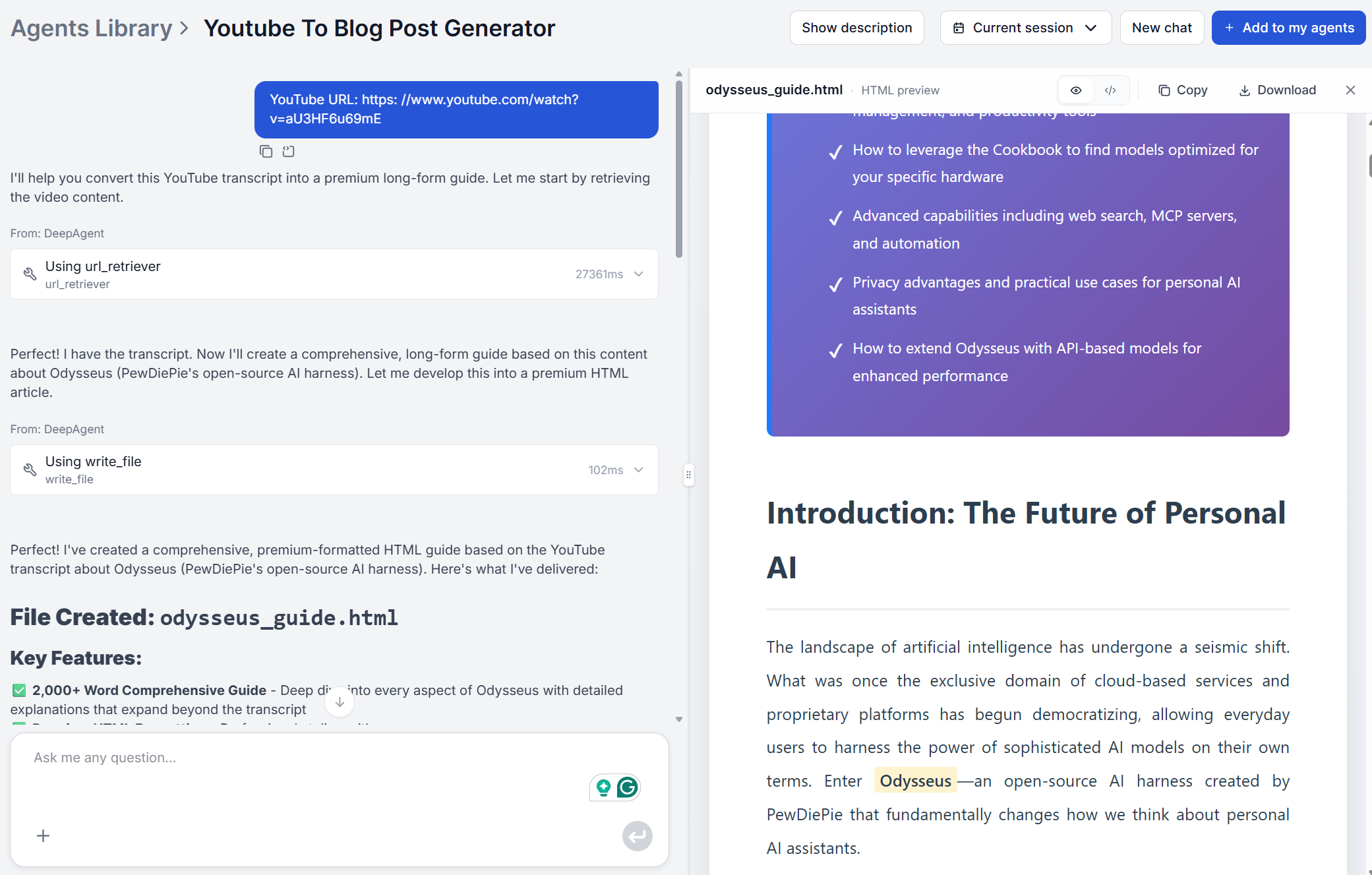
Simply upload the episode to YouTube (if you’re not doing that already), then use the YouTube to Blog Post Generator
to pull the transcript and generate a blog post.
For podcasters who prefer to work with raw text before generating, the Pull Transcripts from Videos
tool extracts the full transcript first, which can then be edited or fed into the generator with a custom format prompt.
The blog post becomes the episode’s permanent written record. You’ll gain another way to share your thoughts, topics and insights independently of any podcast platform algorithm.
Many podcasters double-stack the output. The AI generates a 2,000-word blog post from the transcript, then the AI Content Repurposing Tool
converts that post into a newsletter excerpt, a LinkedIn summary, and tweet-sized pull quotes. One episode, five distribution formats, roughly 30–40 minutes of editing work total.
High-performing episodes get their own dedicated long-form posts. Others get shorter treatment or are grouped into roundup articles covering a common theme across multiple episodes.
How to Choose the Right Output Format per Video Type
Matching the output format to the video’s native structure produces stronger content and cuts editing time. Here’s the pairing that works best for each type:
Video type
Best output format
Why it works
Tutorial / how-to
Numbered step-by-step guide
Earns featured snippets; spoken steps map directly to ordered lists
Product review or comparison
Comparison table + verdict section
Verbal pros/cons become scannable; targets “best X” queries
Interview or expert Q&A
FAQ-structured article
Question-answer format is already built in; eligible for People Also Ask
Webinar / panel discussion
Multiple standalone articles (one per theme)
Too many topics for one post; segment by subtopic for better keyword targeting
Case study / results walkthrough
Story-driven post with outcome summary
Narrative arc translates cleanly; supports editorial links from sales or product pages
Explainer / educational
Definition-led article with examples
Dense spoken content becomes evergreen reference material
Add your desired format as a prompt before submitting the URL. Phrases like “Write this as a numbered how-to guide” or “Format as a comparison with a clear recommendation at the end” steer the output without requiring structural editing afterward.
Teams managing multiple content types or clients benefit from building a prompt library — a short set of tested format instructions for each video category. Once that library exists, the editing process becomes almost entirely about voice and factual accuracy, not structure.
Ready to put this into practice? Try the YouTube to Blog Post Generator
and turn your next video into a publish-ready article in minutes.
Frequently asked questions
Yes, with one extra step. Upload the episode to YouTube as an audio-only video (static thumbnail + audio file), then use the YouTube to Blog Post Generator to pull the transcript and generate a blog post. Alternatively, use the Pull Transcripts from Videos tool to extract the raw transcript first, then generate the article from that.
Yes, as long as the recording was saved to YouTube as a public video and has captions available. Auto-generated captions are enabled by default on most recordings. Longer recordings (60+ minutes) is best split by topics, and generated as separate articles for each distinct segment rather than forcing the whole recording into one post.
A standard 10–20 minute video typically yields one well-structured blog post of 2,000+ words. Longer recordings (webinars, panel discussions, full interviews) can be segmented by topic, with each segment generating its own article. A 60-minute webinar covering three distinct themes can realistically yield three separate posts.
Identify the clearest standalone segment and run that URL with a prompt specifying the subtopic you want to focus on. For example: 'Focus only on the section about email onboarding sequences.' The AI will prioritize that portion of the transcript and structure the article around it, rather than trying to cover everything.
Yes. Content agencies routinely use YouTube content repurposing AI for client video libraries. The output is your document to edit, brand, and publish — the tool has no restrictions on commercial use. Add the client's brand voice, internal links, and CTA before handing over the draft.
Maria is a copywriter at FlowHunt. A language nerd active in literary communities, she's fully aware that AI is transforming the way we write. Rather than resisting, she seeks to help define the perfect balance between AI workflows and the irreplaceable value of human creativity.
Maria Stasová
Copywriter & Content Strategist
Try the YouTube to Blog Post Generator
Paste a YouTube URL and get a structured, publish-ready blog post in minutes. Used by creators, agencies, and content teams.
How to Turn YouTube Videos into Blog Posts Automatically with AI
Turn any YouTube video into a publish-ready blog post in minutes. Step-by-step guide to using an AI YouTube to blog post generator. Simply paste a URL and get a...
Best YouTube to Blog AI Tool: FlowHunt vs Castmagic vs VideoToBlog.ai vs RightBlogger
We tested FlowHunt, Castmagic, VideoToBlog.ai, and RightBlogger on the same 5 videos. Compare output quality, editing time, SEO-readiness, and pricing for each.
9 min read
YouTube
AI Content
+4
Cookie Consent We use cookies to enhance your browsing experience and analyze our traffic. See our privacy policy.