


Tool Calling Agent
LLM agent acting as a technical live chat customer support specialist, responding to user queries, searching internal knowledge base, and deciding when to forwa...
Deploy an AI-powered chatbot on your website that leverages your internal knowledge base to answer customer queries, and seamlessly forwards complex or unresolved inquiries to a real human agent via LiveChat.com. Enhance customer support efficiency and ensure users always get the help they need.
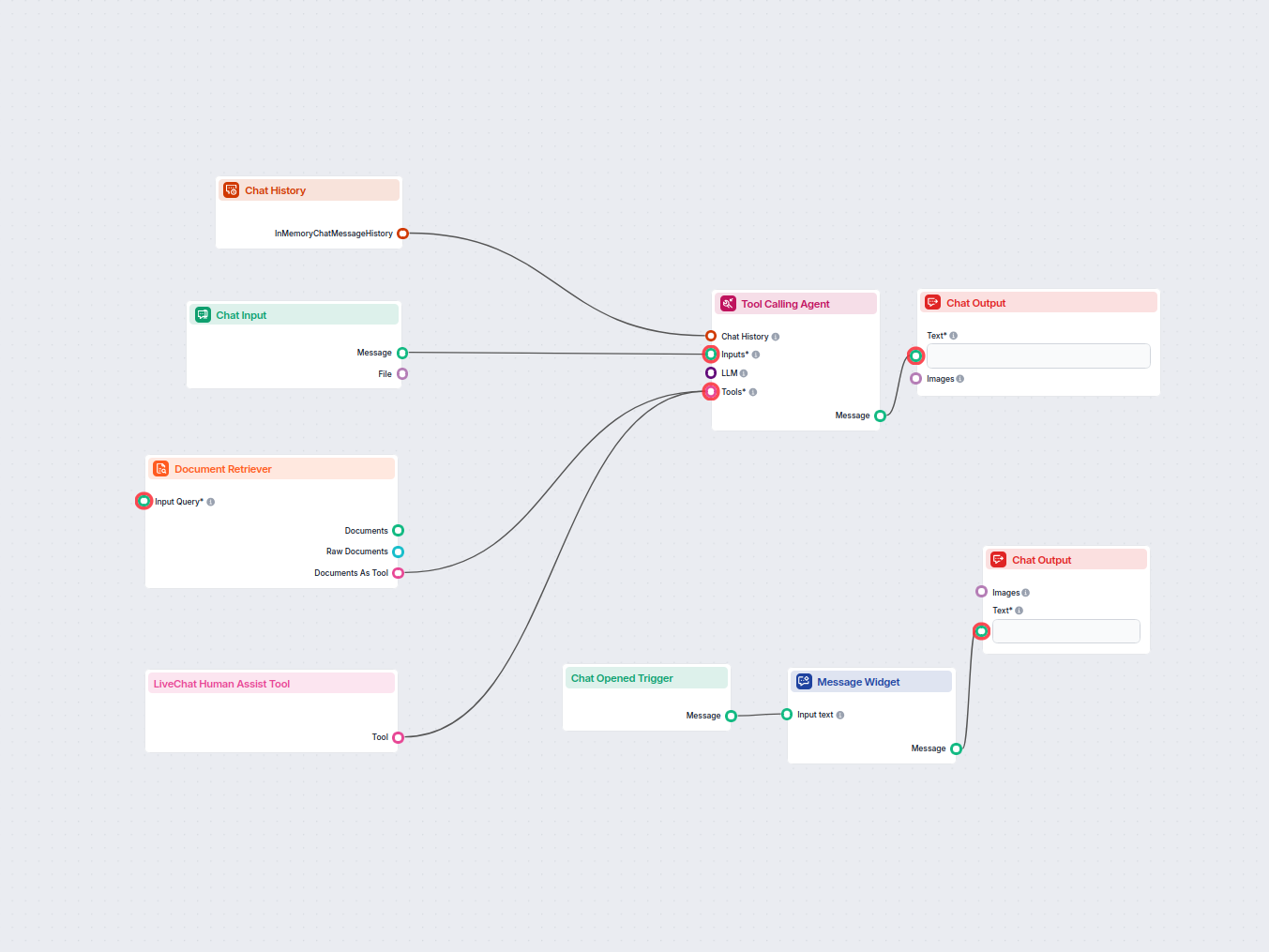

Flows
LLM agent acting as a technical live chat customer support specialist, responding to user queries, searching internal knowledge base, and deciding when to forwa...
Displays a welcome message to the user when they open the chat.
Below is a complete list of all components used in this flow to achieve its functionality. Components are the building blocks of every AI Flow. They allow you to create complex interactions and automate tasks by connecting various functionalities. Each component serves a specific purpose, such as handling user input, processing data, or integrating with external services.

The Chat Input component in FlowHunt initiates user interactions by capturing messages from the Playground. It serves as the starting point for flows, enabling the workflow to process both text and file-based inputs.

The Chat History component in FlowHunt enables chatbots to remember previous messages, ensuring coherent conversations and improved customer experience while optimizing memory and token usage.

FlowHunt's Document Retriever enhances AI accuracy by connecting generative models to your own up-to-date documents and URLs, ensuring reliable and relevant answers using Retrieval-Augmented Generation (RAG).

Explore the Tool Calling Agent in FlowHunt—an advanced workflow component that enables AI agents to intelligently select and use external tools to answer complex queries. Perfect for building smart AI solutions that require dynamic tool usage, iterative reasoning, and integration with multiple resources.

Seamlessly connect FlowHunt Chatbot to your favorite customer service tools for a smooth transition to human support. The AI agent smartly decides when to escalate, turning the chatbot into a live chat solution with a single click.

Discover the Chat Output component in FlowHunt—finalize chatbot responses with flexible, multi-part outputs. Essential for seamless flow completion and creating advanced, interactive AI chatbots.

The Message Widget component displays custom messages within your workflow. Ideal for welcoming users, providing instructions, or showing any important information, it supports Markdown formatting and can be set to appear only once per session.

The Chat Opened Trigger component detects when a chat session starts, enabling workflows to respond instantly as soon as a user opens the chat. It initiates flows with the initial chat message, making it essential for building responsive, interactive chatbots.
Flow description
This workflow sets up a scalable, automated AI chatbot that integrates with LiveChat.com for seamless customer support. It uses an internal knowledge base for instant answers and can smartly escalate to a human agent if needed. Below is a structured explanation of the flow, its logic, and how it benefits support operations.
| Component | Purpose | Key Features |
|---|---|---|
| Chat Input | Receives user messages from the chat interface | Supports text and file inputs |
| Chat History | Stores and retrieves conversation history | Ensures context is maintained across messages |
| Document Retriever | Searches internal knowledge base for relevant information | Supplies data for AI responses |
| Tool Calling Agent (AI) | Core logic that generates chatbot responses and decides escalation | Multilingual support, integrates with retriever & LiveChat |
| LiveChat Human Assist Tool | Connects user to a real agent via LiveChat.com when escalation is needed | Seamless escalation with chat history context |
| Chat Output | Displays AI or agent messages to the user | Two instances: for bot responses and system messages |
| Chat Opened Trigger | Detects when a new chat is started | Initiates welcome message |
| Message Widget | Shows a customizable welcome message | Sets expectations and invites user questions |
User Opens Chat:
Chat Opened Trigger activates, leading to the Message Widget displaying a friendly welcome message.User Sends a Message:
Chat Input node receives the user’s question or request.Chat History node.AI Attempts to Answer:
Tool Calling Agent (AI) analyzes the input.Document Retriever, searching the internal knowledge base for relevant information.Chat Output.Decision Logic for Escalation:
LiveChat Human Assist Tool connects the user with a real agent on LiveChat.com, including chat history for context.Human Handoff:
This flow allows your support system to scale efficiently, ensuring rapid, accurate responses to customers and intelligent escalation to human agents only when needed. It enhances user experience, reduces agent workload, and maximizes the value of your internal knowledge assets.
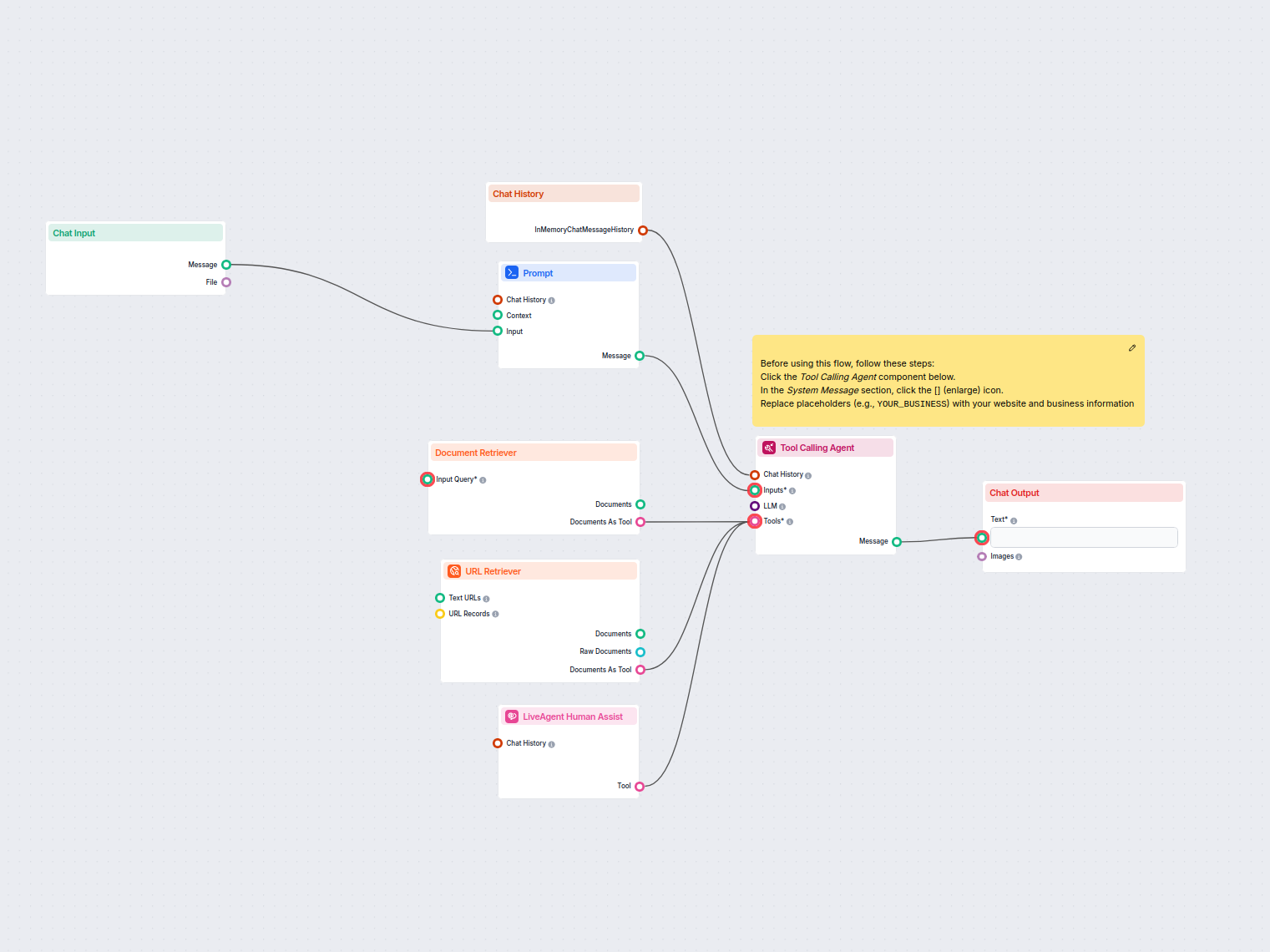
Automate customer support in LiveAgent with an AI chatbot that answers questions using your internal knowledge base, retrieves relevant documents, and seamlessl...
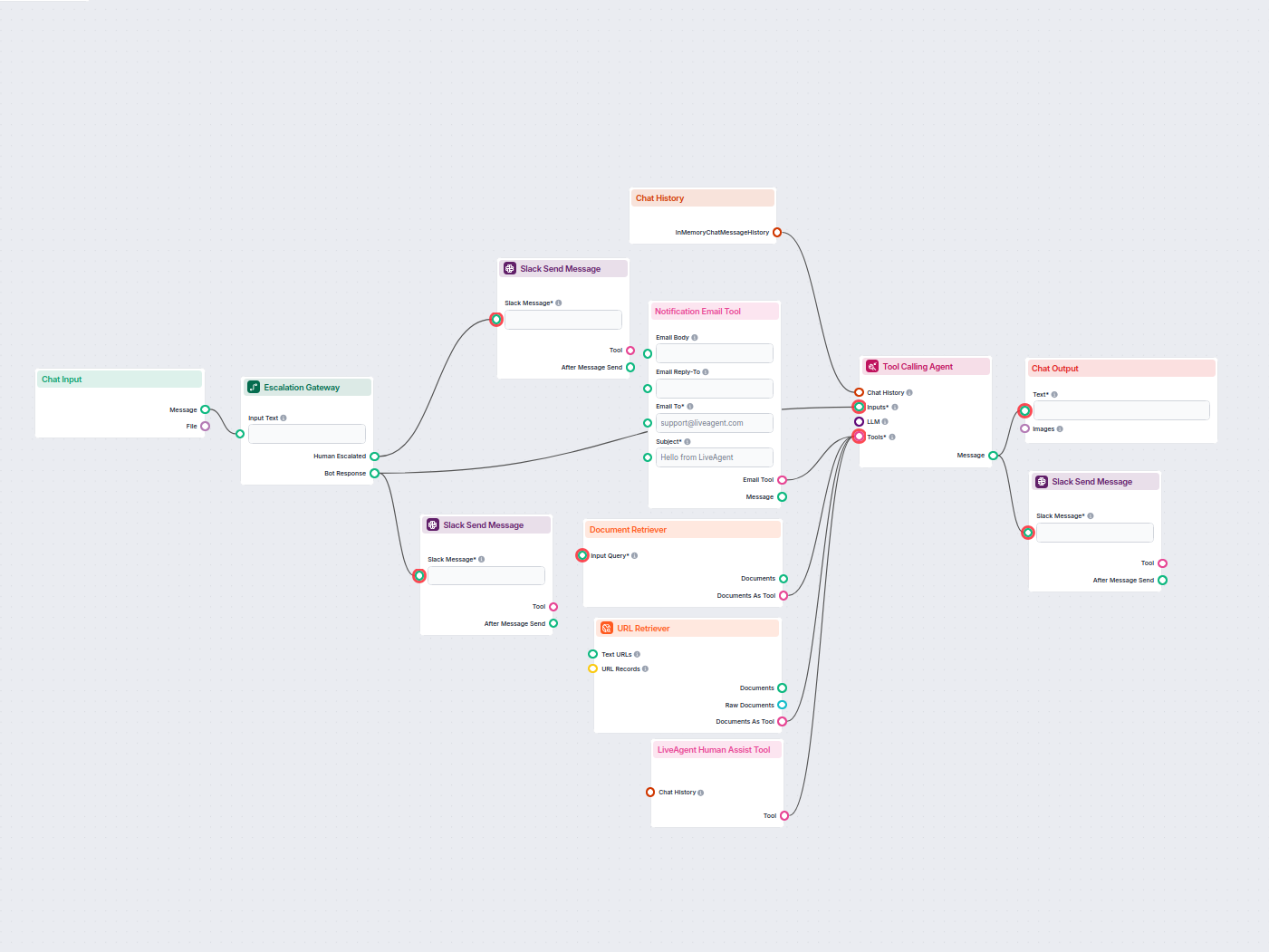
Deploy a smart customer support chatbot for LiveAgent that automatically answers visitor questions, retrieves knowledge base documents, and escalates to a human...
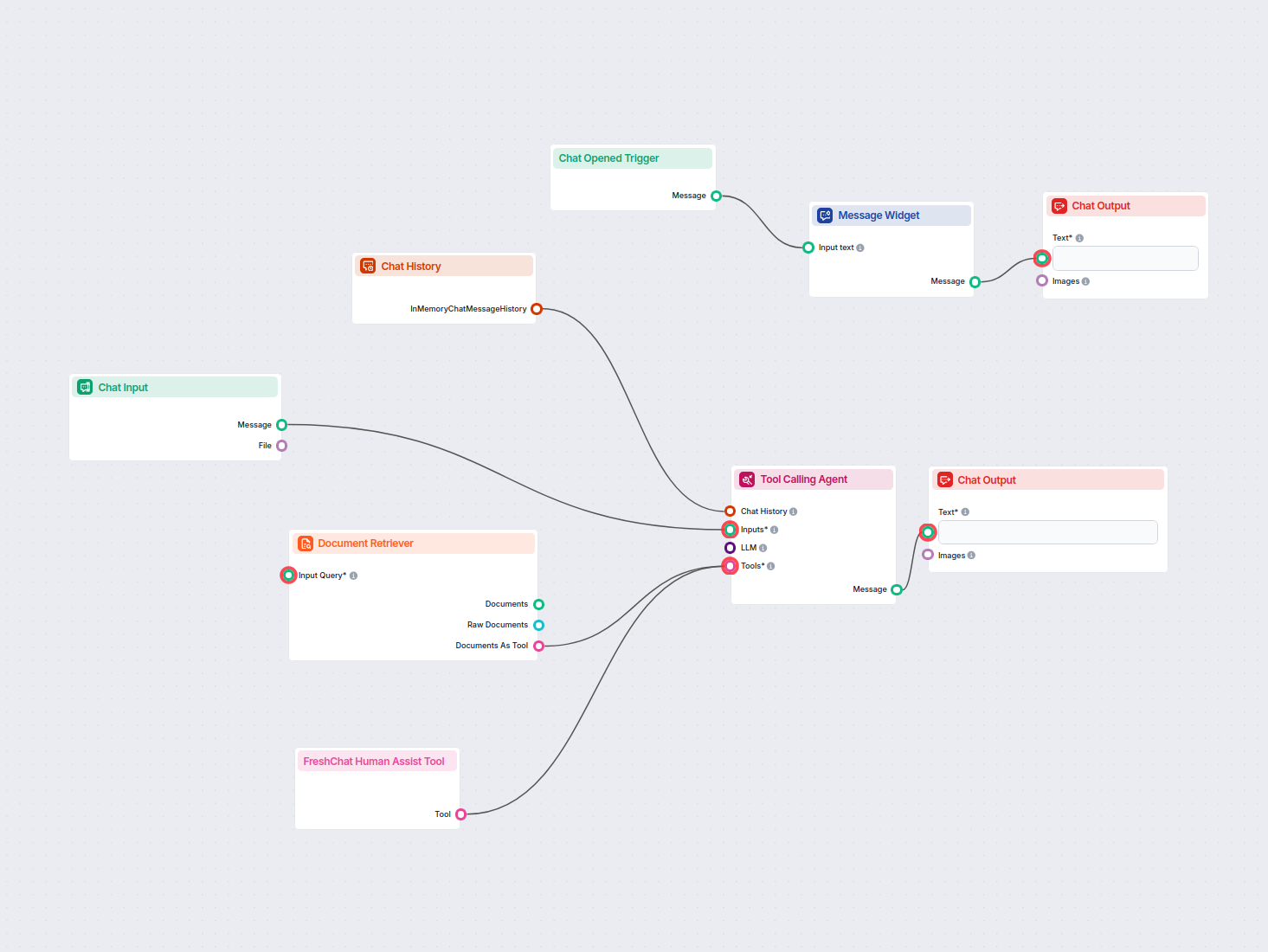
Deploy a smart AI chatbot that integrates seamlessly with FreshChat. The chatbot answers user inquiries using your internal knowledge base and intelligently for...
Cookie Consent
We use cookies to enhance your browsing experience and analyze our traffic. See our privacy policy.