The Short Version
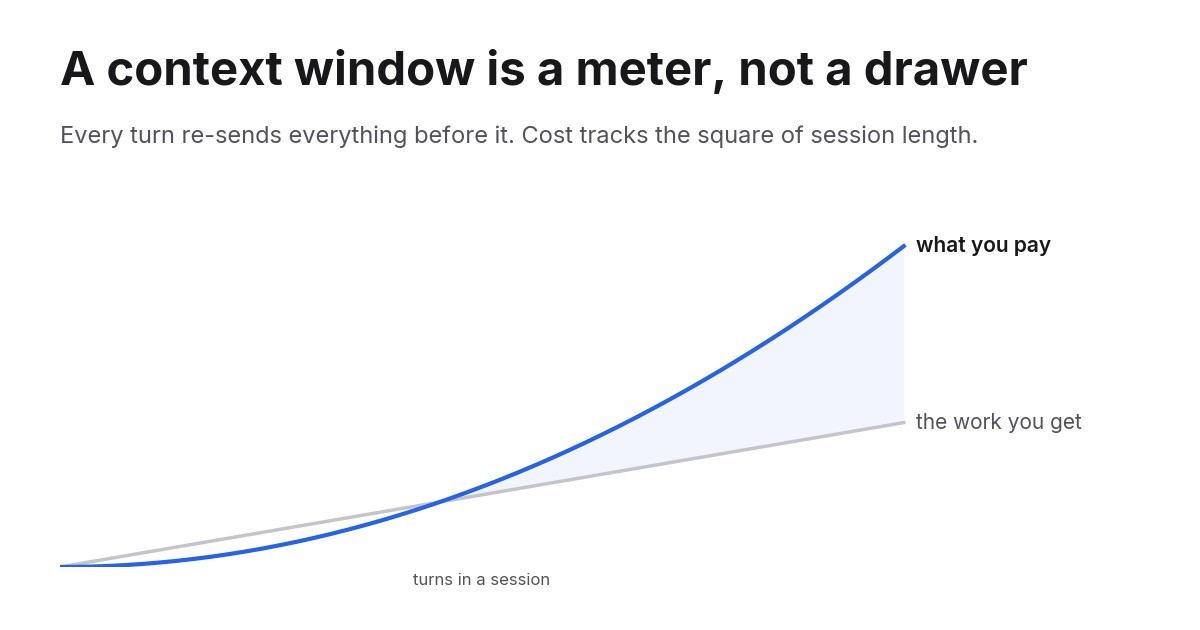
- A model has no memory between requests. Every turn re-sends the entire conversation, so the context window is a cost charged on every call, not a place you fill once.
- That makes the cost of a session grow with the square of its length. Prompt caching cuts the rate to about a tenth but does not change the shape.
- The fix is a smaller window that resets on purpose: cap its growth, clear more often, edit out spent tool output, and keep heavy reading in files and subagents where it never comes back.
A Window Is a Meter, Not a Drawer
Most people picture a context window as storage. You put things in, the model can see them, a bigger window holds more. That picture is wrong in one specific way, and the mistake is expensive.
Models are stateless. There is no session on the other end holding your conversation. Every request sends the whole history again: the system prompt, every tool definition, every file the agent read, every tool result, every message either of you wrote. The model reads all of it, answers, and forgets. Your next message sends all of it again, plus the new part.
So the window is not a drawer. It is a meter, and its reading on each turn is the size of everything you have accumulated so far.

Ready to grow your business?
Start your free trial today and see results within days.
The Arithmetic Nobody Does Up Front
Take a session that grows by about 1,000 tokens per turn and runs for 300 turns. Its context climbs from near zero to 300,000 tokens, averaging 150,000. Total input sent: 300 times 150,000, which is 45 million tokens, to get 300 turns of work.
Now let the same session grow three times faster, to 900,000. The average is 450,000, the total is 135 million, three times the bill for exactly the same 300 turns.
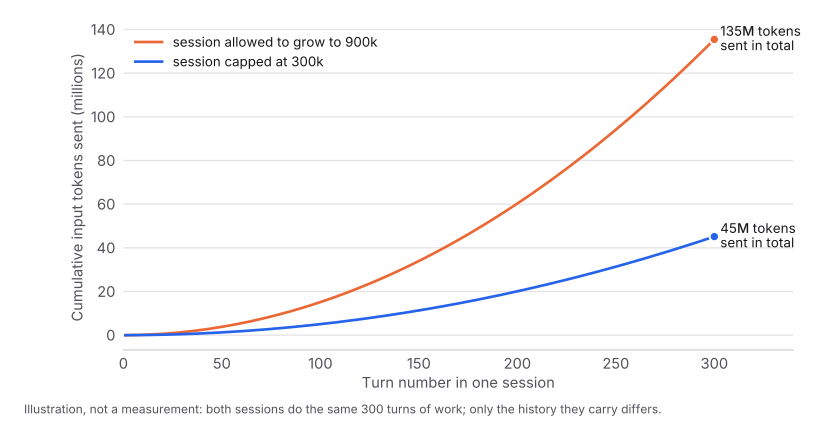
That is the shape of the problem. Cost does not track the work you get. It tracks how long you let the session run, squared. Every turn you add makes every future turn more expensive, which is why the last hour of a long session can cost more than the first four.
In money, at Claude Opus 5’s list price of $5 per million input tokens and with everything after the first turn served from cache at a tenth of that: the capped session costs about $22, the uncapped one about $68, for the same work. On a subscription you do not see dollars, you see the weekly limit run out sooner.
Caching Changes the Rate, Not the Curve
Prompt caching is why long agent sessions are viable at all. The provider keeps your conversation prefix warm and charges a fraction to re-read it.
On Anthropic’s API the multipliers are 1.25x the base input price to write to the five-minute cache, 2x for the one-hour cache, and about 0.1x to read. A five-minute cache write pays for itself on the second request. Every serious agent harness does this automatically, and it works: across five weeks of my own sessions, 98% of all input tokens were cache reads.
Look carefully at what caching did and did not fix. It multiplied the cost of your history by roughly a tenth. It did not stop the history from growing, and it did not stop you re-reading it on every turn. A tenth of 900,000 tokens is 90,000 tokens of billed input for a question you could have asked in twenty.
Caching is what makes the problem survivable. It is also what makes it invisible, because the number on your usage dashboard never looks as alarming as the number of tokens actually moving.
Join our newsletter
Get latest tips, trends, and deals for free.
What Is Actually in There
When a session gets large, people assume it is the conversation. Usually it is not. In a working agent session the weight sits in four places.
Tool definitions. Every tool the agent can call carries a name, a description and a full parameter schema, all loaded before the agent does anything. Connect six MCP servers with 25 tools each and you have 150 schemas in the window on turn one, most of which will never be called.
File reads. An agent reading a 2,000-line source file has just added roughly 25,000 tokens to every future turn of the session. It needed the file once. It carries it forever.
Tool output. A search that returns 200 results, a test run that prints its whole log, an API call that returns a full document. The agent usually needed one line of it. All of it stays.
The conversation itself. Including the parts where the agent explored a dead end, corrected itself, and moved on. Those tokens are still in the window, still being re-read, still shaping the next answer.
The last point matters beyond cost. A window full of abandoned attempts and stale file contents is also a window where the relevant detail is harder to find. Context is a budget and an attention problem at the same time.
Three Ways to Shrink It
Clearing. Start a new session. Everything you wrote down elsewhere survives; everything else is gone. This is the bluntest tool and often the right one. Keeping one session alive all day because it “knows the project” is the habit that costs the most.
Context editing. Remove specific material and keep the rest word for word, usually old tool results once they have been used. Anthropic’s API exposes this directly as a context-management strategy. It is precise and does not distort what remains, so it is the first thing to reach for when the weight is bulky tool output rather than a long conversation.
Compaction. Summarize the history and continue from the summary. This is what most coding agents do automatically when the window fills, and it is the only option that bounds a session’s growth without ending it. It drops a great deal.
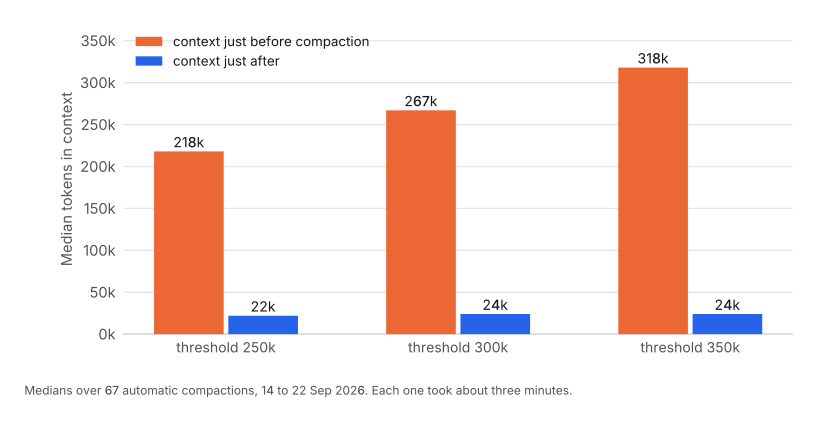
Those are medians over 67 real compactions in my own sessions. Each took about three minutes, and afterwards the agent re-read files it had already seen at nearly twice the previous rate, rebuilding what the summary lost. The trade is worth it. It is still a trade.
The Fourth Option Is Better Than All Three
Do not put it in the window in the first place.
Keep durable state in files the agent can re-read on demand, instead of in the conversation. Send reading-heavy work to a subagent with its own short-lived context, so the twenty files it reads never touch the main session. Load tools when they are needed rather than all up front.
A token that is never added is a token you never re-read. Everything else on this page is damage control for tokens that were.
Where the Threshold Should Sit
If your agent compacts automatically, it has a threshold, and the default is usually close to the model’s full window. That default is the expensive setting, because it lets your session spend its most productive hours carrying the largest possible history.
Setting it lower helps, but there is a floor. Compact too eagerly and you pay the three-minute wait and the rework over and over. On a 1M-context model, a 250,000 threshold forced a compaction in 36% of my long sessions; 350,000 triggered one in only 12% and captured nearly all of the same saving. Across five weeks of sessions the result was 17% fewer cache-weighted tokens for the same number of prompts, and about half the cost in the long sessions where the cap actually bit. The full data is in the companion post .
A workable rule: set the cap at roughly a third of your model’s window and adjust from there. Low enough that no session spends hours near the ceiling, high enough that ordinary work finishes without being interrupted by a summary.
Measure Your Own
None of this needs new instrumentation. Every API response carries a usage object with four fields: input_tokens, cache_creation_input_tokens, cache_read_input_tokens and output_tokens. Most agent harnesses already write these to a session log on disk.
Two numbers tell you almost everything.
Cache-weighted input per call. Weight the fields by what they cost: fresh input at 1, cache writes at 1.25 or 2, cache reads at 0.1. If this climbs week over week while your workload is flat, your sessions are growing and you are paying for it.
Peak context per session. The largest single call in each session. If the peaks sit near your model’s window, you have found your bill.
Raw weekly totals will mislead you, because a busy week beats a quiet week whatever you change. Always divide by something that stands for work: a completed task, a prompt, an API call.
Read Next
A context window is a recurring charge, taken on every turn, for everything you have ever put in it. Caching cuts the rate by about ninety percent and hides the trend. The fix is a smaller window that resets on purpose.
For the measured version, with five weeks of session data and the one setting that produced most of the saving, read the companion piece on cutting agent token use by 17% .