The Short Version
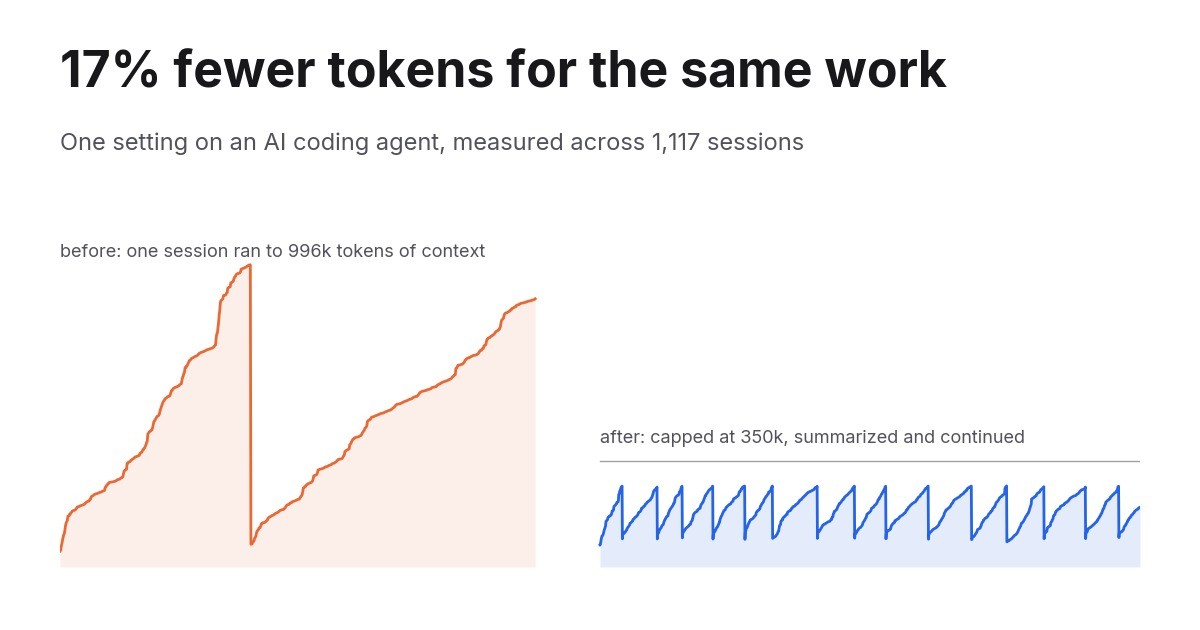
- I run an AI coding agent all day on a model with a 1M token context window. Sessions used to grow until they nearly filled it.
- I added one line to its config, capping a session at 350,000 tokens of context before it summarizes itself and continues.
- Measured across 1,117 session transcripts: 17% fewer tokens for the same number of prompts, and in the long sessions where the cap actually bites, 55% fewer.
Below is the method, every chart, and what it costs you in return, so you can decide whether it applies to your setup.
Why a 1M Window Costs More Than It Looks
A conversation with a model is stateless. Every request carries the whole history: the system prompt, every tool definition, every file the agent has read, every tool result, every message. Not a delta. All of it, every time.
So a session that has grown to 900,000 tokens pays for 900,000 tokens of input on the next call, and on the call after that. Turn 400 does no more work than turn 4. It just costs many times more.
Prompt caching softens this. Tokens the model has seen before are billed at about a tenth of the normal input price. That discount is real, it is what makes long sessions viable at all, and it is also why nobody looks at the problem. In my data, 98% of all input tokens were cache reads. A tenth of a very large number was still the largest line on the bill.
The question is not whether your history is cached. It is how large it is allowed to get before something resets it.

Ready to grow your business?
Start your free trial today and see results within days.
What I Changed
The agent is Claude Code running Opus on the 1M context window. The setting is autoCompactWindow in ~/.claude/settings.json. When a session reaches that many tokens, the agent summarizes the conversation and continues from the summary.
{
  "autoCompactWindow": 350000
}
I had never set it, so sessions ran until they approached the full window. Over four days I tried three values:
| Date | Setting |
|---|---|
| 14 September | 250,000 |
| 15 September | 300,000 |
| 18 September | 350,000 |
How I Measured It
Claude Code writes every session to a JSONL transcript under ~/.claude/projects/, including the token usage of each API call. I parsed all 1,117 of them, covering five weeks from 19 August to 22 September, deduplicated by request ID, and kept only interactive sessions. Runs in GitHub Actions use the same account but cannot be affected by a setting on my laptop, so they are excluded.
Raw token totals are misleading on their own. A busy week beats a quiet week whatever you change. So every number below is cache-weighted, which is what the meter actually reads: fresh input at 1x, cache writes at 1.25x (5-minute cache) or 2x (1-hour cache), cache reads at 0.1x. And every comparison is normalized by work done, either the prompts I typed or the API calls the agent made.
Join our newsletter
Get latest tips, trends, and deals for free.
Two Sessions, Same Agent
This is the mechanism in one picture. On the left, a real session from 3 September, before the cap. On the right, a real session from 15 September, after it.
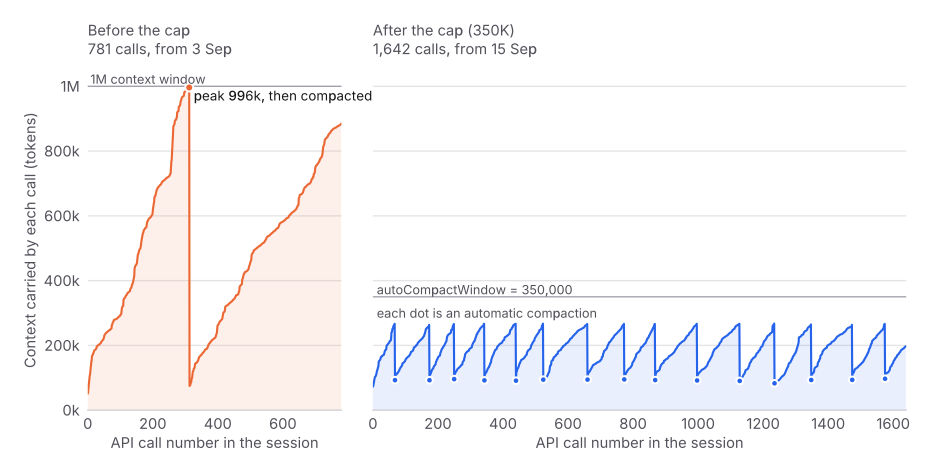
The session on the left ran for 781 calls. It climbed to 996,000 tokens of context, hit the wall of the 1M window, compacted once, and then climbed straight back to 880,000. For the second half of that session, every single call re-read more than half a million tokens.
The session on the right ran for 1,642 calls, more than twice as long, and never carried more than 270,000. It compacted fifteen times. Each compaction is a dot.
The Weekly Numbers
Interactive sessions only. The bars are cache-weighted input tokens per API call, which is the fairest single number because it does not care how much I worked in a given week.
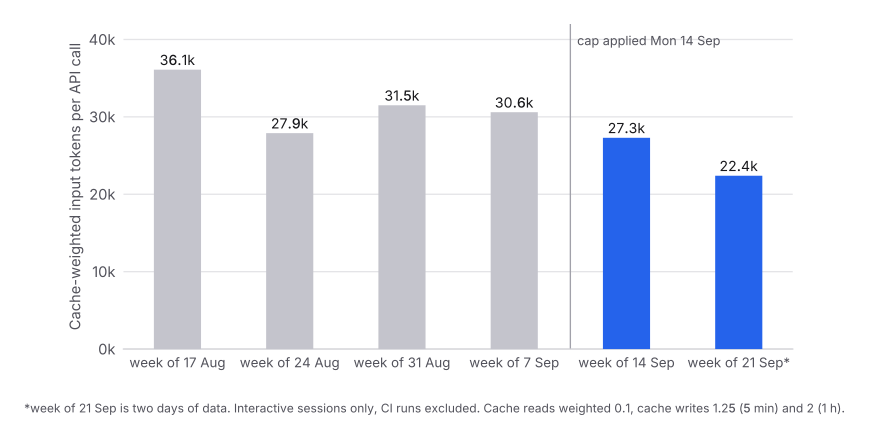
The cleanest comparison in the dataset is the week of 7 September against the week of 14 September, because I did not pick them. They simply landed either side of the change, and I typed almost exactly the same number of prompts in each.
| Week of | Prompts | API calls | Cache-weighted input | Per call |
|---|---|---|---|---|
| 7 Sep | 971 | 11,364 | 348.1M | 30.6k |
| 14 Sep | 968 | 10,555 | 288.5M | 27.3k |
971 prompts against 968. Effective input down from 348.1M to 288.5M. That is 17% less for the same amount of prompting. The two days of the following week came in at 22.4k per call, lower still.
Where the Money Was Going
Split every API call by how much context it was carrying, and the mechanism is visible directly.
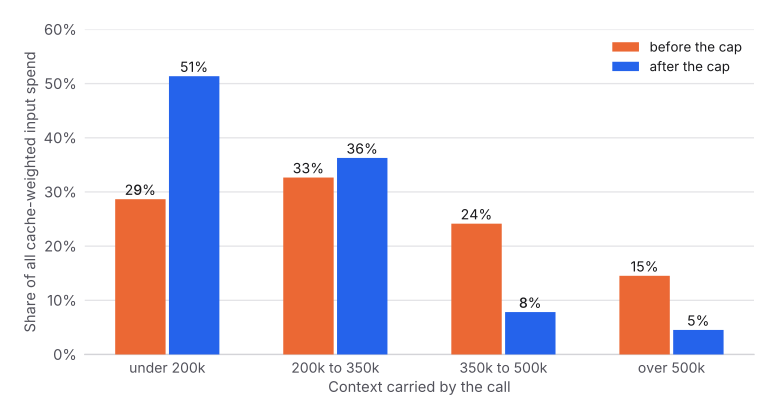
Before the cap, 39% of everything I spent went into calls dragging more than 350,000 tokens of history behind them. Those calls were not doing more work than the others. They were the same work, carrying more baggage. After the cap that share is 12%.
Did the Ceiling Hold
One dot per session, placed at the largest context that session ever carried.
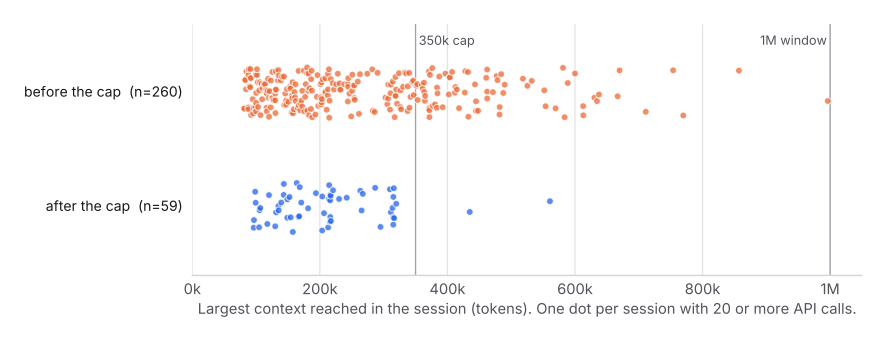
Two sessions in the first two days still ran past the cap, to 434,000 and 561,000, and I did not find out why. Since the 350,000 setting went in on 18 September, no session has exceeded it. The tail of sessions living between 500k and 1M, which is where most of the waste was, is gone.
What It Would Have Cost Without the Cap
To put a total on it, I replayed every session that started after the change as if the dropped context had never been summarized and was still being re-read on every later call, bounded at the 1M window.
| Cache-weighted input | |
|---|---|
| Actual, 73 sessions, 9,675 calls, 55 compactions | 216.8M |
| Same sessions without the cap | 479.2M |
| Avoided | 262.5M, or 55% |
The session on the right of the first chart accounts for 118.5M of that on its own. A long refactor that would otherwise have spent its last several hundred calls re-reading close to a million tokens each.
Treat 55% as the optimistic end. Without the cap I would not really have let a session grind at 900k for hours; eventually I would have cleared it by hand, which resets the cost too. The conservative end is the observed per-call figure, 30.6k down to 22.4k, so roughly 20% to 27%. The truth is somewhere between those two.
What It Costs You
This is not free, and anyone recommending it should say so.
Waiting. 67 compactions since the change, at a median of about three minutes each. Roughly 3.4 hours of watching a summary get written, spread over eight days.
Some rework. Compaction drops a lot. At the 350K setting, the median compaction took a 318,000-token session down to 24,000. The agent loses detail and sometimes rebuilds it: files re-read within the same session went from 11.5% of reads before the first compaction to 20.5% after. The sample behind that second number is small, so read it as a direction rather than a measurement.
Threshold choice matters. At 250K, 36% of my long sessions hit a compaction. At 350K, 12% did, while the ceiling still held. Set it too low and you pay the three minutes and the rework repeatedly for a saving you had already banked.
How to Set It Up
Claude Code. Add autoCompactWindow to ~/.claude/settings.json. On a 1M-context model, 350,000 was the best of the three values I tried. On a 200K model, scale down and start around 120,000 to 140,000. New sessions pick it up; a session already running keeps the old value.
Other agents. Look for the same idea under a different name: a compaction trigger, a context limit, a summarize-and-continue threshold. If there is none, the manual version is clearing the session more often than feels natural. The instinct to keep one long session alive all day because it “knows the project” is the expensive one.
Whatever you use, two habits do more than any setting. Keep durable state in files rather than in the conversation, so the agent can re-read one file cheaply instead of carrying every previous answer forever. And push reading-heavy work to subagents with their own short-lived context, so the twenty files they read never enter the main session at all.
If You Are on a Weekly Limit
If you pay a subscription with a weekly usage limit rather than a per-token bill, this is the lever with the best ratio of effort to effect I have found. One line of JSON, no change to how you work, and the same limit stretches measurably further. In my case the same weekly volume of prompting cost 17% less, and the long sessions cost about half.
Read Next
Context windows are sold as capacity. They behave like a running meter, charged on every turn for everything you have ever put in. If you want the mechanics behind this rather than just the setting, the companion piece walks through what actually fills a context window, why a long session costs far more than the work it does, and how caching, clearing and compaction each change the arithmetic.